# Multiple viewport perspectives of a single vtkRenderer
**URL:** https://discourse.vtk.org/t/multiple-viewport-perspectives-of-a-single-vtkrenderer/1891
**Category:** Support
**Created:** [October 9, 2019, 6:17am UTC](https://discourse.vtk.org/t/multiple-viewport-perspectives-of-a-single-vtkrenderer/1891 "2019-10-09T06:17:25Z")
**Posts on this page:** 14
**Page:** 1
### Author:  [@banesullivan](https://discourse.vtk.org/u/banesullivan)
#### Post date: [October 9, 2019, 6:17am UTC](https://discourse.vtk.org/t/multiple-viewport-perspectives-of-a-single-vtkrenderer/1891/1 "2019-10-09T06:17:25Z")
Is it possible to have a render window with multiple viewports and have only one `vtkRenderer` instance that each of the viewports views from a different perspective?
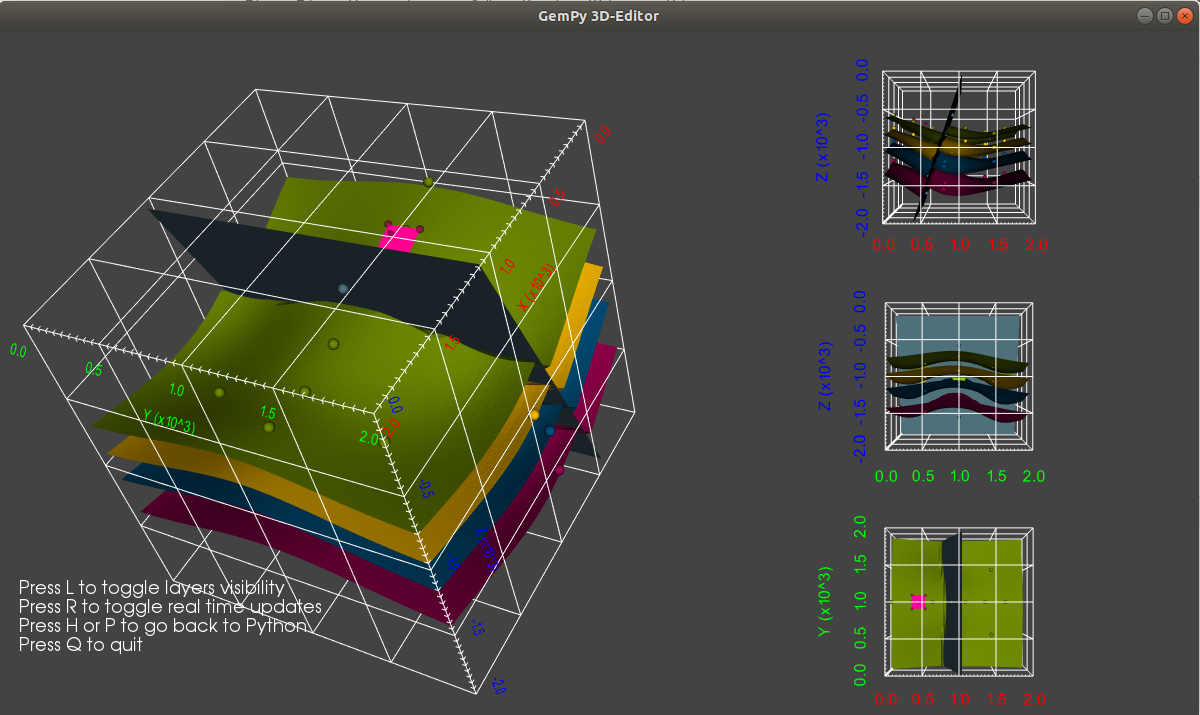
Currently, the only way I have been able to do this is to create many separate `vtkRenderer`s and simultaneously update them all. In PyVista, we have a way to set up many renderers under viewports of arbitrary geometry in a render window (many thanks to @marcomusy), but I’m looking for a way to view a single scene/`vtkRenderer` from different perspectives to get something that looks like this:
(originally from an issue in PyVista: [https://github.com/pyvista/pyvista/issues/395](https://github.com/pyvista/pyvista/issues/395))
---
### Author:  [@danlipsa](https://discourse.vtk.org/u/danlipsa)
#### Post date: [October 9, 2019, 1:41pm UTC](https://discourse.vtk.org/t/multiple-viewport-perspectives-of-a-single-vtkrenderer/1891/2 "2019-10-09T13:41:02Z")
Bane,
You’ll need a different vtkRenderer for each viewport.
Dan
---
### Author:  [@mta](https://discourse.vtk.org/u/mta)
#### Post date: [October 9, 2019, 3:26pm UTC](https://discourse.vtk.org/t/multiple-viewport-perspectives-of-a-single-vtkrenderer/1891/3 "2019-10-09T15:26:44Z")
Yes, we can have multiple viewports with only one instance of vtkRenderer. You can follow this example:
[https://vtk.org/Wiki/VTK/Examples/Cxx/Visualization/MultipleViewports](https://vtk.org/Wiki/VTK/Examples/Cxx/Visualization/MultipleViewports)
Let me know if you have any questions with it.
Mike
---
### Author:  [@banesullivan](https://discourse.vtk.org/u/banesullivan)
#### Post date: [October 9, 2019, 4:18pm UTC](https://discourse.vtk.org/t/multiple-viewport-perspectives-of-a-single-vtkrenderer/1891/4 "2019-10-09T16:18:06Z")
> [@mta](#):
>
> Yes, we can have multiple viewports with only one instance of vtkRenderer. You can follow this example:
That example requires that I create a separate `vtkRenderer` for each viewport… I still can’t find a way to use a single instance of a `vtkRenderer`
---
### Author:  [@cory.quammen](https://discourse.vtk.org/u/cory.quammen)
#### Post date: [October 9, 2019, 5:13pm UTC](https://discourse.vtk.org/t/multiple-viewport-perspectives-of-a-single-vtkrenderer/1891/5 "2019-10-09T17:13:13Z")
Separate `vtkRenderers` are the only way to do this. Is there a technical reason you can’t/don’t want to use more than one?
---
### Author:  [@banesullivan](https://discourse.vtk.org/u/banesullivan)
#### Post date: [October 9, 2019, 5:18pm UTC](https://discourse.vtk.org/t/multiple-viewport-perspectives-of-a-single-vtkrenderer/1891/6 "2019-10-09T17:18:47Z")
> [@cory.quammen](#):
>
> Is there a technical reason you can’t/don’t want to use more than one?
It creates a lot of overhead (mainly on the code side of things) if the scene gets complicated/has many actors in it - if I want to add/remove actors from the scene, I have to make sure that is repeated for all sub plotting renderers.
I suppose I could add hooks so that anytime the “primary” renderer is altered, those changes propagate to the other renderers as well. So my main technical complaint is really that the code to manage that will get messy.
---
### Author:  [@cory.quammen](https://discourse.vtk.org/u/cory.quammen)
#### Post date: [October 9, 2019, 5:47pm UTC](https://discourse.vtk.org/t/multiple-viewport-perspectives-of-a-single-vtkrenderer/1891/7 "2019-10-09T17:47:30Z")
> [@banesullivan](#):
>
> if I want to add/remove actors from the scene, I have to make sure that is repeated for all sub plotting renderers.
[`vtkView`](https://vtk.org/doc/nightly/html/classvtkView.html) may be of interest here in terms of helping manage the complexity. Views are responsible for displaying `vtkDataRepresentation`s. Bundling your renderers into a view and passing in a single representation of your data may make managing the complexity easier - ParaView uses views and representations. See [`vtkPVOrthographicSliceView`](https://gitlab.kitware.com/paraview/paraview/blob/master/ParaViewCore%2FClientServerCore%2FRendering%2FvtkPVOrthographicSliceView.h) for an example that uses several renderers to show data from a common representation.
---
### Author:  [@utkarshayachit](https://discourse.vtk.org/u/utkarshayachit)
#### Post date: [October 9, 2019, 5:52pm UTC](https://discourse.vtk.org/t/multiple-viewport-perspectives-of-a-single-vtkrenderer/1891/8 "2019-10-09T17:52:17Z")
Since you literally want to look at the same scene from different angles, you maybe able to play some tricks. For example, you can render the scene in backbuffer (or offscreen buffers) from each of the sides and then just past those buffers on the side renderers. Thus, the side renderers are simply images and don’t really have the full scene and are not interactive. You just need to make sure you update them whenever the active scene changes.
---
### Author:  [@banesullivan](https://discourse.vtk.org/u/banesullivan)
#### Post date: [October 9, 2019, 5:58pm UTC](https://discourse.vtk.org/t/multiple-viewport-perspectives-of-a-single-vtkrenderer/1891/9 "2019-10-09T17:58:16Z")
@utkarshayachit, what you describe is exactly what I want! No need to interact with those 3 plots to the right so static images would work well.
> [@utkarshayachit](#):
>
> For example, you can render the scene in backbuffer (or offscreen buffers) from each of the sides and then just past those buffers on the side renderers.
I’m not sure I’m familiar with this task, how exactly would that be implemented? Would I have a hook that takes those three screenshots anytime the renderer is modified or at a specified time interval? How would I do this without making the camera go wild in the “primary” scene?
---
### Author:  [@utkarshayachit](https://discourse.vtk.org/u/utkarshayachit)
#### Post date: [October 9, 2019, 6:20pm UTC](https://discourse.vtk.org/t/multiple-viewport-perspectives-of-a-single-vtkrenderer/1891/10 "2019-10-09T18:20:39Z")
it’s definitely non-trivial code, but something like the following is a start.
- you’ll still have multiple renderers. the interactive scene is one render while the others only have the Image actor (or whatever people tend to use to show a 2D image data – I can’t remember of the top of my head)
- After the scene has been setup (or changed), simply capture the window 3 times changing camera appropriately for each of the side views into a `vtkImageData` using `vtkWindowToImageFilter`. Make sure it renders in offscreen or backbuffer. Since the window has the side renderers too, you may want to extract a subset from the generated images using `vtkExtractVOI`.
- Now pass these 3 images to the the 3 side renderers’ actors.
Next stage would be to see how the back and forth from GPU to CPU to GPU can be avoided for the side renderers, but this should get things going.
---
### Author:  [@banesullivan](https://discourse.vtk.org/u/banesullivan)
#### Post date: [October 9, 2019, 6:27pm UTC](https://discourse.vtk.org/t/multiple-viewport-perspectives-of-a-single-vtkrenderer/1891/11 "2019-10-09T18:27:18Z")
Ah that’s very clear, thanks @utkarshayachit! I think I can handle all of that in PyVista, however capturing the 3 screenshots of the primary renderer off screen still seems a bit confusing.
Would I basically perform the following workflow:
1. Save the current camera position in the primary renderer
2. Ensure the `vtkRenderWindow` is set to off screen rendering `.SetOffScreenRendering(True)`
3. for each of the camera positions I want, change to that camera position, take a screenshot, add that screenshot to the its static renderer and repeat
4. Reset the primary renderer to the original camera location
5. Reset offscreen rendering to `False` (or its original state)
6. Rerender everything
---
### Author:  [@utkarshayachit](https://discourse.vtk.org/u/utkarshayachit)
#### Post date: [October 9, 2019, 6:33pm UTC](https://discourse.vtk.org/t/multiple-viewport-perspectives-of-a-single-vtkrenderer/1891/12 "2019-10-09T18:33:44Z")
For the most part, you’re correct; `.SetOffScreenRendering(True)` may be unnecessary though; I think vtkWindowToImageFilter has API to tell is render to back buffer, which should avoid showing the results onscreen and thus will be faster than using offscreen buffers. In otherwords, there are options there, so just bear that in mind.
---
### Author:  [@toddy](https://discourse.vtk.org/u/toddy)
#### Post date: [October 10, 2019, 1:03am UTC](https://discourse.vtk.org/t/multiple-viewport-perspectives-of-a-single-vtkrenderer/1891/13 "2019-10-10T01:03:58Z")
Would it not be simpler to add a root vtkAssembly to each vtkRenderer and then just manage adding/remove actors (AddPart/RemovePart) from that one assembly? That would eliminate the synchronization issue. You can handle nested actors this way too.
[https://vtk.org/doc/nightly/html/classvtkAssembly.html](https://vtk.org/doc/nightly/html/classvtkAssembly.html)
---
### Author:  [@banesullivan](https://discourse.vtk.org/u/banesullivan)
#### Post date: [October 11, 2019, 7:55pm UTC](https://discourse.vtk.org/t/multiple-viewport-perspectives-of-a-single-vtkrenderer/1891/14 "2019-10-11T19:55:22Z")
Hm, that’s an interesting idea as well - I’ve never used `vtkAssembly`s. Thanks for sharing that as well, @toddy!
I’ll have to circle back to this when I have enough time to implement both solutions and see what works best for my needs