# multitextured OBJ seems to shine strongly
**URL:** https://discourse.vtk.org/t/multitextured-obj-seems-to-shine-strongly/8982
**Category:** Support
**Created:** [July 20, 2022, 9:31pm UTC](https://discourse.vtk.org/t/multitextured-obj-seems-to-shine-strongly/8982 "2022-07-20T21:31:46Z")
**Posts on this page:** 4
**Page:** 1
### Author:  [@Daniel](https://discourse.vtk.org/u/Daniel)
#### Post date: [July 20, 2022, 9:31pm UTC](https://discourse.vtk.org/t/multitextured-obj-seems-to-shine-strongly/8982/1 "2022-07-20T21:31:46Z")
Hello everyone,
I use vtkOBJImporter for multitextured OBJ files.
```auto
vtkOBJImporter importer = new vtkOBJImporter();
importer.SetFileName(file);
importer.SetFileNameMTL(fileMTL);
importer.SetTexturePath(texPath);
importer.Update();
vtkActorCollection actors = new vtkActorCollection();
actors = importer.GetRenderer().GetActors();
actors.InitTraversal();
for (int a = 0; a < actors.GetNumberOfItems(); ++a) {
vtkActor actor = actors.GetNextActor();
actor.GetProperty().LightingOn();
if (actor.GetTexture()!=null) {
actor.GetTexture().InterpolateOff();
}
...
// add actor to view
}
```
In the visualization, these are provided with a strong “shadow”, at least at first glance it looks like this. However, when it is rotated, it seems to be more of an extreme shine.

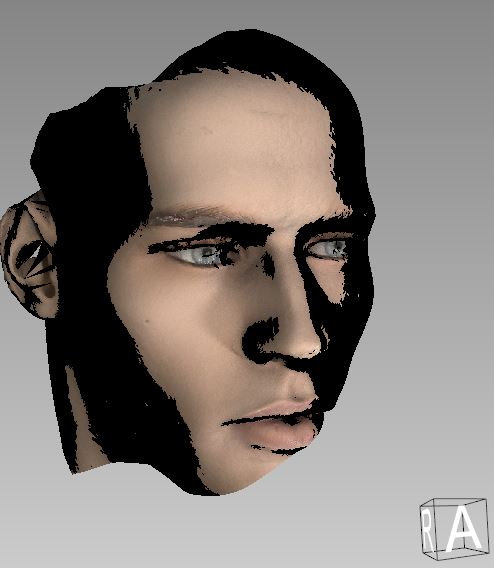

What went wrong here or what do I have to change so that I can display the data in the usual representation, i.e. completely textured and without shadows?
Best regards
---
### Author:  [@Daniel](https://discourse.vtk.org/u/Daniel)
#### Post date: [July 21, 2022, 9:40pm UTC](https://discourse.vtk.org/t/multitextured-obj-seems-to-shine-strongly/8982/2 "2022-07-21T21:40:42Z")
The problem described above mainly occurs with the 3D scanner ‘Vectra’ from ‘Canfield’.
Multitextured objects are a problem. Single textured objects are displayed correctly and get an all-encompassing / complete illumination.
It would be quite helpful if someone could try this out with the [attached test data set](https://www.dropbox.com/s/qp41pn96fpf47lm/multiTex-test-head.zip?dl=0).
Many thanks in advance.
---
### Author:  [@Daniel](https://discourse.vtk.org/u/Daniel)
#### Post date: [June 27, 2023, 8:45am UTC](https://discourse.vtk.org/t/multitextured-obj-seems-to-shine-strongly/8982/3 "2023-06-27T08:45:01Z")
Hi there,
I had only now found time to deal with the problem again, unfortunately it is still present. The texture when importing OBJ files gets a strong shadow (or the object is extremely shiny).
Does anyone have an idea what this can be?
Possibly some light settings or something similar?
Any hint is welcome!
Many greetings
---
### Author:  [@Daniel](https://discourse.vtk.org/u/Daniel)
#### Post date: [August 21, 2023, 1:46pm UTC](https://discourse.vtk.org/t/multitextured-obj-seems-to-shine-strongly/8982/4 "2023-08-21T13:46:21Z")
Meanwhile my problem is solved and it was so trivial.
Only `actor.GetProperty().`**`LightingOff()`** had to be set (in my case).
Greetings to all