# Need help: Trying to have multiple orthogonal viewpoint of same image.

**URL:** https://discourse.vtk.org/t/need-help-trying-to-have-multiple-orthogonal-viewpoint-of-same-image/5146
**Category:** Web
**Created:** [February 5, 2021, 11:04pm UTC](https://discourse.vtk.org/t/need-help-trying-to-have-multiple-orthogonal-viewpoint-of-same-image/5146 "2021-02-05T23:04:54Z")
**Posts on this page:** 12
**Page:** 1

<div class="post-metadata">

### Author: ![wasim92007](https://discourse.vtk.org/user_avatar/discourse.vtk.org/wasim92007/32/2941_2.png) [@wasim92007](https://discourse.vtk.org/u/wasim92007)
#### Post date: [February 5, 2021, 11:04pm UTC](https://discourse.vtk.org/t/need-help-trying-to-have-multiple-orthogonal-viewpoint-of-same-image/5146/1 "2021-02-05T23:04:54Z")

</div>

Hi,

I am trying to add multiple orthogonal views of the same image using vtk.js.  
I have duplicated the procedure for loading on volume slicing twice to achieve the goal.  
For some reason, the 2nd view is not working.  
Can anyone help me understand what I might be doing wrong?

# Below is my index.js -

import macro, { chain } from ‘vtk.js/Sources/macro’;

```
console.log('vtk.js imported: ', macro);

// ----------------------------------------------------------------------------

// Standard renderWindow

// ----------------------------------------------------------------------------

//import vtkFullScreenRenderWindow from 'vtk.js/Sources/Rendering/Misc/FullScreenRenderWindow';

import vtkopenglRenderWindow from 'vtk.js/Sources/Rendering/OpenGL/RenderWindow';

import vtkRenderWindow from 'vtk.js/Sources/Rendering/Core/RenderWindow';

import vtkRenderWindowInteractor from 'vtk.js/Sources/Rendering/Core/RenderWindowInteractor';

import vtkRenderer from 'vtk.js/Sources/Rendering/Core/Renderer';

import vtkInteractorStyleTrackballCamera from 'vtk.js/Sources/Interaction/Style/InteractorStyleTrackballCamera';

// ----------------------------------------------------------------------------

// Standard HttpDataReader for loading remote dataset

// Standard XMLImageDataReader for loading images

// ----------------------------------------------------------------------------

//import vtkHttpDataSetReader from 'vtk.js/Sources/IO/Core/HttpDataSetReader';

import vtkXMLImageDataReader from 'vtk.js/Sources/IO/XML/XMLImageDataReader';

// ----------------------------------------------------------------------------

// Standard Volume slicing Actor and Mapper import

// ----------------------------------------------------------------------------

import vtkImageMapper from 'vtk.js/Sources/Rendering/Core/ImageMapper';

import vtkImageSlice from 'vtk.js/Sources/Rendering/Core/ImageSlice';

import vtkInteractorStyleImage from 'vtk.js/Sources/Interaction/Style/InteractorStyleImage';

import ImageConstants, { SlicingMode } from 'vtk.js/Sources/Rendering/Core/ImageMapper/Constants';

// ----------------------------------------------------------------------------

// Standard rendering instantiation

// ----------------------------------------------------------------------------

// const fullScreenRenderer = vtkFullScreenRenderWindow.newInstance();

// const renderer = fullScreenRenderer.getRenderer({ background: [0.2, 0.3, 0.4] });

// const renderWindow = fullScreenRenderer.getRenderWindow();

const renderWindow = vtkRenderWindow.newInstance();

const renderWindow2 = vtkRenderWindow.newInstance();

const renderer = vtkRenderer.newInstance({ background: [0.2, 0.3, 0.4] });

const renderer2 = vtkRenderer.newInstance({ background: [0.2, 0.3, 0.4] });

renderWindow.addRenderer(renderer);

renderWindow2.addRenderer(renderer2);

// ----------------------------------------------------------------------------

// Use OpenGL as the backend to view the all this

// Multiple views can be added

// ----------------------------------------------------------------------------

const openglRenderWindow = vtkopenglRenderWindow.newInstance();

const openglRenderWindow2 = vtkopenglRenderWindow.newInstance();

renderWindow.addView(openglRenderWindow);

renderWindow2.addView(openglRenderWindow2);

// ----------------------------------------------------------------------------

// Create a div section to put this into

// ----------------------------------------------------------------------------

//const container1 = document.createElement('div');

//document.querySelector('body').appendChild(container1);

const container1 = document.getElementById('container1');

openglRenderWindow.setContainer(container1);

const container2 = document.getElementById('container2');

openglRenderWindow2.setContainer(container2);

// ----------------------------------------------------------------------------

// Capture size of the container and set it to the renderWindow

// ----------------------------------------------------------------------------

const { width, height } = container1.getBoundingClientRect();

openglRenderWindow.setSize(width, height);

const { width2, height2 } = container2.getBoundingClientRect();

openglRenderWindow2.setSize(width2, height2);

// ----------------------------------------------------------------------------

// Setup an interactor to handle mouse events

// ----------------------------------------------------------------------------

const interactor = vtkRenderWindowInteractor.newInstance();

interactor.setView(openglRenderWindow);

interactor.initialize();

interactor.bindEvents(container1);

const interactor2 = vtkRenderWindowInteractor.newInstance();

interactor2.setView(openglRenderWindow2);

interactor2.initialize();

interactor2.bindEvents(container2);

// ----------------------------------------------------------------------------

// Setup interactor style to use

// ----------------------------------------------------------------------------

interactor.setInteractorStyle(vtkInteractorStyleTrackballCamera.newInstance());

interactor2.setInteractorStyle(vtkInteractorStyleTrackballCamera.newInstance());

// renderer camera to parallel projection

renderer.getActiveCamera(0).setParallelProjection(true);

renderer2.getActiveCamera(0).setParallelProjection(true);

// --- Setting slicing mode ---

const { slicingMode } = ImageConstants;

// --- Set up interactor style for image slicing

const istyle = vtkInteractorStyleImage.newInstance();

istyle.setInteractionMode('IMAGE_SLICING');

renderWindow.getInteractor(0).setInteractorStyle(istyle);

const istyle2 = vtkInteractorStyleImage.newInstance();

istyle2.setInteractionMode('IMAGE_SLICING');

renderWindow2.getInteractor(0).setInteractorStyle(istyle2);

// --- setup the slicing actor ---

const slicingActor = vtkImageSlice.newInstance();

const slicingMapper = vtkImageMapper.newInstance();

const slicingActor2 = vtkImageSlice.newInstance();

const slicingMapper2 = vtkImageMapper.newInstance();

slicingMapper.setSliceAtFocalPoint(true);

slicingMapper.setSlicingMode(SlicingMode.Z);

slicingMapper2.setSliceAtFocalPoint(true);

slicingMapper2.setSlicingMode(SlicingMode.X);

// Tell actor which mapper to use

slicingActor.setMapper(slicingMapper);

slicingActor2.setMapper(slicingMapper2);

// --- load local dataset ---

const input = document.querySelector('input[type="file"]')

input.addEventListener('change', function(e) {

    console.log(input.files)

    const reader = new FileReader()

    reader.onload = function () {

        const vtiReader = vtkXMLImageDataReader.newInstance();

        vtiReader.parseAsArrayBuffer(reader.result);

        slicingMapper.setInputData(vtiReader.getOutputData(0))

        slicingMapper2.setInputData(vtiReader.getOutputData(0))

        renderer.addActor(slicingActor);

        renderer2.addActor(slicingActor2);

        renderer.resetCamera();

        renderWindow.render();

        renderer2.resetCamera();

        renderWindow2.render();

    }

    reader.readAsArrayBuffer(input.files[0])

}, false)

// --- Expose globals so we can play with values in the dev console ---

global.renderWindow = renderWindow;

global.renderer = renderer;

global.slicingActor = slicingActor;

global.slicingMapper = slicingMapper;

```

===========================================================

# My index.html -

```
<!DOCTYPE html>

<html lang="en">

<head>

    <meta charset="UTF-8">

    <meta name="viewport" content="width=device-width, initial-scale=1.0">

    <title>Shapework Data Portal</title>

    <!--

    <style type="text/css">

        html, body, #container {

            width: 100%;

            height: 100%;

            margin: 0;

            padding: 0;

        }

    </style>

    -->

    <style type="text/css">

    .h1_heading {

        text-align: center;

    }

    .image_container {

        width: 25%;

        padding-top: 5px;

        padding-left: 5px;

        padding-right: 5px;

        padding-bottom: 5px;

        border: 2px solid black;

        position: relative;

    }

    .left {
    }

    .middle {
    }

    .right {
    }


    </style>

</head>

<body>

    <h1 class="h1_heading">ShapeWorks Data Portal&nbsp;</h1>

    <div id="container"></div>

    <input type="file">

    <p>container1</p>

    <div class="image_container left" id = "container1"></div>

    <p>container2</p>

    <div class="image_container middle" id = "container2"></div>

    <p>container3</p>

    <div class="image_container right" id = "container3"></div>

    <script type="text/javascript" src="./app.js"></script>


</body>

</html>

```

===========================================================

Thanks in advance.

---

<div class="post-metadata">

### Author: ![Sebastien\_Jourdain](https://discourse.vtk.org/user_avatar/discourse.vtk.org/sebastien_jourdain/32/100_2.png) [@Sebastien\_Jourdain](https://discourse.vtk.org/u/Sebastien_Jourdain)
#### Post date: [February 6, 2021, 12:05am UTC](https://discourse.vtk.org/t/need-help-trying-to-have-multiple-orthogonal-viewpoint-of-same-image/5146/2 "2021-02-06T00:05:08Z")

</div>

Could you explain “Not working”? Glancing through the code I don’t see anything specially wrong. Is the view properly oriented so you can see the slice (not its edge)?

---

<div class="post-metadata">

### Author: ![wasim92007](https://discourse.vtk.org/user_avatar/discourse.vtk.org/wasim92007/32/2941_2.png) [@wasim92007](https://discourse.vtk.org/u/wasim92007)
#### Post date: [February 6, 2021, 1:40am UTC](https://discourse.vtk.org/t/need-help-trying-to-have-multiple-orthogonal-viewpoint-of-same-image/5146/3 "2021-02-06T01:40:17Z")

</div>

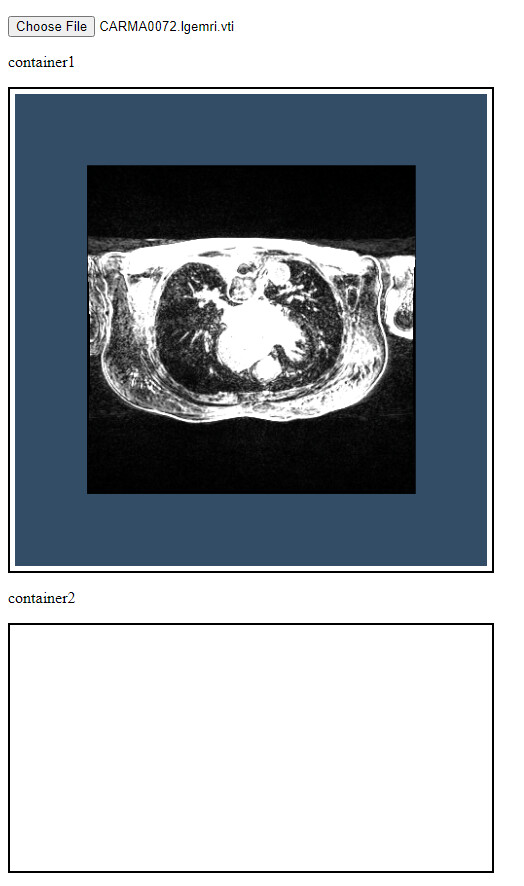
The code is supposed to add one more volume slice in the container2. But the only container1 image is getting shown.  
I also tried the following which also did not work -

1. Kept the SlicingMode.Z for the container2 as well.
2. Commented off the following n the reader.onload event, the image in the container1 disappeared, and container2 still no image.  
renderer.resetCamera();  
renderWindow.render();

Below is the attached image for your reference.
 ![image](https://discourse.vtk.org/uploads/default/original/2X/b/bf352046ecf3ce92c7be15889d26e837a6b82ffe.jpeg)

Thanks in advance.

---

<div class="post-metadata">

### Author: ![Sebastien\_Jourdain](https://discourse.vtk.org/user_avatar/discourse.vtk.org/sebastien_jourdain/32/100_2.png) [@Sebastien\_Jourdain](https://discourse.vtk.org/u/Sebastien_Jourdain)
#### Post date: [February 6, 2021, 8:20pm UTC](https://discourse.vtk.org/t/need-help-trying-to-have-multiple-orthogonal-viewpoint-of-same-image/5146/4 "2021-02-06T20:20:33Z")

</div>

Any error in the console? Can you create a codepen or similar so we can see it live?

---

<div class="post-metadata">

### Author: ![wasim92007](https://discourse.vtk.org/user_avatar/discourse.vtk.org/wasim92007/32/2941_2.png) [@wasim92007](https://discourse.vtk.org/u/wasim92007)
#### Post date: [February 8, 2021, 4:34pm UTC](https://discourse.vtk.org/t/need-help-trying-to-have-multiple-orthogonal-viewpoint-of-same-image/5146/5 "2021-02-08T16:34:09Z")

</div>

I am following the method using npm, webpack etc, and using the vtk.js as an ES6 dependency.  
So after I run “npm run build” webpack compiles all the relevant code and puts it in app.js. And it is hard to debug from that app.js as it is not even readable.

I have created a codepen link and pasted the app.js content in the js section. (Hope I did it right) -  
https://codepen.io/wasim92007/embed/preview/PobNgEG?height=300&slug-hash=PobNgEG&default-tabs=js,result&host=https://codepen.io

Onside notes:  
SlicingMode.Z is and SlicingMode.K are showing the same image slice I believe but the other modes - X, Y, I, J are not showing any image slice.

I tried using the setISlice, setJSlice, setKSlice methods described in the below link, that is also not showing the slice as well.

> **[vtk.js](https://kitware.github.io/vtk-js/examples/MultiSliceImageMapper.html)**
>
> MultiSliceImageMapperLive example Sourceimport 'vtk.js/Sources/favicon';import vtkFullScreenRenderWindow from 'vtk.js/Sources/Rendering/Misc/FullScreenRenderWindow';import vtkHttpDataSetReader from '

I am new to VTK.js and learned JS recently so having a hard time understanding things.  
I wish if there was an example of loading a volume image and showing the 3 orthogonal view in 3 different container(3 different box in HTML) would be helpful.

I have added my entire project directory along with the image in the below drive folder -

> **[Orthogonal\_views - Google Drive](https://drive.google.com/drive/folders/1pucJeib9cj_jlvmFKGKDOQk6WWKrt-Wo?usp=sharing)**

I am using Visual Studio Code as an IDE.

Please let me know if you need anything else.  
Thanks in advance.

---

<div class="post-metadata">

### Author: ![Sebastien\_Jourdain](https://discourse.vtk.org/user_avatar/discourse.vtk.org/sebastien_jourdain/32/100_2.png) [@Sebastien\_Jourdain](https://discourse.vtk.org/u/Sebastien_Jourdain)
#### Post date: [February 8, 2021, 4:47pm UTC](https://discourse.vtk.org/t/need-help-trying-to-have-multiple-orthogonal-viewpoint-of-same-image/5146/6 "2021-02-08T16:47:03Z")

</div>

The idea of the code pen was to put your code in, not a non-readable transpiled version of it. But I’ll try to look at your shared zip.

---

<div class="post-metadata">

### Author: ![wasim92007](https://discourse.vtk.org/user_avatar/discourse.vtk.org/wasim92007/32/2941_2.png) [@wasim92007](https://discourse.vtk.org/u/wasim92007)
#### Post date: [February 8, 2021, 4:57pm UTC](https://discourse.vtk.org/t/need-help-trying-to-have-multiple-orthogonal-viewpoint-of-same-image/5146/7 "2021-02-08T16:57:40Z")

</div>

My html is using the transpiled code (app.js), I am not familiar with codepen. I could not find a way to just use my index.js file. This is why I have shared the zip.

Thanks in advance.

---

<div class="post-metadata">

### Author: ![Sebastien\_Jourdain](https://discourse.vtk.org/user_avatar/discourse.vtk.org/sebastien_jourdain/32/100_2.png) [@Sebastien\_Jourdain](https://discourse.vtk.org/u/Sebastien_Jourdain)
#### Post date: [February 8, 2021, 5:49pm UTC](https://discourse.vtk.org/t/need-help-trying-to-have-multiple-orthogonal-viewpoint-of-same-image/5146/8 "2021-02-08T17:49:03Z")

</div>

The issue was

`const { width: width2, height: height2 } = container2.getBoundingClientRect();`

You were asking to get the field `width2` from `getBoundingClientRect()` which only give you the `width` and `height`. So you got an undefined for both… Since they don’t exist. And setting the size of your window to be `undefined` does not lead to something valid.

---

<div class="post-metadata">

### Author: ![wasim92007](https://discourse.vtk.org/user_avatar/discourse.vtk.org/wasim92007/32/2941_2.png) [@wasim92007](https://discourse.vtk.org/u/wasim92007)
#### Post date: [February 8, 2021, 6:05pm UTC](https://discourse.vtk.org/t/need-help-trying-to-have-multiple-orthogonal-viewpoint-of-same-image/5146/9 "2021-02-08T18:05:34Z")

</div>

Thanks, Seb, let me check it out.

However, I have created two containers in the HTML and named them “container1” and “container2” as shown below -

```
<div class="image_container left" id = "container1"></div>

<div class="image_container middle" id = "container2"></div>

```

And then trying to use those two containers to display to different orthogonal views, not sure why container1 is returning proper value and container2 is returning undefined.

```
const container1 = document.getElementById('container1');
openglRenderWindow1.setContainer(container1);

const container2 = document.getElementById('container2');
openglRenderWindow2.setContainer(container2);

// ----------------------------------------------------------------------------
// Capture size of the container and set it to the renderWindow
// ----------------------------------------------------------------------------

const { width, height } = container1.getBoundingClientRect();
openglRenderWindow1.setSize(width, height);

const { width2, height2 } = container2.getBoundingClientRect();
openglRenderWindow2.setSize(width2, height2);
```

---

<div class="post-metadata">

### Author: ![Sebastien\_Jourdain](https://discourse.vtk.org/user_avatar/discourse.vtk.org/sebastien_jourdain/32/100_2.png) [@Sebastien\_Jourdain](https://discourse.vtk.org/u/Sebastien_Jourdain)
#### Post date: [February 8, 2021, 7:09pm UTC](https://discourse.vtk.org/t/need-help-trying-to-have-multiple-orthogonal-viewpoint-of-same-image/5146/10 "2021-02-08T19:09:03Z")

</div>

```auto
const object = container1.getBoundingClientRect();
// object = {left, top, width, height}
console.log(object.someRandomNameLike_width2) // => undefined

```

This line is totally wrong  
`const { width2, height2 } = container2.getBoundingClientRect();`

---

<div class="post-metadata">

### Author: ![wasim92007](https://discourse.vtk.org/user_avatar/discourse.vtk.org/wasim92007/32/2941_2.png) [@wasim92007](https://discourse.vtk.org/u/wasim92007)
#### Post date: [February 8, 2021, 7:42pm UTC](https://discourse.vtk.org/t/need-help-trying-to-have-multiple-orthogonal-viewpoint-of-same-image/5146/11 "2021-02-08T19:42:48Z")

</div>

I understand the issue with the random names now. I was under the impression that getBoundingClientRect() returns width and height and I can collect the value using const { width2, height2 } on the LHS.

Thanks, Seb for the clarification.  
Now I have modified that particular part of the code into the following -

```
const { width, height } = container1.getBoundingClientRect();

openglRenderWindow1.setSize(width, height);

openglRenderWindow2.setSize(width, height);

openglRenderWindow3.setSize(width, height);

```

Now all the 3 containers are loading images as below -
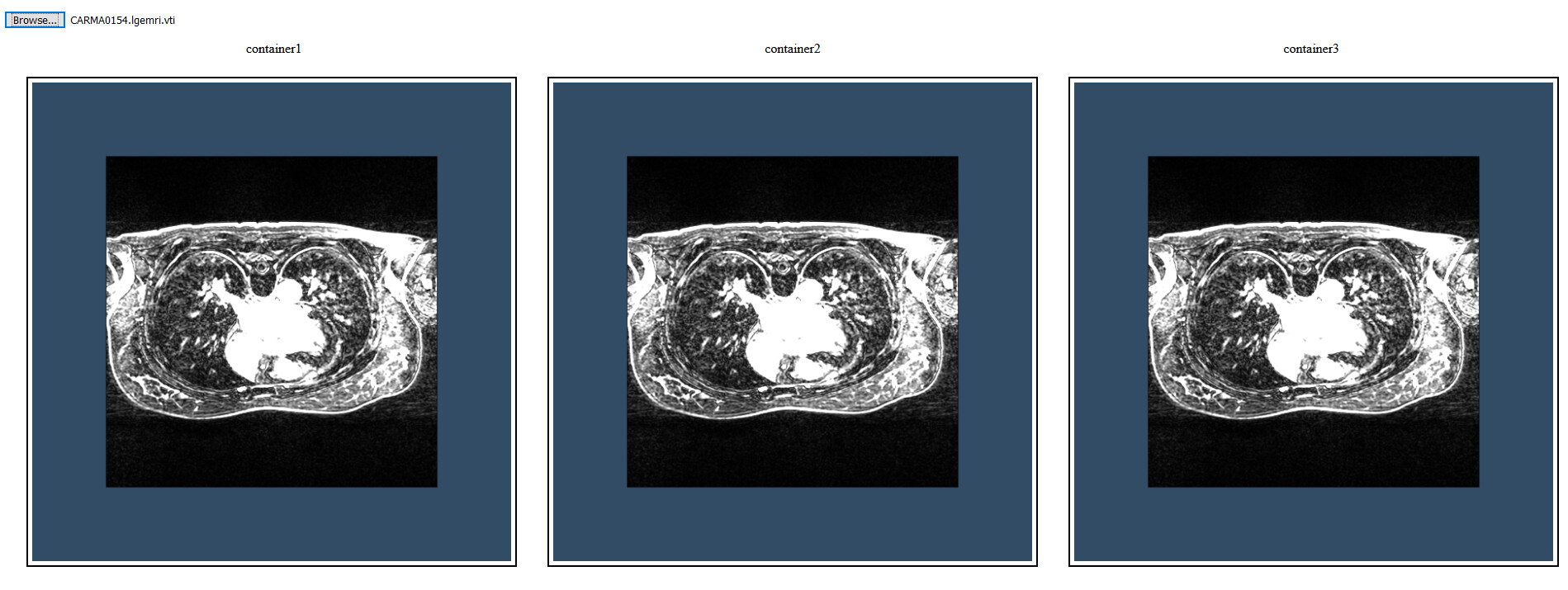
 ![image](https://discourse.vtk.org/uploads/default/original/2X/b/b0cb8cb1ef2099ff68415182f159ebe8c93d4780.jpeg)

However, despite setting the slicing mode for the three individual mappers to X, Y and Z respectively, all of them are showing the slices in the Z direction. Part of the code for setting the Mappers are below -

```
slicingMapper1.setSliceAtFocalPoint(true);

slicingMapper1.setSlicingMode(SlicingMode.X);

slicingMapper2.setSliceAtFocalPoint(true);

slicingMapper2.setSlicingMode(SlicingMode.Y);

slicingMapper3.setSliceAtFocalPoint(true);

slicingMapper3.setSlicingMode(SlicingMode.Z);

```

Below is my entire code for further reference -

```
import macro, { chain } from 'vtk.js/Sources/macro';

console.log('vtk.js imported: ', macro);

// ----------------------------------------------------------------------------

// Standard renderWindow

// ----------------------------------------------------------------------------

//import vtkFullScreenRenderWindow from 'vtk.js/Sources/Rendering/Misc/FullScreenRenderWindow';

import vtkopenglRenderWindow from 'vtk.js/Sources/Rendering/OpenGL/RenderWindow';

import vtkRenderWindow from 'vtk.js/Sources/Rendering/Core/RenderWindow';

import vtkRenderWindowInteractor from 'vtk.js/Sources/Rendering/Core/RenderWindowInteractor';

import vtkRenderer from 'vtk.js/Sources/Rendering/Core/Renderer';

import vtkInteractorStyleTrackballCamera from 'vtk.js/Sources/Interaction/Style/InteractorStyleTrackballCamera';

// ----------------------------------------------------------------------------

// Standard HttpDataReader for loading remote dataset

// Standard XMLImageDataReader for loading images

// ----------------------------------------------------------------------------

//import vtkHttpDataSetReader from 'vtk.js/Sources/IO/Core/HttpDataSetReader';

import vtkXMLImageDataReader from 'vtk.js/Sources/IO/XML/XMLImageDataReader';

// ----------------------------------------------------------------------------

// Standard Volume slicing Actor and Mapper import

// ----------------------------------------------------------------------------

import vtkImageMapper from 'vtk.js/Sources/Rendering/Core/ImageMapper';

import vtkImageSlice from 'vtk.js/Sources/Rendering/Core/ImageSlice';

import vtkInteractorStyleImage from 'vtk.js/Sources/Interaction/Style/InteractorStyleImage';

import ImageConstants, { SlicingMode } from 'vtk.js/Sources/Rendering/Core/ImageMapper/Constants';

// ----------------------------------------------------------------------------

// Standard rendering instantiation

// ----------------------------------------------------------------------------

// const fullScreenRenderer = vtkFullScreenRenderWindow.newInstance();

// const renderer = fullScreenRenderer.getRenderer({ background: [0.2, 0.3, 0.4] });

// const renderWindow = fullScreenRenderer.getRenderWindow();

const renderWindow1 = vtkRenderWindow.newInstance();

const renderWindow2 = vtkRenderWindow.newInstance();

const renderWindow3 = vtkRenderWindow.newInstance();

const renderer1 = vtkRenderer.newInstance({ background: [0.2, 0.3, 0.4] });

const renderer2 = vtkRenderer.newInstance({ background: [0.2, 0.3, 0.4] });

const renderer3 = vtkRenderer.newInstance({ background: [0.2, 0.3, 0.4] });

renderWindow1.addRenderer(renderer1);

renderWindow2.addRenderer(renderer2);

renderWindow3.addRenderer(renderer3);

// ----------------------------------------------------------------------------

// Use OpenGL as the backend to view the all this

// Multiple views can be added

// ----------------------------------------------------------------------------

const openglRenderWindow1 = vtkopenglRenderWindow.newInstance();

const openglRenderWindow2 = vtkopenglRenderWindow.newInstance();

const openglRenderWindow3 = vtkopenglRenderWindow.newInstance();

renderWindow1.addView(openglRenderWindow1);

renderWindow2.addView(openglRenderWindow2);

renderWindow3.addView(openglRenderWindow3);

// ----------------------------------------------------------------------------

// Create a div section to put this into

// ----------------------------------------------------------------------------

//const container1 = document.createElement('div');

//document.querySelector('body').appendChild(container1);

// const container1 = document.createElement('div');

// document.querySelector('#test').appendChild(container1);

// const container2 = document.createElement('div');

// document.querySelector('#test').appendChild(container2);

const container1 = document.getElementById('container1');

console.log("container1 return: ");

console.log(container1);

openglRenderWindow1.setContainer(container1);

const container2 = document.getElementById('container2');

console.log("container2 return: ");

console.log(container2);

openglRenderWindow2.setContainer(container2);

const container3 = document.getElementById('container3');

console.log("container3 return: ");

console.log(container3);

openglRenderWindow3.setContainer(container3);

// ----------------------------------------------------------------------------

// Capture size of the container and set it to the renderWindow

// ----------------------------------------------------------------------------

const { width, height } = container1.getBoundingClientRect();

openglRenderWindow1.setSize(width, height);

console.log("container1 width: "+ width);

//const { width, height } = container2.getBoundingClientRect();

openglRenderWindow2.setSize(width, height);

console.log("container2 width: "+ width);

//const { width, height } = container3.getBoundingClientRect();

openglRenderWindow3.setSize(width, height);

console.log("container3 width: "+ width);

// ----------------------------------------------------------------------------

// Setup an interactor to handle mouse events

// ----------------------------------------------------------------------------

const interactor1 = vtkRenderWindowInteractor.newInstance();

interactor1.setView(openglRenderWindow1);

interactor1.initialize();

interactor1.bindEvents(container1);

const interactor2 = vtkRenderWindowInteractor.newInstance();

interactor2.setView(openglRenderWindow2);

interactor2.initialize();

interactor2.bindEvents(container2);

const interactor3 = vtkRenderWindowInteractor.newInstance();

interactor3.setView(openglRenderWindow3);

interactor3.initialize();

interactor3.bindEvents(container3);

// ----------------------------------------------------------------------------

// Setup interactor style to use

// ----------------------------------------------------------------------------

interactor1.setInteractorStyle(vtkInteractorStyleTrackballCamera.newInstance());

interactor2.setInteractorStyle(vtkInteractorStyleTrackballCamera.newInstance());

interactor3.setInteractorStyle(vtkInteractorStyleTrackballCamera.newInstance());

// renderer camera to parallel projection

renderer1.getActiveCamera().setParallelProjection(true);

renderer2.getActiveCamera().setParallelProjection(true);

renderer3.getActiveCamera().setParallelProjection(true);

// --- Setting slicing mode ---

const { slicingMode } = ImageConstants;

// --- Set up interactor style for image slicing

const istyle1 = vtkInteractorStyleImage.newInstance();

istyle1.setInteractionMode('IMAGE_SLICING');

renderWindow1.getInteractor().setInteractorStyle(istyle1);

const istyle2 = vtkInteractorStyleImage.newInstance();

istyle2.setInteractionMode('IMAGE_SLICING');

renderWindow2.getInteractor().setInteractorStyle(istyle2);

const istyle3 = vtkInteractorStyleImage.newInstance();

istyle3.setInteractionMode('IMAGE_SLICING');

renderWindow3.getInteractor().setInteractorStyle(istyle3);

// --- setup the slicing actor ---

const slicingActor1 = vtkImageSlice.newInstance();

const slicingMapper1 = vtkImageMapper.newInstance();

const slicingActor2 = vtkImageSlice.newInstance();

const slicingMapper2 = vtkImageMapper.newInstance();

const slicingActor3 = vtkImageSlice.newInstance();

const slicingMapper3 = vtkImageMapper.newInstance();

slicingMapper1.setSliceAtFocalPoint(true);

slicingMapper1.setSlicingMode(SlicingMode.X);

slicingMapper2.setSliceAtFocalPoint(true);

slicingMapper2.setSlicingMode(SlicingMode.Y);

slicingMapper3.setSliceAtFocalPoint(true);

slicingMapper3.setSlicingMode(SlicingMode.Z);

// slcingMapper.setKSlice(30);

// slcingMapper2.setJSlice(30);

// Tell actor which mapper to use

slicingActor1.setMapper(slicingMapper1);

slicingActor2.setMapper(slicingMapper2);

slicingActor3.setMapper(slicingMapper3);

// --- load local dataset ---

const input = document.querySelector('input[type="file"]')

input.addEventListener('change', function(e) {

    console.log(input.files)

    const reader = new FileReader()

    reader.onload = function () {

        const vtiReader = vtkXMLImageDataReader.newInstance();

        vtiReader.parseAsArrayBuffer(reader.result);

        slicingMapper1.setInputData(vtiReader.getOutputData(0));

        slicingMapper2.setInputData(vtiReader.getOutputData(0));

        slicingMapper3.setInputData(vtiReader.getOutputData(0));

        renderer1.addActor(slicingActor1);

        renderer2.addActor(slicingActor2);

        renderer3.addActor(slicingActor3);

        renderer1.resetCamera();

        renderer2.resetCamera();

        renderer3.resetCamera();

        renderWindow1.render();

        renderWindow2.render();

        renderWindow3.render();

    }

    reader.readAsArrayBuffer(input.files[0])

}, false)

// --- Expose globals so we can play with values in the dev console ---

global.renderWindow1 = renderWindow1;

global.renderer1 = renderer1;

global.slicingActor1 = slicingActor1;

global.slicingMapper1 = slicingMapper1;

```

Any idea what I might be doing wrong?

---

<div class="post-metadata">

### Author: ![Sebastien\_Jourdain](https://discourse.vtk.org/user_avatar/discourse.vtk.org/sebastien_jourdain/32/100_2.png) [@Sebastien\_Jourdain](https://discourse.vtk.org/u/Sebastien_Jourdain)
#### Post date: [February 8, 2021, 8:02pm UTC](https://discourse.vtk.org/t/need-help-trying-to-have-multiple-orthogonal-viewpoint-of-same-image/5146/12 "2021-02-08T20:02:09Z")

</div>

Probably you need to orient the view correctly first
