# No module named 'vtkIOExodusPython' on Windows
**URL:** https://discourse.vtk.org/t/no-module-named-vtkioexoduspython-on-windows/456
**Category:** Support
**Created:** [March 11, 2019, 9:14pm UTC](https://discourse.vtk.org/t/no-module-named-vtkioexoduspython-on-windows/456 "2019-03-11T21:14:58Z")
**Posts on this page:** 6
**Page:** 1
### Author:  [@addisonElliott](https://discourse.vtk.org/u/addisonElliott)
#### Post date: [March 11, 2019, 9:14pm UTC](https://discourse.vtk.org/t/no-module-named-vtkioexoduspython-on-windows/456/1 "2019-03-11T21:14:58Z")
Hello,
First time poster here. Let me know if this isn’t the correct section for my issue…
I am on Windows 10 64-bit using Python 3.7 and Anaconda. I’ve installed vtk v8.2.0 from the conda-forge channel on Anaconda and I’m receiving the following error:
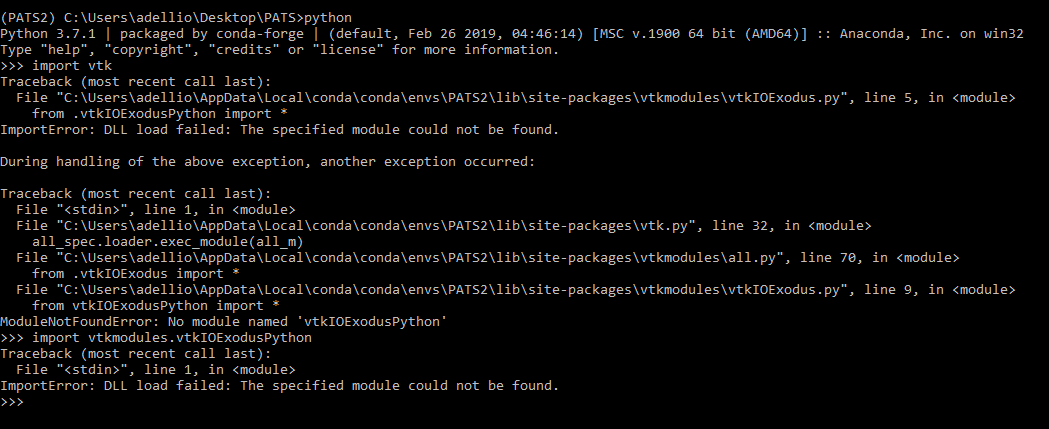
I’ve had this problem before which I solved somehow but I can’t remember how. I’ve also installed VTK on many different machines and none of them have experienced this problem.
Looking for direction for how to trace this problem, assuming I need to check that the correct DLL is being loaded for vtkIOExodus.
Thanks,
Addison
---
### Author:  [@Zai\_F](https://discourse.vtk.org/u/Zai_F)
#### Post date: [March 25, 2019, 9:09am UTC](https://discourse.vtk.org/t/no-module-named-vtkioexoduspython-on-windows/456/2 "2019-03-25T09:09:35Z")
same problem.
---
### Author:  [@nhorro](https://discourse.vtk.org/u/nhorro)
#### Post date: [January 29, 2020, 12:38pm UTC](https://discourse.vtk.org/t/no-module-named-vtkioexoduspython-on-windows/456/3 "2020-01-29T12:38:46Z")
Same problem here.
---
### Author:  [@liushuya7](https://discourse.vtk.org/u/liushuya7)
#### Post date: [February 23, 2020, 9:05pm UTC](https://discourse.vtk.org/t/no-module-named-vtkioexoduspython-on-windows/456/4 "2020-02-23T21:05:50Z")
Same problem here.
---
### Author:  [@Aron\_Helser](https://discourse.vtk.org/u/Aron_Helser)
#### Post date: [February 24, 2020, 2:18pm UTC](https://discourse.vtk.org/t/no-module-named-vtkioexoduspython-on-windows/456/5 "2020-02-24T14:18:57Z")
DLL load indicates that the directory with the dll is not included in the PATH environment variable. Please try this: find out where Conda installed the vtk .dlls, and add it to your path.
---
### Author:  [@dwg](https://discourse.vtk.org/u/dwg)
#### Post date: [December 4, 2020, 10:14pm UTC](https://discourse.vtk.org/t/no-module-named-vtkioexoduspython-on-windows/456/6 "2020-12-04T22:14:59Z")
Resurrecting this old thread because I ran into the same problem on windows 10 machine.
I had narrowed down the issue to some weird interaction between h5py and vtk.
With an environment.yaml file like this:
```
channels:
- conda-forge
- defaults
dependencies:
- python =3.7
- vtk =8.2.0
- h5py =3.1.0
```
Then after `conda env create`, `import vtk` raised the same “ModuleNotFoundError: No module named ‘vtkIOExodusPython’” error. (And commenting out the h5py requirement fixed the problem.)
The weird thing is that `conda create python=3.7 vtk=8.2.0 h5py=3.1.0` worked fine. Inspecting the two different environments, there were a couple of minor differenences in the h5py dependencies installed. I modified the environment file to pin the packages to match the working environment:
```
channels:
- conda-forge
- defaults
dependencies:
- python =3.7
- vtk =8.2.0
- h5py =3.1.0=nompi_py37h19fda09_100
- hdf4 =4.2.13=h0e5069d_1004
- hdf5 =1.10.6=nompi_h5268f04_1112
```
I have absolutely no idea why h5py is interfering with conda installing VTK, but figured I’d post this here in case it was useful for someone else.