# No opacity from VtkImageData
**URL:** https://discourse.vtk.org/t/no-opacity-from-vtkimagedata/13819
**Category:** Support
**Created:** [April 30, 2024, 11:37am UTC](https://discourse.vtk.org/t/no-opacity-from-vtkimagedata/13819 "2024-04-30T11:37:11Z")
**Posts on this page:** 2
**Page:** 1
### Author:  [@bansan](https://discourse.vtk.org/u/bansan)
#### Post date: [April 30, 2024, 11:37am UTC](https://discourse.vtk.org/t/no-opacity-from-vtkimagedata/13819/1 "2024-04-30T11:37:11Z")
Hi,
I would like to open a vti image and show it according to SimpleRayCast C++ example.
At first, I successfully ran SimpleRayCast.
I tried to open a vti file instead. The size [-0.003;+0.003[, [-0.003;+0.003[, [0;+0.010[ and the absolute value [0;5600[.
I replaced:
- the reader from `vtkStructuredPointsReader` by `vtkXMLImageDataReader`. I applied a `vtkImageMathematics.SetOperationToAbsoluteValue` to keep only absolute value.
- The opacity is 0 at 0 and 1 at 5618.
- The color is blue at 0 and red at 5618.
- I set SetScalarOpacityUnitDistance to 0.0003
- I tried mapper `vtkFixedPointVolumeRayCastMapper`, `vtkGPUVolumeRayCastMapper` and `vtkSmartVolumeMapper` without success. I had to set `volumeMapper->SetSampleDistance(0.0001)` to see something with `vtkFixedPointVolumeRayCastMapper`
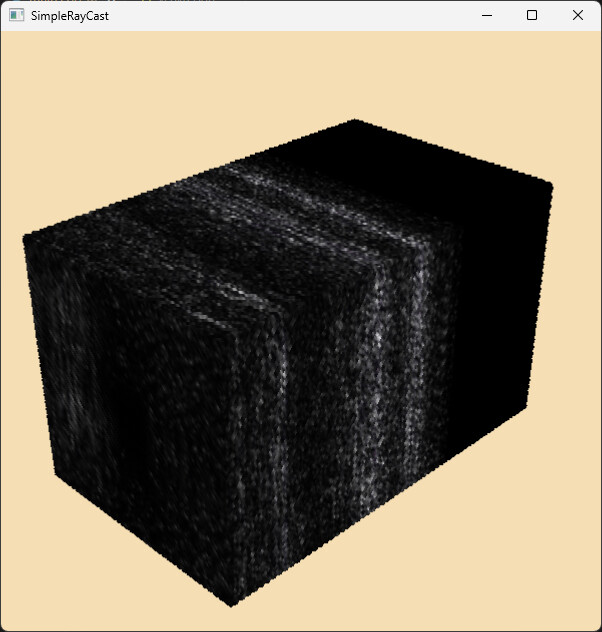
Instead of transparency, I have black pixels.
I read lots of message about opacity problem in the forum. I tried to enable depth peeling in renderer, alpha bit planes in window renderer without success.
I’m under Windows with vtk 9.2.0 built with vcpkg.
Please find enclosed the vti file and the C++ source.
[vti file](https://we.tl/t-SilBSXVM1H)
[main.cpp](https://discourse.vtk.org/uploads/short-url/mAiXNbrXk963pCAq01ig8BPJKif.cpp) (3.7 KB)
Do I missed some thing ? With Paraview, I can easily use opacity and colormap like I want.
What I have: You can see that I only see pixels at the edges.
What I want:
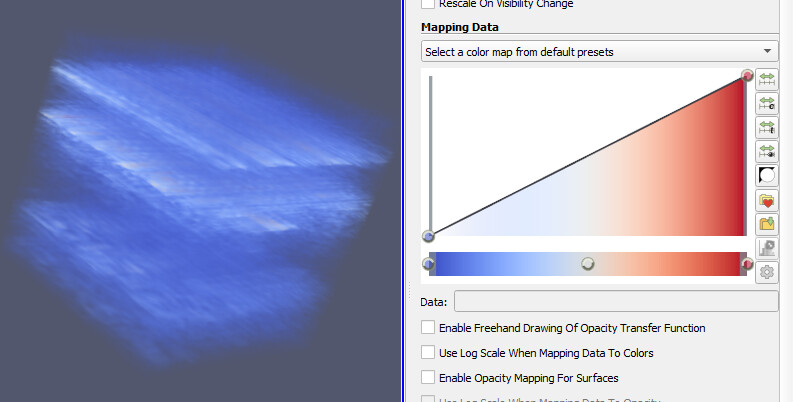
Thanks, Best regards,
---
### Author:  [@bansan](https://discourse.vtk.org/u/bansan)
#### Post date: [May 3, 2024, 2:18pm UTC](https://discourse.vtk.org/t/no-opacity-from-vtkimagedata/13819/2 "2024-05-03T14:18:25Z")
I finally got it. My vti file has 2 components. So Paraview shows the magnitude. In my example, I only show the first component. This component has different values and different range.