# Non-shrinking (Taubin-) smoothing for lines?
**URL:** https://discourse.vtk.org/t/non-shrinking-taubin-smoothing-for-lines/4561
**Category:** Support
**Created:** [November 3, 2020, 6:31pm UTC](https://discourse.vtk.org/t/non-shrinking-taubin-smoothing-for-lines/4561 "2020-11-03T18:31:45Z")
**Posts on this page:** 3
**Page:** 1
### Author:  [@normanius](https://discourse.vtk.org/u/normanius)
#### Post date: [November 3, 2020, 6:31pm UTC](https://discourse.vtk.org/t/non-shrinking-taubin-smoothing-for-lines/4561/1 "2020-11-03T18:31:45Z")
I’m using [`vtkWindowedSincPolyDataFilter`](https://vtk.org/doc/nightly/html/classvtkWindowedSincPolyDataFilter.html) to smooth surfaces without shrinkage.
I wonder if I can use the same filter to smooth curves without shrinkage too. The doc of the aforementioned filter states that it should be possible in principle. Also this [paper by Taubin](https://ieeexplore.ieee.org/document/466848/) referred to both surface and line smoothing.
However, the following example segfaults.
```auto
import vtk
polygon = vtk.vtkRegularPolygonSource()
polygon.SetNumberOfSides(10)
polygon.GeneratePolylineOn() # No face
polygon.GeneratePolygonOff() # just polyline
polygon.Update()
polygon = polygon.GetOutput()
smoothed = vtk.vtkWindowedSincPolyDataFilter()
smoothed.SetInputData(polygon)
smoothed.SetNumberOfIterations(30)
smoothed.SetPassBand(0.3)
smoothed.SetBoundarySmoothing(False)
smoothed.SetNonManifoldSmoothing(False)
smoothed.SetNormalizeCoordinates(True)
smoothed.Update()
```
I address this question to @lassoan and @will.schroeder, because there has been [recent development](https://discourse.vtk.org/t/3262) in `vtkWindowedSincPolyDataFilter`.
Thanks for your hints and clarifications 🙂
* * *
**Update**. The segfault was present in vtk version 8.1. It seems fixed in version 9.0.
In version 9.0, however, no smoothing is applied at all for a polyline input, independent of the choice of parameters (iterations, passband, boundary smoothing, etc.).
The question remains: How could non-shrinking line smoothing be achieved?
---
### Author:  [@lassoan](https://discourse.vtk.org/u/lassoan)
#### Post date: [November 3, 2020, 10:25pm UTC](https://discourse.vtk.org/t/non-shrinking-taubin-smoothing-for-lines/4561/2 "2020-11-03T22:25:13Z")
Curve smoothing is quite different and it should be much simpler than surface smoothing, so I don’t think it should be added to surface smoothing filter.
For example, you can apply Fourier transform to the points, cut the number of coefficients and transform it back - about 10 lines of Python code. It would be nice if you could implement it in a proper VTK filter, as it would be easier to use, from both C++ and Python.
---
### Author:  [@normanius](https://discourse.vtk.org/u/normanius)
#### Post date: [November 4, 2020, 3:04am UTC](https://discourse.vtk.org/t/non-shrinking-taubin-smoothing-for-lines/4561/3 "2020-11-04T03:04:32Z")
Valuable input. Thanks!
Find below my attempt to smooth a polyline using FFT. I’m not an expert in signal processing, but it seems to work in the desired, non-shrinking way. Feedback is welcome.
```auto
from vtk.util.numpy_support import vtk_to_numpy, numpy_to_vtk
from scipy.fftpack import rfft, rfftfreq, irfft
# For newer versions of scipy, use:
# from scipy.fft import rfft, rfftfreq, irfft
def smoothedPolylineFFT(polyline, cutoff=0.5, closed=False):
def _filter(y, cutoff):
# Pretty much followed the instructions here.
# https://realpython.com/python-scipy-fft/
assert(0<=cutoff<=1)
dt = 1/(len(y)-1)
t = np.linspace(0,1,len(y))
xf = rfftfreq(len(t), d=dt)
yf = rfft(y)
yf[int(cutoff*len(yf)):] = 0
return irfft(yf)
points = vtk_to_numpy(polyline.GetPoints().GetData())
# Extend signal to avoid artifacts at beginning and end of the line.
if closed:
ns = points.shape[0]
points = np.tile(points, (3, 1))
else:
ns = points.shape[0]//2
points = np.concatenate([np.tile(points[0], (ns,1)),
points,
np.tile(points[-1], (ns,1))])
points = np.apply_along_axis(_filter, axis=0, arr=points,
cutoff=cutoff)
# Undo signal extension
points = points[ns:-ns+1]
# Create new output poly.
P = vtk.vtkPoints()
P.SetData(numpy_to_vtk(points, deep=True))
C = vtk.vtkCellArray()
I = np.asarray([len(points)] + list(range(0,len(points))))
C.SetCells(1, numpy_to_vtkIdTypeArray(I))
result = vtk.vtkPolyData()
result.SetPoints(P)
result.SetLines(C)
return result
```
For some polyline, I yield the following results:
```auto
p = createPolyLine()
q1 = smoothedPolylineFFT(p, cutoff=0.5, closed=True)
q2 = smoothedPolylineFFT(p, cutoff=0.3, closed=True)
```
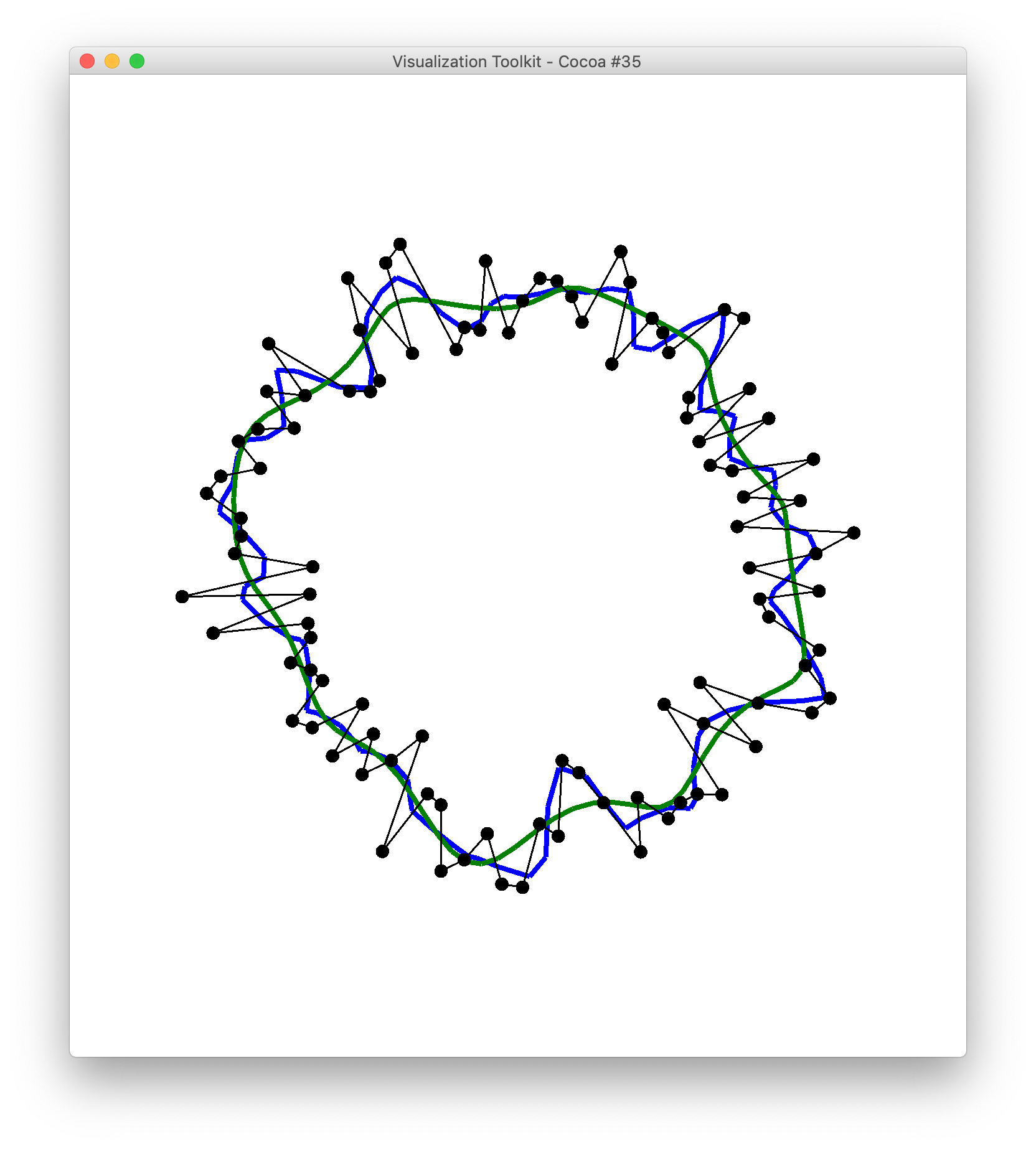
By resampling the input line (e.g. equidistant piecewise-linear interpolation, not shown in the above sample code) the output can be further improved/smoothed. This requires to adjust the cutoff in the above script. But I believe there’s a functional relationship between normalized cutoff-frequency `cutoff` and the (re-)sampling rate, so that’s just fine.