# Normals/roughness appear to be missing from display using vtkOBJImporter
**URL:** https://discourse.vtk.org/t/normals-roughness-appear-to-be-missing-from-display-using-vtkobjimporter/12955
**Category:** Support
**Created:** [December 21, 2023, 9:31pm UTC](https://discourse.vtk.org/t/normals-roughness-appear-to-be-missing-from-display-using-vtkobjimporter/12955 "2023-12-21T21:31:55Z")
**Posts on this page:** 4
**Page:** 1
### Author:  [@scotsman60](https://discourse.vtk.org/u/scotsman60)
#### Post date: [December 21, 2023, 9:31pm UTC](https://discourse.vtk.org/t/normals-roughness-appear-to-be-missing-from-display-using-vtkobjimporter/12955/1 "2023-12-21T21:31:55Z")
Hello,
I’m using vtkOBJImporter to display an obj file. I have an associated .mtl file which references various roughness, normals, diffuse texture .pngs etc.
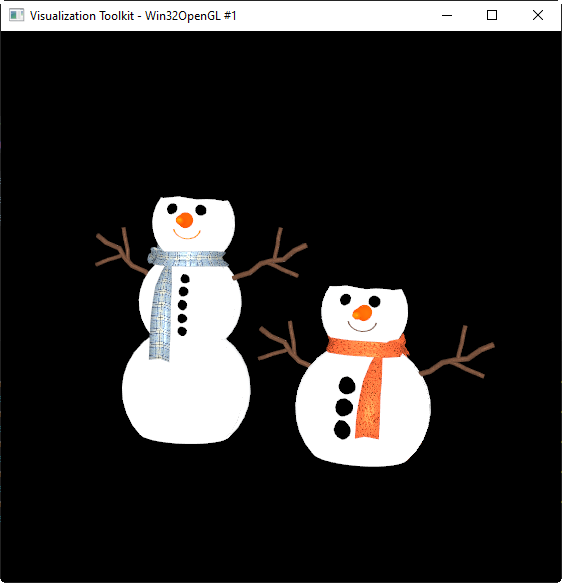
VTK succesfully displays the .obj file and I can clearly see the contents of the diffuse texture are included but it seems like the normals and roughness are not being processed - the image is completely flat.
I’m using Python and VTK 9.2.2 on Windows and the code I’m using is shown below.
Any ideas on why the normals/roughness are not being processed?
Thanks in advance,
Doug
```auto
def main():
# Get the full pathname of the vtp file containing the cow definition from the res folder
current_file_path = os.path.dirname(os.path.realpath( __file__ ))
objfname=os.path.join(os.path.dirname(current_file_path), r'res\snowman\snowman_finish.obj')
matfname=os.path.join(os.path.dirname(current_file_path), r'res\snowman\snowman_finish.mtl')
texturepath=os.path.join(os.path.dirname(current_file_path), r"res\snowman")
# Set up the importer and initialize with the files
objimporter=vtkOBJImporter()
objimporter.SetFileName(objfname)
objimporter.SetFileNameMTL(matfname)
objimporter.SetTexturePath(texturepath)
# Render window, renderer and interactor
renderer=vtkRenderer()
renwin=vtkRenderWindow()
renwin.AddRenderer(renderer)
iren = vtkRenderWindowInteractor()
iren.SetRenderWindow(renwin)
# Connect the importer to the render window
objimporter.SetRenderWindow(renwin)
objimporter.Update()
# Render
iren.Initialize()
renwin.Render()
iren.Start()
if __name__ ==' __main__':
main()
```
---
### Author:  [@scotsman60](https://discourse.vtk.org/u/scotsman60)
#### Post date: [December 21, 2023, 9:33pm UTC](https://discourse.vtk.org/t/normals-roughness-appear-to-be-missing-from-display-using-vtkobjimporter/12955/2 "2023-12-21T21:33:56Z")
Here’s what the display looks like in VTK
And how it looks in an alternate viewer

---
### Author:  [@scotsman60](https://discourse.vtk.org/u/scotsman60)
#### Post date: [December 21, 2023, 9:34pm UTC](https://discourse.vtk.org/t/normals-roughness-appear-to-be-missing-from-display-using-vtkobjimporter/12955/3 "2023-12-21T21:34:55Z")
mtl file
```auto
newmtl snow
Ns 225.000000
Ka 1.000000 1.000000 1.000000
Kd 0.800000 0.800000 0.800000
Ks 0.500000 0.500000 0.500000
Ke 0.000000 0.000000 0.000000
Ni 1.450000
d 1.000000
illum 2
map_Bump -bm 0.500000 snowman2_normal.png
map_Kd snowman2_diffuse.png
map_Ns snowman2_roughness.png
newmtl snowman1.001
Ns 225.000000
Ka 1.000000 1.000000 1.000000
Kd 0.800000 0.800000 0.800000
Ks 0.500000 0.500000 0.500000
Ke 0.000000 0.000000 0.000000
Ni 1.450000
d 1.000000
illum 2
map_Bump -bm 0.500000 snowman1_normal.png
map_Kd snowman1_diffuse.png
map_Ns snowman1_roughness.png
```
---
### Author:  [@scotsman60](https://discourse.vtk.org/u/scotsman60)
#### Post date: [December 23, 2023, 7:22am UTC](https://discourse.vtk.org/t/normals-roughness-appear-to-be-missing-from-display-using-vtkobjimporter/12955/4 "2023-12-23T07:22:17Z")
OK - After some more research, I found,
1. vtkOBJImporter is known to support only a single texture. Not sure how I missed that i my initial research
2. Even if it supported multiple textures my current approach would not have worked because the default Gouraud shading model only supports a single color texture. I need to update my code to use PBR rendering to see the effects of the different roughness etc, textures.