# Obtaining the curve of intersection in vtk
**URL:** https://discourse.vtk.org/t/obtaining-the-curve-of-intersection-in-vtk/4769
**Category:** Development
**Created:** [December 2, 2020, 3:05pm UTC](https://discourse.vtk.org/t/obtaining-the-curve-of-intersection-in-vtk/4769 "2020-12-02T15:05:04Z")
**Posts on this page:** 6
**Page:** 1
### Author:  [@Anish\_Basnet](https://discourse.vtk.org/u/Anish_Basnet)
#### Post date: [December 2, 2020, 3:05pm UTC](https://discourse.vtk.org/t/obtaining-the-curve-of-intersection-in-vtk/4769/1 "2020-12-02T15:05:04Z")
Hello everyone,
Is there a function in VTK that could determine the curve of intersection between two polydatas?
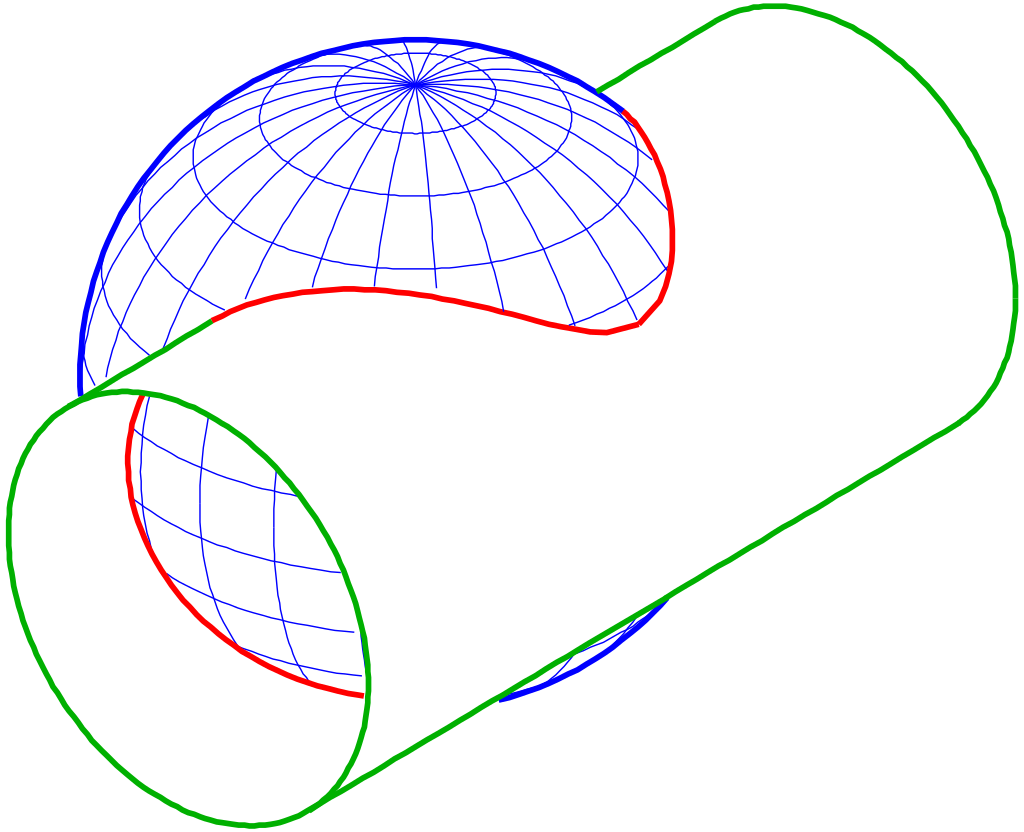
I’d also like to obtain the points that lie in the curve(indicated by the red color in the figure below). Is it somehow possible?
There was no response to this question:
> **[VTK - Users - the four points the vtkCutter intersected with the bounding box](http://vtk.1045678.n5.nabble.com/the-four-points-the-vtkCutter-intersected-with-the-bounding-box-td5734148.html)**
---
### Author:  [@marcomusy](https://discourse.vtk.org/u/marcomusy)
#### Post date: [December 2, 2020, 8:46pm UTC](https://discourse.vtk.org/t/obtaining-the-curve-of-intersection-in-vtk/4769/2 "2020-12-02T20:46:44Z")
You can look into `vtkIntersectionPolyDataFilter` - but also need `vtkTriangleFilter ` to make it work… a quick test:
```python
from vedo import *
sph = Sphere().pos(0,1,0).c('blue').alpha(0.2)
cyl = Cylinder(r=0.5, height=3).triangulate().rotateY(90).alpha(0.2)
sic = sph.intersectWith(cyl).c('red').lw(5)
show(sph, cyl, sic, axes=7)
```

---
### Author:  [@Anish\_Basnet](https://discourse.vtk.org/u/Anish_Basnet)
#### Post date: [December 3, 2020, 4:42pm UTC](https://discourse.vtk.org/t/obtaining-the-curve-of-intersection-in-vtk/4769/3 "2020-12-03T16:42:38Z")
Hello Marco,
Thanks for the reply! I applied the vtkTriangleFilter and the vtkCleanPolydata.
vtkSmartPointer input1;
vtkSmartPointer poly1;
vtkSmartPointer input2;
vtkSmartPointer poly2;
// Create a sphere
vtkSmartPointer sphereSource =
vtkSmartPointer::New();
sphereSource-\>SetCenter(0.0, 0.0, 0.0);
sphereSource-\>SetRadius(25.0);
// Make the surface smooth.
sphereSource-\>SetPhiResolution(50);
sphereSource-\>SetThetaResolution(50);
poly1 = sphereSource -\>GetOutput();
//generation of cube source
vtkSmartPointer cubeSource =
vtkSmartPointer::New();
cubeSource-\>SetCenter(0.0, 0.0, 0.0);
cubeSource-\>SetXLength(50.0);
cubeSource-\>SetYLength(50.0);
cubeSource-\>SetZLength(50.0);
//cubeSource-\>Update();
poly2 = cubeSource-\>GetOutput(); //get PolyData
//-------------------------------------------------------------------------------------------------------------------------//
vtkSmartPointer tri1 =
vtkSmartPointer::New();
tri1-\>SetInputData(poly1);
vtkSmartPointer clean1 =
vtkSmartPointer::New();
clean1-\>SetInputConnection(tri1-\>GetOutputPort());
clean1-\>Update();
input1 = clean1-\>GetOutput();
vtkSmartPointer tri2 =
vtkSmartPointer::New();
tri2-\>SetInputData(poly2);
vtkSmartPointer clean2 =
vtkSmartPointer::New();
clean2-\>SetInputConnection(tri2-\>GetOutputPort());
clean2-\>Update();
input2 = clean2-\>GetOutput();
//input1 and input 2 mapper and actor
vtkSmartPointer input1Mapper =
vtkSmartPointer::New();
input1Mapper-\>SetInputData( input1 );
input1Mapper-\>ScalarVisibilityOff();
vtkSmartPointer input1Actor =
vtkSmartPointer::New();
input1Actor-\>SetMapper(input1Mapper);
input1Actor-\>GetProperty()-\>SetOpacity(0.4);
input1Actor-\>GetProperty()-\>SetColor(0.0, 1.0, 0.0);
vtkSmartPointer input2Mapper =
vtkSmartPointer::New();
input2Mapper-\>SetInputData(input2);
input2Mapper-\>ScalarVisibilityOff();
vtkSmartPointer input2Actor =
vtkSmartPointer::New();
input2Actor-\>SetMapper(input2Mapper);
input2Actor-\>GetProperty()-\>SetOpacity(0.4);
input2Actor-\>GetProperty()-\>SetColor(0.0, 0.501, 0.501); //color code yellow:(0,128,128)
vtkSmartPointer intersectionPolyDataFilter =
vtkSmartPointer::New();
intersectionPolyDataFilter-\>SetInputData( 0, input1);
intersectionPolyDataFilter-\>SetInputData( 1, input2);
intersectionPolyDataFilter-\>Update();
vtkSmartPointer intersectionMapper = vtkSmartPointer::New();
intersectionMapper-\>SetInputConnection( intersectionPolyDataFilter-\>GetOutputPort());
intersectionMapper-\>ScalarVisibilityOff();
vtkSmartPointer intersectionActor = vtkSmartPointer::New();
intersectionActor-\>SetMapper( intersectionMapper );
intersectionActor-\>GetProperty()-\>SetColor(0.0, 0.0, 1.0);
//code for renderer, renderwindow and renderwindow interactor
I am getting a log:: Can’t build OBB tree - no data available!
What can be done to get the filter working??
Best regards,
Anish
---
### Author:  [@Joachim\_P](https://discourse.vtk.org/u/Joachim_P)
#### Post date: [December 4, 2020, 12:04am UTC](https://discourse.vtk.org/t/obtaining-the-curve-of-intersection-in-vtk/4769/4 "2020-12-04T00:04:55Z")
Anish,
Not sure it will be enough but at least there is a bug here. You commented the line `//cubeSource->Update();` while you should not.
BTW, note that the `vtkIntersectionPolyDataFilter` is unfortunately not a robust filter and it might fail in some cases.
HTH.
Joachim
---
### Author:  [@marcomusy](https://discourse.vtk.org/u/marcomusy)
#### Post date: [December 4, 2020, 12:13am UTC](https://discourse.vtk.org/t/obtaining-the-curve-of-intersection-in-vtk/4769/5 "2020-12-04T00:13:01Z")
Yes - same Update() is missing for the first source… Also I don’t see where you apply the `vtkTriangleFilter` (you would need it only for the cube in your case as the sphere is already a triangular mesh).
To quote code you can use triple backquotes:
PS: this also is not right:
`vtkSmartPointer sphereSource = vtkSmartPointer::New();`
should be e.g.
`vtkNew sphereSource;`
---
### Author:  [@Anish\_Basnet](https://discourse.vtk.org/u/Anish_Basnet)
#### Post date: [December 18, 2020, 10:02am UTC](https://discourse.vtk.org/t/obtaining-the-curve-of-intersection-in-vtk/4769/6 "2020-12-18T10:02:46Z")
I found an easier way to find the curve of intersection with the vtkCutterClass. Thank you, everyone!
Best regards,
Anish