# Opacity issue with point picking on surface
**URL:** https://discourse.vtk.org/t/opacity-issue-with-point-picking-on-surface/1193
**Category:** Support
**Created:** [June 21, 2019, 7:52pm UTC](https://discourse.vtk.org/t/opacity-issue-with-point-picking-on-surface/1193 "2019-06-21T19:52:43Z")
**Posts on this page:** 14
**Page:** 1
### Author:  [@kayarre](https://discourse.vtk.org/u/kayarre)
#### Post date: [June 21, 2019, 7:52pm UTC](https://discourse.vtk.org/t/opacity-issue-with-point-picking-on-surface/1193/1 "2019-06-21T19:52:43Z")
I have edited a actor to have an opacity less than 1, such that I can see a second actor inside the first.
There seems to be a weird behavior that I didn’t notice when the opacity was set to 1.
When using an interactive cell picker to select a point on actor 1 surface it doesn’t always pick a point on the surface it picks a seemingly random point somewhere else on the surface. I there way to mediate this behavior?
~Kurt
---
### Author:  [@lassoan](https://discourse.vtk.org/u/lassoan)
#### Post date: [June 21, 2019, 7:57pm UTC](https://discourse.vtk.org/t/opacity-issue-with-point-picking-on-surface/1193/2 "2019-06-21T19:57:00Z")
Which picker class are you using exactly? Can you provide a standalone minimal example that reproduces the issue?
---
### Author:  [@kayarre](https://discourse.vtk.org/u/kayarre)
#### Post date: [June 21, 2019, 8:08pm UTC](https://discourse.vtk.org/t/opacity-issue-with-point-picking-on-surface/1193/3 "2019-06-21T20:08:09Z")
It’s functionality built into vmtk, but I know it uses the same base VTK classes.
It’s going to take time to come up with a more narrow example.
I am curious to know if there is something about opacity that would change the behavior? I probably have to dig deeper. I think it may have to do with the `result == 0`
It seems like result is always returning success, but its clear to me how.
vtk.vtkCellPicker()
> ```
> picker = vtk.vtkCellPicker()
> picker.SetTolerance(1E-4 * self._Surface.GetLength())
> eventPosition = self.vmtkRenderer.RenderWindowInteractor.GetEventPosition()
> result = picker.Pick(float(eventPosition[0]),float(eventPosition[1]),0.0,self.vmtkRenderer.Renderer)
> if result == 0:
> return
>
> ```
---
### Author:  [@kayarre](https://discourse.vtk.org/u/kayarre)
#### Post date: [June 21, 2019, 8:17pm UTC](https://discourse.vtk.org/t/opacity-issue-with-point-picking-on-surface/1193/4 "2019-06-21T20:17:18Z")
Maybe a better question is this:
I have a centerline type object and a surface object the line is enclosed in. How could I create a glyph on the line that I could subsequently dragged along the line?
this might avoid this all together by solving the problem differently.
I think I can do this with. [https://vtk.org/doc/nightly/html/classvtkPolygonalSurfacePointPlacer.html](https://vtk.org/doc/nightly/html/classvtkPolygonalSurfacePointPlacer.html)
~Kurt
---
### Author:  [@lassoan](https://discourse.vtk.org/u/lassoan)
#### Post date: [June 21, 2019, 10:43pm UTC](https://discourse.vtk.org/t/opacity-issue-with-point-picking-on-surface/1193/5 "2019-06-21T22:43:14Z")
In Slicer curve widgets, we simply iterate through the curve line segments, project to the view plane, and find the closest point to the mouse pointer in display coordinates. (see code [here](https://github.com/Slicer/Slicer/blob/087771cd58375ece10ede752bf8817f66dfda3ec/Modules/Loadable/Markups/VTKWidgets/vtkSlicerMarkupsWidgetRepresentation3D.cxx#L374-L390)). Distance must be always computed in display coordinates because picking tolerance (maximum distance from the curve to pick it) must be specified in distance on screen.
By the way, we greatly improved curve (and point, line, etc.) widgets in recent Slicer Preview releases: they can be viewed and edited very quickly and robustly in several 3D and 2D views simultaneously, you can set/get curve points as vtkPoints, you can display labels with correct occlusion, etc. Since VMTK is already available in Slicer’s Python environment (if you install SlicerVMTK extension), I think now it should be quite easy to build very powerful interactive GUI for VMTK features in Slicer.
---
### Author:  [@kayarre](https://discourse.vtk.org/u/kayarre)
#### Post date: [June 24, 2019, 9:16pm UTC](https://discourse.vtk.org/t/opacity-issue-with-point-picking-on-surface/1193/6 "2019-06-24T21:16:46Z")
I want to constrain a point to a polydata entity, how do I do that with interaction?
---
### Author:  [@lassoan](https://discourse.vtk.org/u/lassoan)
#### Post date: [June 30, 2019, 8:57pm UTC](https://discourse.vtk.org/t/opacity-issue-with-point-picking-on-surface/1193/7 "2019-06-30T20:57:09Z")
You can use a cell picker to convert display coordinates to world coordinates. We tried this in the redesigned widget infrastructure in Slicer and it works so well (you can place and slide points on surfaces) that we kept this as the default behavior. You should be able to do this with standard VTK widgets, too.
You can set your own picker in VTK widgets or picking manager and configure it to pick only on the surface of a certain actor.
---
### Author:  [@banesullivan](https://discourse.vtk.org/u/banesullivan)
#### Post date: [July 2, 2019, 1:32am UTC](https://discourse.vtk.org/t/opacity-issue-with-point-picking-on-surface/1193/8 "2019-07-02T01:32:15Z")
> [@kayarre](#):
>
> When using an interactive cell picker to select a point on actor 1 surface it doesn’t always pick a point on the surface it picks a seemingly random point somewhere else on the surface. I there way to mediate this behavior?
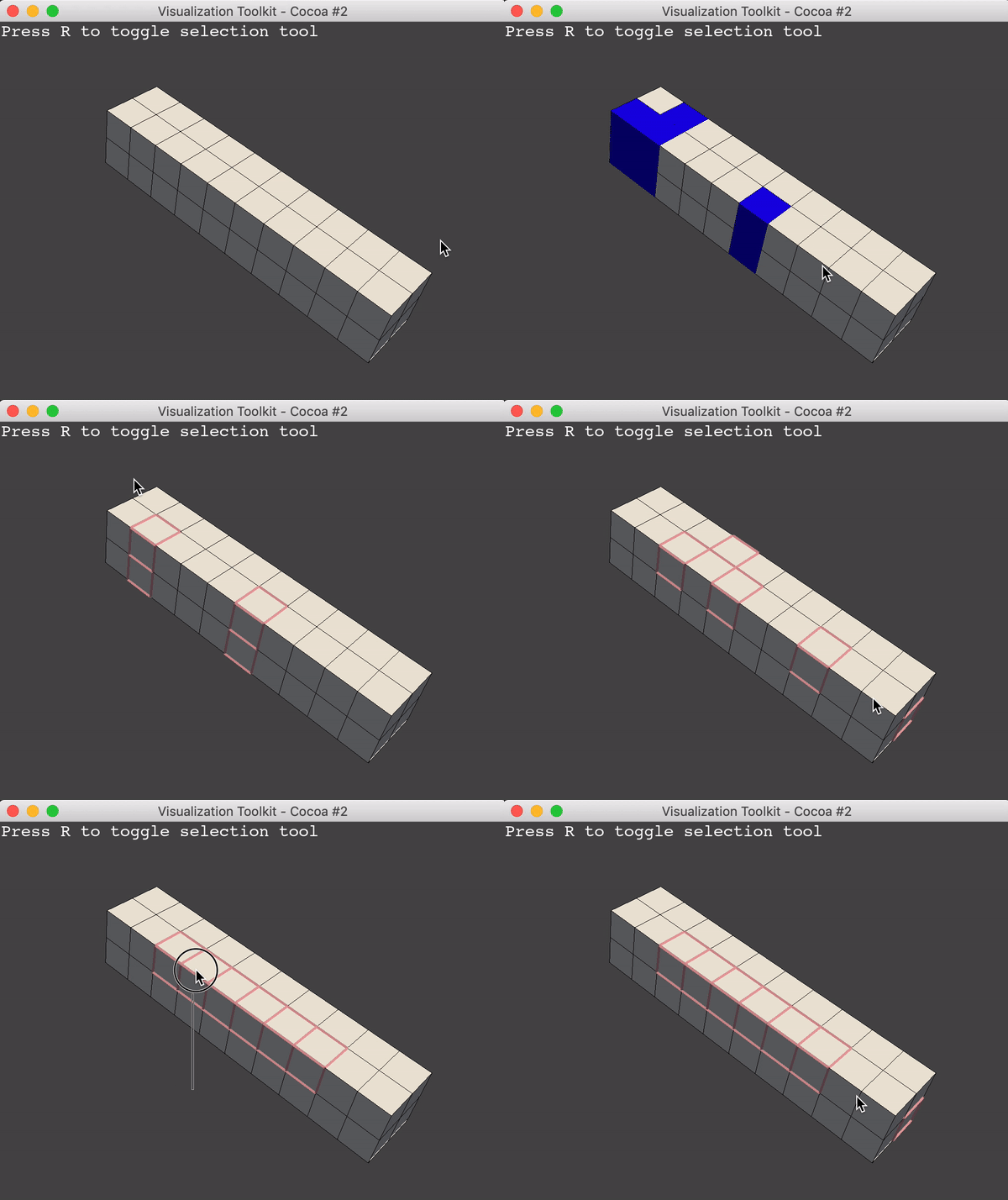
@kayarre - is the mesh purely traingles? Or does it have any non triangle cells? Because we’re running into a similar issue over in [pyvista/281](https://github.com/pyvista/pyvista/pull/281) where the `vtkRenderedAreaPicker` with `vtkOpenGLHardwareSelector` is not able to handle non-triangulated meshes.
---
### Author:  [@lassoan](https://discourse.vtk.org/u/lassoan)
#### Post date: [July 2, 2019, 5:45pm UTC](https://discourse.vtk.org/t/opacity-issue-with-point-picking-on-surface/1193/9 "2019-07-02T17:45:16Z")
> [@banesullivan](#):
>
> `vtkOpenGLHardwareSelector` is not able to handle non-triangulated meshes.
We had problems with even _rendering_ polygons correctly. I’m not sure if it is a bug or it is supposed to work like that. Anyway, we insert a vtkTriangleFilter before the mapper to avoid problems with non-triangulated meshes.
---
### Author:  [@banesullivan](https://discourse.vtk.org/u/banesullivan)
#### Post date: [July 2, 2019, 6:04pm UTC](https://discourse.vtk.org/t/opacity-issue-with-point-picking-on-surface/1193/10 "2019-07-02T18:04:29Z")
> [@lassoan](#):
>
> Anyway, we insert a vtkTriangleFilter before the mapper to avoid problems with non-triangulated meshes.
I suppose that works - is there a way to retain the original cell IDs when triangulating?
But what about 3D cells - did you all have luck with tetrahedralized meshes? Or are you only working with 2D cells (triangles)?
---
### Author:  [@kayarre](https://discourse.vtk.org/u/kayarre)
#### Post date: [July 2, 2019, 6:26pm UTC](https://discourse.vtk.org/t/opacity-issue-with-point-picking-on-surface/1193/11 "2019-07-02T18:26:06Z")
@banesullivan It is a triangle surface, I think the main problem is that I am a noob with interaction concepts.
---
### Author:  [@lassoan](https://discourse.vtk.org/u/lassoan)
#### Post date: [July 2, 2019, 6:48pm UTC](https://discourse.vtk.org/t/opacity-issue-with-point-picking-on-surface/1193/12 "2019-07-02T18:48:45Z")
> [@banesullivan](#):
>
> But what about 3D cells - did you all have luck with tetrahedralized meshes?
For volumetric meshes, we use vtkExtractGeometry or vtkClipDataSet filter output as mapper input. There does not seem to be a need for triangulation - probably because these filters already generate triangles or because the inputs were tetrahedral and wedge elements.
> [@banesullivan](#):
>
> is there a way to retain the original cell IDs when triangulating?
We triangulate early, so all the references already use the triangulated output. However, triangulation does not need to create new points, so I would assume that point IDs are not affected.
---
### Author:  [@banesullivan](https://discourse.vtk.org/u/banesullivan)
#### Post date: [July 2, 2019, 8:15pm UTC](https://discourse.vtk.org/t/opacity-issue-with-point-picking-on-surface/1193/13 "2019-07-02T20:15:35Z")
> [@lassoan](#):
>
> However, triangulation does not need to create new points, so I would assume that point IDs are not affected.
Thats an excellent point - I suppose my application is more focused on cell picking than point picking as we want to retain the input mesh’s resolution as much as possible so I’ll have to find a work around for that.
Thanks, @lassoan!
---
### Author:  [@lassoan](https://discourse.vtk.org/u/lassoan)
#### Post date: [July 3, 2019, 3:19pm UTC](https://discourse.vtk.org/t/opacity-issue-with-point-picking-on-surface/1193/14 "2019-07-03T15:19:43Z")
The input mesh resolution is not affected by triangulation. Only cells may be split and so their IDs may change. If you triangulate right after you create the mesh then you don’t need to deal with ID changes later on.