# OpenGL errors rendering transparency on mesa
**URL:** https://discourse.vtk.org/t/opengl-errors-rendering-transparency-on-mesa/4523
**Category:** Development
**Created:** [October 29, 2020, 4:45pm UTC](https://discourse.vtk.org/t/opengl-errors-rendering-transparency-on-mesa/4523 "2020-10-29T16:45:14Z")
**Posts on this page:** 5
**Page:** 1
### Author:  [@andreasbuykx](https://discourse.vtk.org/u/andreasbuykx)
#### Post date: [October 29, 2020, 4:45pm UTC](https://discourse.vtk.org/t/opengl-errors-rendering-transparency-on-mesa/4523/1 "2020-10-29T16:45:14Z")
Hi, I’ve posted a [question](https://discourse.vtk.org/t/transparent-objects-not-rendered-with-vtk9-and-mesa-18-3-4-20-1-8/4417) 2 weeks ago in the Support category but did not get a response that got me much further, so I’m trying on Development. I am trying to render transparency with VTK 9.0.1 on Mesa 18.3.4 (also observed on 20.1.8) with a very simple python script (see earlier post) but any transparent object is not rendered at all, and heaps of OpenGL related errors are reported by VTK. I don’t know how to interpret those errors or how to proceed.
Today I enabled debugging in Mesa with `MESA_DEBUG=1` which appears to confirm that it get erroneous input from VTK (see [mesa-18.3.4-trace.out](https://discourse.vtk.org/uploads/short-url/sGAeCWHF0V3cWdBJjU5DsBTvw0k.out) (8.7 KB))
I would appreciate any help debugging these errors as it is blocking our migration from vtk8.1.1 to vtk9.
Thank you very much.
Andreas
---
### Author:  [@andreasbuykx](https://discourse.vtk.org/u/andreasbuykx)
#### Post date: [October 30, 2020, 1:56pm UTC](https://discourse.vtk.org/t/opengl-errors-rendering-transparency-on-mesa/4523/2 "2020-10-30T13:56:55Z")
I’ve been debugging my VTK9.0.1 and found that the vtkOpenGLState fails to initialize the `TextureInternalFormats` for VTK\_FLOAT.
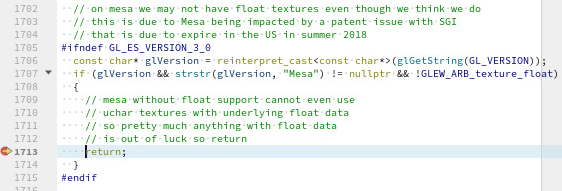
Seeing that 8.1.1 has similar code something else must have changed in between I suppose.
I tried setting the `MESA_GL_VERSION_OVERRIDE` but then I get
> vtkOpenGLState.cxx:505 WARN| Error glBindFramebuffer1 OpenGL errors detected
> 0 : (1286) Invalid framebuffer operation
and nothing gets rendered anymore.
Googling around a bit I found an [article](https://www.phoronix.com/scan.php?page=news_item&px=OpenGL-Texture-Float-Freed) that suggests that mesa should have the GL\_ARB\_texture\_float extension enabled.
---
### Author:  [@tigarmo](https://discourse.vtk.org/u/tigarmo)
#### Post date: [October 30, 2020, 2:54pm UTC](https://discourse.vtk.org/t/opengl-errors-rendering-transparency-on-mesa/4523/3 "2020-10-30T14:54:34Z")
I get something similar; I can confirm that I only get the following error output if I enable transparency - if both actors are fully opaque then Mesa doesn’t report any errors:
```
$ MESA_DEBUG=1 python main.py
Mesa: User error: GL_INVALID_VALUE in glTexImage2D(internalFormat=GL_NONE)
Mesa: 1 similar GL_INVALID_VALUE errors
Mesa: User error: GL_INVALID_FRAMEBUFFER_OPERATION in glClear(incomplete framebuffer)
Mesa: User error: GL_INVALID_FRAMEBUFFER_OPERATION in glBlitFramebuffer(incomplete draw/read buffers)
Mesa: User error: GL_INVALID_FRAMEBUFFER_OPERATION in glDrawRangeElements(incomplete framebuffer)
Mesa: User error: GL_INVALID_FRAMEBUFFER_OPERATION in glClear(incomplete framebuffer)
Mesa: User error: GL_INVALID_FRAMEBUFFER_OPERATION in glBlitFramebuffer(incomplete draw/read buffers)
Mesa: User error: GL_INVALID_FRAMEBUFFER_OPERATION in glDrawRangeElements(incomplete framebuffer)
```
---
### Author:  [@andreasbuykx](https://discourse.vtk.org/u/andreasbuykx)
#### Post date: [October 30, 2020, 2:59pm UTC](https://discourse.vtk.org/t/opengl-errors-rendering-transparency-on-mesa/4523/4 "2020-10-30T14:59:09Z")
I suspect your mesa doesn’t have the proper GL extension too. Try:
> glxinfo | grep GL\_ARB\_texture\_float
Mesa 18.3.4 should have it enabled but the version on our CentOS 7 doesn’t have it either.
---
### Author:  [@tigarmo](https://discourse.vtk.org/u/tigarmo)
#### Post date: [October 30, 2020, 3:58pm UTC](https://discourse.vtk.org/t/opengl-errors-rendering-transparency-on-mesa/4523/5 "2020-10-30T15:58:02Z")
It’s true; I only have these that I assume are OpenGL ES-related:
```
$ glxinfo | grep -i texture_float
GL_OES_texture_float_linear, GL_OES_texture_half_float_linear
```