# Optimizing \`traverseOpaqueZBufferPass\` for rendering many PolyData Actors
**URL:** https://discourse.vtk.org/t/optimizing-traverseopaquezbufferpass-for-rendering-many-polydata-actors/10761
**Category:** Web
**Created:** [February 22, 2023, 2:49pm UTC](https://discourse.vtk.org/t/optimizing-traverseopaquezbufferpass-for-rendering-many-polydata-actors/10761 "2023-02-22T14:49:19Z")
**Posts on this page:** 13
**Page:** 1
### Author:  [@Alireza](https://discourse.vtk.org/u/Alireza)
#### Post date: [February 22, 2023, 2:49pm UTC](https://discourse.vtk.org/t/optimizing-traverseopaquezbufferpass-for-rendering-many-polydata-actors/10761/1 "2023-02-22T14:49:20Z")
I’m using a thin slab volume actor (using clipping planes) along with multiple polydata actors (each with unique color and the same clipping planes applied) to render a DICOM RT, and it works fine, but not performance wise.
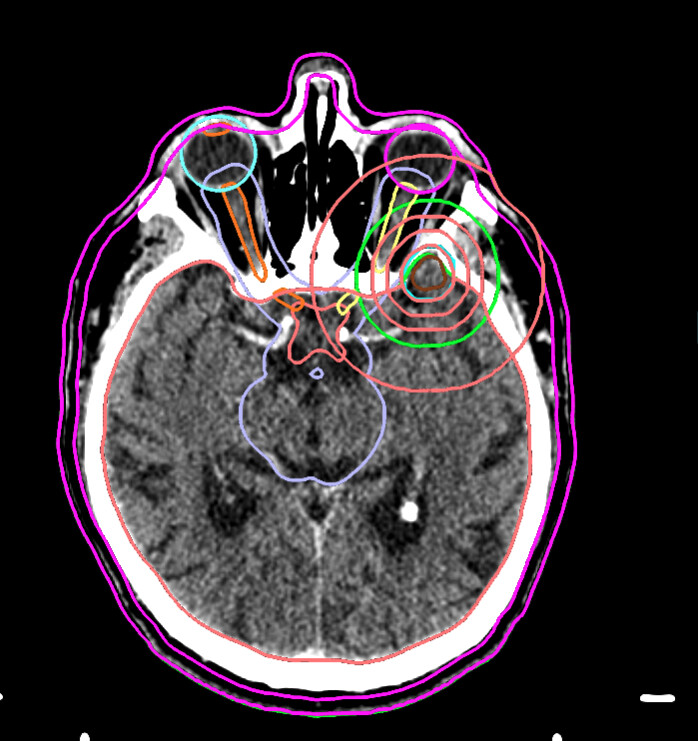
Basically, I’m rendering the polyData with the following code
```plaintext
const points = vtkPoints.newInstance();
points.setData(flatPoints, 3);
const lines = vtkCellArray.newInstance();
lines.setData(indices, 3);
const polygon = vtkPolyData.newInstance();
polygon.setPoints(points);
polygon.setLines(lines);
const mapper = vtkMapper.newInstance();
mapper.setInputData(polygon);
const actor = vtkActor.newInstance();
actor.setMapper(mapper);
actor.getProperty().setLineWidth(4);
actor.getProperty().setColor(colorToUse[0], colorToUse[1], colorToUse[2]);
```
overall I have 1 volume Actor and 31 polyData actors (each contourSet has a unique color and spans multiple slices).
I did a performance profiling and it seems like it is dropping a lot of frames, and something that caught my attention was `traverseOpaqueZBufferPass`.

I guess the problem is for each render it needs to draw each of the 31 polydata and clipping planes doesn’t help there.
My questions are basically
1. Is it possible to have ONE polydata actor for all my polyData? In other words, is there a way to use one actor to render two “cones” with unique color that are not touching each other for instance?
2. Is there a filter that I can use for my polyData to limit the region for the GPU to traverse? I know there is one clipClosedSurface, but I don’t have a closedSurface…
A movie of performance stats for reference
[/uploads/default/original/2X/7/73245b0aeec198892b10526d87f7456d9449ddba.mp4](https://discourse.vtk.org/uploads/default/original/2X/7/73245b0aeec198892b10526d87f7456d9449ddba.mp4)
I appreciate your help
---
### Author:  [@finetjul](https://discourse.vtk.org/u/finetjul)
#### Post date: [February 22, 2023, 6:26pm UTC](https://discourse.vtk.org/t/optimizing-traverseopaquezbufferpass-for-rendering-many-polydata-actors/10761/2 "2023-02-22T18:26:46Z")
1. Yes, you can “append” all your polydata in a unique polydata (`vtkAppendPolyData`). Then you can create a “point data” scalar array of unsigned ints and assign a unique value per original “polydata” (I think it would be a great optional behavior to add to `vtkAppendPolyData`). You can then use a `vtkLookupTable` or a discretized `vtkColorTransferFunction` to assign a unique color to each point (see [example](https://kitware.github.io/vtk-js/examples/ScalarBarActor.html)).
2. not sure to understand the question
---
### Author:  [@Alireza](https://discourse.vtk.org/u/Alireza)
#### Post date: [February 22, 2023, 6:58pm UTC](https://discourse.vtk.org/t/optimizing-traverseopaquezbufferpass-for-rendering-many-polydata-actors/10761/3 "2023-02-22T18:58:43Z")
Thanks for the reply Julien.
Basically my second question is that is there any alternative to `vtkClipClosedSurface` which is a filter for clipping closed surfaces BUT for polyData? Is there such filter to clip polyData in CPU via a filter? (I guess it accepts two planes and just remove the vertices that the polyData has outside those planes)
---
### Author:  [@finetjul](https://discourse.vtk.org/u/finetjul)
#### Post date: [February 22, 2023, 7:07pm UTC](https://discourse.vtk.org/t/optimizing-traverseopaquezbufferpass-for-rendering-many-polydata-actors/10761/4 "2023-02-22T19:07:30Z")
2.a `vtkCutter`
2.b `vtkClipClosedSurface` with 2 planes and from which you discard the “closed surface” (set `generateOutline` and `generateFaces` to `false` ?)
Btw, did you see [VolumeOutline](https://kitware.github.io/vtk-js/examples/VolumeOutline.html) ?
---
### Author:  [@Alireza](https://discourse.vtk.org/u/Alireza)
#### Post date: [February 22, 2023, 7:16pm UTC](https://discourse.vtk.org/t/optimizing-traverseopaquezbufferpass-for-rendering-many-polydata-actors/10761/5 "2023-02-22T19:16:54Z")
Thanks!
They are 3D contours and not volumes, since they are overlapping and they span whole image (often +100 slices), I guess the cost of having 31 volumes in the cache would be huge, unless I’m missing something
---
### Author:  [@finetjul](https://discourse.vtk.org/u/finetjul)
#### Post date: [February 22, 2023, 7:41pm UTC](https://discourse.vtk.org/t/optimizing-traverseopaquezbufferpass-for-rendering-many-polydata-actors/10761/6 "2023-02-22T19:41:15Z")
indeed, VolumeOutline does not fit your need.
---
### Author:  [@Alireza](https://discourse.vtk.org/u/Alireza)
#### Post date: [February 28, 2023, 10:29pm UTC](https://discourse.vtk.org/t/optimizing-traverseopaquezbufferpass-for-rendering-many-polydata-actors/10761/7 "2023-02-28T22:29:11Z")
I tried the `clipClosedSurface` and `vtkCutter` and it was not great re performance. So I used the `AppendPolyData` and it works like a charm for the performance, I can reach 58 fps which is awesome
(video below if you are intereseted)
before I move to figuring out the coloring for each contour, I had a question about using `AppendPolyData`
- is it possible to have separate thickness assigned for each polyData?
- can I hide/show each polyData separately?
[/uploads/default/original/2X/a/a67e5aef1b4fb56ab68c3eb75652753d135761a8.mp4](https://discourse.vtk.org/uploads/default/original/2X/a/a67e5aef1b4fb56ab68c3eb75652753d135761a8.mp4)
---
### Author:  [@finetjul](https://discourse.vtk.org/u/finetjul)
#### Post date: [March 1, 2023, 11:41am UTC](https://discourse.vtk.org/t/optimizing-traverseopaquezbufferpass-for-rendering-many-polydata-actors/10761/8 "2023-03-01T11:41:04Z")
separate thickness: no, it’s not possible without rewritting the shader
show/hide: yes if you play with the opacity parameter of the transfer function.
---
### Author:  [@Alireza](https://discourse.vtk.org/u/Alireza)
#### Post date: [March 10, 2023, 3:16am UTC](https://discourse.vtk.org/t/optimizing-traverseopaquezbufferpass-for-rendering-many-polydata-actors/10761/9 "2023-03-10T03:16:14Z")
I appreciate your help along the way Julien. I was able to fully implement the appendPolyData. Something interesting that I encountered was that the lineWidth had a direct impact on the rendering performance (fps). Is this a known fact? See below comparison of lineWidth 10 (achieving 20 fps) vs lineWidth of 1 (58 fps)
[/uploads/default/original/2X/9/965c7e92141f8fe8971e931f918043b5cb164fcd.mp4](https://discourse.vtk.org/uploads/default/original/2X/9/965c7e92141f8fe8971e931f918043b5cb164fcd.mp4)
---
### Author:  [@finetjul](https://discourse.vtk.org/u/finetjul)
#### Post date: [March 10, 2023, 7:52am UTC](https://discourse.vtk.org/t/optimizing-traverseopaquezbufferpass-for-rendering-many-polydata-actors/10761/10 "2023-03-10T07:52:58Z")
@sankhesh
---
### Author:  [@sankhesh](https://discourse.vtk.org/u/sankhesh)
#### Post date: [March 10, 2023, 2:46pm UTC](https://discourse.vtk.org/t/optimizing-traverseopaquezbufferpass-for-rendering-many-polydata-actors/10761/11 "2023-03-10T14:46:12Z")
@Alireza Yes, line width is _tricky_. Most of the graphics drivers support very small widths, so the mapper simulates wide lines by instancing the original line. If you want, you can query the maximum supported line width via `openglRenderWindow.getHardwareMaximumLineWidth()` and stick to a width under that number. However, the lines will look different on different systems.
---
### Author:  [@Alireza](https://discourse.vtk.org/u/Alireza)
#### Post date: [April 4, 2023, 1:04am UTC](https://discourse.vtk.org/t/optimizing-traverseopaquezbufferpass-for-rendering-many-polydata-actors/10761/12 "2023-04-04T01:04:12Z")
Hey @sankhesh thanks for the answer. Keeping the width below the maximum supported with seems to be very narrow (for me width 1).
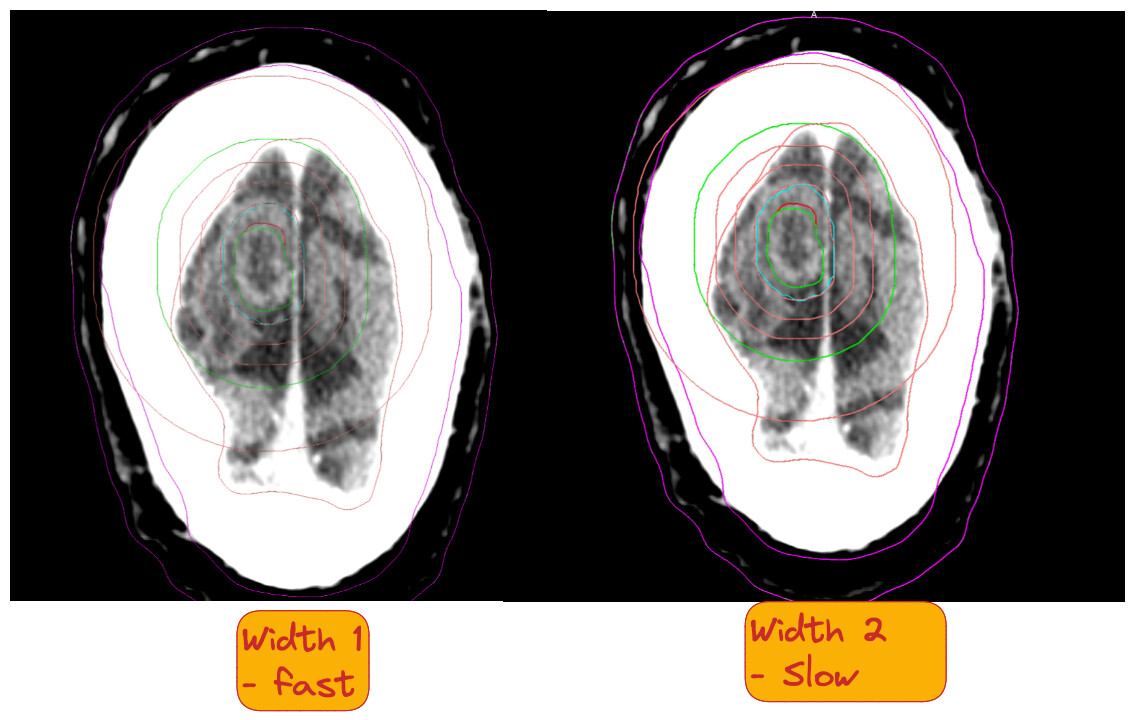
Also I set the width to be like 1.4 or 1.5 but doesn’t seem to have any effect. Is it taking integer width only? Any other trick to make it be best of both worlds (fast as width 1 and thick as width 2)
Thanks in advance
---
### Author:  [@sankhesh](https://discourse.vtk.org/u/sankhesh)
#### Post date: [April 12, 2023, 1:27pm UTC](https://discourse.vtk.org/t/optimizing-traverseopaquezbufferpass-for-rendering-many-polydata-actors/10761/13 "2023-04-12T13:27:53Z")
Hi @Alireza, are you on a mac? I agree that a maximum supported width of 1 is really small.
Yes, line widths have to be integer values. The custom line width code uses an instanced pass which should be faster but I haven’t run performance benchmarks on a two-triangle approach.