# Outline/silhouette a subset of points
**URL:** https://discourse.vtk.org/t/outline-silhouette-a-subset-of-points/8470
**Category:** Support
**Created:** [May 11, 2022, 7:56am UTC](https://discourse.vtk.org/t/outline-silhouette-a-subset-of-points/8470 "2022-05-11T07:56:01Z")
**Posts on this page:** 2
**Page:** 1
### Author:  [@CharInt0](https://discourse.vtk.org/u/CharInt0)
#### Post date: [May 11, 2022, 7:56am UTC](https://discourse.vtk.org/t/outline-silhouette-a-subset-of-points/8470/1 "2022-05-11T07:56:01Z")
Hello,
I am trying to add an outline (or better a silhouette) to a subset of points visualized as a Glyph3D. I already managed to change the color to the subset points. In my code, I use vtkExtractGeometry and vtkVertexGlyphFilter to extract the subset from the point set. This work as expected and I obtain the subset point’s ID that I use to change the points’ colors:
```auto
auto* frustum = static_cast(GetInteractor()->GetPicker())->GetFrustum();
vtkNew extractGeometry;
extractGeometry->SetImplicitFunction(frustum);
extractGeometry->SetInputData(ptsElement->getGlyph()->GetOutput());
extractGeometry->Update();
vtkNew glyphFilter;
glyphFilter->SetInputConnection(extractGeometry->GetOutputPort());
glyphFilter->Update();
auto* selected = glyphFilter->GetOutput();
```
For the outline I use a vtkOutlineSource with a vtkPolyDataMapper to create a vtkGlyph3D for the subset:
```auto
Outline = vtkSmartPointer::New();
OutlineGlyph = vtkSmartPointer::New();
OutlineGlyph->ScalingOff();
OutlineGlyph->SetScaleModeToDataScalingOff();
OutlineGlyph->SetSourceConnection(Outline->GetOutputPort());
OutlineMapper = vtkSmartPointer::New();
OutlineMapper->SetInputConnection(OutlineGlyph->GetOutputPort());
OutlineActor = vtkSmartPointer::New();
OutlineActor->SetMapper(OutlineMapper);
OutlineActor->GetProperty()->SetColor(1.0, 0.0, 0.0);
OutlineActor->GetProperty()->SetAmbient(1.0);
OutlineActor->GetProperty()->SetDiffuse(0.0);
```
Then I pass the above glyphFilter output to the OutlineGlyph:
```auto
OutlineGlyph->SetInputData(selected);
//glyph3D->SetScaleFactor(scaleFactor);
OutlineGlyph->Update();
GetDefaultRenderer()->AddActor(OutlineActor);
```
What I obtain is that the selected points (in green) have some scattered red dots added but not and outline:
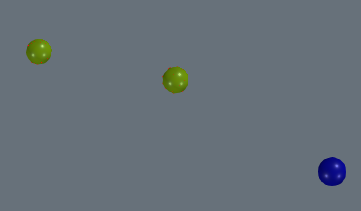
I tried also drawing a Silhouette with vtkPolyDataSilhouette but it worked only when drawing on the whole point set but nothing showed up when passing the subset data.
An alternative approach, yet much less efficient I think, could be to create an actor for each subset’s point.
Any help is much appreciated,
Carlo
---
### Author:  [@CharInt0](https://discourse.vtk.org/u/CharInt0)
#### Post date: [May 12, 2022, 6:42am UTC](https://discourse.vtk.org/t/outline-silhouette-a-subset-of-points/8470/2 "2022-05-12T06:42:54Z")
I think that I figured it out:
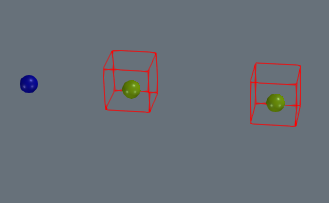
I create a new Polydata and I obtain the coordinates of the points. This last part is not completely correct as I am not taking the glyph centers because the selected-\>GetPoints(); returns many more points than the point coordinates but I am trying to fix this now.
Sketchy code:
```auto
auto* selected = glyphFilter->GetOutput();
auto* ids = dynamic_cast(selected->GetPointData()->GetArray("InputPointIds"));
auto* selPoints = selected->GetPoints();
vtkNew selPointsData;
auto* ptsData = static_cast(data.GetPointer());
auto* colors = vtkUnsignedCharArray::SafeDownCast(ptsData->GetPointData()->GetScalars(colorsName.c_str()));
long long uniquePtId = -1;
for (auto i = 0; i < ids->GetNumberOfValues(); i++)
{
auto ptId = ids->GetValue(i);
if (uniquePtId == ptId)
{
continue;
}
double pt[3];
selPoints->GetPoint(i, pt);
std::cout << "x: " << pt[0] << " y: " << pt[1] << " z: " << pt[2] << std::endl;
selPointsData->InsertNextPoint(pt);
uniquePtId = ptId;
}
vtkNew polydata;
polydata->SetPoints(selPointsData);
OutlineGlyph->SetInputData(polydata);
OutlineGlyph->SetScaleFactor(600.0);
OutlineGlyph->Update();
GetDefaultRenderer()->AddActor(OutlineActor);
```