# painting vtkWindowToImageFilter output into QPixmap in Qt widget
**URL:** https://discourse.vtk.org/t/painting-vtkwindowtoimagefilter-output-into-qpixmap-in-qt-widget/1226
**Category:** Support
**Created:** [June 27, 2019, 4:15pm UTC](https://discourse.vtk.org/t/painting-vtkwindowtoimagefilter-output-into-qpixmap-in-qt-widget/1226 "2019-06-27T16:15:10Z")
**Posts on this page:** 4
**Page:** 1
### Author:  [@sbucc](https://discourse.vtk.org/u/sbucc)
#### Post date: [June 27, 2019, 4:15pm UTC](https://discourse.vtk.org/t/painting-vtkwindowtoimagefilter-output-into-qpixmap-in-qt-widget/1226/1 "2019-06-27T16:15:11Z")
I’m trying to use vtkWindowToImageFilter to paint a single view of an object into a widget in my Qt application. The closest I can get is this (still wrong):
```
# generate the view
renderWin = vtk.vtkRenderWindow()
renderWin.OffScreenRenderingOn()
renderWin.AddRenderer(self.renderer)
renderWin.Render()
# copy the view to an image
windowToImageFilter = vtk.vtkWindowToImageFilter()
windowToImageFilter.SetInput(renderWin)
windowToImageFilter.ReadFrontBufferOff(); # read from the back buffer
windowToImageFilter.Update()
img = windowToImageFilter.GetOutput()
w, h, _ = img.GetDimensions()
vtk_array = img.GetPointData().GetScalars()
components = vtk_array.GetNumberOfComponents()
# DEBUG: save image
writer = vtk.vtkPNGWriter()
writer.SetFileName("window_{}.png".format(view.name))
writer.SetInputConnection(windowToImageFilter.GetOutputPort())
writer.Write()
# put the image on the window
qim = QImage(vtk_array, w, h, QImage.Format_RGB32)
qPixmap = QPixmap.fromImage(qim)
window.setPixmap(qPixmap)
```
The images are ok when saved, but what I get in the window is a garbled image, because there is clearly a format mismatch between vtk (24-bit image) and Qt (32-bit image), and I can’t find a way to pass the information about the different strides.
Is there a “proper” way to do the conversion, which I haven’t found, or do I have to explicitly convert the buffer to 32-bit, then pass it to QImage? Or else write my own function, porting this C++ example:
[https://vtk.org/Wiki/VTK/Examples/Cxx/Qt/ImageDataToQImage](https://vtk.org/Wiki/VTK/Examples/Cxx/Qt/ImageDataToQImage)
---
### Author:  [@estan](https://discourse.vtk.org/u/estan)
#### Post date: [June 27, 2019, 5:04pm UTC](https://discourse.vtk.org/t/painting-vtkwindowtoimagefilter-output-into-qpixmap-in-qt-widget/1226/2 "2019-06-27T17:04:04Z")
Hi @sbucc,
In your example, change to `QImage.Format_RGB888`.
You probably also want to do `renderWin.SwapBuffersOff()`, see [https://blog.kitware.com/be-careful-what-you-grab/](https://blog.kitware.com/be-careful-what-you-grab/) for why.
Hope that helps.
---
### Author:  [@estan](https://discourse.vtk.org/u/estan)
#### Post date: [June 27, 2019, 5:07pm UTC](https://discourse.vtk.org/t/painting-vtkwindowtoimagefilter-output-into-qpixmap-in-qt-widget/1226/3 "2019-06-27T17:07:54Z")
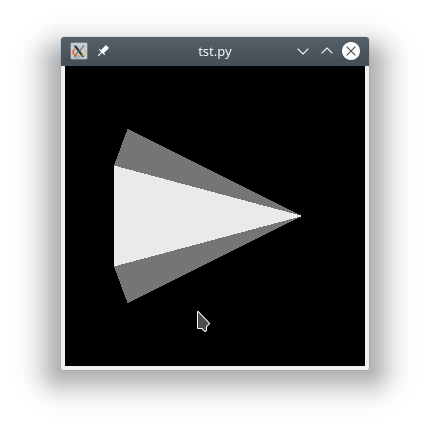
I converted your snippet to a full example:
**tst.py**
```python
import vtk
import sys
from PyQt5.QtGui import QImage, QPixmap
from PyQt5.QtWidgets import QLabel, QApplication
# create cone
cone = vtk.vtkConeSource()
# mapper
coneMapper = vtk.vtkPolyDataMapper()
coneMapper.SetInputConnection(cone.GetOutputPort())
# actor
coneActor = vtk.vtkActor()
coneActor.SetMapper(coneMapper)
# assign actor to the renderer
ren = vtk.vtkRenderer()
ren.AddActor(coneActor)
ren.ResetCamera()
# generate the view
renderWin = vtk.vtkRenderWindow()
renderWin.OffScreenRenderingOn()
renderWin.SwapBuffersOff()
renderWin.AddRenderer(ren)
renderWin.Render()
# copy the view to an image
windowToImageFilter = vtk.vtkWindowToImageFilter()
windowToImageFilter.SetInput(renderWin)
windowToImageFilter.ReadFrontBufferOff(); # read from the back buffer
windowToImageFilter.Update()
img = windowToImageFilter.GetOutput()
w, h, _ = img.GetDimensions()
vtk_array = img.GetPointData().GetScalars()
components = vtk_array.GetNumberOfComponents()
# DEBUG: save image
writer = vtk.vtkPNGWriter()
writer.SetFileName("test_image.png")
writer.SetInputConnection(windowToImageFilter.GetOutputPort())
writer.Write()
app = QApplication(sys.argv)
label = QLabel()
# put the image on the window
qim = QImage(vtk_array, w, h, QImage.Format_RGB888)
qPixmap = QPixmap.fromImage(qim)
label.setPixmap(qPixmap)
label.show()
app.exec_()
```
**Result**
---
### Author:  [@sbucc](https://discourse.vtk.org/u/sbucc)
#### Post date: [June 28, 2019, 4:27pm UTC](https://discourse.vtk.org/t/painting-vtkwindowtoimagefilter-output-into-qpixmap-in-qt-widget/1226/4 "2019-06-28T16:27:58Z")
@estan, thank you! I don’t know how I managed to miss that format.