# PoissonReconstruction
**URL:** https://discourse.vtk.org/t/poissonreconstruction/4777
**Category:** Support
**Created:** [December 4, 2020, 2:50pm UTC](https://discourse.vtk.org/t/poissonreconstruction/4777 "2020-12-04T14:50:06Z")
**Posts on this page:** 15
**Page:** 1
### Author:  [@SArbabi](https://discourse.vtk.org/u/SArbabi)
#### Post date: [December 4, 2020, 2:50pm UTC](https://discourse.vtk.org/t/poissonreconstruction/4777/1 "2020-12-04T14:50:07Z")
to use [PoissonReconstruction in VTK in the examples site](https://kitware.github.io/vtk-examples/site/Cxx/Points/PoissonExtractSurface/), it says to:
Enable the remote module by setting _Module\_PoissonReconstruction:BOOL=ON_.
but where in the building process I should do this setting? it’s not one of the CMake configuration switches that show up during configuration.
the same goes to the PowerCrust surface reconstruction.
---
### Author:  [@amaclean](https://discourse.vtk.org/u/amaclean)
#### Post date: [December 4, 2020, 11:45pm UTC](https://discourse.vtk.org/t/poissonreconstruction/4777/2 "2020-12-04T23:45:13Z")
I have never used it but in your VTK source there will be a folder called `Remote` it may already have `PoissonReconstruction.remote.cmake` and `Powercrust.remote.cmake` in it. If not, download the files and put them in the `Remote` folder.
Then go to where you build VTK and run `cmake-gui`. In the VTK section, you will see a line called `VTK_MODULE_ENABLE_VTK_PoissonReconstruction`. Set the value to `WANT` and do the same for for `VTK_MODULE_ENABLE_VTK_Powercrust`. Then rebuild VTK.
The new names are `VTK_MODULE_ENABLE_VTK_*` not `Module_*`. If you get it working, let me know and I’ll update the instructions.
---
### Author:  [@SArbabi](https://discourse.vtk.org/u/SArbabi)
#### Post date: [December 5, 2020, 9:46am UTC](https://discourse.vtk.org/t/poissonreconstruction/4777/3 "2020-12-05T09:46:48Z")
in the `Remote` folder there exist those two `.cmake` files.
but when in the vtk/build folder (where I previously cmake built the vtk source) I open cmake-gui, I don’t see any key or line as you said. you mean reconfiguring again? then I did it and there’s till no key containing `PoissonReconstruction` nor `PowerCrust`.
---
### Author:  [@amaclean](https://discourse.vtk.org/u/amaclean)
#### Post date: [December 6, 2020, 12:56am UTC](https://discourse.vtk.org/t/poissonreconstruction/4777/4 "2020-12-06T00:56:40Z")
I am using VTK 9.0, after you have pressed configure, you should see lines like this in the VTK section of `cmake-gui`:

---
### Author:  [@SArbabi](https://discourse.vtk.org/u/SArbabi)
#### Post date: [December 14, 2020, 6:18pm UTC](https://discourse.vtk.org/t/poissonreconstruction/4777/5 "2020-12-14T18:18:09Z")
@amaclean I downloaded VTK 9.0.1, building with cmake, using visual studio 16 2019 as the generator, then by hitting configure, none of the options are like the ones you showed above, actually even none is having VTK\_MODULE\_ prefix.
The reomote folder does have the PoissonReconstruction.remote.cmake file in it.
So I wonder if I’m missing some step?
---
### Author:  [@amaclean](https://discourse.vtk.org/u/amaclean)
#### Post date: [December 15, 2020, 4:42am UTC](https://discourse.vtk.org/t/poissonreconstruction/4777/6 "2020-12-15T04:42:42Z")
I am assuming you are in your VTK build folder. Make sure that after starting ``cmake-gui` you have checked the **Grouped** and **Advanced** boxes. After you do this, this is what you should see when scrolling through the VTK group:
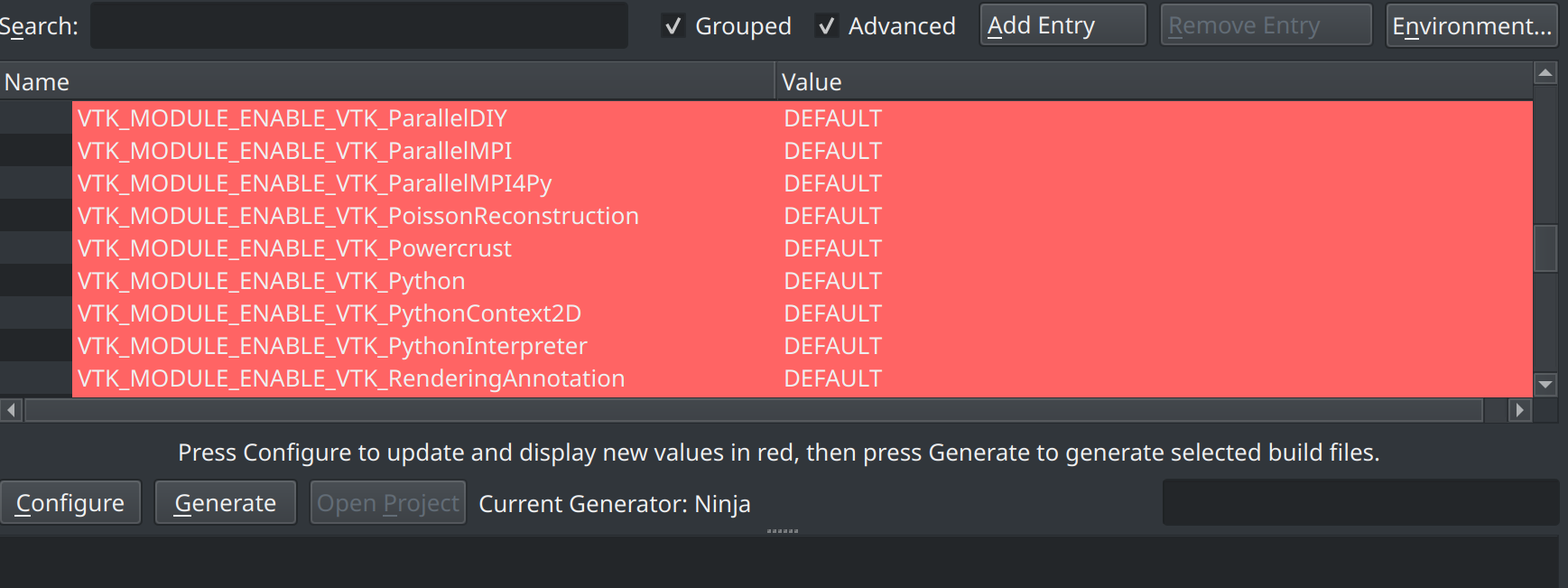
Then set the values to **WANT** then configure and build.
---
### Author:  [@SArbabi](https://discourse.vtk.org/u/SArbabi)
#### Post date: [December 15, 2020, 10:21am UTC](https://discourse.vtk.org/t/poissonreconstruction/4777/7 "2020-12-15T10:21:42Z")
@amaclean checked **grouped** and **advanced** , put the _VTK\_MODULE\_ENABLE\_VTK\_PoissonReconstruction_ and _VTK\_MODULE\_ENABLE\_VTK\_Powercrust_ to **WANT**
then configure, generate, then opened **VTK.sln** in visual studio, built the **All Build** and then built the **Install**.
both successfull with no failed packages.
then when I want to build the example again it fails with error:
_PoissonExtractSurface\PoissonExtractSurface.cxx(11,10): fatal error C1083: Cannot open include file: ‘vtkPoissonReconstruction.h’: No such file or directory_
Is there something I should consider?
---
### Author:  [@amaclean](https://discourse.vtk.org/u/amaclean)
#### Post date: [December 16, 2020, 11:08pm UTC](https://discourse.vtk.org/t/poissonreconstruction/4777/8 "2020-12-16T23:08:09Z")
I would suspect that you are missing the requisite VTK module in your `find_package(VTK COMPONENTS ...)` for your `CMakeList.txt` for your example.
Perhaps it is called `PoissonReconstruction`
You could also try running `VTK/Utilities/Maintenance/FindNeededModules.py` - follow the instructions at the top of this script.
---
### Author:  [@toddy](https://discourse.vtk.org/u/toddy)
#### Post date: [April 5, 2022, 5:34am UTC](https://discourse.vtk.org/t/poissonreconstruction/4777/10 "2022-04-05T05:34:00Z")
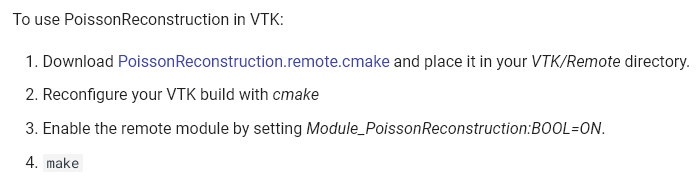
[https://kitware.github.io/vtk-examples/site/Cxx/Points/PoissonExtractSurface/](https://kitware.github.io/vtk-examples/site/Cxx/Points/PoissonExtractSurface/)
---
### Author:  [@tonghao\_Yuan](https://discourse.vtk.org/u/tonghao_Yuan)
#### Post date: [May 12, 2022, 8:40am UTC](https://discourse.vtk.org/t/poissonreconstruction/4777/11 "2022-05-12T08:40:52Z")
I have a similar issue, when build with `make install` the `vtkPoissonReconstruction.h` is not installed in the install directory
---
### Author:  [@Freya\_the\_Goddess](https://discourse.vtk.org/u/Freya_the_Goddess)
#### Post date: [July 6, 2022, 7:53am UTC](https://discourse.vtk.org/t/poissonreconstruction/4777/12 "2022-07-06T07:53:50Z")
Where `vtkPoissonReconstruction.h` is installed then? at the build directory?
---
### Author:  [@tonghao\_Yuan](https://discourse.vtk.org/u/tonghao_Yuan)
#### Post date: [July 7, 2022, 12:31am UTC](https://discourse.vtk.org/t/poissonreconstruction/4777/13 "2022-07-07T00:31:18Z")
It is not installed anywhre, it stays in the source directory
---
### Author:  [@Joao-G-Martins](https://discourse.vtk.org/u/Joao-G-Martins)
#### Post date: [August 11, 2022, 2:59pm UTC](https://discourse.vtk.org/t/poissonreconstruction/4777/14 "2022-08-11T14:59:49Z")
I can’t add the vtkPoissonReconstruction.h to my project, what do I need to put in the CMakelist of my project?
Thanks in advance.
---
### Author:  [@Freya\_the\_Goddess](https://discourse.vtk.org/u/Freya_the_Goddess)
#### Post date: [August 13, 2022, 2:26pm UTC](https://discourse.vtk.org/t/poissonreconstruction/4777/15 "2022-08-13T14:26:42Z")
Is the vtkPoissonReconstruction.h located in the include folder?
for me it is in:
**$hamzstlib/Kitware/install/VTK/include/vtk-9.1**
If so, then adjust the path to the header (.h files)
Make sure you have VTK path to the right cmake VTK (given you are using Linux OS).
For example I append my path (in .bashrc)
**VTK\_DIR=“$hamzstlib/Kitware/install/VTK/lib/cmake/vtk-9.1”**
It will handle to pointing to the necessary libraries installed and headers files too. Correct me if I am wrong.
The CMakelist for the example usually need least modification except if you are doing major change or modification or experimentation on the VTK example.
---
### Author:  [@adeelz92](https://discourse.vtk.org/u/adeelz92)
#### Post date: [August 16, 2022, 6:43pm UTC](https://discourse.vtk.org/t/poissonreconstruction/4777/16 "2022-08-16T18:43:36Z")
I was able to solve the problem using following steps.
1. Instead of downloading and placing _PoissonReconstruction.remote.cmake_ or _Powercrust.remote.cmake_ in src/remote folder, download the code directly from these github links. [PoissonReconstruction](https://github.com/lorensen/PoissonReconstruction) and [Powercrust](https://github.com/lorensen/Powercrust).
2. Extract and place the folders in src/remote directory. Rename the folders, remove “-master” from the end.
3. Reconfigure using cmake GUI and you should see following messages in the console.
_Powercrust: Building as a Remote VTK module_
_PoissonReconstruction: Building as a Remote VTK module_
4. Now you can build and install vtk. You will be able to see install dll and libs in the VTK directory.
The problem is that when we use _PoissonReconstruction.remote.cmake_ or _Powercrust.remote.cmake_ to clone the directory, it fails to download the file named “vtk.module” which seems to be an essential file for configuration for cmake. Manually downloading the code from github solves this problem. Cheers!