# polydata surface border as polyline
**URL:** https://discourse.vtk.org/t/polydata-surface-border-as-polyline/5451
**Category:** Support
**Created:** [March 27, 2021, 4:15pm UTC](https://discourse.vtk.org/t/polydata-surface-border-as-polyline/5451 "2021-03-27T16:15:01Z")
**Posts on this page:** 9
**Page:** 1
### Author:  [@bistek](https://discourse.vtk.org/u/bistek)
#### Post date: [March 27, 2021, 4:15pm UTC](https://discourse.vtk.org/t/polydata-surface-border-as-polyline/5451/1 "2021-03-27T16:15:01Z")
Hello, I’d like to obtain the border of a polydata triangulated surface as a polyline.
With the following code (where **tri\_surf** is the triangulated surface polydata), I get all the edges on the border, but they are not ordered, so I cannot build a proper closed polyline representing the border of the surface from these scattered edges.
> edges = vtk.vtkFeatureEdges()
> edges.BoundaryEdgesOn()
> edges.NonManifoldEdgesOff()
> edges.FeatureEdgesOff()
> edges.ManifoldEdgesOff()
> edges.SetInputData(tri\_surf)
> edges.Update()
Thanks very much!
---
### Author:  [@will.schroeder](https://discourse.vtk.org/u/will.schroeder)
#### Post date: [March 27, 2021, 4:50pm UTC](https://discourse.vtk.org/t/polydata-surface-border-as-polyline/5451/2 "2021-03-27T16:50:44Z")
Off the top of my head you might want to try the triangle strip / polyline stripper filter (vtkStripper).
---
### Author:  [@bistek](https://discourse.vtk.org/u/bistek)
#### Post date: [March 28, 2021, 3:01pm UTC](https://discourse.vtk.org/t/polydata-surface-border-as-polyline/5451/3 "2021-03-28T15:01:12Z")
Hello, thanks for quick answer! It looks like vtkStripper is what I need, however the order of the lines in the polyline is still messed up. In this example, what I expect as border is in yellow and the polyline I get is in one.

This is my code:
> ```
> def get_boundary_edges(self):
> border_edges = vtk.vtkFeatureEdges()
> border_edges.BoundaryEdgesOn()
> border_edges.NonManifoldEdgesOff()
> border_edges.FeatureEdgesOff()
> border_edges.ManifoldEdgesOff()
> border_edges.SetInputData(self)
> border_edges.Update()
> clean_border_edges = vtk.vtkCleanPolyData()
> clean_border_edges.SetInputConnection(border_edges.GetOutputPort())
> border_strips = vtk.vtkStripper()
> border_strips.SetInputConnection(clean_border_edges.GetOutputPort())
> border_strips.Update()
> border_polyline = vtk.vtkPolyData()
> border_polyline.SetPoints(border_strips.GetOutput().GetPoints())
> border_polyline.SetPolys(border_strips.GetOutput().GetLines())
> return border_polyline
>
> ```
Thanks!!!
---
### Author:  [@bistek](https://discourse.vtk.org/u/bistek)
#### Post date: [March 28, 2021, 5:36pm UTC](https://discourse.vtk.org/t/polydata-surface-border-as-polyline/5451/4 "2021-03-28T17:36:56Z")
Update: like this it works!
```
def get_boundary_edges(self):
border_edges = vtk.vtkFeatureEdges()
border_edges.BoundaryEdgesOn()
border_edges.NonManifoldEdgesOff()
border_edges.FeatureEdgesOff()
border_edges.ManifoldEdgesOff()
border_edges.SetInputData(self)
border_edges.Update()
clean_border_edges = vtk.vtkCleanPolyData()
clean_border_edges.SetInputConnection(border_edges.GetOutputPort())
border_strips = vtk.vtkStripper()
border_strips.SetInputConnection(clean_border_edges.GetOutputPort())
border_strips.Update()
border_polyline = vtk.vtkPolyData()
border_polyline.SetPoints(border_strips.GetOutput().GetCell(0).GetPoints())
border_polyline.SetPolys(border_strips.GetOutput().GetLines())
return border_polyline
```
I just changed the line
```auto
border_polyline.SetPoints(border_strips.GetOutput().GetPoints())
```
into
```auto
border_polyline.SetPoints(border_strips.GetOutput().GetCell(0).GetPoints())
```
I guess that the reason is that the cell called here is a polyline, generated by vtkStripper, that combines all the single lines in the correct order.
However, if the surface is composed of two disconnected parts, I get two polylines, and in this case I am still not able to add all the points properly, and I end up with just the border of the first part.
I thought I can append the points from the second cell (or more cells) like this
> ```
> for i in range(border_polyline.GetNumberOfCells()-1):
> border_polyline.GetPoints().AppendPoints(border_strips.GetOutput().GetCell(i+1).GetPoints())
>
> ```
But for some reason I don’t understand it does not work. It appears it replaces the points of the first part with those of the second one.
Suggestions? Thanks very much!
---
### Author:  [@will.schroeder](https://discourse.vtk.org/u/will.schroeder)
#### Post date: [March 29, 2021, 10:35am UTC](https://discourse.vtk.org/t/polydata-surface-border-as-polyline/5451/5 "2021-03-29T10:35:31Z")
Rather than trying to manually construct the polydata, how about:
```auto
r_polyline = r_strips.GetOutput()
```
which will have both the polylines and associated points.
---
### Author:  [@bistek](https://discourse.vtk.org/u/bistek)
#### Post date: [March 29, 2021, 12:51pm UTC](https://discourse.vtk.org/t/polydata-surface-border-as-polyline/5451/6 "2021-03-29T12:51:49Z")
Thanks Will! Unfortunately this was the first option I tried, but this is the messed up, unordered border I get (in red).
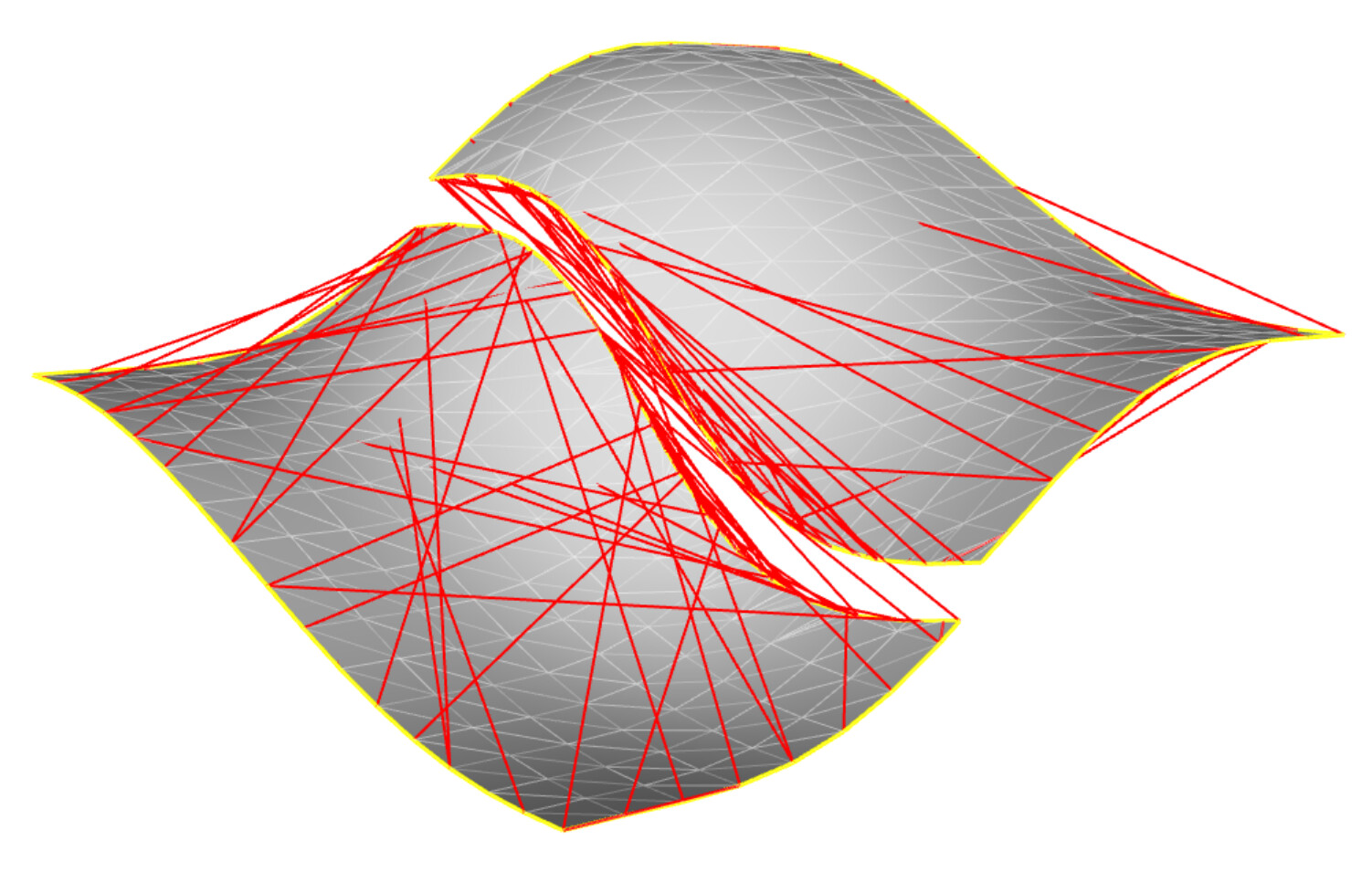
That’s why I was experimenting with the code above, that works in case of single-part surfaces, but yields just the border of the first part in case of multiple parts.
For this reason I was trying to add also the other parts.
Thanks!
---
### Author:  [@bistek](https://discourse.vtk.org/u/bistek)
#### Post date: [March 30, 2021, 4:12pm UTC](https://discourse.vtk.org/t/polydata-surface-border-as-polyline/5451/7 "2021-03-30T16:12:11Z")
Hello, now it works. Basically I am building the polygons that correspond to borders, using points in the order with which they appear in the polyline cells issued by vtkStripper.
In this way I get proper borders even in case of multi-part surfaces.
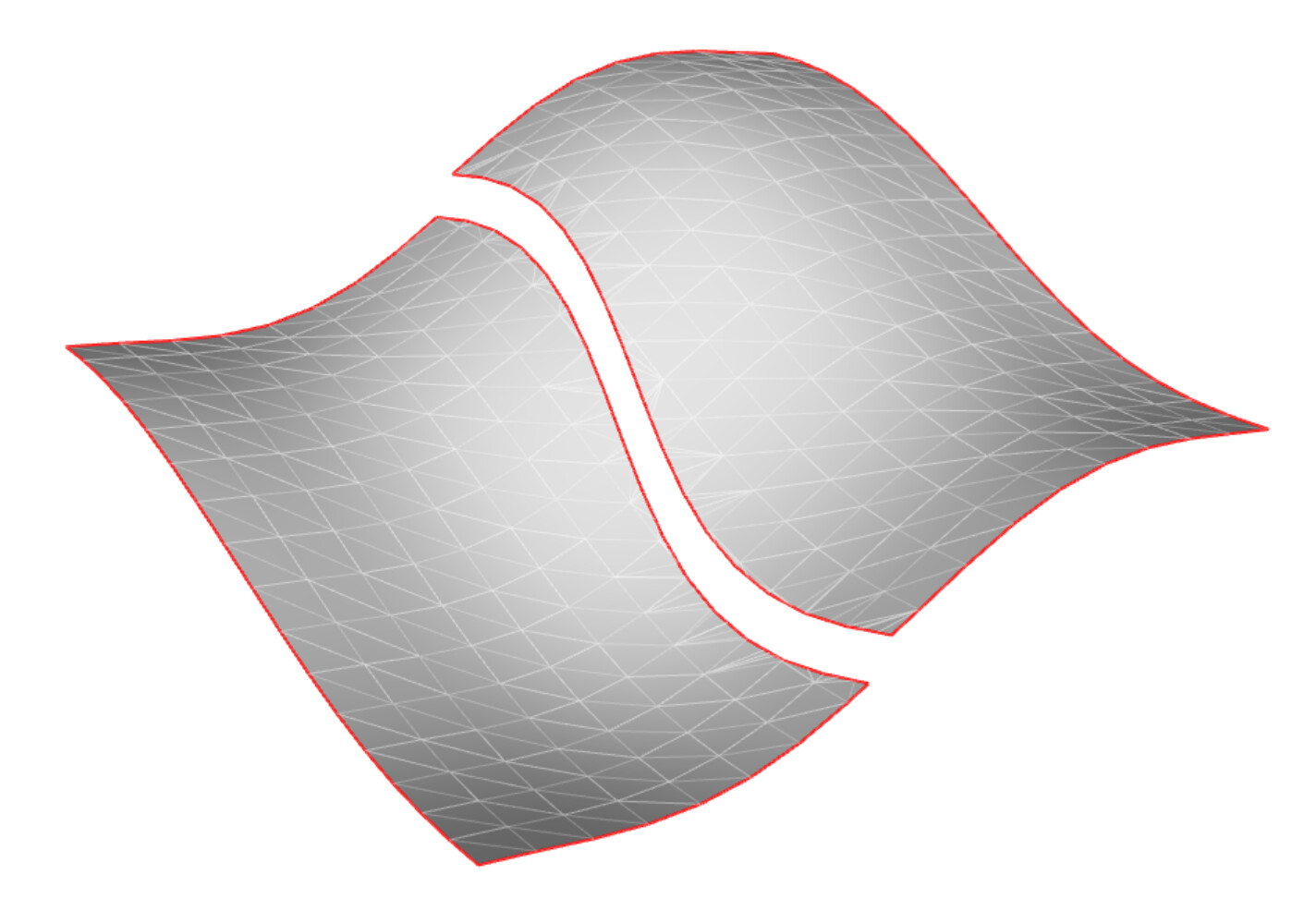
This is the code:
```
def get_boundary_edges(self):
border_edges = vtk.vtkFeatureEdges()
border_edges.BoundaryEdgesOn()
border_edges.NonManifoldEdgesOff()
border_edges.FeatureEdgesOff()
border_edges.ManifoldEdgesOff()
border_edges.SetInputData(self)
border_edges.Update()
clean_border_edges = vtk.vtkCleanPolyData()
clean_border_edges.SetInputConnection(border_edges.GetOutputPort())
border_strips = vtk.vtkStripper()
border_strips.SetJoinContiguousSegments(True)
border_strips.SetInputConnection(clean_border_edges.GetOutputPort())
border_strips.Update()
border_polygons = vtk.vtkCellArray()
border_polygons.SetNumberOfCells(border_strips.GetOutput().GetNumberOfCells())
border_points = vtk.vtkPoints()
points_in_border = 0
for cell in range(border_strips.GetOutput().GetNumberOfCells()):
polygon = vtk.vtkPolygon()
polygon.GetPointIds().SetNumberOfIds(border_strips.GetOutput().GetCell(cell).GetNumberOfPoints())
for point_in_cell in range(border_strips.GetOutput().GetCell(cell).GetNumberOfPoints()):
point_in_border = point_in_cell + points_in_border
border_points.InsertNextPoint(border_strips.GetOutput().GetCell(cell).GetPoints().GetPoint(point_in_cell))
polygon.GetPointIds().SetId(point_in_cell, point_in_border)
border_polygons.InsertNextCell(polygon)
points_in_polygon = polygon.GetNumberOfPoints()
points_in_border += points_in_polygon
borders = vtk.vtkPolyData()
borders.SetPoints(border_points)
borders.SetPolys(border_polygons)
borders.Modified()
return borders
```
Please let me know if you find a more efficient or elegant solution!
Thanks!
---
### Author:  [@omdaniel](https://discourse.vtk.org/u/omdaniel)
#### Post date: [April 18, 2024, 2:57pm UTC](https://discourse.vtk.org/t/polydata-surface-border-as-polyline/5451/8 "2024-04-18T14:57:51Z")
> [@bistek](#):
>
> ```auto
> def get_boundary_edges(self):
> border_edges = vtk.vtkFeatureEdges()
> border_edges.BoundaryEdgesOn()
> border_edges.NonManifoldEdgesOff()
> border_edges.FeatureEdgesOff()
> border_edges.ManifoldEdgesOff()
> border_edges.SetInputData(self)
> border_edges.Update()
> clean_border_edges = vtk.vtkCleanPolyData()
> clean_border_edges.SetInputConnection(border_edges.GetOutputPort())
> border_strips = vtk.vtkStripper()
> border_strips.SetJoinContiguousSegments(True)
> border_strips.SetInputConnection(clean_border_edges.GetOutputPort())
> border_strips.Update()
> border_polygons = vtk.vtkCellArray()
> border_polygons.SetNumberOfCells(border_strips.GetOutput().GetNumberOfCells())
> border_points = vtk.vtkPoints()
> points_in_border = 0
> for cell in range(border_strips.GetOutput().GetNumberOfCells()):
> polygon = vtk.vtkPolygon()
> polygon.GetPointIds().SetNumberOfIds(border_strips.GetOutput().GetCell(cell).GetNumberOfPoints())
> for point_in_cell in range(border_strips.GetOutput().GetCell(cell).GetNumberOfPoints()):
> point_in_border = point_in_cell + points_in_border
> border_points.InsertNextPoint(border_strips.GetOutput().GetCell(cell).GetPoints().GetPoint(point_in_cell))
> polygon.GetPointIds().SetId(point_in_cell, point_in_border)
> border_polygons.InsertNextCell(polygon)
> points_in_polygon = polygon.GetNumberOfPoints()
> points_in_border += points_in_polygon
> borders = vtk.vtkPolyData()
> borders.SetPoints(border_points)
> borders.SetPolys(border_polygons)
> borders.Modified()
> return borders
>
> ```
This was just what I was looking for, I spent over an hour trying to write an algorithm that reordered the points but realized this must already be an anticipated/desired output structure
---
### Author:  [@bistek](https://discourse.vtk.org/u/bistek)
#### Post date: [April 18, 2024, 3:02pm UTC](https://discourse.vtk.org/t/polydata-surface-border-as-polyline/5451/9 "2024-04-18T15:02:31Z")
You’re welcome!