(currVolumeImageData-\>GetScalarPointer(i, j, k));
oldVoxValint = static\_cast(oldVoxVal[0]);
// If the location is empty, only then transfer the old value to it. Otherwise, new location remains empty.
if (oldVoxValint \> 0){
newVoxVal[0] = oldVoxVal[0];
//newVoxVal[1] = oldVoxVal[1];
//newVoxVal[2] = oldVoxVal[2];
}
else{
newVoxVal[0] = static\_cast(255);
}
}
}
}
```
compositeOpacity->AddPoint(0, 0.0);
compositeOpacity->AddPoint(80, 1.0);
compositeOpacity->AddPoint(80.1, 0.0); // compositeOpacity->AddPoint(150, 1.0);
compositeOpacity->AddPoint(255, 0.0);
```
volumeProperty-\>SetInterpolationType(2);
volumeProperty-\>SetScalarOpacity(compositeOpacity);
volumeProperty-\>SetAmbient(0.1);
volumeProperty-\>SetDiffuse(0.9);
volumeProperty-\>SetSpecular(0.2);
mapper-\>SetInputData(currVolumeImageData);
mapper-\>SetBlendModeToComposite();
volume-\>SetMapper(mapper);
volume-\>SetProperty(volumeProperty);
renderer-\>AddViewProp(volume);
ui-\>view-\>GetRenderWindow()-\>AddRenderer(renderer);
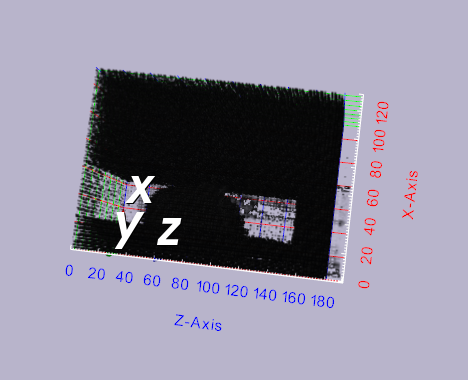
Please note in the image attached that the volume is rendering, but all these static noise is also getting added. I do not know where they are coming from. Could you please help me figure out the problem?
Sincerely
Arefin
---
### Author:  [@lassoan](https://discourse.vtk.org/u/lassoan)
#### Post date: [June 30, 2019, 4:33pm UTC](https://discourse.vtk.org/t/problem-in-volume-rendering-noise-added-automatically/1235/2 "2019-06-30T16:33:51Z")
Probably you need to adjust the transfer functions to make the background noise voxels transparent. You can use 3D Slicer, ParaView, MITK, or other 3D visualization applications that have built-in transfer function editor with real-time display.
---
### Author:  [@arefinster](https://discourse.vtk.org/u/arefinster)
#### Post date: [June 30, 2019, 4:42pm UTC](https://discourse.vtk.org/t/problem-in-volume-rendering-noise-added-automatically/1235/3 "2019-06-30T16:42:14Z")
Hi Andras, Thank you for your response. It totally makes sense that I need to setup an appropriate transfer function. Unfortunately, for my project I am unable to use the existing software, as my code generates the volume based on the algorithms I wrote. Could you please refer me to any documentation or sites that could help me setup the transfer function.
---
### Author:  [@lassoan](https://discourse.vtk.org/u/lassoan)
#### Post date: [June 30, 2019, 5:19pm UTC](https://discourse.vtk.org/t/problem-in-volume-rendering-noise-added-automatically/1235/4 "2019-06-30T17:19:06Z")
You can use existing interactive software to explore what transfer functions work well and then in your custom application you can use a simplified GUI to slightly adjust them. Usually a few sliders are enough that move a few key transfer functions points.
> [@arefinster](#):
>
> Unfortunately, for my project I am unable to use the existing software, as my code generates the volume based on the algorithms I wrote.
All the software that I recommended above is fully customizable and extensible. You can add your custom algorithms as plugins and leverage the enormous amount of software development effort that were invested into these software.
---
### Author:  [@arefinster](https://discourse.vtk.org/u/arefinster)
#### Post date: [July 3, 2019, 7:23pm UTC](https://discourse.vtk.org/t/problem-in-volume-rendering-noise-added-automatically/1235/5 "2019-07-03T19:23:16Z")
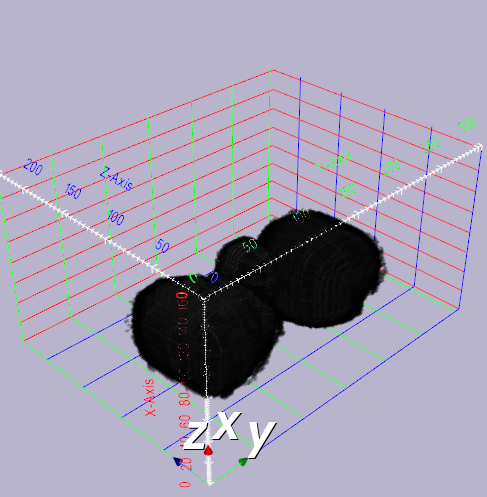
Hi Andras, Thank you so much for your suggestions. I was able to use both 3D slicer and ParaView to diagnose the issue with my transfer function. Apparently, CHAR type sometimes give rise to noise problem in volume rendering. When I saved the produced volume in INT type in Slicer, I was able to make the necessary changes to reconstruct the volume. Attached is the working model. Hopefully, this response helps someone in future.