# Problem rendering surfaces after upgrading to VTK 8.2.0
**URL:** https://discourse.vtk.org/t/problem-rendering-surfaces-after-upgrading-to-vtk-8-2-0/11070
**Category:** Support
**Created:** [March 28, 2023, 5:59am UTC](https://discourse.vtk.org/t/problem-rendering-surfaces-after-upgrading-to-vtk-8-2-0/11070 "2023-03-28T05:59:01Z")
**Posts on this page:** 4
**Page:** 1
### Author:  [@whereismymoney](https://discourse.vtk.org/u/whereismymoney)
#### Post date: [March 28, 2023, 5:59am UTC](https://discourse.vtk.org/t/problem-rendering-surfaces-after-upgrading-to-vtk-8-2-0/11070/1 "2023-03-28T05:59:01Z")
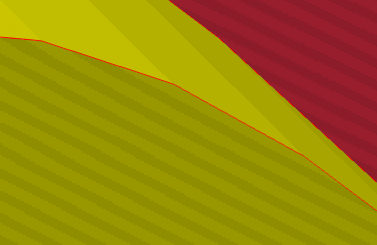
After upgrading our application from VTK 6.0.0 to VTK 8.2.0 we have a problem with artifacts (“cross-hatching,” “Moire patterns,” “aliasing”) when zooming in on details. This is for vtkCamera::ParallelProjectionOn()
For an example, take
[https://kitware.github.io/vtk-examples/site/Cxx/Widgets/ScalarBarWidget/](https://kitware.github.io/vtk-examples/site/Cxx/Widgets/ScalarBarWidget/)
and edit the .vtk file so the last three points are changed to the following:
0.9 1.0 60.0
1.0 0.9 60.1
1.1 1.0 60.0
This gives us a small triangle about 60 units away from the rest of the polygons. If you zoom in on that triangle you will see the artifacts.
Is there some setting having to do with Clipping Planes, z buffering, etc, that we can change to make the artifacts go away?
Thanks!
---
### Author:  [@whereismymoney](https://discourse.vtk.org/u/whereismymoney)
#### Post date: [April 9, 2023, 4:13am UTC](https://discourse.vtk.org/t/problem-rendering-surfaces-after-upgrading-to-vtk-8-2-0/11070/2 "2023-04-09T04:13:22Z")
Here I provide a simple program that is just 30 lines of actual code.
If you compile and link this with VTK 8.2.0, you should be able to see the Moire patterns when you zoom in on the small triangle. We did not have this problem with VTK 6.0.0.
```auto
// This simple program demonstrates a problem we have with VTK 8.2.0.
// When we zoom in we get Moire patterns ("cross-hatching" or "aliasing")
// Based on https://kitware.github.io/vtk-examples/site/Cxx/Widgets/ScalarBarWidget/
#include
#include
#include
#include
#include
#include
#include
#include
#include
#include
// Note: At the end of the list of points, there are 3 points which define a small triangle that we will zoom in on.
const char* data_string =
"# vtk DataFile Version 1.0\n\
Unstructured Grid Example\n\
ASCII\n\
DATASET UNSTRUCTURED_GRID\n\
POINTS 27 float\n\
0.0 0.0 0.0\n\
1.0 0.0 0.0\n\
2.0 0.0 0.0\n\
0.0 1.0 0.0\n\
1.0 1.0 0.0\n\
2.0 1.0 0.0\n\
0.0 0.0 1.0\n\
1.0 0.0 1.0\n\
2.0 0.0 1.0\n\
0.0 1.0 1.0\n\
1.0 1.0 1.0\n\
2.0 1.0 1.0\n\
0.0 1.0 2.0\n\
1.0 1.0 2.0\n\
2.0 1.0 2.0\n\
0.0 1.0 3.0\n\
1.0 1.0 3.0\n\
2.0 1.0 3.0\n\
0.0 1.0 4.0\n\
1.0 1.0 4.0\n\
2.0 1.0 4.0\n\
0.0 1.0 5.0\n\
1.0 1.0 5.0\n\
2.0 1.0 5.0\n\
0.95 1.0 6.0\n\
1.0 0.95 6.05\n\
1.05 1.05 5.95\n\
CELLS 12 64\n\
8 0 1 4 3 6 7 10 9\n\
8 1 2 5 4 7 8 11 10\n\
4 7 10 9 12\n\
4 8 11 10 14\n\
6 15 16 17 14 13 12\n\
6 18 15 19 16 20 17\n\
4 22 23 20 19\n\
3 21 22 18\n\
3 22 19 18\n\
3 24 25 26\n\
2 21 24\n\
1 25\n\
CELL_TYPES 12\n\
12\n12\n10\n10\n7\n6\n9\n5\n5\n5\n3\n1\n\
POINT_DATA 27\n\
SCALARS scalars float\n\
LOOKUP_TABLE default\n\
0.0\n1.0\n2.0\n3.0\n4.0\n5.0\n6.0\n7.0\n8.0\n9.0\n10.0\n11.0\n12.0\n13.0\n14.0\n15.0\n16.0\n17.0\n18.0\n19.0\n20.0\n21.0\n22.0\n23.0\n24.0\n25.0\n26.0\n";
int main(int argc, char* argv[])
{
vtkNew reader;
reader->ReadFromInputStringOn();
reader->SetInputString(data_string);
reader->Update();
vtkNew mapper;
mapper->SetInputData(reader->GetOutput());
vtkNew actor;
actor->SetMapper(mapper);
vtkNew renderer;
renderer->AddActor(actor);
renderer->SetBackground(0.1,0.4,0.1);
vtkNew renderWindow;
renderWindow->AddRenderer(renderer);
renderWindow->SetSize(1500, 1000);
renderWindow->SetWindowName("TestMoirePatterns");
vtkNew interactor;
interactor->SetRenderWindow(renderWindow);
interactor->Initialize();
renderWindow->Render();
// The triangle of interest is near the point (1, 1, 6)
renderer->GetActiveCamera()->SetPosition(-9.0, 11.0, 7.0);
renderer->GetActiveCamera()->SetFocalPoint(1.0, 1.0, 6.0);
renderer->GetActiveCamera()->SetViewUp(0.6, 0.4, -0.7);
renderer->GetActiveCamera()->ParallelProjectionOn();
renderWindow->Render();
interactor->Start();
return EXIT_SUCCESS;
}
```
---
### Author:  [@ben.boeckel](https://discourse.vtk.org/u/ben.boeckel)
#### Post date: [April 24, 2023, 3:15am UTC](https://discourse.vtk.org/t/problem-rendering-surfaces-after-upgrading-to-vtk-8-2-0/11070/3 "2023-04-24T03:15:48Z")
@sankhesh ?
---
### Author:  [@whereismymoney](https://discourse.vtk.org/u/whereismymoney)
#### Post date: [April 24, 2023, 3:18am UTC](https://discourse.vtk.org/t/problem-rendering-surfaces-after-upgrading-to-vtk-8-2-0/11070/4 "2023-04-24T03:18:57Z")
This problem has been resolved in
> [@Problem with Parallel Projection after upgrading to VTK 9.1.0](https://discourse.vtk.org/t/problem-with-parallel-projection-after-upgrading-to-vtk-9-1-0/11169):
>
> After upgrading to VTK 9.1.0, we have problems when zooming in (with Parallel Projection on). [image] There are artifacts (“cross-hatching,” “Moire patterns,” “aliasing”) that are extremely bad in some cases. Is there a setting we can change to make these go away. We did not have this problem with VTK 6.0.0. Here is a simple example: // This simple program demonstrates a problem we have with VTK 8.2.0 and VTK 9.1.0 // When we zoom in we get Moire patterns ("cross-hatching" or "aliasing") /…