# Problem with transparency with VTK \>= 8.0 on Linux
**URL:** https://discourse.vtk.org/t/problem-with-transparency-with-vtk-8-0-on-linux/3309
**Category:** Support
**Created:** [May 14, 2020, 3:48pm UTC](https://discourse.vtk.org/t/problem-with-transparency-with-vtk-8-0-on-linux/3309 "2020-05-14T15:48:55Z")
**Posts on this page:** 6
**Page:** 1
### Author:  [@tigarmo](https://discourse.vtk.org/u/tigarmo)
#### Post date: [May 14, 2020, 3:48pm UTC](https://discourse.vtk.org/t/problem-with-transparency-with-vtk-8-0-on-linux/3309/1 "2020-05-14T15:48:55Z")
Hi, I have an issue with rendering transparent objects with any version of VTK from 8.0 onwards (tested up to 9.0.0). I’m running CentOS 7 inside VirtualBox, and `glxinfo` reports:
```auto
OpenGL version string: 3.3 (Compatibility Profile) Mesa 18.3.4
OpenGL renderer string: llvmpipe (LLVM 7.0, 256 bits)
```
This is the code that I’m using to test, which I picked up online from somewhere:
```python
import vtk
def main():
cubeSource = vtk.vtkCubeSource()
cubeMapper = vtk.vtkPolyDataMapper()
cubeMapper.SetInputConnection(cubeSource.GetOutputPort())
cubeActor = vtk.vtkActor()
cubeActor.GetProperty().SetOpacity(0.5)
cubeActor.SetMapper(cubeMapper)
sphereSource = vtk.vtkSphereSource()
sphereMapper = vtk.vtkPolyDataMapper()
sphereMapper.SetInputConnection(sphereSource.GetOutputPort());
sphereActor = vtk.vtkActor()
sphereActor.GetProperty().SetColor(0.5,1,0.5);
sphereActor.SetMapper(sphereMapper);
renderer = vtk.vtkRenderer()
renderer.AddActor(cubeActor);
renderer.AddActor(sphereActor);
renderWindow = vtk.vtkRenderWindow()
renderWindow.AddRenderer(renderer);
interactor = vtk.vtkRenderWindowInteractor()
interactor.SetRenderWindow(renderWindow);
renderer.SetBackground(0,0,0);
renderWindow.Render();
interactor.Start();
if __name__ == ' __main__':
main()
```
So the code creates a sphere inside a transparent box. Result on Windows:
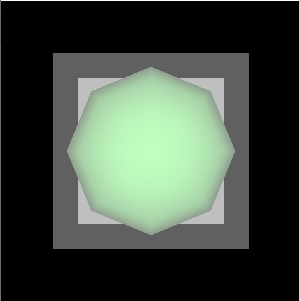
Result on Linux:

I’ve tried enabling depth peeling, it makes no different from what I can tell. The box also isn’t shown even if it’s the only actor on the scene. Is there anything else I can test, or any extra info I can provide? The code works as expected with VTK 7.1.1.
Thanks.
---
### Author:  [@andreasbuykx](https://discourse.vtk.org/u/andreasbuykx)
#### Post date: [May 18, 2020, 11:02am UTC](https://discourse.vtk.org/t/problem-with-transparency-with-vtk-8-0-on-linux/3309/2 "2020-05-18T11:02:04Z")
You could try to set this in your environment …
```auto
MESA_GL_VERSION_OVERRIDE=4.5
```
---
### Author:  [@tigarmo](https://discourse.vtk.org/u/tigarmo)
#### Post date: [May 18, 2020, 1:09pm UTC](https://discourse.vtk.org/t/problem-with-transparency-with-vtk-8-0-on-linux/3309/3 "2020-05-18T13:09:36Z")
Hi Andreas, thanks for the reply. The problem persists with that change too, and from my understanding the currently reported version (3.3) should be enough for VTK.
---
### Author:  [@andreasbuykx](https://discourse.vtk.org/u/andreasbuykx)
#### Post date: [May 18, 2020, 3:02pm UTC](https://discourse.vtk.org/t/problem-with-transparency-with-vtk-8-0-on-linux/3309/4 "2020-05-18T15:02:12Z")
Another flag to try could be
`LIBGL_ALWAYS_INDIRECT=1`
---
### Author:  [@tigarmo](https://discourse.vtk.org/u/tigarmo)
#### Post date: [May 18, 2020, 3:17pm UTC](https://discourse.vtk.org/t/problem-with-transparency-with-vtk-8-0-on-linux/3309/5 "2020-05-18T15:17:48Z")
This one segfaults with:
```auto
ERROR: In ../Rendering/OpenGL2/vtkOpenGLRenderWindow.cxx, line 741
vtkXOpenGLRenderWindow (0x5606d38c1640): GLEW could not be initialized: Missing GL version
```
This happens even if I set both variables (`LIBGL_ALWAYS_INDIRECT` and `MESA_GL_VERSION_OVERRIDE`)
---
### Author:  [@tigarmo](https://discourse.vtk.org/u/tigarmo)
#### Post date: [May 20, 2020, 12:52pm UTC](https://discourse.vtk.org/t/problem-with-transparency-with-vtk-8-0-on-linux/3309/6 "2020-05-20T12:52:47Z")
As an update, I got someone to run the sample on a machine (non-remote) with different hardward/libs:
```auto
OpenGL renderer string: Radeon RX 5500 XT (NAVI14, DRM 3.35.0, 5.4.0-29-generic, LLVM 9.0.1)
OpenGL core profile version string: 4.6 (Core Profile) Mesa 20.0.4
OpenGL core profile shading language version string: 4.60
```
In this setup the rendering works as expected. It works even if there they force software rendering via `LIBGL_ALWAYS_SOFTWARE=1 GALLIUM_DRIVER=llvmpipe python main.py`. Here’s the output from `glxinfo` in this case:
```auto
OpenGL vendor string: VMware, Inc.
OpenGL renderer string: llvmpipe (LLVM 9.0.1, 128 bits)
OpenGL core profile version string: 3.3 (Core Profile) Mesa 20.0.4
```
The main difference that I can see is that in this latest report the Mesa version is `20.0.4`, while in my original case it is `18.3.4`. Is there a minimum Mesa version for VTK, or versions that are known to present issues?
Thanks!