# Python - Dynamically change the opacity values of vtkPieceWiseFunction()
**URL:** https://discourse.vtk.org/t/python-dynamically-change-the-opacity-values-of-vtkpiecewisefunction/4698
**Category:** Development
**Created:** [November 20, 2020, 1:07pm UTC](https://discourse.vtk.org/t/python-dynamically-change-the-opacity-values-of-vtkpiecewisefunction/4698 "2020-11-20T13:07:34Z")
**Posts on this page:** 3
**Page:** 1
### Author:  [@Gibser](https://discourse.vtk.org/u/Gibser)
#### Post date: [November 20, 2020, 1:07pm UTC](https://discourse.vtk.org/t/python-dynamically-change-the-opacity-values-of-vtkpiecewisefunction/4698/1 "2020-11-20T13:07:34Z")
Hi everyone, this is my first post here. I used vtkplotter to show a 3d model starting from dicom scans with the following code:
```auto
import vtk
from vtkplotter import *
import numpy as np
from vtkmodules.vtkCommonDataModel import vtkPiecewiseFunction
from vtkmodules.vtkRenderingCore import vtkRenderer, vtkVolume, vtkVolumeProperty, vtkColorTransferFunction
volume = load('Letter:/path')
volumeColor = vtkColorTransferFunction()
r, g, b = getColor('white')
volumeColor.AddRGBPoint(-1024, r, g, b)
r, g, b = getColor('yellow')
volumeColor.AddRGBPoint(-1023, r, g, b)
r, g, b = getColor('blue')
volumeColor.AddRGBPoint(-1022, r, g, b)
volumeScalarOpacity = vtkPiecewiseFunction()
volumeScalarOpacity.AddPoint(-1024, 0.00)
volumeScalarOpacity.AddPoint(-1023, 0.5)
volumeScalarOpacity.AddPoint(-1022, 0.5)
volumeProperty = vtkVolumeProperty()
volumeProperty.SetColor(volumeColor)
volumeProperty.SetScalarOpacity(volumeScalarOpacity)
volumeProperty.SetInterpolationTypeToLinear()
volumeProperty.ShadeOn()
volumeProperty.SetAmbient(0.4)
volumeProperty.SetDiffuse(0.6)
volumeProperty.SetSpecular(0.2)
volume.SetProperty(volumeProperty)
show(volume)
```
How can I change the opacity values dynamically with a slider?
Thanks in advance for your answers
---
### Author:  [@marcomusy](https://discourse.vtk.org/u/marcomusy)
#### Post date: [November 22, 2020, 12:19pm UTC](https://discourse.vtk.org/t/python-dynamically-change-the-opacity-values-of-vtkpiecewisefunction/4698/2 "2020-11-22T12:19:39Z")
You can try something like this:
```python
from vedo import load, datadir
from vedo.applications import RayCaster
embryo = load(datadir+"embryo.tif") # vtkVolume
embryo.mode(1).c('jet').alpha([0,0.1,0.9]) # change properties
# volumeProperty = embryo.GetProperty()
plt = RayCaster(embryo) # Plotter instance
plt.show(viewup="z", bg='black', bg2='blackboard', axes=7)
```
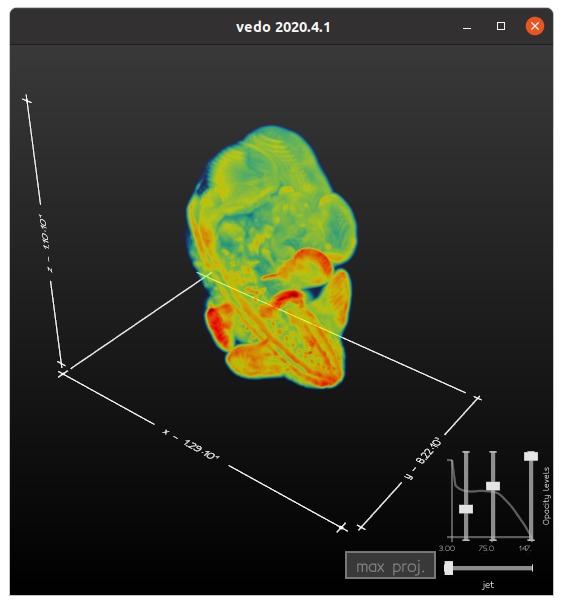
or customize it the way you like using [this](https://github.com/marcomusy/vedo/blob/867dc3b70045c8efcc7f7d70e901306bbebe722a/vedo/applications.py#L277). If you encounter any problems please submit an issue [here](https://github.com/marcomusy/vedo/issues).
---
### Author:  [@Gibser](https://discourse.vtk.org/u/Gibser)
#### Post date: [November 26, 2020, 11:45am UTC](https://discourse.vtk.org/t/python-dynamically-change-the-opacity-values-of-vtkpiecewisefunction/4698/3 "2020-11-26T11:45:05Z")
I’ll try, thank you very much!