# Pyvista based on vtk kernel cannot draw and display all edges of the mesh in vtk files.
**URL:** https://discourse.vtk.org/t/pyvista-based-on-vtk-kernel-cannot-draw-and-display-all-edges-of-the-mesh-in-vtk-files/10299
**Category:** Support
**Tags:** pyvista, python, code
**Created:** [December 22, 2022, 6:34am UTC](https://discourse.vtk.org/t/pyvista-based-on-vtk-kernel-cannot-draw-and-display-all-edges-of-the-mesh-in-vtk-files/10299 "2022-12-22T06:34:52Z")
**Posts on this page:** 4
**Page:** 1
### Author:  [@csmx](https://discourse.vtk.org/u/csmx)
#### Post date: [December 22, 2022, 6:34am UTC](https://discourse.vtk.org/t/pyvista-based-on-vtk-kernel-cannot-draw-and-display-all-edges-of-the-mesh-in-vtk-files/10299/1 "2022-12-22T06:34:52Z")
When I used Pyvista to display the mesh model in vtk file, I found that Pyvista based on vtk kernel cannot draw and display all edges of the mesh in vtk files.
Please help solve this problem. Many thanks.

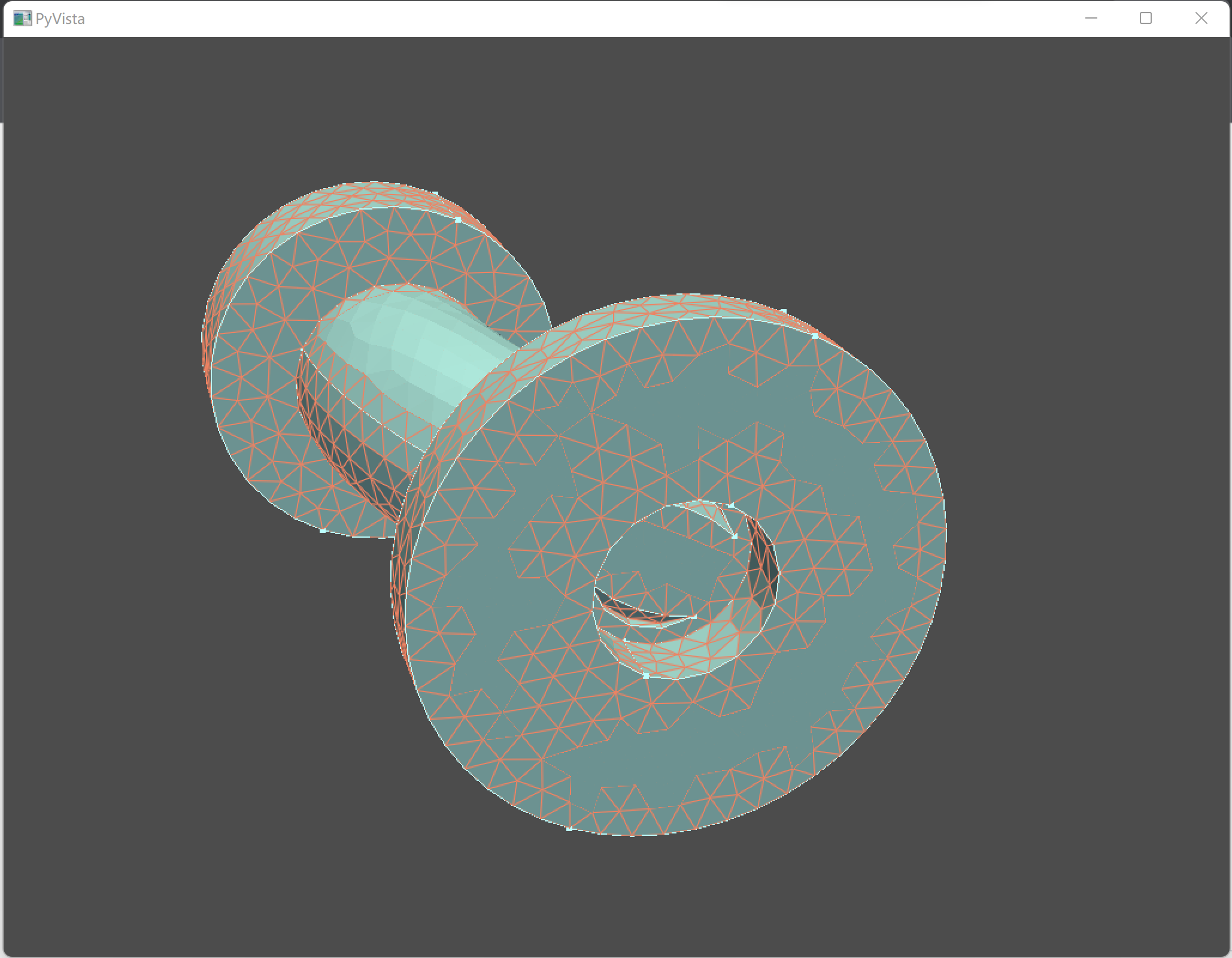
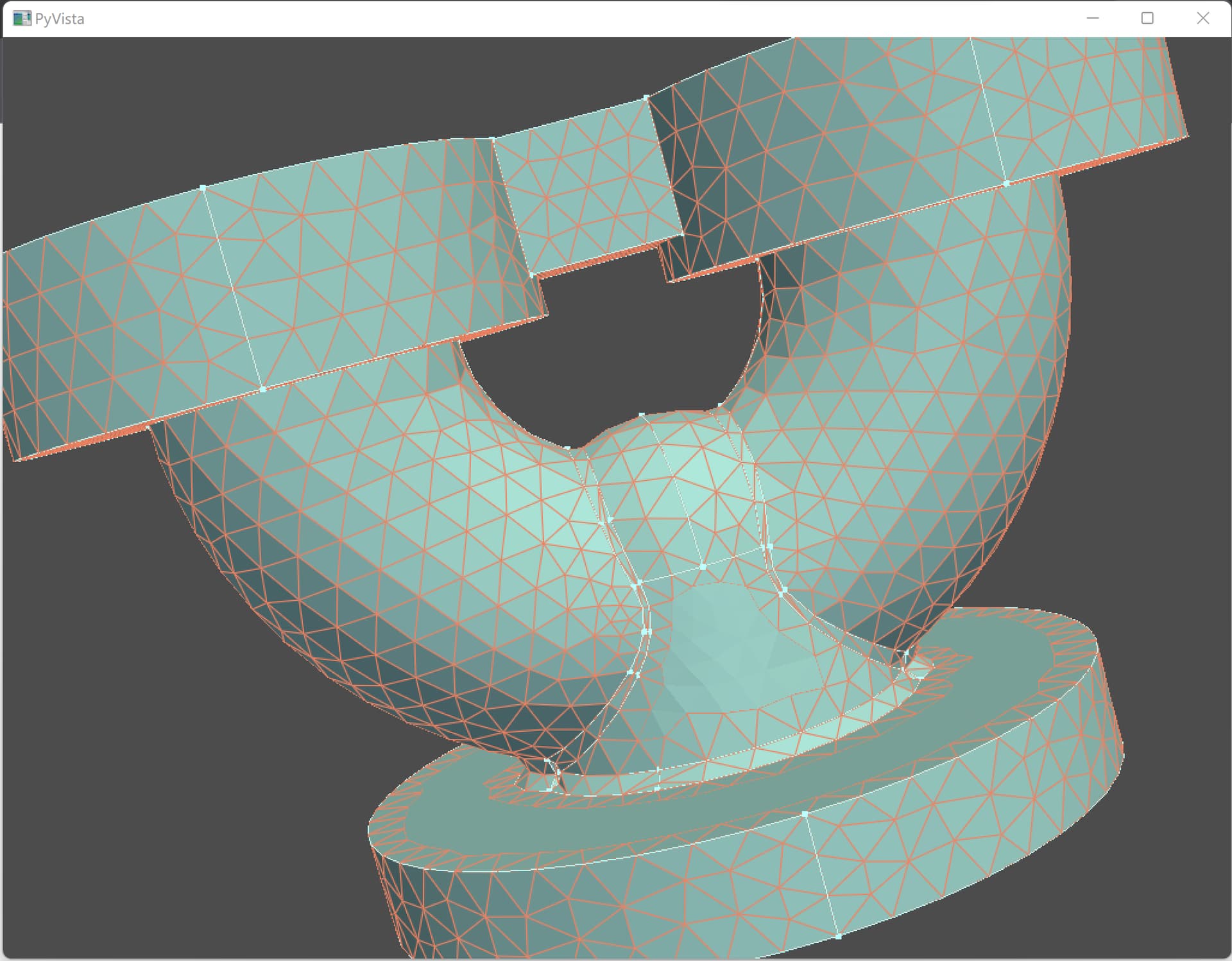
Here is my code:
import pyvista as pv
my\_mesh = pv.read(“D:/mesh\_file/test.vtk”)
plotter = pv.Plotter()
\_ = plotter.add\_mesh(my\_mesh, color = ‘#BBFFFF’, style = ‘surface’, show\_edges = True,
edge\_color = ‘#EE8262’, line\_width = 0.5, opacity = 1.0)
plotter.show()
The following link can get the vtk file.
[https://github.com/pyvista/pyvista/issues/3738](https://github.com/pyvista/pyvista/issues/3738)
System Information:
OS : Windows
CPU(s) : 20
Machine : AMD64
Architecture : 64bit
Environment : Python
GPU Vendor : Intel
GPU Renderer : Intel(R) Iris(R) Xe Graphics
GPU Version : 4.5.0 - Build 31.0.101.3616
Python 3.8.15 (default, Nov 21 2022, 10:47:13) [MSC v.1916 64 bit (AMD64)]
pyvista : 0.37.0
vtk : 9.2.2
numpy : 1.23.5
imageio : 2.23.0
scooby : 0.7.0
pooch : v1.6.0
matplotlib : 3.6.2
pyvistaqt : 0.9.0
PyQt5 : 5.15.2
meshio : 5.3.4
---
### Author:  [@mwestphal](https://discourse.vtk.org/u/mwestphal)
#### Post date: [December 22, 2022, 7:34am UTC](https://discourse.vtk.org/t/pyvista-based-on-vtk-kernel-cannot-draw-and-display-all-edges-of-the-mesh-in-vtk-files/10299/2 "2022-12-22T07:34:30Z")
@banesullivan
---
### Author:  [@cory.quammen](https://discourse.vtk.org/u/cory.quammen)
#### Post date: [December 22, 2022, 1:39pm UTC](https://discourse.vtk.org/t/pyvista-based-on-vtk-kernel-cannot-draw-and-display-all-edges-of-the-mesh-in-vtk-files/10299/3 "2022-12-22T13:39:04Z")
I responded on the original PyVista issue.
---
### Author:  [@csmx](https://discourse.vtk.org/u/csmx)
#### Post date: [February 9, 2023, 3:22am UTC](https://discourse.vtk.org/t/pyvista-based-on-vtk-kernel-cannot-draw-and-display-all-edges-of-the-mesh-in-vtk-files/10299/4 "2023-02-09T03:22:42Z")
Now, I directly use the python API of vtk to display the model, but I still can’t solve this problem. How should I solve this problem?
Part of my code is as follows:
reader = vtk.vtkUnstructuredGridReader()
reader.SetFileName(mesh\_file\_name)
reader.Update()
output = reader.GetOutput()
self.mapper = vtk.vtkDataSetMapper()
self.mapper.SetInputData(output)
self.mapper.ScalarVisibilityOff()
self.actor = vtk.vtkActor()
self.actor.SetMapper(self.mapper)
self.actor.GetProperty().EdgeVisibilityOn()
self.actor.GetProperty().SetLineWidth(2.0)
surface\_color = [51, 161, 201]
surface\_color = [x/255.0 for x in surface\_color]
self.actor.GetProperty().SetColor(surface\_color)
Many Thanks!