# PyVista + Trame = Jupyter 3D Visualization
**URL:** https://discourse.vtk.org/t/pyvista-trame-jupyter-3d-visualization/10610
**Category:** Announcements
**Tags:** pyvista, python
**Created:** [February 3, 2023, 8:12pm UTC](https://discourse.vtk.org/t/pyvista-trame-jupyter-3d-visualization/10610 "2023-02-03T20:12:35Z")
**Posts on this page:** 8
**Page:** 1
### Author:  [@banesullivan](https://discourse.vtk.org/u/banesullivan)
#### Post date: [February 3, 2023, 8:12pm UTC](https://discourse.vtk.org/t/pyvista-trame-jupyter-3d-visualization/10610/1 "2023-02-03T20:12:35Z")
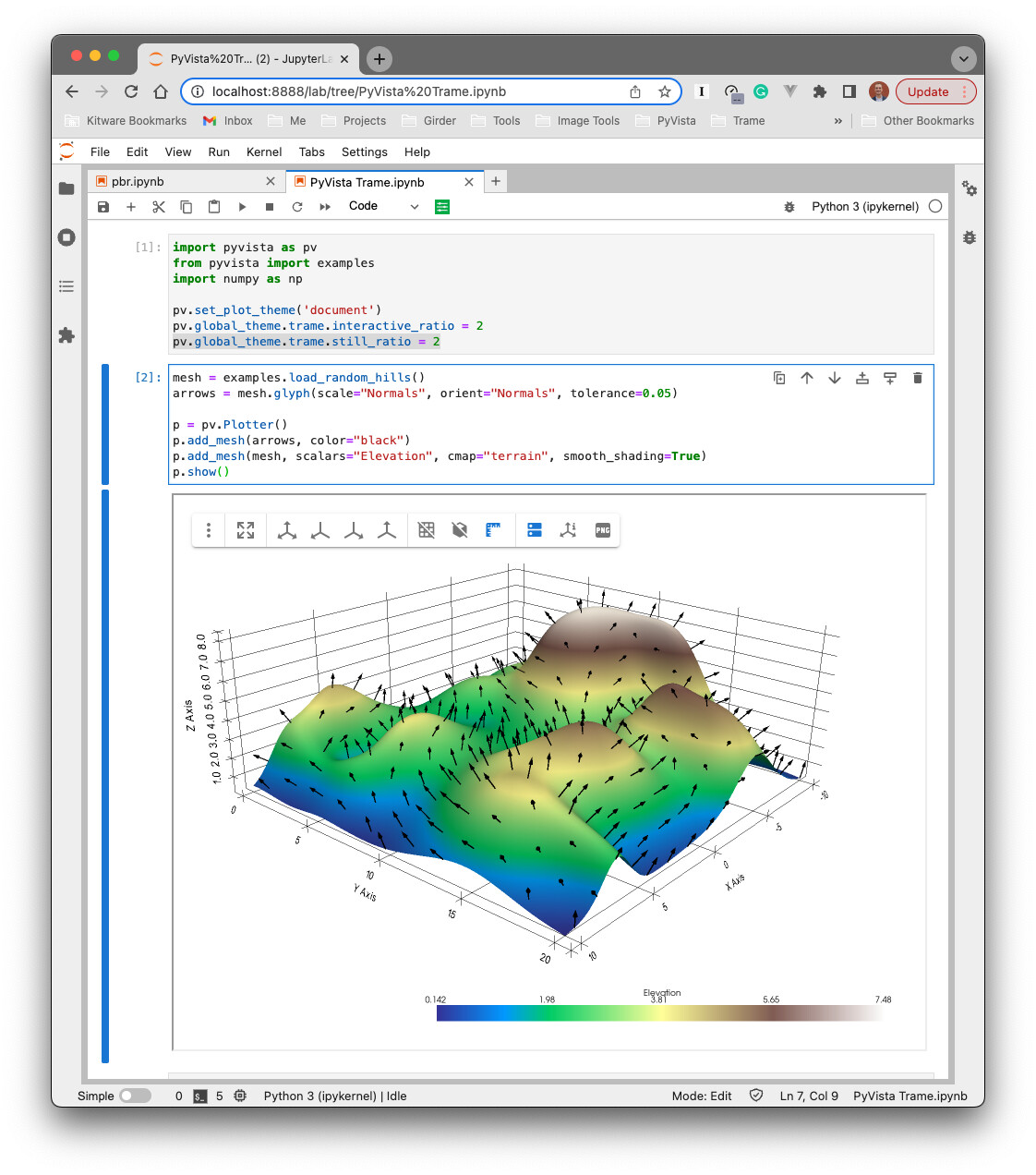
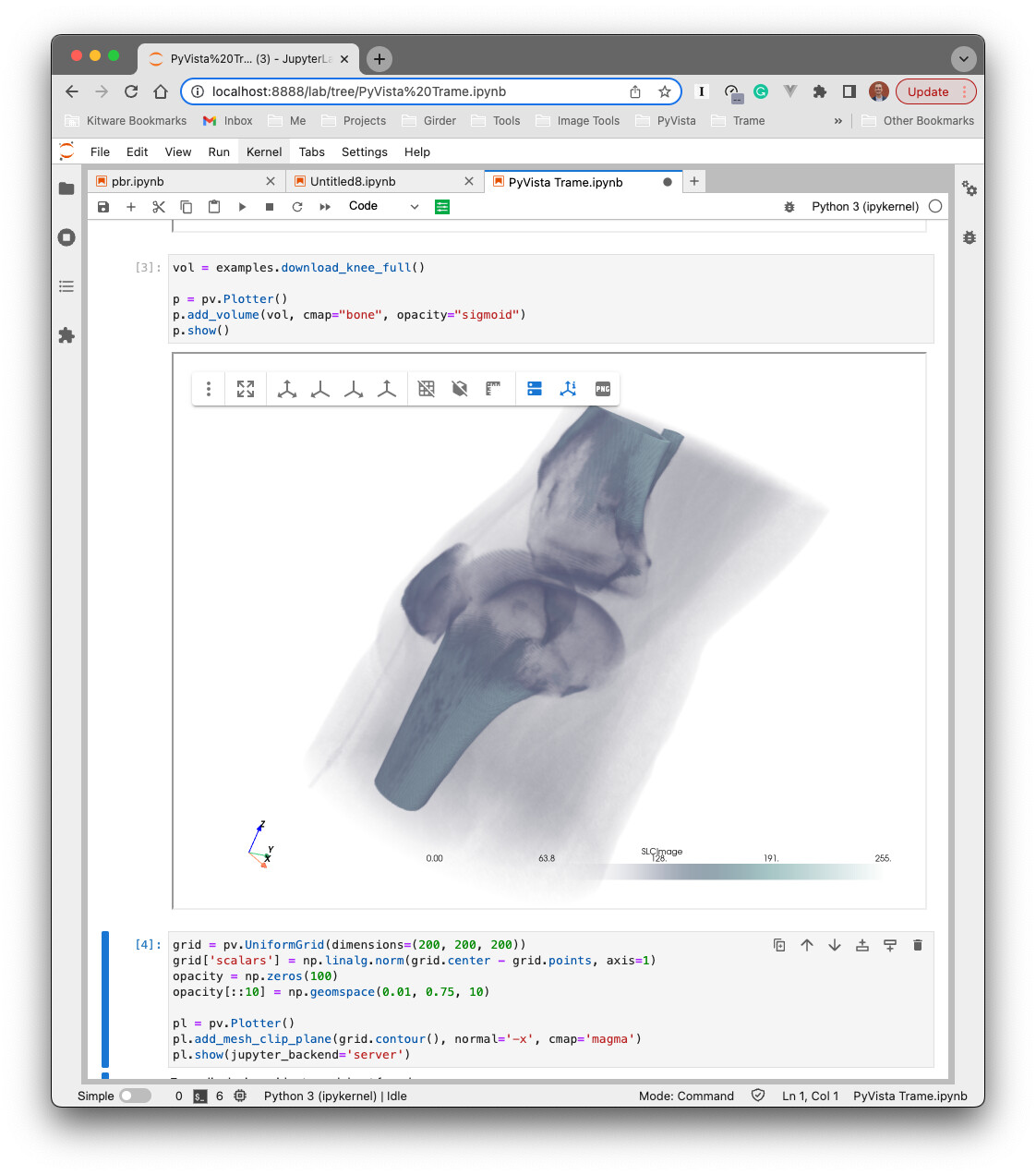
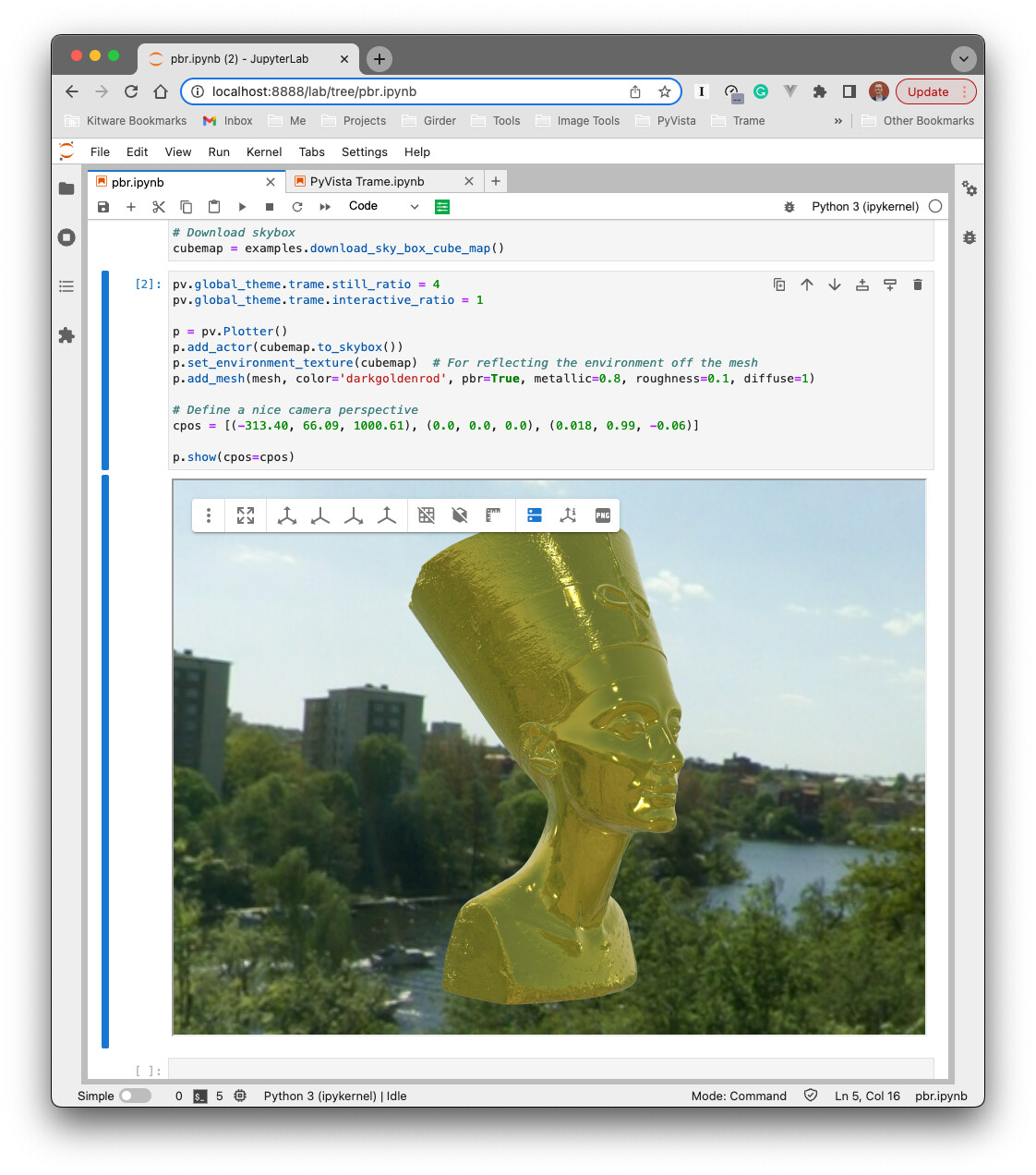
We’ve recently been improving the support between [PyVista](https://docs.pyvista.org/) and [Trame](https://kitware.github.io/trame/index.html) to provide a cutting-edge viewer for Jupyter. This is included in PyVista’s latest `0.38.1` release!
```bash
pip install 'pyvista[jupyter]>=0.38.1'
```
1. Trame provides a high-level framework for building reactive, stateful web applications
2. PyVista provides a high-level framework for 3D visualization, exposing VTK in a “Pythonic” manner
High-level framework 1 + high-level framework 2 = a streamlined approach to making powerful web applications with 3D visualization front and center.
An example of this I am most thrilled to share is with Jupyter Notebooks. For PyVista’s latest release, we included a Jupyter widget built on Trame that will connect to a PyVista Plotter to stream both server-rendered visualizations and/or the scene data for client-side rendering with VTK.js.
I’d include a video, but I’m limited to upload sizes of 4Mb. Perhaps check out my tweet:
[https://twitter.com/banesullivan/status/1621535825103126530?s=20&t=h4BRJe\_dn-jcU7Boowh16A](https://twitter.com/banesullivan/status/1621535825103126530?s=20&t=h4BRJe_dn-jcU7Boowh16A)
## More information
- Jupyter docs: [Trame Jupyter Backend for PyVista — PyVista 0.46.3 documentation](https://docs.pyvista.org/user-guide/jupyter/trame.html)
- Trame web app examples: [pyvista/examples\_trame at main · pyvista/pyvista · GitHub](https://github.com/pyvista/pyvista/tree/main/examples_trame)
Feel free to post questions here, and I’d be happy share more!
---
### Author:  [@banesullivan](https://discourse.vtk.org/u/banesullivan)
#### Post date: [February 3, 2023, 8:38pm UTC](https://discourse.vtk.org/t/pyvista-trame-jupyter-3d-visualization/10610/2 "2023-02-03T20:38:20Z")
I also want to highlight a long-requested feature for PyVista from VTK power-users: `vtkAgorithm` support with PyVista’s `Plotter` API. This was also added in PyVista’s `0.38.1` release, and we have examples here:
- With Trame: [pyvista/vtkAlgorithm.py at main · pyvista/pyvista · GitHub](https://github.com/pyvista/pyvista/blob/main/examples_trame/basic/vtkAlgorithm.py)
- Normal PyVista (works in Jupyter): [Plotting with VTK Algorithms — PyVista 0.38.1 documentation](https://docs.pyvista.org/examples/99-advanced/plotting-algorithms.html)
[/uploads/default/original/2X/9/9903c147ea01390bd55e38323a0815e4de7f2b58.mov](https://discourse.vtk.org/uploads/default/original/2X/9/9903c147ea01390bd55e38323a0815e4de7f2b58.mov)
---
### Author:  [@mwestphal](https://discourse.vtk.org/u/mwestphal)
#### Post date: [February 6, 2023, 10:16am UTC](https://discourse.vtk.org/t/pyvista-trame-jupyter-3d-visualization/10610/3 "2023-02-06T10:16:59Z")
FYI @Thomas_Galland @Timothee_Chabat @Charles_Gueunet
---
### Author:  [@jxfruit](https://discourse.vtk.org/u/jxfruit)
#### Post date: [June 5, 2024, 7:13am UTC](https://discourse.vtk.org/t/pyvista-trame-jupyter-3d-visualization/10610/4 "2024-06-05T07:13:19Z")
May I ask how to deploy this with jupyter-notebook in container?
---
### Author:  [@Sebastien\_Jourdain](https://discourse.vtk.org/u/Sebastien_Jourdain)
#### Post date: [June 5, 2024, 2:13pm UTC](https://discourse.vtk.org/t/pyvista-trame-jupyter-3d-visualization/10610/5 "2024-06-05T14:13:22Z")
You only need an offscreen version of vtk and trame.
```bash
pip uninstall vtk
pip install vtk-osmesa --extra-index-url https://wheels.vtk.org # or vtk-egl if you have a GPU
pip install trame trame-vtk trame-vuetify
```
Then in a cell you can do
```python
from trame.app import get_server
from trame.decorators import TrameApp, change
from trame.widgets import vuetify, vtk as vtk_widgets
from trame.ui.vuetify import SinglePageLayout
from vtkmodules.vtkFiltersSources import vtkConeSource
from vtkmodules.vtkRenderingCore import (
vtkRenderer,
vtkRenderWindow,
vtkRenderWindowInteractor,
vtkPolyDataMapper,
vtkActor,
)
# VTK factory initialization
from vtkmodules.vtkInteractionStyle import vtkInteractorStyleSwitch # noqa
import vtkmodules.vtkRenderingOpenGL2 # noqa
@TrameApp()
class Cone:
def __init__ (self, server_or_name=None):
self.server = get_server(server_or_name, client_type="vue2")
self._vtk_rw, self._vtk_cone = self._vtk_setup()
self.ui = self._generate_ui()
@property
def ctrl(self):
return self.server.controller
@property
def state(self):
return self.server.state
@change("resolution")
def on_resolution_change(self, resolution, **kwargs):
self._vtk_cone.SetResolution(resolution)
self.ctrl.view_update()
@property
def resolution(self):
return self.state.resolution
@resolution.setter
def resolution(self, v):
with self.state:
self.state.resolution = v
def reset_resolution(self):
self.resolution = 6
def _vtk_setup(self):
renderer = vtkRenderer()
renderWindow = vtkRenderWindow()
renderWindow.AddRenderer(renderer)
renderWindow.OffScreenRenderingOn()
renderWindowInteractor = vtkRenderWindowInteractor()
renderWindowInteractor.SetRenderWindow(renderWindow)
renderWindowInteractor.GetInteractorStyle().SetCurrentStyleToTrackballCamera()
cone_source = vtkConeSource()
mapper = vtkPolyDataMapper()
actor = vtkActor()
mapper.SetInputConnection(cone_source.GetOutputPort())
actor.SetMapper(mapper)
renderer.AddActor(actor)
renderer.ResetCamera()
renderWindow.Render()
return renderWindow, cone_source
def _generate_ui(self):
with SinglePageLayout(self.server) as layout:
layout.title.set_text("Trame demo")
with layout.toolbar as toolbar:
toolbar.dense = True
vuetify.VSpacer()
vuetify.VSlider(
v_model=("resolution", 6),
min=3,
max=60,
step=1,
hide_details=True,
style="max-width: 300px;",
)
with vuetify.VBtn(icon=True, click=self.reset_resolution):
vuetify.VIcon("mdi-lock-reset")
with vuetify.VBtn(icon=True, click=self.ctrl.view_reset_camera):
vuetify.VIcon("mdi-crop-free")
with layout.content:
with vuetify.VContainer(fluid=True, classes="pa-0 fill-height"):
view = vtk_widgets.VtkRemoteView(self._vtk_rw)
self.ctrl.view_update = view.update
self.ctrl.view_reset_camera = view.reset_camera
return layout
```
Then in another cell you can do
```python
app = Cone()
await app.ui.ready
app.ui
```
---
### Author:  [@jxfruit](https://discourse.vtk.org/u/jxfruit)
#### Post date: [June 6, 2024, 7:28am UTC](https://discourse.vtk.org/t/pyvista-trame-jupyter-3d-visualization/10610/6 "2024-06-06T07:28:36Z")
I start the environment with jupyter-notebook in docker container. With the codes you provided, I got the error:
ERROR:root:Exception raised by task = \ exception=OSError(99, “error while attempting to bind on address (‘::1’, 0, 0, 0): cannot assign requested address”)\>
Traceback (most recent call last):
File “/usr/local/envs/ssenv/lib/python3.8/site-packages/trame\_server/core.py”, line 686, in on\_done
task.result()
File “/usr/local/envs/ssenv/lib/python3.8/site-packages/wslink/backends/aiohttp/ **init**.py”, line 123, in start
await self.\_site.start()
File “/usr/local/envs/ssenv/lib/python3.8/site-packages/aiohttp/web\_runner.py”, line 119, in start
self.\_server = await loop.create\_server(
File “/usr/local/envs/ssenv/lib/python3.8/asyncio/base\_events.py”, line 1463, in create\_server
raise OSError(err.errno, ‘error while attempting ’
OSError: [Errno 99] error while attempting to bind on address (’::1’, 0, 0, 0): cannot assign requested address
---
### Author:  [@Sebastien\_Jourdain](https://discourse.vtk.org/u/Sebastien_Jourdain)
#### Post date: [June 6, 2024, 3:26pm UTC](https://discourse.vtk.org/t/pyvista-trame-jupyter-3d-visualization/10610/7 "2024-06-06T15:26:15Z")
Try to set `ENV TRAME_DEFAULT_HOST=127.0.0.1`
---
### Author:  [@Malaika](https://discourse.vtk.org/u/Malaika)
#### Post date: [July 9, 2024, 5:38am UTC](https://discourse.vtk.org/t/pyvista-trame-jupyter-3d-visualization/10610/8 "2024-07-09T05:38:23Z")
**Interactive visualisation using PyVista**
I was trying to generate an interactive visualisation but it was throwing errors,
so installed these modules along with ipywidgets to generate viz in jupyter notebook and it worked fine.
Hope this might help someone