# QVTKOpenGLNativeWidget render artefact when printing
**URL:** https://discourse.vtk.org/t/qvtkopenglnativewidget-render-artefact-when-printing/4441
**Category:** Development
**Created:** [October 18, 2020, 9:48pm UTC](https://discourse.vtk.org/t/qvtkopenglnativewidget-render-artefact-when-printing/4441 "2020-10-18T21:48:04Z")
**Posts on this page:** 8
**Page:** 1
### Author:  [@drpeterfranz](https://discourse.vtk.org/u/drpeterfranz)
#### Post date: [October 18, 2020, 9:48pm UTC](https://discourse.vtk.org/t/qvtkopenglnativewidget-render-artefact-when-printing/4441/1 "2020-10-18T21:48:04Z")
I am trying to “print” a QVTKOpenGLNativeWidget to a pdf. To achieve this I simply use
```
w->render(painter);
```
where w is a QVTKOpenGLNativeWidget and the painter has been created using
```
QPainter painter(dlg.printer());
painter.setRenderHint(QPainter::Antialiasing, true);
painter.setRenderHint(QPainter::TextAntialiasing, true);
```
The printout itself looks fine, but I noticed two thin grey lines to the left and right of the widget. I would like to upload a sample file but seems as a new user I can’t do this.
This is not a huge issue but I still would like to get rid of these lines. Does anybody have an explanation or solution how to get rid of them?
---
### Author:  [@drpeterfranz](https://discourse.vtk.org/u/drpeterfranz)
#### Post date: [October 18, 2020, 9:48pm UTC](https://discourse.vtk.org/t/qvtkopenglnativewidget-render-artefact-when-printing/4441/2 "2020-10-18T21:48:46Z")
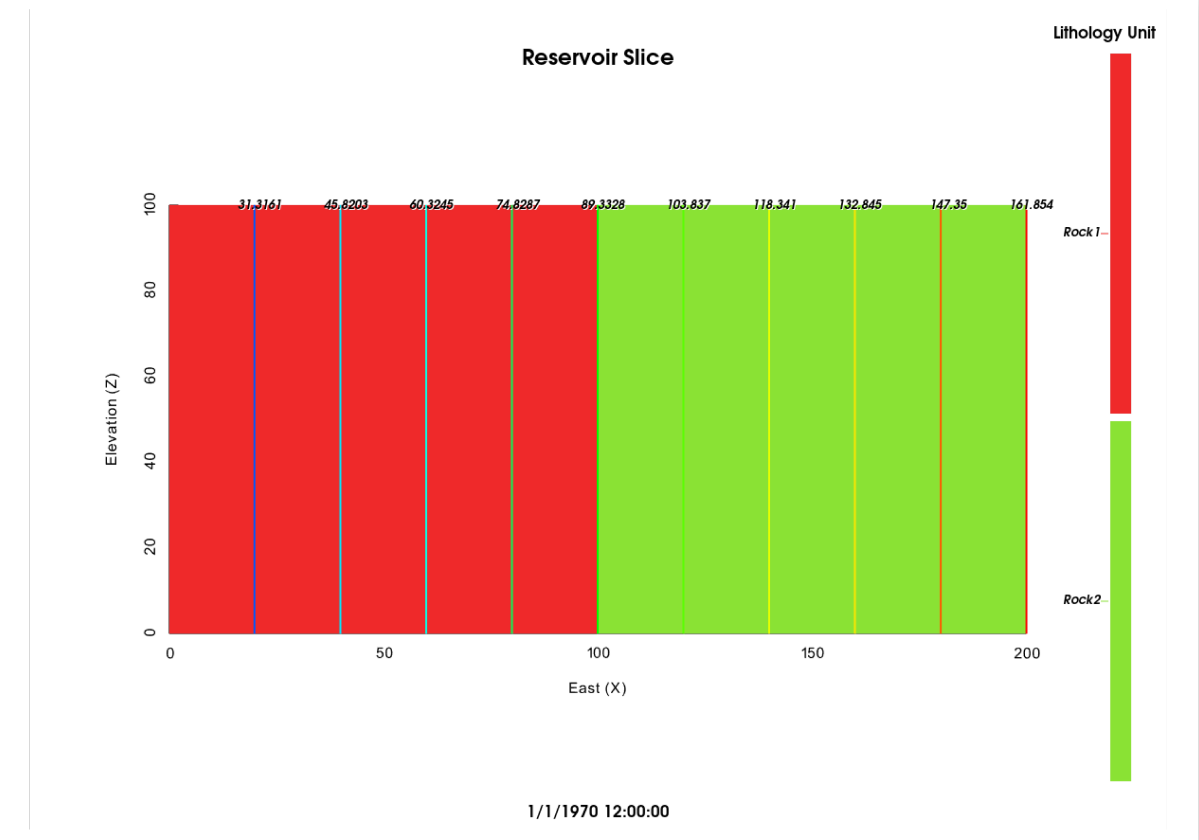
Above screenshot has the thin grey lines to the left and right.
---
### Author:  [@lassoan](https://discourse.vtk.org/u/lassoan)
#### Post date: [October 20, 2020, 1:38pm UTC](https://discourse.vtk.org/t/qvtkopenglnativewidget-render-artefact-when-printing/4441/3 "2020-10-20T13:38:33Z")
Do you have the artifact if you don’t enable anti-aliasing?
Does setting the background color or mode helps? (maybe what you see is the default dark background appearing due to interpolation)
---
### Author:  [@drpeterfranz](https://discourse.vtk.org/u/drpeterfranz)
#### Post date: [October 20, 2020, 7:31pm UTC](https://discourse.vtk.org/t/qvtkopenglnativewidget-render-artefact-when-printing/4441/4 "2020-10-20T19:31:38Z")
Hi @lassoan,
thanks for your suggestions.
I have tried
```
painter.setRenderHint(QPainter::Antialiasing, false);
painter.setRenderHint(QPainter::TextAntialiasing, false);
```
and
painter.SetBackground(Qt::white)
renderer-\>SetBackground(1,1,1)
None of the above makes a difference.
---
### Author:  [@lassoan](https://discourse.vtk.org/u/lassoan)
#### Post date: [October 20, 2020, 10:36pm UTC](https://discourse.vtk.org/t/qvtkopenglnativewidget-render-artefact-when-printing/4441/5 "2020-10-20T22:36:40Z")
I meant to change the QPainter background color or mode.
Sometimes correct behavior is only possible if the canvas size must be multiple of 2, 4, or 8. You can try to change the render window size and see if it helps.
---
### Author:  [@drpeterfranz](https://discourse.vtk.org/u/drpeterfranz)
#### Post date: [October 20, 2020, 10:45pm UTC](https://discourse.vtk.org/t/qvtkopenglnativewidget-render-artefact-when-printing/4441/6 "2020-10-20T22:45:05Z")
I changed the QPainter background (see above); what do you mean by mode?
The widget has a width of 1200 so it is divisible by 8.
---
### Author:  [@lassoan](https://discourse.vtk.org/u/lassoan)
#### Post date: [October 20, 2020, 11:00pm UTC](https://discourse.vtk.org/t/qvtkopenglnativewidget-render-artefact-when-printing/4441/7 "2020-10-20T23:00:34Z")
> [@drpeterfranz](#):
>
> I changed the QPainter background (see above); what do you mean by mode?
You can try adjusting `backgroundMode` and `compositionMode` properties.
There are also lots of parameters that you can specify for the [widget’s render method](https://doc.qt.io/qt-5/qwidget.html#render-1) - try all combinations and adjust the region size and position.
You may also try adding some more content using the painter and see if they can cover the artifacts or not (it can help determining where the root cause of the issue).
---
### Author:  [@drpeterfranz](https://discourse.vtk.org/u/drpeterfranz)
#### Post date: [October 21, 2020, 4:11am UTC](https://discourse.vtk.org/t/qvtkopenglnativewidget-render-artefact-when-printing/4441/8 "2020-10-21T04:11:19Z")
Thanks for the suggestions.
I tried all QPainter background and composition modes available; non of them make a difference. I’ll try tomorrow to add more content to see if that helps boiling down the issue.