# QVTKOpenGLWidget cannot be displayed with Remote Desktop xfce.
**URL:** https://discourse.vtk.org/t/qvtkopenglwidget-cannot-be-displayed-with-remote-desktop-xfce/8942
**Category:** Support
**Created:** [July 13, 2022, 5:24am UTC](https://discourse.vtk.org/t/qvtkopenglwidget-cannot-be-displayed-with-remote-desktop-xfce/8942 "2022-07-13T05:24:12Z")
**Posts on this page:** 2
**Page:** 1
### Author:  [@nnw](https://discourse.vtk.org/u/nnw)
#### Post date: [July 13, 2022, 5:24am UTC](https://discourse.vtk.org/t/qvtkopenglwidget-cannot-be-displayed-with-remote-desktop-xfce/8942/1 "2022-07-13T05:24:12Z")
Hello,
I have been trying to use QVTKOpenGLWidget with PCL in Jetson nano. It’s working fine in Jetson nano but I need to run the program with remote desktop in windows10. When I open Qt Creator in remote desktop(xfce), the Plugin Loader Messages window shows as follows.
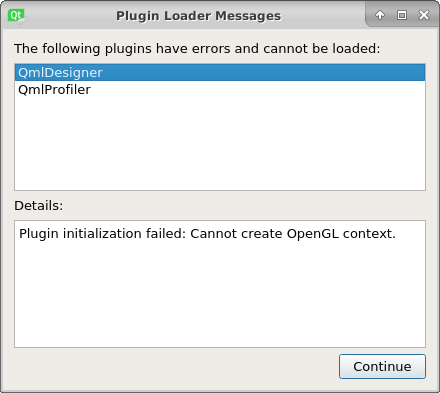
I also try to run my code but the program crashed with the following error messages.
**Starting ~/Codes/build-gui\_test-Desktop-Release/gui\_test…
QXcbIntegration: Cannot create platform OpenGL context, neither GLX nor EGL are enabled
QOpenGLWindow::beginPaint: Failed to create context
QOpenGLWindow::beginPaint: Failed to make context current
ERROR: In ~/Software/VTK-8.2.0/Rendering/OpenGL2/vtkOpenGLRenderWindow.cxx, line 741
vtkGenericOpenGLRenderWindow (0x5584affbf0): GLEW could not be initialized: Missing GL version**
**QOpenGLFunctions created with non-current context
The program has unexpectedly finished.
The process was ended forcefully.
~/Codes/build-gui\_test-Desktop-Release/gui\_test crashed.**
Is there any thing that I need to do in change for OpenGL in VTK installation or Qt ? ? As I’m a beginner, I lost the way after searching many topics on the internet.
---
### Author:  [@nnw](https://discourse.vtk.org/u/nnw)
#### Post date: [July 14, 2022, 6:08am UTC](https://discourse.vtk.org/t/qvtkopenglwidget-cannot-be-displayed-with-remote-desktop-xfce/8942/2 "2022-07-14T06:08:29Z")
I installed VirtualGL and TurboVNC for remote desktop and use TurboVNC viewer in my client PC(Windows 10).
I try to open qtcreator from the terminal with the following line.
**$ sudo /opt/VirtualGL/bin/vglrun qtcreator**
But it gives the same error.