# QVTKRenderWindowInteractor PySide2 Resize Issue
**URL:** https://discourse.vtk.org/t/qvtkrenderwindowinteractor-pyside2-resize-issue/13095
**Category:** Support
**Tags:** python
**Created:** [January 18, 2024, 11:08pm UTC](https://discourse.vtk.org/t/qvtkrenderwindowinteractor-pyside2-resize-issue/13095 "2024-01-18T23:08:00Z")
**Posts on this page:** 10
**Page:** 1
### Author:  [@theodorebaltis](https://discourse.vtk.org/u/theodorebaltis)
#### Post date: [January 18, 2024, 11:08pm UTC](https://discourse.vtk.org/t/qvtkrenderwindowinteractor-pyside2-resize-issue/13095/1 "2024-01-18T23:08:00Z")
I am trying to embed a QVTKRenderWindowInteractor in a QT app using PySide2 and VTK 9.0
I’ve done so successfully with PyQt5, but now with PySide2 the rendering area doesn’t update properly upon resizing.
Initial render and after resizing:
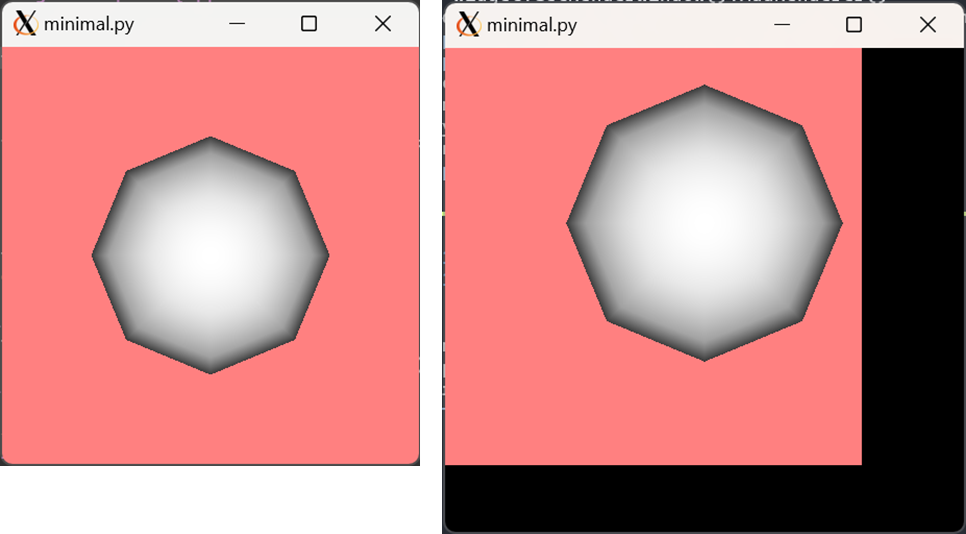
The sphere scales and translates to account for the new window size, but the actual rendering frame doesn’t update.
In a slightly more complex case I’ve tried capturing the resize event of the `QVTKRenderWindowInteractor` and injecting all kinds of update/render calls but to no avail.
Any ideas? I’m happy to provide more information a la `vtk.vtkRenderWindow.ReportCapabilities` or something similar.
A minimal (hopefully) reproducible example:
```python
#!/usr/bin/env python
# -*- coding: utf-8 -*-
#import PyQt5
#from PyQt5.QtWidgets import QApplication
import PySide2
from PySide2.QtWidgets import QApplication
import vtk
from vtk.qt.QVTKRenderWindowInteractor import QVTKRenderWindowInteractor
def add_sphere(ren):
# Create source
source = vtk.vtkSphereSource()
source.SetCenter(0, 0, 0)
source.SetRadius(5.0)
# Create a mapper
mapper = vtk.vtkPolyDataMapper()
mapper.SetInputConnection(source.GetOutputPort())
# Create an actor
actor = vtk.vtkActor()
actor.SetMapper(mapper)
# Add actor
ren.AddActor(actor)
ren.ResetCamera()
app = QApplication([])
widget = QVTKRenderWindowInteractor()
ren = vtk.vtkRenderer()
widget.GetRenderWindow().AddRenderer(ren)
widget.show()
widget.Initialize()
widget.Start()
add_sphere(ren)
ren.SetBackground([1.0, 0.5, 0.5])
app.exec_()
```
---
### Author:  [@jaswantp](https://discourse.vtk.org/u/jaswantp)
#### Post date: [January 19, 2024, 12:12am UTC](https://discourse.vtk.org/t/qvtkrenderwindowinteractor-pyside2-resize-issue/13095/2 "2024-01-19T00:12:43Z")
Are you using a hi-dpi screen? By that I mean to ask if you configured the display with a scaling factor \> 100% in the windows display settings.
---
### Author:  [@theodorebaltis](https://discourse.vtk.org/u/theodorebaltis)
#### Post date: [January 19, 2024, 3:23pm UTC](https://discourse.vtk.org/t/qvtkrenderwindowinteractor-pyside2-resize-issue/13095/3 "2024-01-19T15:23:13Z")
Indeed I am. My main monitor is 4K with a scale factor of 150%.
I changed the scale to 100% but still have the same issue.
And the issue also persists on my secondary monitor that is always at 100%.
I know there are various QT environment variables to handle scaling and hi-dpi displays, perhaps I should investigate them anyway.
---
### Author:  [@jaswantp](https://discourse.vtk.org/u/jaswantp)
#### Post date: [January 19, 2024, 3:26pm UTC](https://discourse.vtk.org/t/qvtkrenderwindowinteractor-pyside2-resize-issue/13095/4 "2024-01-19T15:26:51Z")
Can you try a more recent version of VTK? Try vtk 9.3.0. The X logo makes me think you’re running it throug WSL? VTK doesn’t really support such configurations, maybe WSL-gui thinks your display resolution is something else.
---
### Author:  [@theodorebaltis](https://discourse.vtk.org/u/theodorebaltis)
#### Post date: [January 19, 2024, 4:01pm UTC](https://discourse.vtk.org/t/qvtkrenderwindowinteractor-pyside2-resize-issue/13095/5 "2024-01-19T16:01:55Z")
I’m not running through WSL. I’m running off a Linux server and using a Xserver to display on my local Windows client.
But indeed I’ll try with the latest VTK and let you know what happens. Thanks
---
### Author:  [@theodorebaltis](https://discourse.vtk.org/u/theodorebaltis)
#### Post date: [January 19, 2024, 4:25pm UTC](https://discourse.vtk.org/t/qvtkrenderwindowinteractor-pyside2-resize-issue/13095/6 "2024-01-19T16:25:05Z")
Oh and I should add that this issue doesn’t exist when run directly on my Windows machine. Same versions of all packages.
---
### Author:  [@theodorebaltis](https://discourse.vtk.org/u/theodorebaltis)
#### Post date: [January 19, 2024, 5:04pm UTC](https://discourse.vtk.org/t/qvtkrenderwindowinteractor-pyside2-resize-issue/13095/7 "2024-01-19T17:04:00Z")
Update: Same issue with VTK 9.2 and 9.3
---
### Author:  [@theodorebaltis](https://discourse.vtk.org/u/theodorebaltis)
#### Post date: [January 19, 2024, 5:30pm UTC](https://discourse.vtk.org/t/qvtkrenderwindowinteractor-pyside2-resize-issue/13095/8 "2024-01-19T17:30:24Z")
I’ve discovered that the issue is actually independent of QT.
So using PyQt5 actually _solves_ the issue.
Maybe the question is: What is PyQt5 doing differently from PySide2? Which I understand is not necessarily for this forum then.
This pure-VTK example has the exact same troublesome behavior:
```python
#!/usr/bin/env python
# -*- coding: utf-8 -*-
import vtk
def add_sphere(ren):
# Create source
source = vtk.vtkSphereSource()
source.SetCenter(0, 0, 0)
source.SetRadius(5.0)
# Create a mapper
mapper = vtk.vtkPolyDataMapper()
mapper.SetInputConnection(source.GetOutputPort())
# Create an actor
actor = vtk.vtkActor()
actor.SetMapper(mapper)
# Add actor
ren.AddActor(actor)
ren.ResetCamera()
ren = vtk.vtkRenderer()
renwin = vtk.vtkRenderWindow()
renwin.AddRenderer(ren)
iren = vtk.vtkRenderWindowInteractor()
iren.SetRenderWindow(renwin)
add_sphere(ren)
ren.SetBackground([1.0, 0.5, 0.5])
iren.Initialize()
renwin.Render()
iren.Start()
```
---
### Author:  [@theodorebaltis](https://discourse.vtk.org/u/theodorebaltis)
#### Post date: [January 19, 2024, 10:08pm UTC](https://discourse.vtk.org/t/qvtkrenderwindowinteractor-pyside2-resize-issue/13095/9 "2024-01-19T22:08:01Z")
After some experimenting I’ve found that in my actual project with a proper `PySide2.QtWidgets.QMainWindow`, if I override the `resizeEvent` method like this then the issue is resolved.
```python
def resizeEvent(self, *args):
picker = vtk.vtkPropPicker()
picker.Pick(0, 0, 0, self.ren)
super().resizeEvent(*args)
```
where `self.ren` is a reference to a `vtk.vtkRenderer` instance.
Any idea why the `Pick` method forces a proper redraw?
I looked through the source code for `vtk.vtkPropPicker` but didn’t see anything obvious.
---
### Author:  [@jaswantp](https://discourse.vtk.org/u/jaswantp)
#### Post date: [January 20, 2024, 3:10am UTC](https://discourse.vtk.org/t/qvtkrenderwindowinteractor-pyside2-resize-issue/13095/10 "2024-01-20T03:10:36Z")
Hmm that’s strange. The pick method eventually triggers a framebuffer capture to read pixels. I guess this had an effect of resizing the framebuffer to the actual size? It could be a bug in pyside2 that occurs in remote X sessions.