### Author:  [@Edoardo\_Pasca](https://discourse.vtk.org/u/Edoardo_Pasca)
#### Post date: [August 9, 2019, 11:01am UTC](https://discourse.vtk.org/t/qvtkwidget-render-window-is-outside-main-qt-app-window/1539/1 "2019-08-09T11:01:34Z")
Hi all,
I put together a VTK viewer in Python. I also extended QVTKWidget to host the viewer in a Qt app. It all looks and works fine with Qt 5.9.7 and VTK 8.1.2 on windows (in a conda environment).
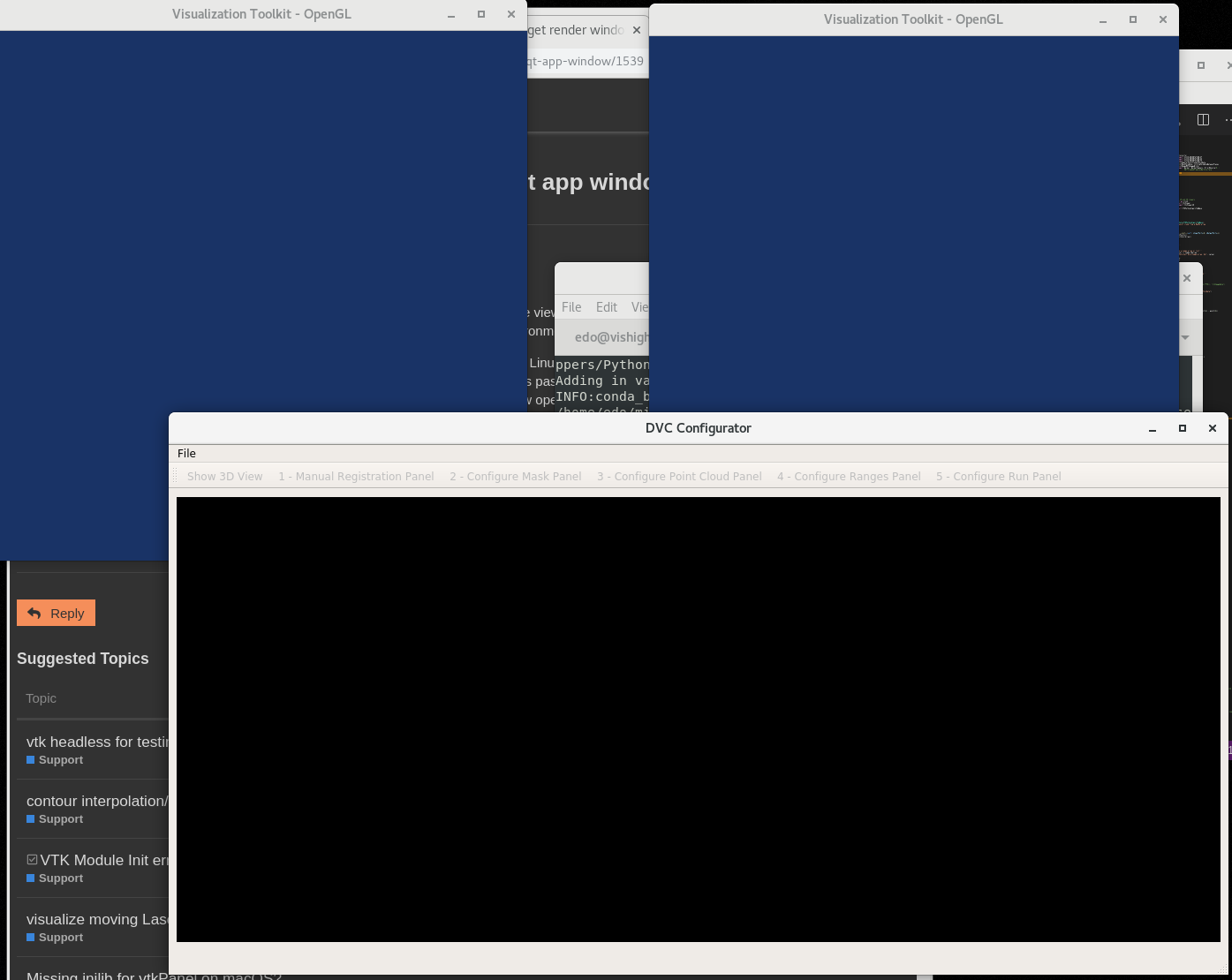
If I set up the “same” (Qt, Python, VTK versions are the same) environment on Linux, the QVTKWidget renders on its own window outside the Qt application so the interaction which is passed from Qt to VTK happens on the Qt window, while the display happens on the OpenGL2 window opened by VTK.
I have seen this behaviour before and I believe the fix I found was to change the VTK version. Is that something that you recognise?
Edo
---
### Author:  [@Edoardo\_Pasca](https://discourse.vtk.org/u/Edoardo_Pasca)
#### Post date: [August 9, 2019, 1:30pm UTC](https://discourse.vtk.org/t/qvtkwidget-render-window-is-outside-main-qt-app-window/1539/2 "2019-08-09T13:30:22Z")
Here just a screenshot of what happens, you can see 2 OpenGL windows separated from the main window (DVC\_Configurator)
Edo
---
### Author:  [@Edoardo\_Pasca](https://discourse.vtk.org/u/Edoardo_Pasca)
#### Post date: [August 9, 2019, 2:46pm UTC](https://discourse.vtk.org/t/qvtkwidget-render-window-is-outside-main-qt-app-window/1539/3 "2019-08-09T14:46:01Z")
This old thread seems to be related
>
---
### Author:  [@Edoardo\_Pasca](https://discourse.vtk.org/u/Edoardo_Pasca)
#### Post date: [August 12, 2019, 11:11am UTC](https://discourse.vtk.org/t/qvtkwidget-render-window-is-outside-main-qt-app-window/1539/4 "2019-08-12T11:11:50Z")
Hi
I tracked down the problem to these lines:
I have created a `QGLWidget` and inside it a `vtkRenderWindow`. To instruct the latter to use a pre-existing window one uses
```
self._RenderWindow = vtk.vtkRenderWindow()
WId = self.winId()
self._RenderWindow.SetWindowInfo(str(int(WId)))
```
Now, it seems in Windows the third line works as expected, i.e. if I comment it out the `vtkRenderWindow` opens its own window. In Linux the third line doesn’t seem to have effect.
Any ideas?
Edo
---
### Author:  [@dgobbi](https://discourse.vtk.org/u/dgobbi)
#### Post date: [August 12, 2019, 5:32pm UTC](https://discourse.vtk.org/t/qvtkwidget-render-window-is-outside-main-qt-app-window/1539/5 "2019-08-12T17:32:40Z")
I’m a bit confused by your question… you are asking about QVTKWidget (which is a C++ class), but that code looks like it came from QVTKRenderWindowInteractor (which is a Python class, totally unrelated to the C++ QVTKWidget).
Are you using your own, custom class to connect VTK and Qt? If so, then you can try adapting the following code from QVTKRenderWindowInteractor.py:
```
WId = self.winId()
# Python2
if type(WId). __name__ == 'PyCObject':
from ctypes import pythonapi, c_void_p, py_object
pythonapi.PyCObject_AsVoidPtr.restype = c_void_p
pythonapi.PyCObject_AsVoidPtr.argtypes = [py_object]
WId = pythonapi.PyCObject_AsVoidPtr(WId)
# Python3
elif type(WId). __name__ == 'PyCapsule':
from ctypes import pythonapi, c_void_p, py_object, c_char_p
pythonapi.PyCapsule_GetName.restype = c_char_p
pythonapi.PyCapsule_GetName.argtypes = [py_object]
name = pythonapi.PyCapsule_GetName(WId)
pythonapi.PyCapsule_GetPointer.restype = c_void_p
pythonapi.PyCapsule_GetPointer.argtypes = [py_object, c_char_p]
WId = pythonapi.PyCapsule_GetPointer(WId, name)
self._RenderWindow.SetWindowInfo(str(int(WId)))
```
---
### Author:  [@Edoardo\_Pasca](https://discourse.vtk.org/u/Edoardo_Pasca)
#### Post date: [August 13, 2019, 7:55am UTC](https://discourse.vtk.org/t/qvtkwidget-render-window-is-outside-main-qt-app-window/1539/6 "2019-08-13T07:55:24Z")
Hi David,
that’s why I need help!
The confusion is because (apparently) I accidentally created a Python class with the same name of an unrelated C++ class. At any rate the code is [here](https://github.com/vais-ral/CILViewer/blob/master/Wrappers/Python/ccpi/viewer/QVTKWidget.py) and it is a class I modified from some code I found on internet (I don’t exactly remember where) to pass the interaction from Qt to VTK.
It did its job nicely on Windows, but as I tried to use it on Linux the VTK render window would pop up in a different window, i.e. making it unusable.
The code you posted is exactly in my class. But the `SetWindowInfo` does not seem to work on Linux.
However I think this is an old “hack” and I should instead use the QVTKRenderWindowInteractor to pass the interaction from Qt to VTK. That’s what I did and my new code works on Linux and Windows.
Thanks
Edo
---
### Author:  [@Edoardo\_Pasca](https://discourse.vtk.org/u/Edoardo_Pasca)
#### Post date: [August 13, 2019, 8:38am UTC](https://discourse.vtk.org/t/qvtkwidget-render-window-is-outside-main-qt-app-window/1539/7 "2019-08-13T08:38:42Z")
Hi David,
I now see that my class [`QVTKWidget`](https://github.com/vais-ral/CILViewer/blob/master/Wrappers/Python/ccpi/viewer/QVTKWidget.py) in facts is a modification of the [`QVTKRenderWindowInteractor.py`](https://gitlab.kitware.com/vtk/vtk/blob/741fffbf6490c34228dfe437f330d854b2494adc/Wrapping/Python/vtkmodules/qt/QVTKRenderWindowInteractor.py) where I added a [method](https://github.com/vais-ral/CILViewer/blob/master/Wrappers/Python/ccpi/viewer/QVTKWidget.py#L423) to get also the `alt` key modifier and used it in stead of the [one](https://gitlab.kitware.com/vtk/vtk/blob/741fffbf6490c34228dfe437f330d854b2494adc/Wrapping/Python/vtkmodules/qt/QVTKRenderWindowInteractor.py#L364) to get only `shift` and `ctrl`.
Now, the plot thickens. The same `self._RenderWindow.SetWindowInfo(str(int(WId)))` does not work in my case.
I believe I’ll change my class to inherit from VTK’s and then add the `alt` event modifier to it.
Edo
---
### Author:  [@dgobbi](https://discourse.vtk.org/u/dgobbi)
#### Post date: [August 13, 2019, 12:40pm UTC](https://discourse.vtk.org/t/qvtkwidget-render-window-is-outside-main-qt-app-window/1539/8 "2019-08-13T12:40:58Z")
Your class uses the native vtkRenderWindowInteractor:
```
self._Iren = vtk.vtkRenderWindowInteractor()
```
but the QVTKRenderWindowInteractor uses the ‘generic’ interactor:
```
self._Iren = vtkGenericRenderWindowInteractor()
```
The difference is that the ‘native’ interactor gets events directly from the windowing system, but the ‘generic’ interactor gets all of its events from the Qt widget. The ‘generic’ interactor is the one that plays nice with Qt.
---
### Author:  [@Edoardo\_Pasca](https://discourse.vtk.org/u/Edoardo_Pasca)
#### Post date: [August 13, 2019, 2:47pm UTC](https://discourse.vtk.org/t/qvtkwidget-render-window-is-outside-main-qt-app-window/1539/9 "2019-08-13T14:47:14Z")
Thanks!
Edo
---
### Author:  [@Edoardo\_Pasca](https://discourse.vtk.org/u/Edoardo_Pasca)
#### Post date: [August 14, 2019, 8:02am UTC](https://discourse.vtk.org/t/qvtkwidget-render-window-is-outside-main-qt-app-window/1539/10 "2019-08-14T08:02:21Z")
Thanks David.
I realised that the best solution was to extend the `QVTKRenderWindowInteractor` to get the alt modifier as well. BTW why don’t you get it as well by default?
In this way I will be keeping my code up to date with VTK code base rather than using a (random) version I found online.
[Here](https://github.com/vais-ral/CILViewer/blob/fe0a4503989b354a8a60d76dec7600129fc0128e/Wrappers/Python/ccpi/viewer/QCILRenderWindowInteractor.py) my solution.
Thanks
Edo
---
### Author:  [@dgobbi](https://discourse.vtk.org/u/dgobbi)
#### Post date: [August 14, 2019, 12:31pm UTC](https://discourse.vtk.org/t/qvtkwidget-render-window-is-outside-main-qt-app-window/1539/11 "2019-08-14T12:31:53Z")
> [@Edoardo\_Pasca](#):
>
> BTW why don’t you get it as well by default?
I don’t use this class, myself. But as you can see from the code comments, lots of people have contributed to it over the years. [Info on submitting code to VTK is here.](https://gitlab.kitware.com/vtk/vtk/tree/master/Documentation/dev/git)