# Random horizontal lines when displaying image
**URL:** https://discourse.vtk.org/t/random-horizontal-lines-when-displaying-image/8956
**Category:** Support
**Created:** [July 15, 2022, 12:59pm UTC](https://discourse.vtk.org/t/random-horizontal-lines-when-displaying-image/8956 "2022-07-15T12:59:17Z")
**Posts on this page:** 4
**Page:** 1
### Author:  [@Jesper\_Henriksen](https://discourse.vtk.org/u/Jesper_Henriksen)
#### Post date: [July 15, 2022, 12:59pm UTC](https://discourse.vtk.org/t/random-horizontal-lines-when-displaying-image/8956/1 "2022-07-15T12:59:17Z")
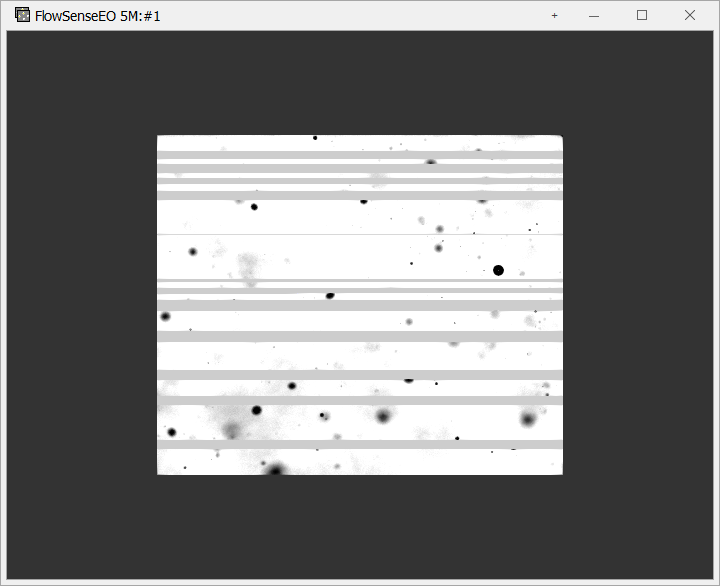
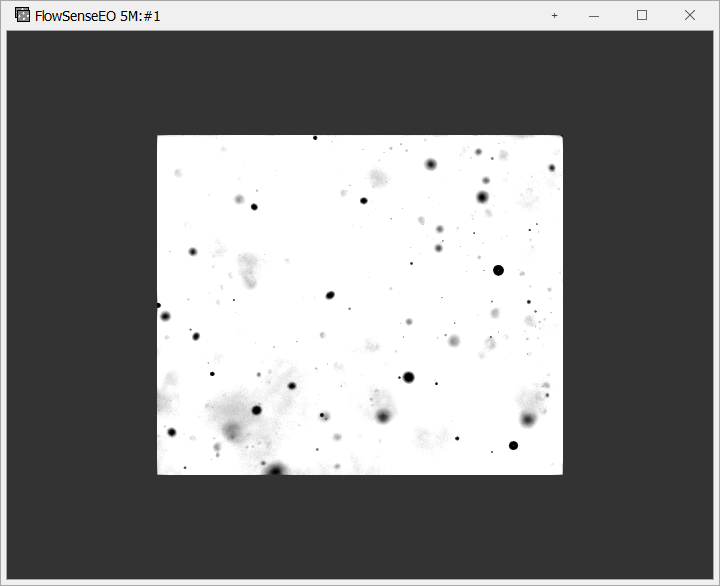
I get a strange behavior when displaying an image in vtk.
At random the image displays horizontal lines when being displayed.
Has anybody encountered this bug before.
The code (slightly stripped) looks like this:
// CWndVTK\* m\_pWndVTK; //Initialized elswhere
vtkSmartPointer table = vtkSmartPointer::New();
table-\>SetRange(0, 255); // image intensity range
table-\>SetValueRange(0.0, 1.0); // from black to white
table-\>SetSaturationRange(0.0, 0.0); // no color saturation
table-\>SetRampToLinear();
table-\>Build();
vtkSmartPointer m\_imgActor\_0 = vtkSmartPointer::New();
vtkSmartPointer imgImport\_0 = vtkSmartPointer::New();
vtkSmartPointer color\_0 = vtkSmartPointer::New();
Size imageSize = Size(m\_image\_width, m\_image\_height);
void\* imageBuffer\_0 = malloc(m\_image\_width \* m\_image\_height \* sizeof(unsigned short));
imgImport\_0-\>SetDataScalarTypeToUnsignedShort();
image\_data\_size = m\_image\_width \* m\_image\_height \* sizeof(unsigned short);
imgImport\_0-\>CopyImportVoidPointer( imageBuffer\_0, image\_data\_size );
imgImport\_0-\>SetWholeExtent(0, m\_image\_width - 1, 0, m\_image\_height - 1, 0, 0);
imgImport\_0-\>SetDataExtentToWholeExtent();
imgImport\_0-\>UpdateWholeExtent();
imgImport\_0-\>Update();
color\_0-\>SetLookupTable(table);
color\_0-\>SetInputConnection (imgImport\_0-\>GetOutputPort());
color\_0-\>Update();
m\_imgActor\_0-\>GetMapper()-\>SetInputConnection(imgImport\_0-\>GetOutputPort());
m\_imgActor\_0-\>GetMapper()-\>SetInputConnection(color\_0-\>GetOutputPort());
// Get data to display transform
CoordinateSystem^ cs = m\_pWndVTK-\>displayTransform-\>ConvertFrom(dsImgMap-\>CoordinateSystem);
double\* p = &(ForwardAffineMatrix);
// Move plane one hundredth of a pixel back, such that 3d objects in the same plane are not clipped by the image
p[11] -= Math::Abs(p[0]) / 100;
// Apply transform
vtkSmartPointer imageGridToDisplayTransform = vtkSmartPointer::New();
imageGridToDisplayTransform-\>SetMatrix(p);
m\_imgActor\_0-\>SetUserTransform(imageGridToDisplayTransform);
m\_imgActor\_0-\>SetInterpolate(m\_info-\>useInterpolation);
m\_imgActor\_0-\>Update();
m\_imgActor\_0-\>Render(m\_pWndVTK-\>GetRenderWindow()-\>GetRenderers()-\>GetFirstRenderer());
vtkSmartPointer colorTransferFunction = vtkSmartPointer::New();
for (int i = 0; i \< paletteColors-\>Length; i++)
{
rgba[0] = paletteColors[i].R / 255.0f;
rgba[1] = paletteColors[i].G / 255.0f;
rgba[2] = paletteColors[i].B / 255.0f;
```
colorTransferFunction->AddRGBPoint(lookupHandler->GetLookupTableValueValue(i), rgba[0], rgba[1], rgba[2]);
```
}
color\_0-\>SetLookupTable(colorTransferFunction);
m\_pWndVTK-\>GetRenderWindow()-\>Render();
---
### Author:  [@dgobbi](https://discourse.vtk.org/u/dgobbi)
#### Post date: [July 15, 2022, 2:12pm UTC](https://discourse.vtk.org/t/random-horizontal-lines-when-displaying-image/8956/2 "2022-07-15T14:12:12Z")
Please use [GitLab Flavored Markdown (GLFM) | GitLab](https://docs.gitlab.com/ee/user/markdown.html#colored-code-and-syntax-highlighting) for code, otherwise it isn’t displayed properly (and some parts aren’t displayed at all, such as template parameter lists).
---
### Author:  [@lassoan](https://discourse.vtk.org/u/lassoan)
#### Post date: [July 16, 2022, 9:10am UTC](https://discourse.vtk.org/t/random-horizontal-lines-when-displaying-image/8956/3 "2022-07-16T09:10:31Z")
I see that you use `malloc`, which indicates that some error-prone C-style manual memory management is being used. Memory corruption (you don’t properly allocate or free memory areas) can lead to random lines to appear in images, so overall it is a quite likely root cause.
A slightly stripped code is somewhat informative but to be able to help effectively, we would need a complete example that reproduces the issue. Python is preferred because we can then simply copy-paste the example into a Python console and we don’t need to spend time with setting up a build.
---
### Author:  [@Paulo\_Carvalho](https://discourse.vtk.org/u/Paulo_Carvalho)
#### Post date: [July 18, 2022, 10:01pm UTC](https://discourse.vtk.org/t/random-horizontal-lines-when-displaying-image/8956/4 "2022-07-18T22:01:05Z")
Hi, Jesper,
Why do you seem to call `m_imgActor_0->GetMapper()->SetInputConnection()` twice in tandem passing two different objects?
Also, please, do as suggested above and put your code after a ```cpp and before a ``` to make it more readabale and with increased probability of getting help.
regards,
Paulo