# read STL begginer
**URL:** https://discourse.vtk.org/t/read-stl-begginer/9569
**Category:** Support
**Created:** [October 11, 2022, 2:52pm UTC](https://discourse.vtk.org/t/read-stl-begginer/9569 "2022-10-11T14:52:28Z")
**Posts on this page:** 7
**Page:** 1
### Author:  [@Minigandi](https://discourse.vtk.org/u/Minigandi)
#### Post date: [October 11, 2022, 2:52pm UTC](https://discourse.vtk.org/t/read-stl-begginer/9569/1 "2022-10-11T14:52:28Z")
Hey,
I’m new with VTK and I compiled all the basics tutorial without any problems.
But I wanted to try to read a .stl file with the example in the VTK website [https://kitware.github.io/vtk-examples/site/Cxx/IO/ReadSTL/](https://kitware.github.io/vtk-examples/site/Cxx/IO/ReadSTL/)
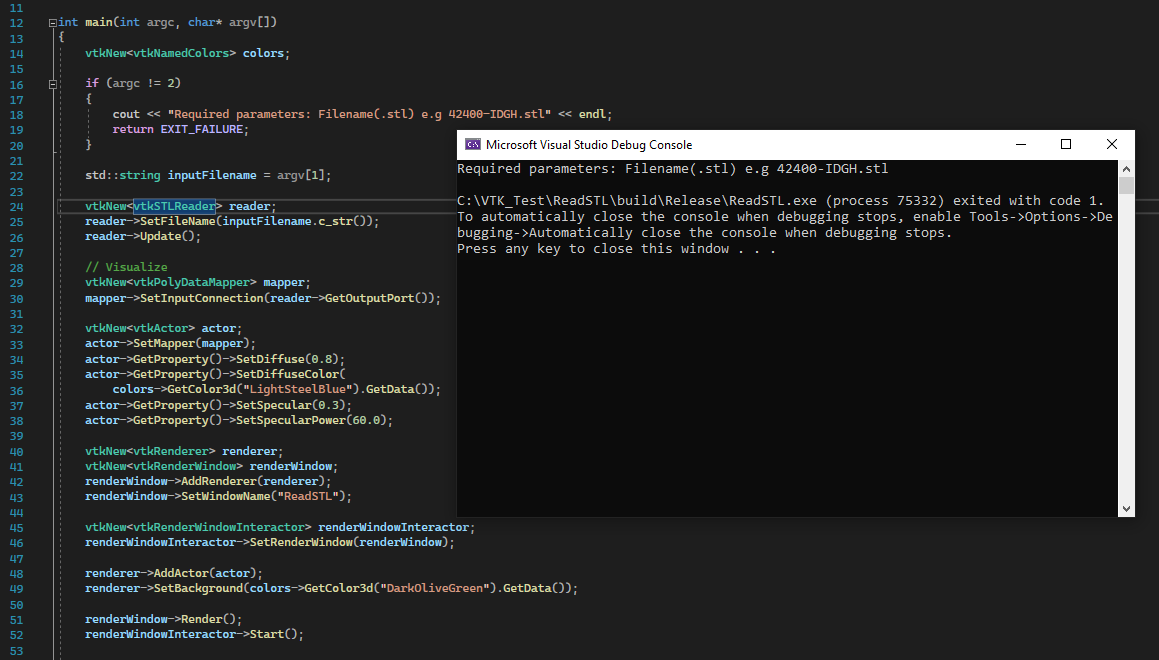
And as you can see on the screenshot, I don’t really know where to put the .stl file to be read…
I’m stuck trying to run this example, so if anyone can explain me how it’s working, it will be very usefull.
Thanks for considering my problem,
Clement Gandillon
---
### Author:  [@mwestphal](https://discourse.vtk.org/u/mwestphal)
#### Post date: [October 12, 2022, 3:00am UTC](https://discourse.vtk.org/t/read-stl-begginer/9569/2 "2022-10-12T03:00:10Z")
Hi @Minigandi ,
You are supposed to put the name as the argument of the command line, do you run from a terminal or from visual studio ?
A simple work around is to simply hard code your path line 22.
best,
---
### Author:  [@Fernan33](https://discourse.vtk.org/u/Fernan33)
#### Post date: [November 28, 2022, 5:43am UTC](https://discourse.vtk.org/t/read-stl-begginer/9569/3 "2022-11-28T05:43:36Z")
Hi @[mwestphal](https://discourse.vtk.org/u/mwestphal),
I am also new with c++ and I don’t know how to do it either, I have tried to enter the path by modifying line 22 in multiple ways and it doesn’t work. I’ve put a “cube.stl” file in the build folder, would you mind showing us how it’s done?
I’m working with visual studio.
Thank you,
---
### Author:  [@mwestphal](https://discourse.vtk.org/u/mwestphal)
#### Post date: [November 28, 2022, 7:52am UTC](https://discourse.vtk.org/t/read-stl-begginer/9569/4 "2022-11-28T07:52:28Z")
Just put a hard path line 22.
eg: `C:\path\to\your\cube.stl`
Best,
---
### Author:  [@Fernan33](https://discourse.vtk.org/u/Fernan33)
#### Post date: [November 28, 2022, 5:34pm UTC](https://discourse.vtk.org/t/read-stl-begginer/9569/5 "2022-11-28T17:34:56Z")
@[mwestphal](https://discourse.vtk.org/u/mwestphal)
I’m really sorry, but I really want to learn. I have tried in a thousand ways but I can’t find how to import .stl files.
std::string inputFilename = “C:\Users\HUAWEI\Desktop\cubo.stl”;
Best,
```auto
#include
#include
#include
#include
#include
#include
#include
#include
#include
#include
int main(int argc, char* argv[])
{
vtkNew colors;
if (argc != 2)
{
cout << "Required parameters: Filename(.stl) e.g 42400-IDGH.stl" << endl;
return EXIT_FAILURE;
}
std::string inputFilename = "C:/Users/HUAWEI/Desktop/cubo.stl";
vtkNew reader;
reader->SetFileName(inputFilename.c_str());
reader->Update();
// Visualize
vtkNew mapper;
mapper->SetInputConnection(reader->GetOutputPort());
vtkNew actor;
actor->SetMapper(mapper);
actor->GetProperty()->SetDiffuse(0.8);
actor->GetProperty()->SetDiffuseColor(
colors->GetColor3d("LightSteelBlue").GetData());
actor->GetProperty()->SetSpecular(0.3);
actor->GetProperty()->SetSpecularPower(60.0);
vtkNew renderer;
vtkNew renderWindow;
renderWindow->AddRenderer(renderer);
renderWindow->SetWindowName("ReadSTL");
vtkNew renderWindowInteractor;
renderWindowInteractor->SetRenderWindow(renderWindow);
renderer->AddActor(actor);
renderer->SetBackground(colors->GetColor3d("DarkOliveGreen").GetData());
renderWindow->Render();
renderWindowInteractor->Start();
return EXIT_SUCCESS;
}
```
---
### Author:  [@Fernan33](https://discourse.vtk.org/u/Fernan33)
#### Post date: [November 28, 2022, 5:37pm UTC](https://discourse.vtk.org/t/read-stl-begginer/9569/6 "2022-11-28T17:37:32Z")
@ [Minigandi](https://discourse.vtk.org/u/Minigandi)
Hi, Could you show me how you solved the problem?
Thank you.
---
### Author:  [@mwestphal](https://discourse.vtk.org/u/mwestphal)
#### Post date: [November 28, 2022, 5:58pm UTC](https://discourse.vtk.org/t/read-stl-begginer/9569/7 "2022-11-28T17:58:52Z")
```auto
#include
#include
#include
#include
#include
#include
#include
#include
#include
#include
int main(int argc, char* argv[])
{
vtkNew colors;
std::string inputFilename = "C:\Users\HUAWEI\Desktop\cubo.stl";
vtkNew reader;
reader->SetFileName(inputFilename.c_str());
reader->Update();
// Visualize
vtkNew mapper;
mapper->SetInputConnection(reader->GetOutputPort());
vtkNew actor;
actor->SetMapper(mapper);
actor->GetProperty()->SetDiffuse(0.8);
actor->GetProperty()->SetDiffuseColor(
colors->GetColor3d("LightSteelBlue").GetData());
actor->GetProperty()->SetSpecular(0.3);
actor->GetProperty()->SetSpecularPower(60.0);
vtkNew renderer;
vtkNew renderWindow;
renderWindow->AddRenderer(renderer);
renderWindow->SetWindowName("ReadSTL");
vtkNew renderWindowInteractor;
renderWindowInteractor->SetRenderWindow(renderWindow);
renderer->AddActor(actor);
renderer->SetBackground(colors->GetColor3d("DarkOliveGreen").GetData());
renderWindow->Render();
renderWindowInteractor->Start();
return EXIT_SUCCESS;
}
```
Should work.