# Reading PLY file with color
**URL:** https://discourse.vtk.org/t/reading-ply-file-with-color/5538
**Category:** Support
**Created:** [April 12, 2021, 3:08pm UTC](https://discourse.vtk.org/t/reading-ply-file-with-color/5538 "2021-04-12T15:08:33Z")
**Posts on this page:** 12
**Page:** 1
### Author:  [@csad6517](https://discourse.vtk.org/u/csad6517)
#### Post date: [April 12, 2021, 3:08pm UTC](https://discourse.vtk.org/t/reading-ply-file-with-color/5538/1 "2021-04-12T15:08:33Z")
I have a PLY file (exported from Solidworks incl. vertex colors), which I want to visualize using vtk. The header information of the file shows that it contains some color information:
´
ply
format binary\_little\_endian 1.0
comment SOLIDWORKS generated,length unit = Millimeter
element vertex 8927
property float x
property float y
property float z
element face 17436
property uchar red
property uchar green
property uchar blue
property uchar alpha
property list uchar int vertex\_indices
end\_header
I read the file using vtkPLYReader, but somehow I do not see different colors on the model. The whole model is represented as white. If I open the file in e.g. ParaView or MeshLab, the colors are there.
```
dataPath = 'model.PLY'
reader = vtk.vtkPLYReader()
reader.SetFileName(dataPath)
polyDataMapper = vtk.vtkPolyDataMapper()
polyDataMapper.SetInputConnection(reader.GetOutputPort())
polyDataMapper.ScalarVisibilityOff()
polyDataMapper.Update()
actor = vtk.vtkActor()
actor.SetMapper(polyDataMapper)
actor.GetProperty().SetOpacity(1.0)
actor.Modified()
renderer.AddActor(actor)
```
How could I visualize it with colors?
---
### Author:  [@Paulo\_Carvalho](https://discourse.vtk.org/u/Paulo_Carvalho)
#### Post date: [April 14, 2021, 2:32pm UTC](https://discourse.vtk.org/t/reading-ply-file-with-color/5538/2 "2021-04-14T14:32:31Z")
Hi, friend,
Why did you disable rendering of scalar fields?
cheers,
PC
---
### Author:  [@Sebastien\_Jourdain](https://discourse.vtk.org/u/Sebastien_Jourdain)
#### Post date: [April 14, 2021, 3:37pm UTC](https://discourse.vtk.org/t/reading-ply-file-with-color/5538/3 "2021-04-14T15:37:50Z")
[This is the ColorMode you want to use](https://github.com/Kitware/vtk-js/blob/master/Sources/Rendering/Core/Mapper/Constants.js#L4).
---
### Author:  [@csad6517](https://discourse.vtk.org/u/csad6517)
#### Post date: [April 14, 2021, 5:37pm UTC](https://discourse.vtk.org/t/reading-ply-file-with-color/5538/4 "2021-04-14T17:37:58Z")
None of the color mode in mapper shows the colors on the model.
---
### Author:  [@csad6517](https://discourse.vtk.org/u/csad6517)
#### Post date: [April 14, 2021, 5:38pm UTC](https://discourse.vtk.org/t/reading-ply-file-with-color/5538/5 "2021-04-14T17:38:54Z")
Unfortunately there is no difference between on or off for the representation.
---
### Author:  [@Joachim\_P](https://discourse.vtk.org/u/Joachim_P)
#### Post date: [April 14, 2021, 9:34pm UTC](https://discourse.vtk.org/t/reading-ply-file-with-color/5538/6 "2021-04-14T21:34:07Z")
Can you share one file so we can check what is going on here?
---
### Author:  [@csad6517](https://discourse.vtk.org/u/csad6517)
#### Post date: [April 15, 2021, 12:56pm UTC](https://discourse.vtk.org/t/reading-ply-file-with-color/5538/7 "2021-04-15T12:56:55Z")
Please see a sample file [testModel.PLY](https://discourse.vtk.org/uploads/short-url/lzbhJ4dKQTxbsSypGYUsMVzwIBx.PLY) (48.8 KB). As mentioned above, I can see all colors (yellow and black), if I open it via ParaView or MeshLab
Thank you!
---
### Author:  [@Sebastien\_Jourdain](https://discourse.vtk.org/u/Sebastien_Jourdain)
#### Post date: [April 15, 2021, 5:30pm UTC](https://discourse.vtk.org/t/reading-ply-file-with-color/5538/8 "2021-04-15T17:30:38Z")
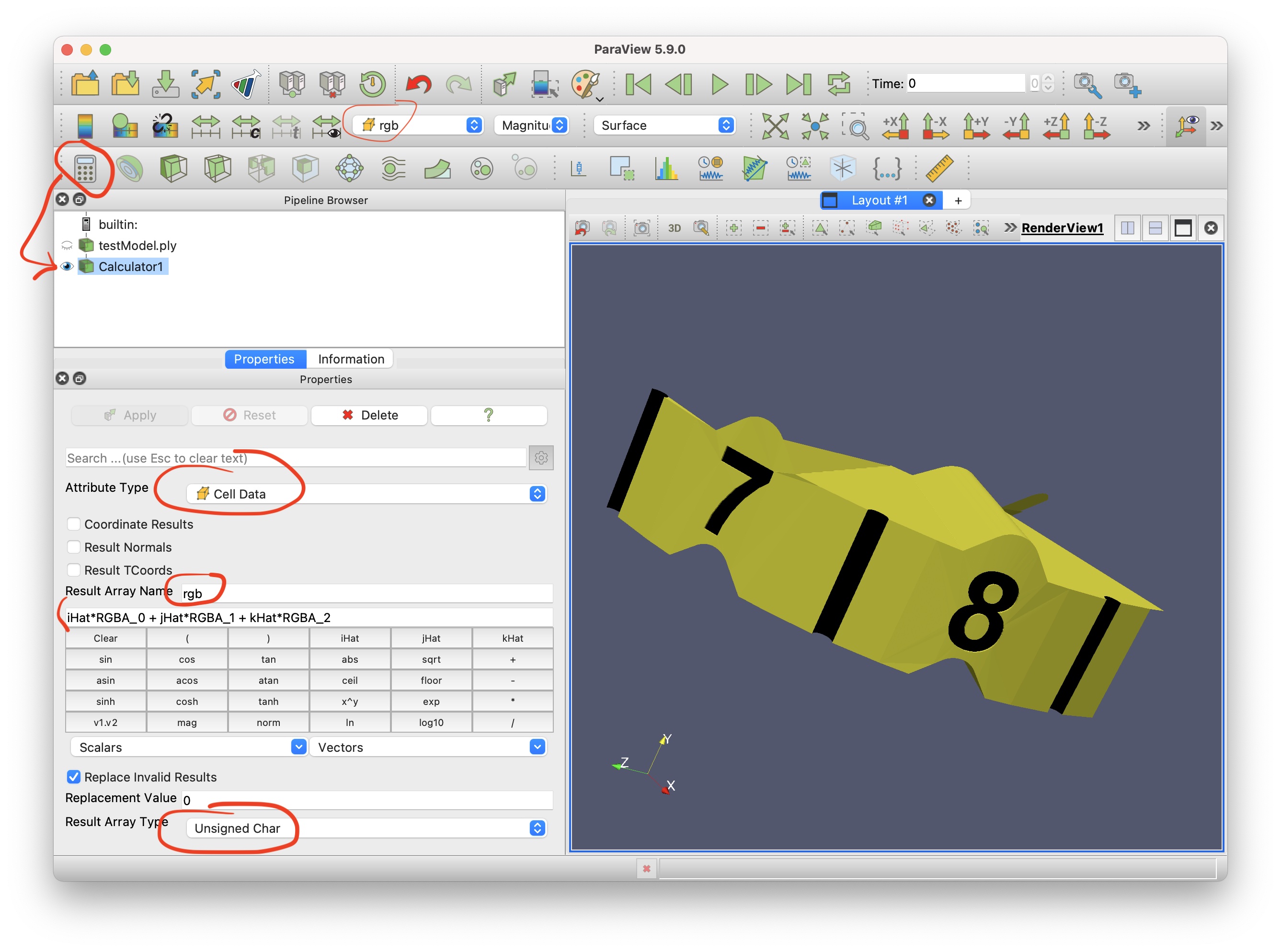
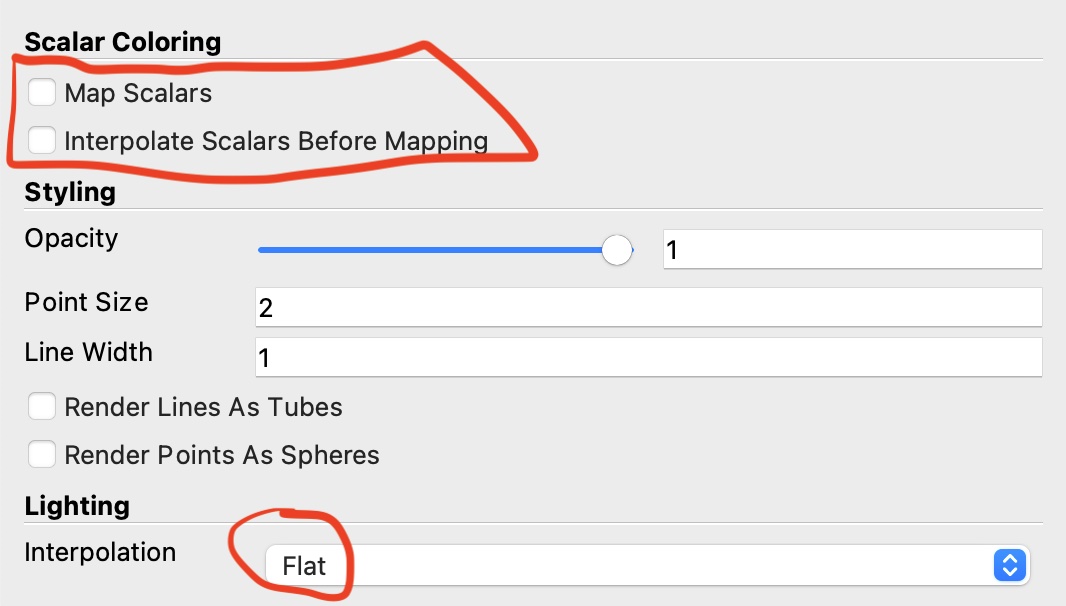
In PV I had to remove the 4th component otherwise it would be all transparent when I disable the “Map Scalars”
---
### Author:  [@csad6517](https://discourse.vtk.org/u/csad6517)
#### Post date: [April 15, 2021, 6:41pm UTC](https://discourse.vtk.org/t/reading-ply-file-with-color/5538/9 "2021-04-15T18:41:14Z")
Sorry what do you mean with PV exactly? The file? What is the 4th component?
---
### Author:  [@Sebastien\_Jourdain](https://discourse.vtk.org/u/Sebastien_Jourdain)
#### Post date: [April 15, 2021, 6:45pm UTC](https://discourse.vtk.org/t/reading-ply-file-with-color/5538/10 "2021-04-15T18:45:47Z")
In ParaView I had to use the calculator to strip down the alpha component of the RGBA provided to get the black/yellow color. Since the available alpha is only equal to 0.
---
### Author:  [@csad6517](https://discourse.vtk.org/u/csad6517)
#### Post date: [April 15, 2021, 7:02pm UTC](https://discourse.vtk.org/t/reading-ply-file-with-color/5538/11 "2021-04-15T19:02:55Z")
Could you please explain how to do that in ParaView, so that I can follow your steps?
Thank you!
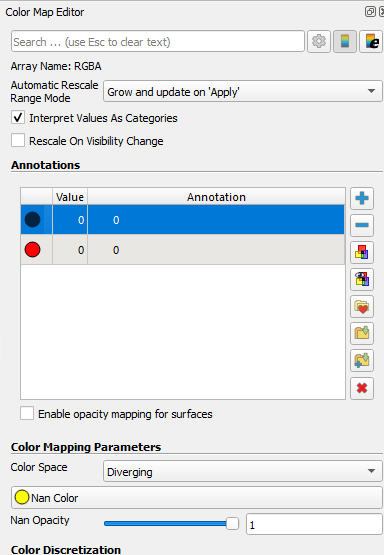
Ok. No need to explain. I figured it out. In “Color Map Editor” I select the “Interpret Values As Categories” and under “Annotations”, I select the desired color. During export as ply file, I deselect the “Alpha” value and write it only with RGB color information.
Thank you for your effort.
---
### Author:  [@Sebastien\_Jourdain](https://discourse.vtk.org/u/Sebastien_Jourdain)
#### Post date: [April 15, 2021, 10:33pm UTC](https://discourse.vtk.org/t/reading-ply-file-with-color/5538/12 "2021-04-15T22:33:35Z")
Actually that is not it. That is what I did…