::New();
mapper->SetInputConnection(r->GetOutputPort());
mapper->SetLookupTable(lut);
mapper->SetScalarModeToUseCellData();
mapper->SetColorModeToMapScalars();
mapper->SelectColorArray("Radiance"); //<-- are you sure the temperature field is called "Radiance"?
mapper->SetScalarRange(min, max);
(...)
```
This shouldn’t be difficult to port to Python/Javascript since the API is much like the same.
I hope this helps,
PC
---
### Author:  [@rexthor](https://discourse.vtk.org/u/rexthor)
#### Post date: [February 20, 2025, 1:48pm UTC](https://discourse.vtk.org/t/render-cell-scalars-from-vtkxmlpolydata/15282/3 "2025-02-20T13:48:43Z")
Still gives me just one color - I changed `m.SetArrayName("Temperature")` to `m.SelectColorArray("Temperature")`.
I’m pretty sure that the vtkLookupTable is configured correctly. I stopped in the debugger after the table was built and checked values:
```python
a = [0, 0, 0]
lut.GetColor(0, a); a
# prints [0.0, 0.0, 0.0]
lut.GetColor(200, a); a
# prints[0.5, 0.5, 0.5] (well, close to it anyhow)
lut.GetColor(400, a); a
# prints[1.0, 1.0, 1.0]
```
The shape of the geometry shows up, so I don’t think I’m missing an `Update` anywhere … my `vtkPolyDataMapper` is essentially the same as yours, with the change I made to match mine to yours (unless the order of the calls matters??)
Is there some setting I need to set on the `vtkActor`?
---
### Author:  [@Paulo\_Carvalho](https://discourse.vtk.org/u/Paulo_Carvalho)
#### Post date: [February 20, 2025, 5:23pm UTC](https://discourse.vtk.org/t/render-cell-scalars-from-vtkxmlpolydata/15282/4 "2025-02-20T17:23:33Z")
I believe we need to take a look at the code used to make the actor as well as reading the XML data to build the `vtkXMLPolyData` object. Sharing the source XML file is also helpful.
---
### Author:  [@rexthor](https://discourse.vtk.org/u/rexthor)
#### Post date: [February 20, 2025, 6:56pm UTC](https://discourse.vtk.org/t/render-cell-scalars-from-vtkxmlpolydata/15282/5 "2025-02-20T18:56:01Z")
The code for the actor was in the block above, but I’ll reproduce it here:
```python
a = vtkActor()
a.SetMapper(m)
a.RotateX(-20)
a.RotateY(50)
ren = vtkRenderer()
ren.AddActor(a)
renWin = vtkRenderWindow()
renWin.AddRenderer(ren)
iren = vtkRenderWindowInteractor()
iren.SetRenderWindow(renWin)
style = vtkInteractorStyleTrackballCamera()
iren.SetInteractorStyle(style)
renWin.SetSize(300, 300)
renWin.SetWindowName("Solid Body")
iren.Initialize()
ren.ResetCamera()
renWin.Render()
iren.Start()
```
The code for reading the file also reproduced:
```python
r = vtkXMLPolyDataReader()
r.SetFileName(fname)
r.Update()
```
I’ll see if I can find a suitable XML file to share, but the one I am working on now is customer’s data, and I’m not sure I can share. However, it does show up fine in ParaView.
---
### Author:  [@rexthor](https://discourse.vtk.org/u/rexthor)
#### Post date: [February 20, 2025, 8:35pm UTC](https://discourse.vtk.org/t/render-cell-scalars-from-vtkxmlpolydata/15282/6 "2025-02-20T20:35:09Z")
Ok - I have a datafile that shows temperature in ParaView, but does NOT show it with my script.
[hot\_tetra.vtp](https://discourse.vtk.org/uploads/short-url/toF5i8LONNL6QiR34vQ80DG42pv.vtp) (2.6 KB)
Below is the entire script:
```python
#!/usr/bin/env python3
import vtkmodules.vtkRenderingOpenGL2
from glob import glob
from vtkmodules.vtkCommonCore import vtkLookupTable
from vtkmodules.vtkIOImage import vtkPNGWriter
from vtkmodules.vtkRenderingCore import (
vtkActor,
vtkPolyDataMapper,
vtkRenderWindow,
vtkRenderWindowInteractor,
vtkRenderer)
from vtkmodules.vtkIOXML import vtkXMLPolyDataReader
MAX_TEMPERATURE = 400
def debug_view(fname):
import sys
from vtkmodules.vtkInteractionStyle import vtkInteractorStyleTrackballCamera
r = vtkXMLPolyDataReader()
r.SetFileName(fname)
r.Update()
lut = vtkLookupTable()
lut.SetNumberOfTableValues(256)
lut.SetTableRange(0, MAX_TEMPERATURE)
lut.SetHueRange(0, 0)
lut.SetValueRange(0, 1)
lut.SetSaturationRange(0, 0)
lut.Build()
m = vtkPolyDataMapper()
m.SetInputConnection(r.GetOutputPort())
m.SetLookupTable(lut)
m.SetColorModeToMapScalars()
m.SetScalarModeToUseCellData()
m.SetScalarRange(0, MAX_TEMPERATURE)
m.SelectColorArray("Temperature")
m.SetScalarVisibility(True)
a = vtkActor()
a.SetMapper(m)
a.RotateX(-20)
a.RotateY(50)
ren = vtkRenderer()
ren.AddActor(a)
renWin = vtkRenderWindow()
renWin.AddRenderer(ren)
iren = vtkRenderWindowInteractor()
iren.SetRenderWindow(renWin)
style = vtkInteractorStyleTrackballCamera()
iren.SetInteractorStyle(style)
renWin.SetSize(300, 300)
renWin.SetWindowName("Tetra")
iren.Initialize()
ren.ResetCamera()
renWin.Render()
iren.Start()
if __name__ == " __main__":
debug_view("hot_tetra.vtp")
```
---
### Author:  [@Paulo\_Carvalho](https://discourse.vtk.org/u/Paulo_Carvalho)
#### Post date: [February 20, 2025, 10:20pm UTC](https://discourse.vtk.org/t/render-cell-scalars-from-vtkxmlpolydata/15282/7 "2025-02-20T22:20:37Z")
Hello,
> [@rexthor](#):
>
> I’m pretty sure that the vtkLookupTable is configured correctly.
I fear it isn’t yet. Your code is missing the `vtkColorTransferFunction` part and how this object is used to correctly build the color lookup table. It is in the C++ working example I posted earlier.
best,
PC
---
### Author:  [@rexthor](https://discourse.vtk.org/u/rexthor)
#### Post date: [February 21, 2025, 1:53pm UTC](https://discourse.vtk.org/t/render-cell-scalars-from-vtkxmlpolydata/15282/8 "2025-02-21T13:53:06Z")
Changed my table code to mimic your C++ example, and still don’t get coloring. ☹
```python
ctf = vtkColorTransferFunction()
ctf.SetColorSpaceToRGB()
ctf.AddRGBPoint(0, 1.0, 0.0, 0.0)
ctf.AddRGBPoint(MAX_RADIANCE, 0.0, 1.0, 1.0)
lut = vtkLookupTable()
lut.SetNumberOfTableValues(TABLE_SIZE)
for i in range(TABLE_SIZE):
rgb = ctf.GetColor(i/TABLE_SIZE)
lut.SetTableValue(i, *rgb)
lut.SetRampToLinear()
lut.Build()
```
---
### Author:  [@Paulo\_Carvalho](https://discourse.vtk.org/u/Paulo_Carvalho)
#### Post date: [February 21, 2025, 2:43pm UTC](https://discourse.vtk.org/t/render-cell-scalars-from-vtkxmlpolydata/15282/9 "2025-02-21T14:43:24Z")
Not quite, yet. This call is still missing in your code:
```python
lut.SetTableRange(0, MAX_RADIANCE)
```
---
### Author:  [@rexthor](https://discourse.vtk.org/u/rexthor)
#### Post date: [February 21, 2025, 3:36pm UTC](https://discourse.vtk.org/t/render-cell-scalars-from-vtkxmlpolydata/15282/10 "2025-02-21T15:36:16Z")
Same result: no color
```python
ctf = vtkColorTransferFunction()
ctf.SetColorSpaceToRGB()
ctf.AddRGBPoint(0, 1.0, 0.0, 0.0)
ctf.AddRGBPoint(MAX_RADIANCE, 0.0, 1.0, 1.0)
lut = vtkLookupTable()
lut.SetNumberOfTableValues(TABLE_SIZE)
lut.SetTableRange(0, MAX_RADIANCE)
for i in range(TABLE_SIZE):
rgb = ctf.GetColor(i/TABLE_SIZE)
lut.SetTableValue(i, *rgb)
lut.SetRampToLinear()
lut.Build()
```
---
### Author:  [@Paulo\_Carvalho](https://discourse.vtk.org/u/Paulo_Carvalho)
#### Post date: [February 21, 2025, 5:17pm UTC](https://discourse.vtk.org/t/render-cell-scalars-from-vtkxmlpolydata/15282/11 "2025-02-21T17:17:24Z")
How does it appear in ParaView?
---
### Author:  [@rexthor](https://discourse.vtk.org/u/rexthor)
#### Post date: [February 21, 2025, 5:20pm UTC](https://discourse.vtk.org/t/render-cell-scalars-from-vtkxmlpolydata/15282/12 "2025-02-21T17:20:08Z")
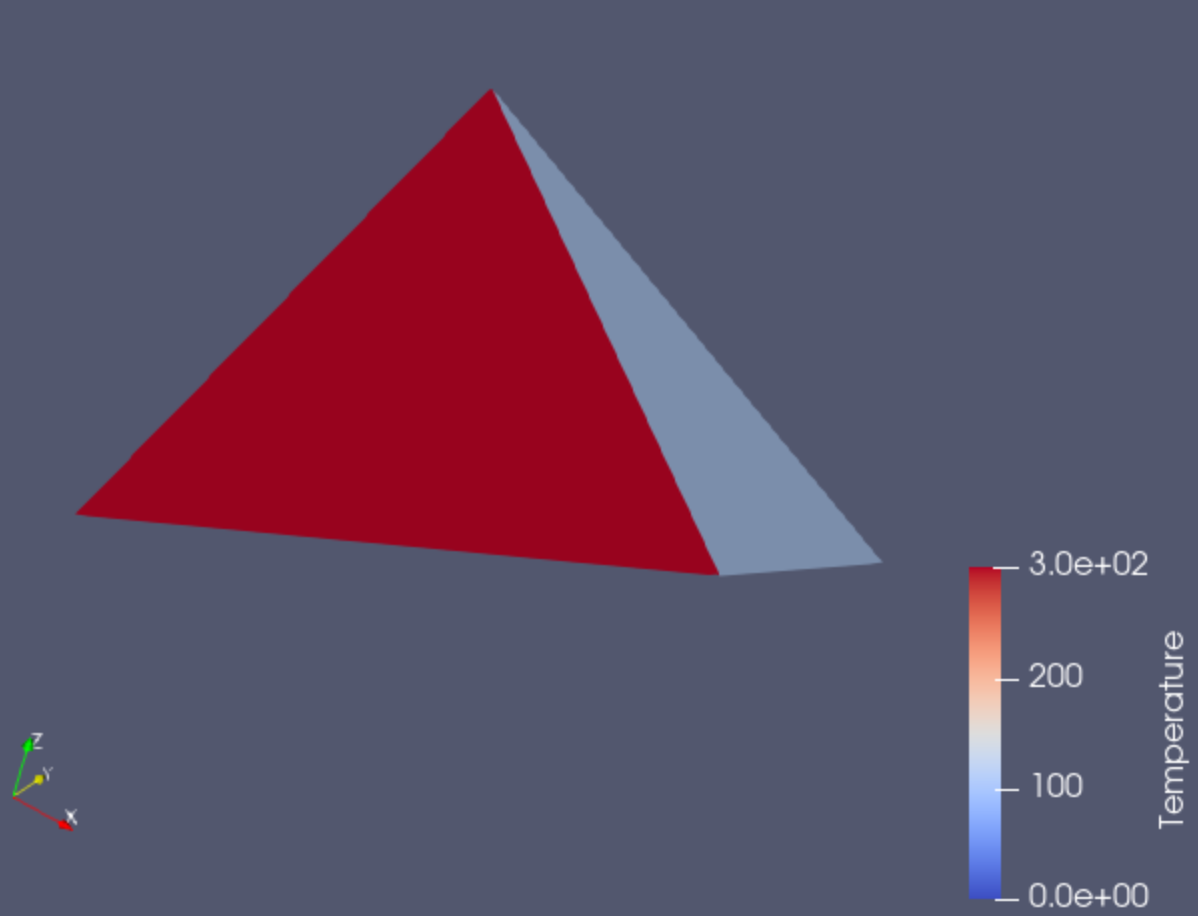
---
### Author:  [@Paulo\_Carvalho](https://discourse.vtk.org/u/Paulo_Carvalho)
#### Post date: [February 21, 2025, 5:49pm UTC](https://discourse.vtk.org/t/render-cell-scalars-from-vtkxmlpolydata/15282/13 "2025-02-21T17:49:42Z")
Try to configure your mapper this way (no more, no less):
```cpp
m = vtkPolyDataMapper()
m.SetInputConnection(r.GetOutputPort())
m.SetLookupTable(lut)
m.SetScalarModeToUseCellData()
m.SetColorModeToMapScalars()
m.SelectColorArray("Temperature")
m.SetScalarRange(0, MAX_TEMPERATURE)
```
---
### Author:  [@rexthor](https://discourse.vtk.org/u/rexthor)
#### Post date: [February 21, 2025, 6:01pm UTC](https://discourse.vtk.org/t/render-cell-scalars-from-vtkxmlpolydata/15282/14 "2025-02-21T18:01:51Z")
Still no color … edited script below.
```python
#!/usr/bin/env python3
import vtkmodules.vtkRenderingOpenGL2
from glob import glob
from vtkmodules.vtkCommonCore import vtkLookupTable
from vtkmodules.vtkIOImage import vtkPNGWriter
from vtkmodules.vtkRenderingCore import (
vtkActor,
vtkColorTransferFunction,
vtkPolyDataMapper,
vtkRenderWindow,
vtkRenderWindowInteractor,
vtkRenderer)
from vtkmodules.vtkIOXML import vtkXMLPolyDataReader
MAX_TEMP = 400
TABLE_SIZE = 256
def debug_view(fname):
import sys
from vtkmodules.vtkInteractionStyle import vtkInteractorStyleTrackballCamera
r = vtkXMLPolyDataReader()
r.SetFileName(fname)
r.Update()
ctf = vtkColorTransferFunction()
ctf.SetColorSpaceToRGB()
ctf.AddRGBPoint(0, 1.0, 0.0, 0.0)
ctf.AddRGBPoint(MAX_TEMP, 0.0, 1.0, 1.0)
lut = vtkLookupTable()
lut.SetNumberOfTableValues(TABLE_SIZE)
lut.SetTableRange(0, MAX_TEMP)
for i in range(TABLE_SIZE):
rgb = ctf.GetColor(i/TABLE_SIZE)
lut.SetTableValue(i, *rgb)
lut.SetRampToLinear()
lut.Build()
m = vtkPolyDataMapper()
m.SetInputConnection(r.GetOutputPort())
m.SetLookupTable(lut)
m.SetScalarModeToUseCellData()
m.SetColorModeToMapScalars()
m.SelectColorArray("Temperature")
m.SetScalarRange(0, MAX_TEMP)
a = vtkActor()
a.SetMapper(m)
a.RotateX(-20)
a.RotateY(50)
ren = vtkRenderer()
ren.AddActor(a)
renWin = vtkRenderWindow()
renWin.AddRenderer(ren)
iren = vtkRenderWindowInteractor()
iren.SetRenderWindow(renWin)
style = vtkInteractorStyleTrackballCamera()
iren.SetInteractorStyle(style)
renWin.SetSize(300, 300)
renWin.SetWindowName("Tetra")
iren.Initialize()
ren.ResetCamera()
renWin.Render()
iren.Start()
if __name__ == " __main__":
debug_view("hot_tetra.vtp")
```
---
### Author:  [@Paulo\_Carvalho](https://discourse.vtk.org/u/Paulo_Carvalho)
#### Post date: [February 21, 2025, 8:09pm UTC](https://discourse.vtk.org/t/render-cell-scalars-from-vtkxmlpolydata/15282/15 "2025-02-21T20:09:53Z")
Take a look at this example: [https://examples.vtk.org/site/Python/Visualization/AssignCellColorsFromLUT/](https://examples.vtk.org/site/Python/Visualization/AssignCellColorsFromLUT/)
---
### Author:  [@rexthor](https://discourse.vtk.org/u/rexthor)
#### Post date: [February 21, 2025, 8:31pm UTC](https://discourse.vtk.org/t/render-cell-scalars-from-vtkxmlpolydata/15282/16 "2025-02-21T20:31:19Z")
That was the missing clue, I think. There was a note in there that mentioned `SetScalars` … I guess I had naively assumed that storing arrays would make them available to use for the mapper. I guess in ParaView, it figures it out, but in raw VTK, there is a difference between an array in the cell data, and a _scalar_ in the cell data.
The change that needed to be made was to set the temperature array as the scalars for the cell data.
Here’s the script that works now:
```python
#!/usr/bin/env python3
import vtkmodules.vtkRenderingOpenGL2
from glob import glob
from vtkmodules.vtkCommonCore import vtkLookupTable
from vtkmodules.vtkIOImage import vtkPNGWriter
from vtkmodules.vtkRenderingCore import (
vtkActor,
vtkColorTransferFunction,
vtkPolyDataMapper,
vtkRenderWindow,
vtkRenderWindowInteractor,
vtkRenderer)
from vtkmodules.vtkIOXML import vtkXMLPolyDataReader
MAX_TEMP = 300
TABLE_SIZE = 256
def debug_view(fname):
import sys
from vtkmodules.vtkInteractionStyle import vtkInteractorStyleTrackballCamera
r = vtkXMLPolyDataReader()
r.SetFileName(fname)
r.Update()
pd = r.GetOutput()
t = pd.GetCellData().GetArray("Temperature")
pd.GetCellData().SetScalars(t)
ctf = vtkColorTransferFunction()
ctf.SetColorSpaceToRGB()
ctf.AddRGBPoint(0, 1.0, 0.0, 0.0)
ctf.AddRGBPoint(MAX_TEMP, 0.0, 0.0, 1.0)
lut = vtkLookupTable()
lut.SetNumberOfTableValues(TABLE_SIZE)
lut.SetTableRange(0, MAX_TEMP)
lut.SetRampToLinear()
lut.Build()
m = vtkPolyDataMapper()
m.SetInputData(pd)
m.SetLookupTable(lut)
m.SetScalarModeToUseCellData()
m.SetColorModeToMapScalars()
m.SelectColorArray("Temperature")
m.SetScalarRange(0, MAX_TEMP)
a = vtkActor()
a.SetMapper(m)
a.RotateX(-20)
a.RotateY(50)
ren = vtkRenderer()
ren.AddActor(a)
renWin = vtkRenderWindow()
renWin.AddRenderer(ren)
iren = vtkRenderWindowInteractor()
iren.SetRenderWindow(renWin)
style = vtkInteractorStyleTrackballCamera()
iren.SetInteractorStyle(style)
renWin.SetSize(300, 300)
renWin.SetWindowName("Tetra")
iren.Initialize()
ren.ResetCamera()
renWin.Render()
iren.Start()
if __name__ == " __main__":
debug_view("hot_tetra.vtp")
```