# rendering 3d elements on top
**URL:** https://discourse.vtk.org/t/rendering-3d-elements-on-top/10839
**Category:** Web
**Created:** [March 1, 2023, 10:08am UTC](https://discourse.vtk.org/t/rendering-3d-elements-on-top/10839 "2023-03-01T10:08:27Z")
**Posts on this page:** 14
**Page:** 1
### Author:  [@nomis6432](https://discourse.vtk.org/u/nomis6432)
#### Post date: [March 1, 2023, 10:08am UTC](https://discourse.vtk.org/t/rendering-3d-elements-on-top/10839/1 "2023-03-01T10:08:27Z")
Hey, I’m creating a transformation tool that allows translating, rotating and scaling of polydata. To do this, I thought to create a structure within the 3d view that you can drag to transform the polydata like this:
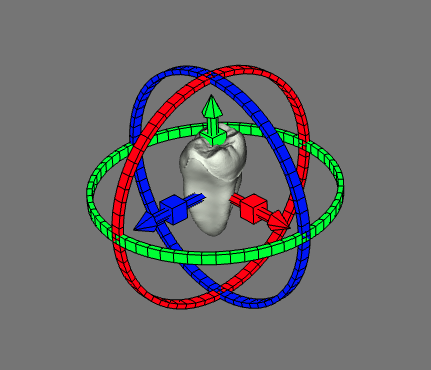
My issue with this is that I want to let the arrows appear on top of the polydata. Is there a way to do this?
I believe it should be possible to achieve this by having one pass where you draw all polydata, resetting the depth buffer and then drawing the controls. I’m not sure if it is possible to implement something like this in vtk.js?
---
### Author:  [@Thibault\_Bruyere](https://discourse.vtk.org/u/Thibault_Bruyere)
#### Post date: [March 1, 2023, 10:56am UTC](https://discourse.vtk.org/t/rendering-3d-elements-on-top/10839/2 "2023-03-01T10:56:36Z")
Hello !
A solution could be `arrowActor.setForceTranslucent(true);`.
It should force the actor to be rendered in an OrderIndependantTranslucentPass after the opaquePass, which will disable depth test and buffer writing.
---
### Author:  [@finetjul](https://discourse.vtk.org/u/finetjul)
#### Post date: [March 1, 2023, 11:16am UTC](https://discourse.vtk.org/t/rendering-3d-elements-on-top/10839/3 "2023-03-01T11:16:42Z")
While `arrowActor.setForceTranslucent(true);` may work, it is more of a bug than what is expected from
The order independent pass shall NOT ignore the depth buffer (you do not want to have far translucent fragments rendered on top of near opaque fragments).
To me the best way is to render your actors in the final overlay pass.
Problem is, that overlay pass does not clear the depth buffer.
@sankhesh, don’t you think it could be the default behavior for the overlay pass, or at least an option for such pass ?
@nomis6432 , it would be great if you could contribute your widget/tool to VTK.js. It will have the benefit to then be supported by the community.
---
### Author:  [@nomis6432](https://discourse.vtk.org/u/nomis6432)
#### Post date: [March 1, 2023, 1:15pm UTC](https://discourse.vtk.org/t/rendering-3d-elements-on-top/10839/4 "2023-03-01T13:15:26Z")
Hey, thanks for the responses.
So for the overlay pass I’d have to modify this code in the ForwardPass class?:
```auto
if (model.overlayActorCount > 0) {
// reset depth buffer
publicAPI.setCurrentOperation('overlayPass');
renNode.traverse(publicAPI);
}
```
I was wondering if you know how to reset the depth buffer. I’m not familiar with webgl and couldn’t find where this is currently done.
One issue with this is that we’re still on version `17.0.0` which doesn’t have this overlay pass yet as far as I can tell. I could look into upgrading but that would require some work.
Maybe I could make a custom vtkForwardPass class with the added functionality? Would it be possible to replace the vtkForwardPass without modifying the VTK.js code?
I would love to contribute the widget to VTK.js. I can’t however promise this yet since I’d have to ask my boss for that and since we’re on an older version, it might not be compatible with the latest version.
---
### Author:  [@nomis6432](https://discourse.vtk.org/u/nomis6432)
#### Post date: [March 2, 2023, 4:08pm UTC](https://discourse.vtk.org/t/rendering-3d-elements-on-top/10839/5 "2023-03-02T16:08:41Z")
Hey, so my current approach is overwriting the `vtkForwardPass`, `vtkOpenglActor`, `vtkOpenglCamera`, `vtkOpenGLPolyDataMapper` and making a seperate custom `vtkActor` (`vtkOverlayActor3d`) . The later is exatly the same as the normal actor except it has an attribute on the `publicAPI` to easily distinguish it from normal actors. I added a different `passOverlay3d` and `traversePassOverlay3d` to the other classes where needed. This is equivalent to the `opaquePass` function except that the `opaquePass` filters out normal actors and the `traversePassOverlay3d` handles the `vtkOverlayActor3d`.
I then add a step to the `vtkForwardPass`:
```auto
publicAPI.setCurrentOperation('cameraPass');
renNode.traverse(publicAPI);
if (model.opaqueActorCount > 0) {
publicAPI.setCurrentOperation('opaquePass');
renNode.traverse(publicAPI);
}
if (model.translucentActorCount > 0) {
publicAPI.setCurrentOperation('translucentPass');
renNode.traverse(publicAPI);
}
if (model.volumeCount > 0) {
publicAPI.setCurrentOperation('volumePass');
renNode.traverse(publicAPI);
}
if (model.overlay3dActorCount > 0) {
const context = viewNode.getContext();
context.clearDepth(1.0);
publicAPI.setCurrentOperation('passOverlay3d');
renNode.traverse(publicAPI);
}
```
These `vtkOverlayActor3d`s are visualized but they don’t yet ignore the depth buffer. I thus believe `clearDepth` doesn’t work? I was wondering if you happen to know how to reset the depth buffer
doing `context.disable(context.DEPTH_TEST)` does disable the depth buffer for just these overlay actors but that’s not the behaviour I’m looking for
---
### Author:  [@finetjul](https://discourse.vtk.org/u/finetjul)
#### Post date: [March 2, 2023, 7:49pm UTC](https://discourse.vtk.org/t/rendering-3d-elements-on-top/10839/6 "2023-03-02T19:49:15Z")
> I was wondering if you happen to know how to reset the depth buffer
`gl.clear(gl.DEPTH_BUFFER_BIT)`
To avoid overwriting classes in VTK.js, here is what you could do:
Create a PR in VTK.js with:
- a new `overlay` boolean property in `vtkActor` and you conditionally call `incrementOverlayActorCount` in `publicAPI.queryPass`. You will also have to redirect `publicAPI.translucentPass` to `publicAPI.opaquePass`. (Or use vtkActor2D if that works instead)
- a new `clearDepthBeforeOverlayPass` boolean property in `vtkForwardPass` and you then optionally call `gl.clear(gl.DEPTH_BUFFER_BIT)`.
@sankhesh
---
### Author:  [@nomis6432](https://discourse.vtk.org/u/nomis6432)
#### Post date: [March 3, 2023, 8:55am UTC](https://discourse.vtk.org/t/rendering-3d-elements-on-top/10839/7 "2023-03-03T08:55:01Z")
Hey,
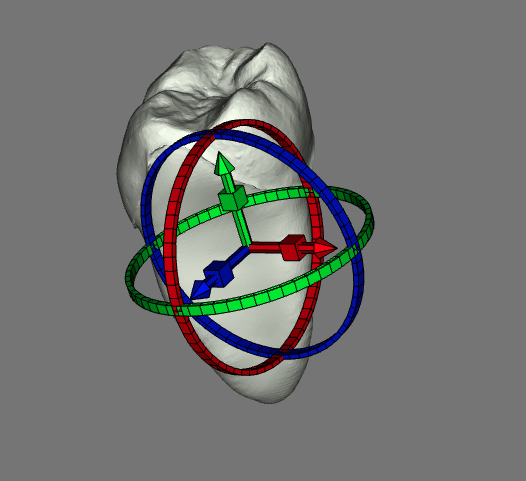
I still had to call `gl.depthMask(true);` before `gl.clear(gl.DEPTH_BUFFER_BIT)` for it to work but now It does.
I’m open to contribute some of my work once I’m done but I’ll have to see since I’m still on an older version.
Thanks a lot for all the info
current result:
---
### Author:  [@sankhesh](https://discourse.vtk.org/u/sankhesh)
#### Post date: [March 3, 2023, 2:41pm UTC](https://discourse.vtk.org/t/rendering-3d-elements-on-top/10839/8 "2023-03-03T14:41:01Z")
@nomis6432 Did you try using `Actor2D/PolyDataMapper2D`? That should do exactly what you want without having the manually clear depth.
---
### Author:  [@nomis6432](https://discourse.vtk.org/u/nomis6432)
#### Post date: [March 3, 2023, 3:18pm UTC](https://discourse.vtk.org/t/rendering-3d-elements-on-top/10839/9 "2023-03-03T15:18:33Z")
Hey, @sankhesh . I haven’t tried using `PolyDataMapper2D` yet since it was introduced after the version I’m using (`17.0.0`) but it does seem interesting. I’ll see if I can update. Thanks a lot
---
### Author:  [@nomis6432](https://discourse.vtk.org/u/nomis6432)
#### Post date: [March 9, 2023, 9:50am UTC](https://discourse.vtk.org/t/rendering-3d-elements-on-top/10839/10 "2023-03-09T09:50:57Z")
I’ve upgraded to the latest vtk.js version and tried using `Actor2D/PolyDataMapper2D`. I was wondering if there is a simple way to make sure the axis always apear on top of the center of the 3d polyData I want to move. I’ve tried setting the origin of the axis on the polydata but that doesn’t seem to affect the position. The only way I seem to be able to control the position of the Actor2D is with `setDisplayPosition` which is the 2d pixel position
EDIT: for some reason the `PolyDataMapper2D` also doesn’t render `vtkConcentricCylinderSource`. I’ve tried passing it first through the `vtkTriangleFilter` since it has cells with 4 points but that didn’t fix it.
EDIT2: I’ve figured out I can set the position to the woorld coordinates by calling `setCoordinateSystemToWorld()` on the `Actor2D` but the orientation doesn’t update. The axis dont point to the woorld coordinates x, y and z direction but stay the same relative to the screen.
EDIT3: `Property2D` doesn’t have `edgeVisibility`. Is there a way to add this. If it’s not too much work I could make a PR for this
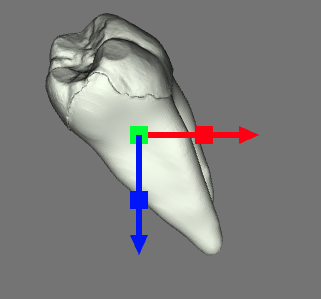
EDIT4: It also doesn’t seem like `Actor2D` ignores the depth buffer and writes everything on top of each other. This is not ideal for my case since I’d still want the arrows to be displayed correctly when they overlap. In the image below, the green square should be below the blue. Render order is red → green → blue so it just drew the blue on top of the green even though it’s further
---
### Author:  [@sankhesh](https://discourse.vtk.org/u/sankhesh)
#### Post date: [March 9, 2023, 2:20pm UTC](https://discourse.vtk.org/t/rendering-3d-elements-on-top/10839/11 "2023-03-09T14:20:37Z")
> for some reason the `PolyDataMapper2D` also doesn’t render `vtkConcentricCylinderSource` . I’ve tried passing it first through the `vtkTriangleFilter` since it has cells with 4 points but that didn’t fix it.
Not sure why. Are the output point coordinates in world space?
> I’ve figured out I can set the position to the woorld coordinates by calling `setCoordinateSystemToWorld()` on the `Actor2D` but the orientation doesn’t update. The axis dont point to the woorld coordinates x, y and z direction but stay the same relative to the screen.
How is the orientation being set?
> `Property2D` doesn’t have `edgeVisibility` . Is there a way to add this. If it’s not too much work I could make a PR for this
Go for it 👍
> It also doesn’t seem like `Actor2D` ignores the depth buffer and writes everything on top of each other. This is not ideal for my case since I’d still want the arrows to be displayed correctly when they overlap. In the image below, the green square should be below the blue. Render order is red → green → blue so it just drew the blue on top of the green even though it’s further
That is indeed true. You can either order your axes in the order you want them rendered or use coincident topology resolution properties to push certain 2d props back in clip space.
---
### Author:  [@nomis6432](https://discourse.vtk.org/u/nomis6432)
#### Post date: [March 9, 2023, 3:20pm UTC](https://discourse.vtk.org/t/rendering-3d-elements-on-top/10839/12 "2023-03-09T15:20:45Z")
Thanks for the response!
> Not sure why. Are the output point coordinates in world space?
Just figured it out, was a bug on my end. I misconfigured a parameter making it too small to see.
> How is the orientation being set?
like this:
```auto
const orientation = [1, 0, 0] // or [0, 1, 0] or [0, 0, 1]
const cylinder = vtkCylinderSource.newInstance();
cylinder.setDirection(orientation);
const cone = vtkConeSource.newInstance();
cone.setDirection(orientation);
const circle = vtkConcentricCylinderSource.newInstance();
circle.setDirection(orientation);
```
> Go for it 👍
Cool, I’ll look into it
> That is indeed true. You can either order your axes in the order you want them rendered or use coincident topology resolution properties to push certain 2d props back in clip space.
Thansk for the tip. I’ve tried this using the 3D vtkMapper class but this doesn’t seem to affect vtkMapper2D. Is there a way to also do this for 2D mappers?
```auto
vtkMapper.setResolveCoincidentTopologyToPolygonOffset()
```
It could be that I’m not properly configuring `setResolveCoincidentTopologyLineOffsetParameters`, `setResolveCoincidentTopologyPolygonOffsetFaces` and `setResolveCoincidentTopologyPointOffsetParameters` but I’ve tried different values and didn’t see any changes
---
### Author:  [@nomis6432](https://discourse.vtk.org/u/nomis6432)
#### Post date: [March 9, 2023, 4:11pm UTC](https://discourse.vtk.org/t/rendering-3d-elements-on-top/10839/13 "2023-03-09T16:11:19Z")
> How is the orientation being set?
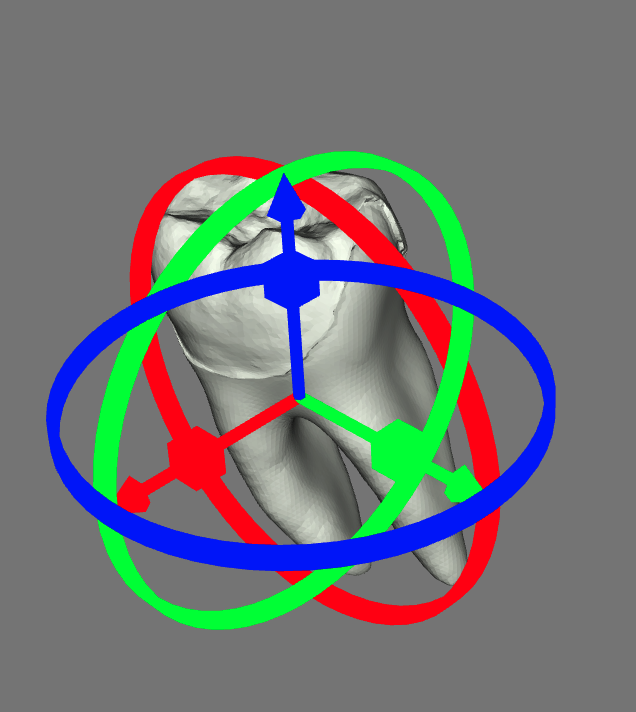
Figured it out. The issue was that I set the mapping to the world coordinates like this:
```auto
actor2D.getActualPositionCoordinate().setCoordinateSystemToWorld()
```
Which only takes care of the position. In stead I should do this:
```auto
const c = vtkCoordinate.newInstance();
c.setCoordinateSystemToWorld();
Mapper2D.setTransformCoordinate(c)
```
current result:
---
### Author:  [@finetjul](https://discourse.vtk.org/u/finetjul)
#### Post date: [April 26, 2023, 10:36am UTC](https://discourse.vtk.org/t/rendering-3d-elements-on-top/10839/14 "2023-04-26T10:36:17Z")
Hi @nomis6432,
Good job on getting it to work. Is there any chance you could contribute your widget into VTK.js ?
Thanks,
Julien.