# Rendering a time sequence of volumes
**URL:** https://discourse.vtk.org/t/rendering-a-time-sequence-of-volumes/788
**Category:** Support
**Created:** [April 19, 2019, 12:48am UTC](https://discourse.vtk.org/t/rendering-a-time-sequence-of-volumes/788 "2019-04-19T00:48:03Z")
**Posts on this page:** 9
**Page:** 1
### Author:  [@guillaumedavidphd](https://discourse.vtk.org/u/guillaumedavidphd)
#### Post date: [April 19, 2019, 12:48am UTC](https://discourse.vtk.org/t/rendering-a-time-sequence-of-volumes/788/1 "2019-04-19T00:48:03Z")
Hi All,
I’m new around here, and also new to VTK so bear with me. I have a series of vti files of an object. The series describes the movement of the object. I would like to render the series as an animation. So far I’ve been able to render only one at a time. Here’s what I have so far, and it’s not rendering the second volume:
> reader = vtk.vtkXMLImageDataReader()
> reader.SetFileName(‘…/data/vtk/object\_00.vti’)
> reader.Update()
>
> reader0 = vtk.vtkXMLImageDataReader()
> reader0.SetFileName(‘…/data/vtk/object\_05.vti’)
> reader0.Update()
>
> alphaChannelFunc = vtk.vtkPiecewiseFunction()
> alphaChannelFunc.AddPoint(0, 0.0)
> alphaChannelFunc.AddPoint(50, 0.05)
> alphaChannelFunc.AddPoint(51, 0.5)
> alphaChannelFunc.AddPoint(255, 0.5)
>
> colorFunc = vtk.vtkColorTransferFunction()
> colorFunc.AddRGBPoint(0, 0.0, 0.0, 0.0)
> colorFunc.AddRGBPoint(50, 0.1, 0.1, 0.1)
> colorFunc.AddRGBPoint(51, 0.5, 0.5, 0.5)
> colorFunc.AddRGBPoint(100, 0.7, 0.7, 0.7)
> colorFunc.AddRGBPoint(150, 0.9, 0.9, 0.9)
>
> volumeProperty = vtk.vtkVolumeProperty()
> volumeProperty.SetColor(colorFunc)
> volumeProperty.SetScalarOpacity(alphaChannelFunc)
>
> volumeMapper = vtk.vtkGPUVolumeRayCastMapper()
> volumeMapper.SetInputConnection(reader.GetOutputPort())
> volumeMapper.AddInputConnection(reader0.GetOutputPort())
>
> volume = vtk.vtkVolume()
> volume.SetMapper(volumeMapper)
> volume.SetProperty(volumeProperty)
>
> renderer = vtk.vtkRenderer()
> renderWin = vtk.vtkRenderWindow()
> renderWin.AddRenderer(renderer)
> renderInteractor = vtk.vtkRenderWindowInteractor()
> renderInteractor.SetRenderWindow(renderWin)
>
> renderer.AddVolume(volume)
> renderer.SetBackground(0,0,0)
> renderWin.SetSize(800, 600)
>
> def exitCheck(obj, event):
> if obj.GetEventPending() != 0:
> obj.SetAbortRender(1)
>
> renderWin.AddObserver(“AbortCheckEvent”, exitCheck)
>
> renderInteractor.Initialize()
> renderWin.Render()
> renderInteractor.Start()
Any help appreciated!
-Guillaume
---
### Author:  [@Andrew](https://discourse.vtk.org/u/Andrew)
#### Post date: [April 20, 2019, 8:29am UTC](https://discourse.vtk.org/t/rendering-a-time-sequence-of-volumes/788/2 "2019-04-20T08:29:46Z")
Are you wanting to output the series of images as raw pngs? As video? Real time? Side by side?
---
### Author:  [@guillaumedavidphd](https://discourse.vtk.org/u/guillaumedavidphd)
#### Post date: [April 23, 2019, 2:09pm UTC](https://discourse.vtk.org/t/rendering-a-time-sequence-of-volumes/788/3 "2019-04-23T14:09:01Z")
Hi Andrew,
I want to render the series in real time.
Thanks!
-G
---
### Author:  [@Andrew](https://discourse.vtk.org/u/Andrew)
#### Post date: [April 24, 2019, 3:36am UTC](https://discourse.vtk.org/t/rendering-a-time-sequence-of-volumes/788/4 "2019-04-24T03:36:51Z")
You could just manually switch the mappers image input to your next volume, at the next time point. To do this in “real time” you can setup a timer with the interactor to do this every x milliseconds (like 16ms). [https://vtk.org/Wiki/VTK/Examples/Cxx/Utilities/Timer](https://vtk.org/Wiki/VTK/Examples/Cxx/Utilities/Timer)
---
### Author:  [@marcomusy](https://discourse.vtk.org/u/marcomusy)
#### Post date: [April 24, 2019, 6:48pm UTC](https://discourse.vtk.org/t/rendering-a-time-sequence-of-volumes/788/5 "2019-04-24T18:48:21Z")
If you wish to use the [vtkplotter](https://github.com/marcomusy/vtkplotter) library this becomes very easy:
```python
from vtkplotter import *
img = loadImageData(datadir+'head.vti') # load vtkImageData obj
for i in range(9): # animation
x, y, z = i*200, sin(i)*120, cos(i)*120
vol = Volume(img, c=i) # vtkVolume
vol.crop(back=0.4).pos(x,y,z) # crop 40% from the back (neg.y)
vol.show(bg='white', interactive=0)
#screenshot(str(i)+'.png')
printHistogram(img, logscale=True)
show(interactive=1)
```
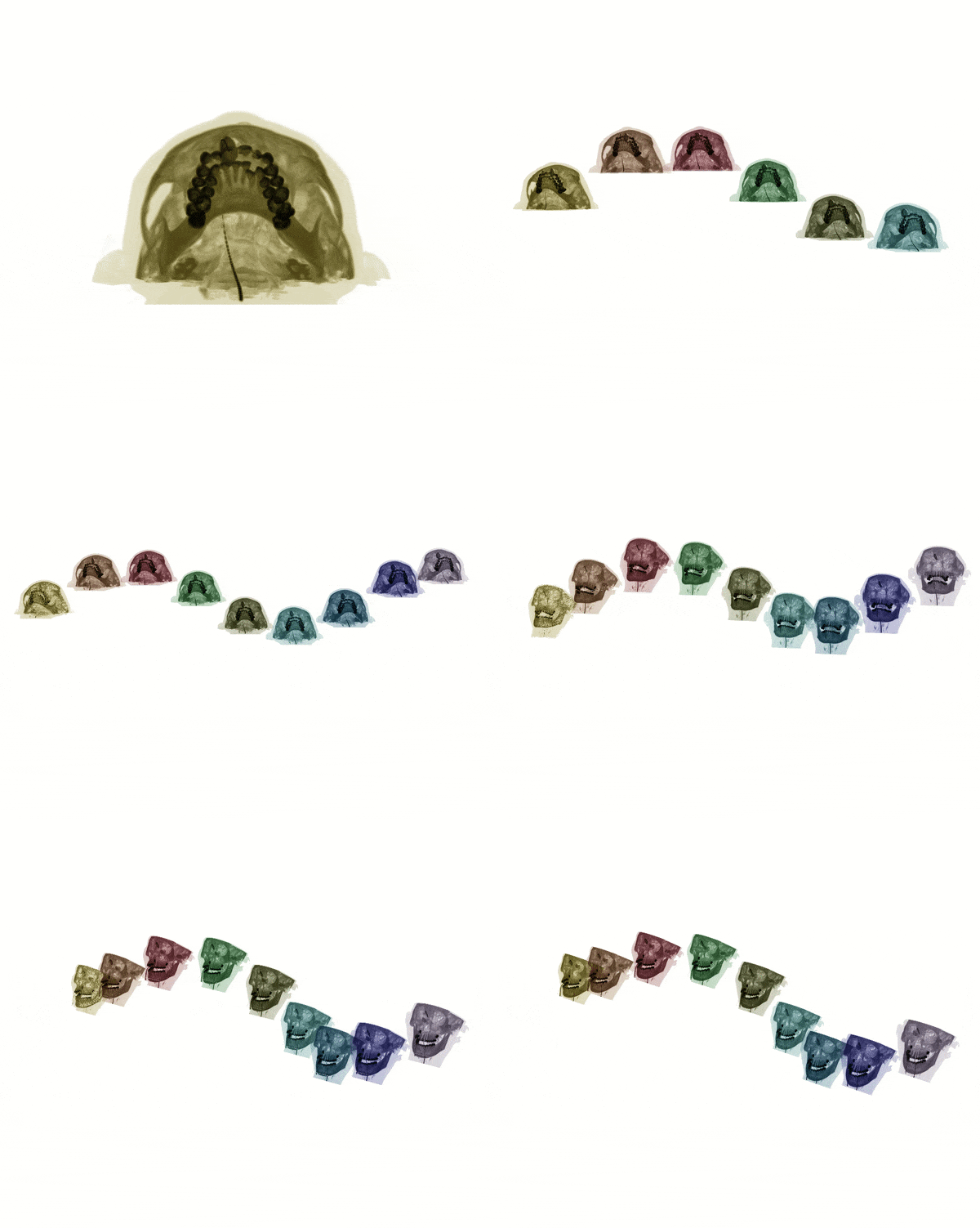
Note that also another great tool exists which is [vtki](https://github.com/vtkiorg/vtki) to achieve a similar result.
---
### Author:  [@guillaumedavidphd](https://discourse.vtk.org/u/guillaumedavidphd)
#### Post date: [May 6, 2019, 4:33pm UTC](https://discourse.vtk.org/t/rendering-a-time-sequence-of-volumes/788/6 "2019-05-06T16:33:33Z")
I finally got around to trying this out. `vtkplotter` makes this very easy indeed, thanks! However I’m not using a typical rendering window. I’m using the `vtkOpenVRRenderWindow`. Is there a way to make `vtkplotter` work with OpenVR?
To give more context: I’m able to do something close to what I want with ParaView and its OpenVR plugin. However for some reason switching from one volume at time _t_ to the next at time _t+1_ seems to be CPU bound, and therefore slow. I’d like to load all my volumes in the GPU at first and create a timer that toggles visibility on/off in a loop but I’d like for all of this to happen in the GPU, not involving the CPU to avoid the slowdowns I’ve been experienceing. Is this doable?
My apologies if this isn’t clear. I’m not too familiar with the world of 3D rendering and I’m learning as I go.
---
### Author:  [@marcomusy](https://discourse.vtk.org/u/marcomusy)
#### Post date: [May 6, 2019, 9:25pm UTC](https://discourse.vtk.org/t/rendering-a-time-sequence-of-volumes/788/7 "2019-05-06T21:25:00Z")
i’m not sure if i can answer your questions, we need a real vtk expert here… 😉
`vtkplotter` uses `vtkGPUVolumeRayCastMapper` so i guess everything should be happening on the gpu…
As the classes you mention inherit from the usual ones you might clone the vtkplotter and just change 2 lines in [plotter.py](https://github.com/marcomusy/vtkplotter/blob/master/vtkplotter/plotter.py) (line 370, and 494) and see if that works…
---
### Author:  [@guillaumedavidphd](https://discourse.vtk.org/u/guillaumedavidphd)
#### Post date: [May 13, 2019, 2:46pm UTC](https://discourse.vtk.org/t/rendering-a-time-sequence-of-volumes/788/8 "2019-05-13T14:46:15Z")
I’m a bit confused: following your link, [line 370](https://github.com/marcomusy/vtkplotter/blob/91defa43e5b2924dc31b8cfeece32e881f2a7204/vtkplotter/plotter.py#L370) is just `title="",` and [line 494](https://github.com/marcomusy/vtkplotter/blob/91defa43e5b2924dc31b8cfeece32e881f2a7204/vtkplotter/plotter.py#L494) is `############################`. Did you reference the correct lines?
---
### Author:  [@marcomusy](https://discourse.vtk.org/u/marcomusy)
#### Post date: [May 13, 2019, 2:55pm UTC](https://discourse.vtk.org/t/rendering-a-time-sequence-of-volumes/788/9 "2019-05-13T14:55:25Z")
… that’s because in the meanwhile I committed a new version… try
`pip install -U vtkplotter`
then lines are now [567](https://github.com/marcomusy/vtkplotter/blob/91defa43e5b2924dc31b8cfeece32e881f2a7204/vtkplotter/plotter.py#L567)
`self.interactor = vtk.vtkRenderWindowInteractor()`
and [443](https://github.com/marcomusy/vtkplotter/blob/91defa43e5b2924dc31b8cfeece32e881f2a7204/vtkplotter/plotter.py#L443)
`self.window = vtk.vtkRenderWindow()`