interactor;
interactor->SetRenderWindow(renderWindow);
// Camera setup
renderer->ResetCamera();
renderer->GetActiveCamera()->Azimuth(30);
renderer->GetActiveCamera()->Elevation(30);
renderWindow->Render();
interactor->Start();
return EXIT_SUCCESS;
}
```
```cmake
cmake_minimum_required(VERSION 3.16)
project(vtk-test-app VERSION 1.0.0 LANGUAGES CXX)
set(CMAKE_CXX_STANDARD 17)
set(CMAKE_CXX_STANDARD_REQUIRED ON)
set(CMAKE_BUILD_TYPE Debug)
# Note: Update path to VTK
set(CMAKE_PREFIX_PATH "../vtk/install/lib/cmake")
find_package(VTK REQUIRED COMPONENTS
CommonCore
FiltersSources
InteractionStyle
RenderingCore
RenderingOpenGL2
RenderingFreeType
RenderingVolumeOpenGL2
RenderingSceneGraph
)
if (NOT VTK_FOUND)
message(FATAL_ERROR "Unable to find the VTK build folder.")
endif()
set(CMAKE_AUTOUIC OFF)
file(GLOB SRC_FILES ${PROJECT_SOURCE_DIR}/*.cpp)
add_executable(vtk-test-app ${SRC_FILES})
target_link_libraries(vtk-test-app PRIVATE ${VTK_LIBRARIES})
# vtk_module_autoinit is needed
vtk_module_autoinit(
TARGETS vtk-test-app
MODULES ${VTK_LIBRARIES}
)
```
I had no issue running the example with VTK 9.3.0.
Is this a bug or did I miss something following the update ?
Thanks a lot,
Clément
---
### Author:  [@lgivord](https://discourse.vtk.org/u/lgivord)
#### Post date: [June 26, 2025, 1:08pm UTC](https://discourse.vtk.org/t/rendering-glitches-when-using-vtkssaopass-and-vtkdepthpeelingpass/15762/2 "2025-06-26T13:08:10Z")
It’s definitively a bug, @LucasGandel does that ring a bell ?
---
### Author:  [@LucasGandel](https://discourse.vtk.org/u/LucasGandel)
#### Post date: [June 27, 2025, 6:42am UTC](https://discourse.vtk.org/t/rendering-glitches-when-using-vtkssaopass-and-vtkdepthpeelingpass/15762/3 "2025-06-27T06:42:41Z")
Your render passes setup looks weird to me. The steps pass should be the delegate of the ssao pass. Here is how the VTK test initializes the render passes:
```auto
vtkNew basicPasses;
vtkNew ssao;
ssao->SetRadius(0.05);
ssao->SetKernelSize(128);
ssao->SetDelegatePass(basicPasses);
vtkOpenGLRenderer* glrenderer = vtkOpenGLRenderer::SafeDownCast(renderer);
glrenderer->SetPass(ssao);
```
Is the result the same if you use this code?
---
### Author:  [@ctroesch](https://discourse.vtk.org/u/ctroesch)
#### Post date: [June 27, 2025, 8:52am UTC](https://discourse.vtk.org/t/rendering-glitches-when-using-vtkssaopass-and-vtkdepthpeelingpass/15762/4 "2025-06-27T08:52:48Z")
Thanks for the replies.
You are right, your configuration works to display the SSAO, however when I add a depth peeling pass, the SSAO doesn’t work anymore I get the following warning:
> vtkOpenGLState.cxx:623 WARN| Attempt to set draw buffers from a Framebuffer Object that is not bound.
I guess there is something wrong in the way I set up the rendering passes, here is my updated code:
```c++
#include
#include
#include
#include
#include
#include
#include
#include
#include
#include
#include
#include
#include
#include
#include
#include
#include
vtkSmartPointer read(const std::string& filename, std::array color)
{
// Read the OBJ file
vtkNew reader;
reader->SetFileName(filename.c_str());
reader->Update();
// Mapper and Actor
vtkNew mapper;
mapper->SetInputConnection(reader->GetOutputPort());
const auto actor = vtkSmartPointer::New();
actor->SetMapper(mapper);
actor->GetProperty()->SetColor(color[0], color[1], color[2]);
actor->GetProperty()->SetOpacity(color[3]);
actor->GetProperty()->SetInterpolationToPBR();
actor->GetProperty()->SetMetallic(0);
actor->GetProperty()->SetRoughness(0.5);
return actor;
}
int main() {
// Renderer
vtkNew renderer;
renderer->SetBackground(0.1, 0.1, 0.1);
// Load meshes
renderer->AddActor(read("Bronchus.obj", { 1, 0.9, 0.9, 1 }));
renderer->AddActor(read("Pulmonary_Artery.obj", { 1, 0.1, 0.1, 1 }));
renderer->AddActor(read("Pulmonary_Vein.obj", { 0.2, 0.4, 1, 1 }));
renderer->AddActor(read("Left_Lung.obj", { 1, 0.8, 0.9, 0.4 }));
// Create steps pass
vtkNew stepsPass;
// Depth Peeling pass
vtkNew depthPeelingPass;
depthPeelingPass->SetMaximumNumberOfPeels(8);
depthPeelingPass->SetOcclusionRatio(0);
depthPeelingPass->SetTranslucentPass(stepsPass->GetTranslucentPass());
stepsPass->SetTranslucentPass(depthPeelingPass);
// SSAO pass setup
vtkNew ssaoPass;
ssaoPass->SetDelegatePass(stepsPass);
ssaoPass->SetRadius(20);
ssaoPass->SetKernelSize(256);
// Use SSAO pass as render pass
renderer->SetPass(ssaoPass);
// Render window and interactor
vtkNew renderWindow;
renderWindow->AddRenderer(renderer);
renderWindow->SetSize(800, 600);
vtkNew interactor;
interactor->SetRenderWindow(renderWindow);
// Camera setup
renderer->ResetCamera();
renderer->GetActiveCamera()->Elevation(-90);
renderWindow->Render();
interactor->Start();
return EXIT_SUCCESS;
}
```
And this is the result with and without depth peeling:
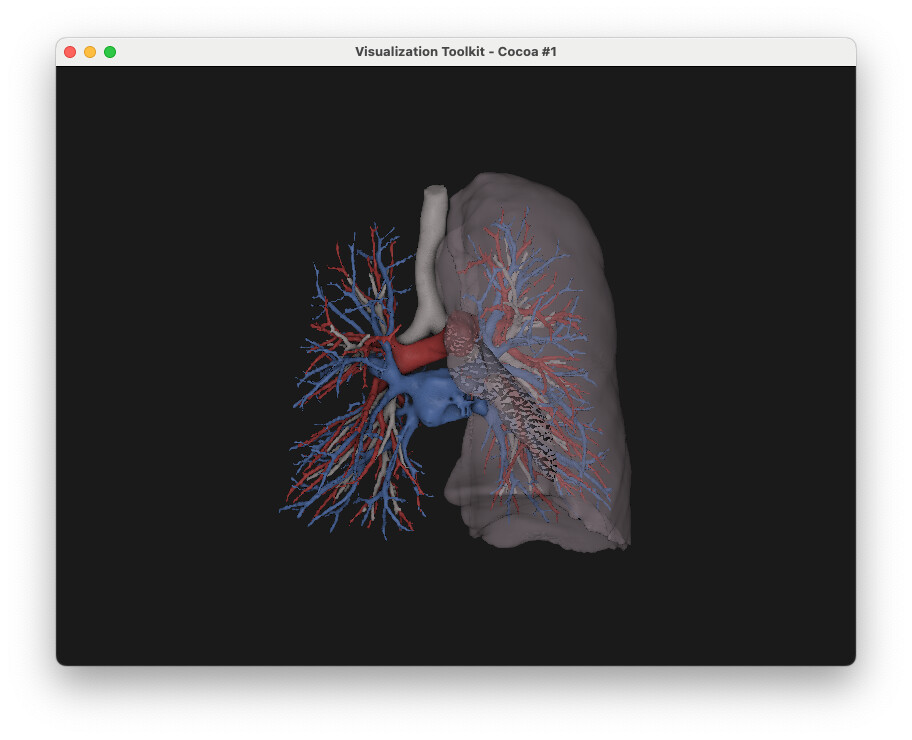 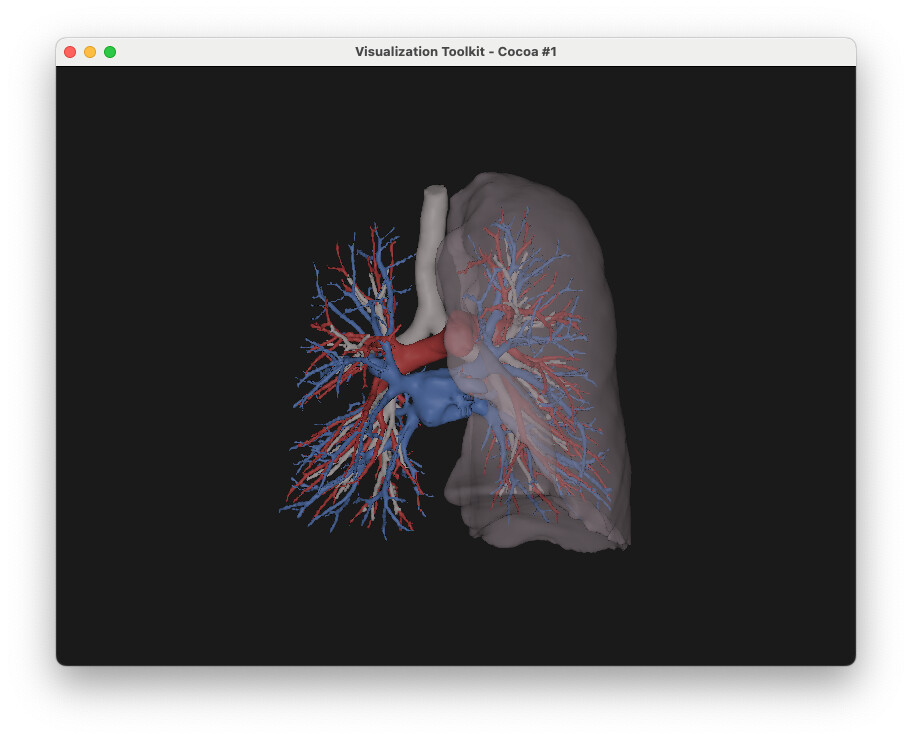
Any clue on what is wrong with my configuration ?
Thanks a lot,
Clément
---
### Author:  [@ctroesch](https://discourse.vtk.org/u/ctroesch)
#### Post date: [June 27, 2025, 9:39am UTC](https://discourse.vtk.org/t/rendering-glitches-when-using-vtkssaopass-and-vtkdepthpeelingpass/15762/5 "2025-06-27T09:39:26Z")
Alright, I managed to make it work by using a custom `vtkRenderPassCollection` and a dedicated SSAO camera pass.
Someone had a similar issue in python:
> [@SSAO peculiar effect with translucent geometry](https://discourse.vtk.org/t/ssao-peculiar-effect-with-translucent-geometry/4410/2):
>
> The odd color behavior is related to an internal color buffer that you are not supposed to see. Note that you will be able to enable SSAO without render passes in VTK 9.1. In the mean time, you can try something equivalent to [F3D render passes](https://gitlab.kitware.com/f3d/f3d/-/blob/master/src/vtkF3DRenderPass.cxx#L125): lightsP = vtk.vtkLightsPass() opaqueP = vtk.vtkOpaquePass() translucentP = vtk.vtkTranslucentPass() volumeP = vtk.vtkVolumetricPass() collection = vtk.vtkRenderPassCollection() collection.AddItem(lightsP) # opaque passes …
For anyone interested this is my final setup to make SSAO & Depth Peeling work together:
```c++
vtkNew opaque;
vtkNew ssaoCameraPass;
ssaoCameraPass->SetDelegatePass(opaque);
vtkNew ssaoPass;
ssaoPass->SetDelegatePass(ssaoCameraPass); // SSAO applies to opaque geometry
ssaoPass->SetRadius(20);
ssaoPass->SetKernelSize(256);
// Depth peeling for translucent geometry
vtkNew peelingPass;
peelingPass->SetMaximumNumberOfPeels(16);
peelingPass->SetOcclusionRatio(0.01);
vtkNew translucentPass;
peelingPass->SetTranslucentPass(translucentPass);
vtkNew lights;
// Compose the sequence
vtkNew passes;
passes->AddItem(lights);
passes->AddItem(ssaoPass); // SSAO for opaque geometry
passes->AddItem(peelingPass); // Depth peeling for translucent
vtkNew sequence;
sequence->SetPasses(passes);
// Wrap it into a camera pass
vtkNew cameraPass;
cameraPass->SetDelegatePass(sequence);
// Set the final pass
renderer->SetPass(cameraPass);
```
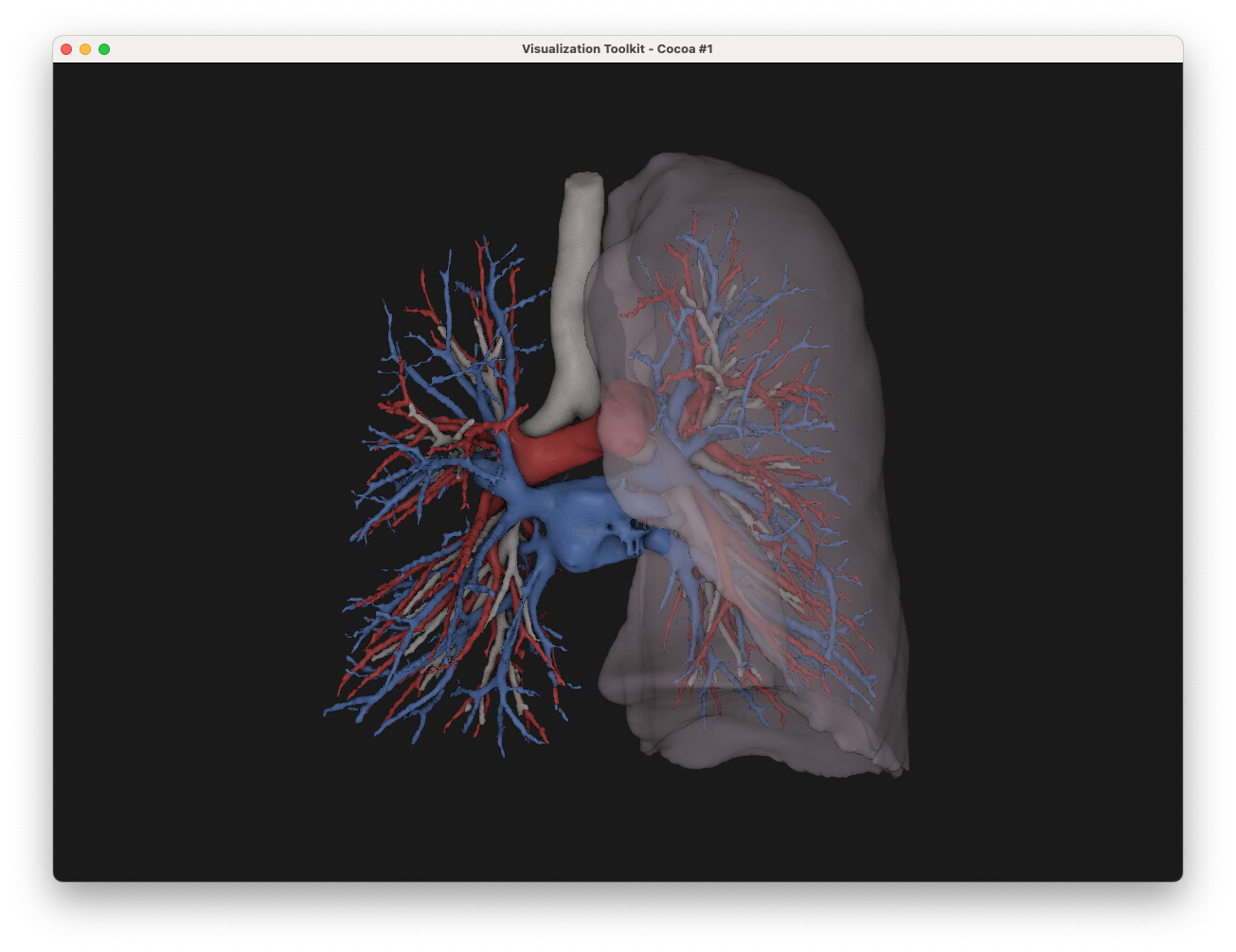
Thanks for the help,
Clément
---
### Author:  [@LucasGandel](https://discourse.vtk.org/u/LucasGandel)
#### Post date: [June 27, 2025, 11:14am UTC](https://discourse.vtk.org/t/rendering-glitches-when-using-vtkssaopass-and-vtkdepthpeelingpass/15762/6 "2025-06-27T11:14:29Z")
Nice, thanks for sharing!