# Rendering
**URL:** https://discourse.vtk.org/t/rendering/3366
**Category:** Web
**Created:** [May 21, 2020, 11:01pm UTC](https://discourse.vtk.org/t/rendering/3366 "2020-05-21T23:01:40Z")
**Posts on this page:** 10
**Page:** 1
### Author:  [@Lokeshwar\_Obuli](https://discourse.vtk.org/u/Lokeshwar_Obuli)
#### Post date: [May 21, 2020, 11:01pm UTC](https://discourse.vtk.org/t/rendering/3366/1 "2020-05-21T23:01:41Z")
While rendering using HTTP what has to be the file format. I am rendering the file as content disposition and the vtk.js is not able to render and says no input in the console of the browser.
---
### Author:  [@Sebastien\_Jourdain](https://discourse.vtk.org/u/Sebastien_Jourdain)
#### Post date: [May 22, 2020, 8:57am UTC](https://discourse.vtk.org/t/rendering/3366/2 "2020-05-22T08:57:40Z")
I don’t understand. HTTP is a network protocol, not a rendering technique or technology?
I guess if we start from the beginning:
- What it your data format? (.vtp, .vti, .dicom, .stl, .obj, …)
- What type of rendering? (geometry vs volume)
- What does not work? Please provide context to your issue with code snippet.
---
### Author:  [@Lokeshwar\_Obuli](https://discourse.vtk.org/u/Lokeshwar_Obuli)
#### Post date: [May 22, 2020, 2:32pm UTC](https://discourse.vtk.org/t/rendering/3366/3 "2020-05-22T14:32:51Z")
This is my index.js
import ‘vtk.js/Sources/favicon’;
import vtkActor from ‘vtk.js/Sources/Rendering/Core/Actor’;
import vtkFullScreenRenderWindow from ‘vtk.js/Sources/Rendering/Misc/FullScreenRenderWindow’;
import vtkMapper from ‘vtk.js/Sources/Rendering/Core/Mapper’;
import vtkPolyDataReader from ‘vtk.js/Sources/IO/Legacy/PolyDataReader’;
const fileName = ‘sphere.vtk’; // ‘uh60.vtk’; // ‘luggaBody.vtk’;
const fileName = file
const **BASE\_PATH** = [http://localhost:8000](http://localhost:8000)
// ----------------------------------------------------------------------------
// Standard rendering code setup
// ----------------------------------------------------------------------------
const fullScreenRenderer = vtkFullScreenRenderWindow.newInstance();
const renderer = fullScreenRenderer.getRenderer();
const renderWindow = fullScreenRenderer.getRenderWindow();
const resetCamera = renderer.resetCamera;
const render = renderWindow.render;
// ----------------------------------------------------------------------------
// Example code
// ----------------------------------------------------------------------------
const reader = vtkPolyDataReader.newInstance();
reader.setUrl(`${ __BASE_PATH__ }/${fileName}`).then(() =\> {
const polydata = reader.getOutputData(0);
const mapper = vtkMapper.newInstance();
const actor = vtkActor.newInstance();
mapper.setInputData(polydata)
actor.setMapper(mapper);
// mapper.setInputData(polydata);
renderer.addActor(actor);
resetCamera();
render();
});
// // -----------------------------------------------------------
// // Make some variables global so that you can inspect and
// // modify objects in your browser’s developer console:
// // -----------------------------------------------------------
global.reader = reader;
global.fullScreenRenderer = fullScreenRenderer;
This is my server code
from django.shortcuts import render
from django.contrib.auth.models import User, Group
from rest\_framework import viewsets
from rest\_framework import permissions
from rest\_framework import status
from rest\_framework.decorators import api\_view
from rest\_framework.response import Response
from django.http import HttpResponse
from django.http import JsonResponse
from wsgiref.util import FileWrapper
import vtk
# Create your views here.
@api\_view([‘GET’])
def req\_file(request, format = None):
“”"
List all code snippets, or create a new snippet.
“”"
if request.method == ‘GET’:
file\_location = ‘server/assets/DEM30168\_surface\_FIBULA.vtk’
# reader = vtk.vtkPolyDataReader()
# reader.SetFileName(file\_location)
# reader.Update()
# polydata = reader.GetOutput()
try:
with open(file\_location, ‘rb’) as f:
file\_data = f.read()
```
# sending response
response = HttpResponse(file_data, content_type='application/force-download')
response['Content-Disposition'] = 'attachment; filename="output.vtk"'
return response
except IOError:
# handle file not exist case here
response = {'msg': 'file not found'}
return JsonResponse(response)
```
Kindly review this and let me where things are going wrong
---
### Author:  [@Lokeshwar\_Obuli](https://discourse.vtk.org/u/Lokeshwar_Obuli)
#### Post date: [May 22, 2020, 2:40pm UTC](https://discourse.vtk.org/t/rendering/3366/4 "2020-05-22T14:40:40Z")
The above are the two code snippets of the front end and the backend I am trying to render a file from the web server and render it using vtk.js. All I get is a grey screen. I am using a .vtk model.
---
### Author:  [@Sebastien\_Jourdain](https://discourse.vtk.org/u/Sebastien_Jourdain)
#### Post date: [May 22, 2020, 2:41pm UTC](https://discourse.vtk.org/t/rendering/3366/5 "2020-05-22T14:41:30Z")
The code seems fine. But just so you know the VTK legacy reader has some limitation.
It was written quickly in a plane so we could get some geometry in. I would recommend using the vtp format if you can.
---
### Author:  [@Lokeshwar\_Obuli](https://discourse.vtk.org/u/Lokeshwar_Obuli)
#### Post date: [May 22, 2020, 3:20pm UTC](https://discourse.vtk.org/t/rendering/3366/6 "2020-05-22T15:20:23Z")
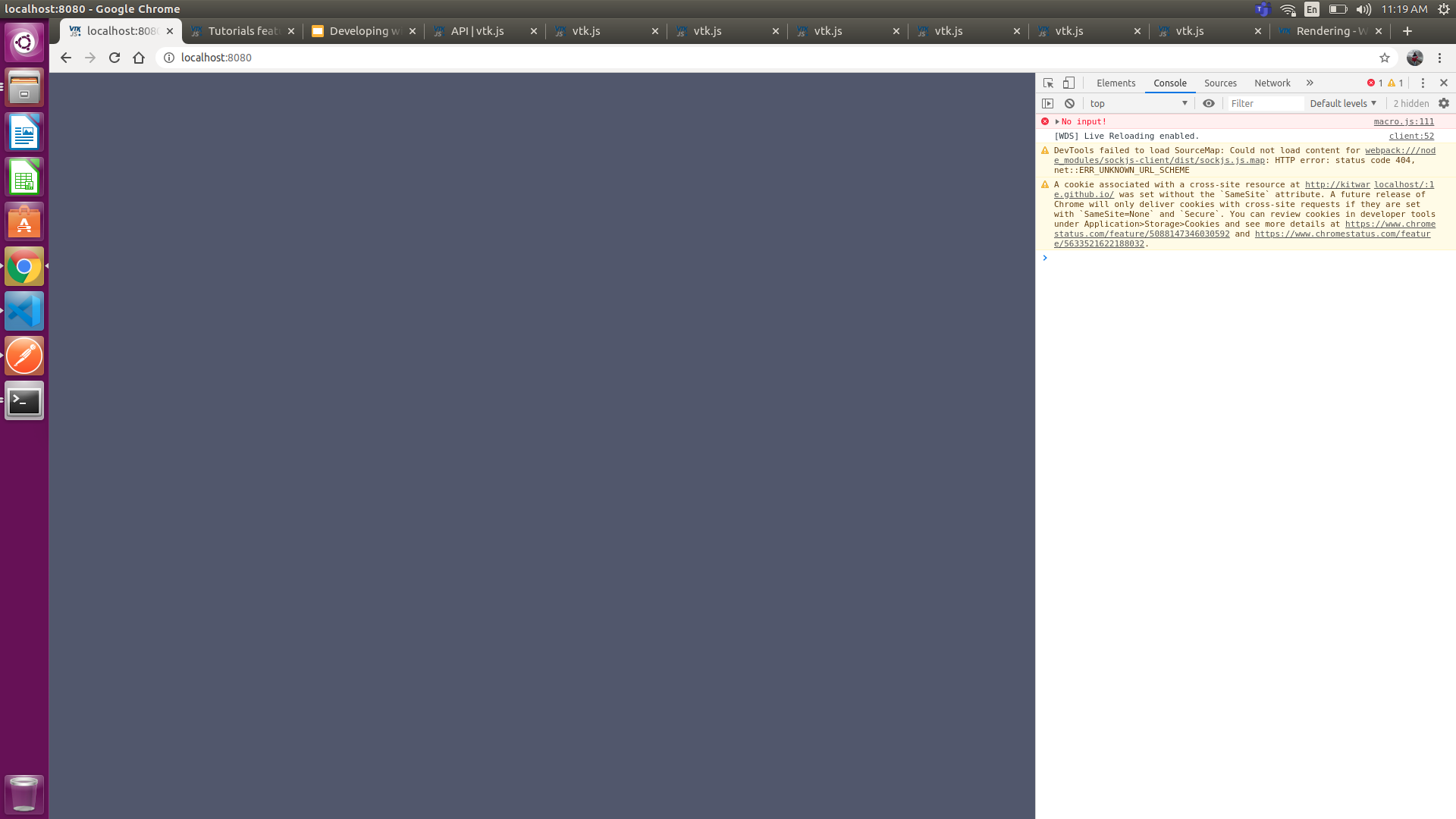
If I try to render .vtp or any other format the attached screenshot is what appears
---
### Author:  [@Sebastien\_Jourdain](https://discourse.vtk.org/u/Sebastien_Jourdain)
#### Post date: [May 22, 2020, 3:39pm UTC](https://discourse.vtk.org/t/rendering/3366/7 "2020-05-22T15:39:12Z")
Do you choose the correct reader when you change the file format that you serve?
Can you load your vtp inside [ParaView Glance](https://kitware.github.io/paraview-glance/app/)?
It seems the reader is giving you an empty polydata. Probably because it can not load/decode your file.
---
### Author:  [@Lokeshwar\_Obuli](https://discourse.vtk.org/u/Lokeshwar_Obuli)
#### Post date: [May 22, 2020, 3:41pm UTC](https://discourse.vtk.org/t/rendering/3366/8 "2020-05-22T15:41:50Z")
Which loader can load the vtp file and httpdatasetreader can load what formats?
---
### Author:  [@Lokeshwar\_Obuli](https://discourse.vtk.org/u/Lokeshwar_Obuli)
#### Post date: [May 22, 2020, 3:47pm UTC](https://discourse.vtk.org/t/rendering/3366/9 "2020-05-22T15:47:39Z")
I tried the same .vtp file in paraview glance. It is able to load over there.
---
### Author:  [@Lokeshwar\_Obuli](https://discourse.vtk.org/u/Lokeshwar_Obuli)
#### Post date: [May 23, 2020, 3:56pm UTC](https://discourse.vtk.org/t/rendering/3366/10 "2020-05-23T15:56:26Z")
Yeah paraview Glance can load the same .vtp file and I am trying all different loaders to the load the file. But some say no input, some loaders search for index.json like [http://localhost:8000/file/index.json](http://localhost:8000/file/index.json) which i don’t understand