### Author:  [@dgobbi](https://discourse.vtk.org/u/dgobbi)
#### Post date: [August 19, 2019, 4:52pm UTC](https://discourse.vtk.org/t/reslice-of-imagedata-and-glyph3d-arrows/1617/2 "2019-08-19T16:52:13Z")
Hi Louis,
Can you can add backticks to format your code blocks? E.g.:
````
```
x = vtkSmartPointer::New();
```
````
More importantly, if you don’t do this, then bits of code go missing, e.g.:
x = vtkSmartPointer::New();
I tried to read your code, but I don’t know what classes you are instantiating!
David
---
### Author:  [@Louis](https://discourse.vtk.org/u/Louis)
#### Post date: [August 20, 2019, 7:26am UTC](https://discourse.vtk.org/t/reslice-of-imagedata-and-glyph3d-arrows/1617/3 "2019-08-20T07:26:05Z")
Done.
Sorry this is my first time on a forum.
---
### Author:  [@dgobbi](https://discourse.vtk.org/u/dgobbi)
#### Post date: [August 20, 2019, 12:32pm UTC](https://discourse.vtk.org/t/reslice-of-imagedata-and-glyph3d-arrows/1617/4 "2019-08-20T12:32:37Z")
If your imageVectorMem data set has vectors and normals, they will be ignored by vtkImageReslice. It only works on scalar data. You might have to try using vtkProbeFilter instead.
---
### Author:  [@Louis](https://discourse.vtk.org/u/Louis)
#### Post date: [August 20, 2019, 1:31pm UTC](https://discourse.vtk.org/t/reslice-of-imagedata-and-glyph3d-arrows/1617/5 "2019-08-20T13:31:04Z")
Ok I will try it.
But it seems that the vtkProbeFilter is complex to use, so if you already have an idea how to use it in my pipeline it would be great.
Thanks for your fast replies
---
### Author:  [@Louis](https://discourse.vtk.org/u/Louis)
#### Post date: [August 21, 2019, 12:57pm UTC](https://discourse.vtk.org/t/reslice-of-imagedata-and-glyph3d-arrows/1617/6 "2019-08-21T12:57:37Z")
I try it since yesterday but it doesn’t work. I guess I don’t use it in a good way.
Could you detail more your solution ?
I don’t see where I have to integrate it and how to use it.
Louis
---
### Author:  [@dgobbi](https://discourse.vtk.org/u/dgobbi)
#### Post date: [August 21, 2019, 4:33pm UTC](https://discourse.vtk.org/t/reslice-of-imagedata-and-glyph3d-arrows/1617/7 "2019-08-21T16:33:03Z")
There are some vtkProbeFilter examples [here](https://lorensen.github.io/VTKExamples/site/). The new vtkResampleToImage filter might be easier to use (it is designed to output vtkImageData, and it uses vtkProbeFilter internally).
But if you only need to extract existing slices (rather than generating oblique slices), then vtkExtractVOI might be enough: [https://lorensen.github.io/VTKExamples/site/Cxx/ImageData/ExtractVOI/](https://lorensen.github.io/VTKExamples/site/Cxx/ImageData/ExtractVOI/)
---
### Author:  [@Louis](https://discourse.vtk.org/u/Louis)
#### Post date: [August 22, 2019, 8:07am UTC](https://discourse.vtk.org/t/reslice-of-imagedata-and-glyph3d-arrows/1617/8 "2019-08-22T08:07:40Z")
What I want is to be able to see my vectors, and to be able to change the slice of my volume displayed. And for this I have a matrix 4x4 to set the orientation and the position of my slice displayed.
Seems that the vtkProbeFilter doesn’t work with me …
```auto
imageProbeFilterMem = vtkSmartPointer::New();
imageProbeFilterMem->SetInputData(imageVectorMem);
imageProbeFilterMem->SetSourceData(imageResliceMem->GetOutput());
```
---
### Author:  [@dgobbi](https://discourse.vtk.org/u/dgobbi)
#### Post date: [August 22, 2019, 4:39pm UTC](https://discourse.vtk.org/t/reslice-of-imagedata-and-glyph3d-arrows/1617/9 "2019-08-22T16:39:53Z")
The probe filter works the other way around: the “Source” has the attributes you want (the vectors), and the “Input” has the point grid to use for the output. But I’ve been thinking, and the probe filter is probably not the best solution for you, since you already have something that almost works with vtkImageReslice (and ImageReslice is also much faster than Probe, since it is designed specifically for image data).
I remembered some old code that I wrote that does something similar to what you want. In my case, I had tensor values for every voxel in my image volume and I displayed them with vtkImageReslice and vtkTensorGlyph. The code is [here](https://github.com/dgobbi/AIRS/blob/new-greens-strain/Programs/StrainGlyph.cxx#L442) and the resulting image looked like this:
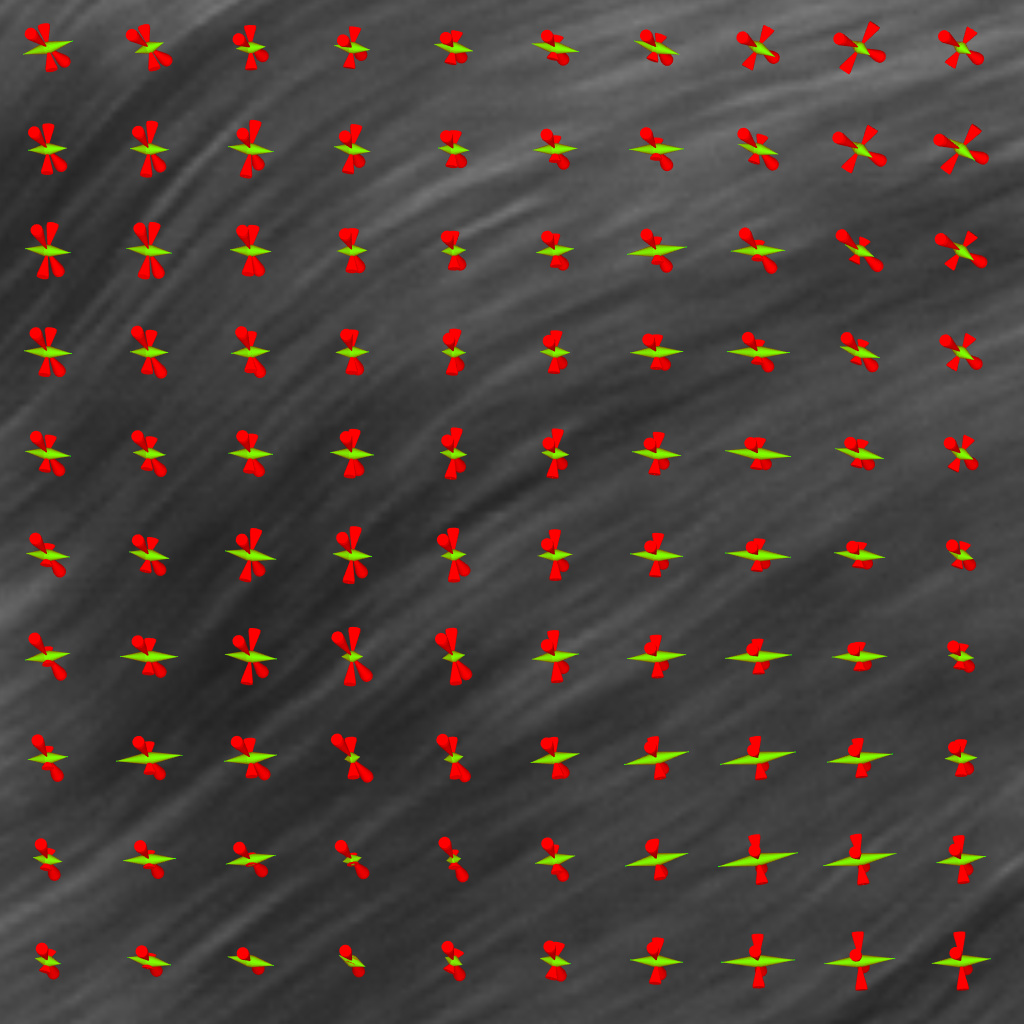
The trick was to create a temporary image where the “Tensors” were moved to the “Scalars” so that vtkImageReslice would reslice them. Something like the following:
```
# make a new data set where tensors are scalars
vtkSmartPointer tensorsAsScalars =
vtkSmartPointer::New();
tensorsAsScalars->CopyStructure(tensorData);
tensorsAsScalars->GetPointData()->SetScalars(
tensorData->GetPointData()->GetTensors());
# reslice works because the data is stored as Scalars
tensorReslice->SetInputData(tensorsAsScalars);
# put the scalar data back into "Tensors" for use by vtkTensorGlyph
vtkSmartPointer tensorsData2 =
vtkSmartPointer::New();
tensorsData2->CopyStructure(tensorReslice->GetOutput());
tensorsData2->GetPointData()->SetTensors(
tensorReslice->GetOutput()->GetPointData()->GetScalars());
```
In my case, I wasn’t applying any rotation when I was reslicing, so I didn’t have to rotate the tensors after resampling them.
---
### Author:  [@Louis](https://discourse.vtk.org/u/Louis)
#### Post date: [August 23, 2019, 8:49am UTC](https://discourse.vtk.org/t/reslice-of-imagedata-and-glyph3d-arrows/1617/10 "2019-08-23T08:49:53Z")
Thank for your replies !
It seems it still does not work … this time I got nothing displayed as if my glyph does not have any input.
Not worries for the rotation, I already have a case where it work, so I just have to fix the display of my vector in arrows
Here my new pipeline, tell me if I do something wrong that I do not see :
```auto
imageVectorMem = vtkSmartPointer::New();
imageVectorMem2 = vtkSmartPointer::New();
imageVectorMem2->CopyStructure(imageVectorMem);
imageVectorMem2->GetPointData()->SetScalars(imageVectorMem->GetPointData()->GetVectors());
imageResliceMem = vtkSmartPointer::New();
imageResliceMem->SetInputData(imageVectorMem2);
imageResliceMem->SetOutputDimensionality(2);
//imageResliceMem->SetInterpolationMode(true ? VTK_RESLICE_LINEAR : VTK_RESLICE_NEAREST);
//imageResliceMem->SetInterpolationMode(true);
imageVectorSliceMem = vtkSmartPointer::New();
imageVectorSliceMem->CopyStructure(imageResliceMem->GetOutput());
imageVectorSliceMem->GetPointData()->SetVectors(imageResliceMem->GetOutput()->GetPointData()->GetScalars());
//imageVectorSliceMem->GetPointData()->SetActiveVectors("ImageScalars");
arrowSourceMem = vtkSmartPointer::New();
glyphFilterMem = vtkSmartPointer::New();
glyphFilterMem->SetSourceConnection(arrowSourceMem->GetOutputPort());
glyphFilterMem->SetInputData(imageVectorSliceMem);
glyphFilterMem->SetVectorModeToUseVector();
glyphFilterMem->OrientOn();
vectorMapperMem = vtkSmartPointer::New();
vectorMapperMem->SetInputConnection(glyphFilterMem->GetOutputPort());
actorMem = vtkSmartPointer::New();
actorMem->SetMapper(vectorMapperMem);
```
Here my inputs (maybe it come form this, but I don’t think so) :
```auto
imageVectorMem->SetDimensions(dim[0],dim[1],dim[2]);
imageVectorMem->SetSpacing(spacing[0],spacing[1],spacing[2]);
imageVectorMem->SetOrigin(0,0,0);
imageVectorMem->AllocateScalars(VTK_FLOAT, 3);
int idx =0;
for (int i = 0; i < dim[2]; i ++)
{
for (int j = 0; j < dim[1]; j ++)
{
for (int k = 0; k < dim[0]; k ++, idx ++ )
{
float* dataDef = static_cast(imageVectorMem->GetScalarPointer(k, j, i));
dataDef[0] = dataToDisplay->vectorField.at(idx)[0];
dataDef[1] = dataToDisplay->vectorField.at(idx)[1];
dataDef[2] = dataToDisplay->vectorField.at(idx)[2];
}
}
}
//imageVectorMem->GetPointData()->SetActiveScalars("ImageScalars");
imageVectorMem->GetPointData()->SetActiveVectors(imageVectorMem->GetPointData()->GetArray(0)->GetName());
```
---
### Author:  [@dgobbi](https://discourse.vtk.org/u/dgobbi)
#### Post date: [August 23, 2019, 12:41pm UTC](https://discourse.vtk.org/t/reslice-of-imagedata-and-glyph3d-arrows/1617/11 "2019-08-23T12:41:21Z")
You must call Update() before calling GetOutput():
```
imageResliceMem->Update();
...
imageVectorSliceMem->CopyStructure(imageResliceMem->GetOutput());
```
Since the code that creates imageVectorMem2 calls AllocateScalars() and GetScalarPointer(), your vector data is already stored as Scalars, so you do not need imageVectorMem2, and you do not need this before using vtkImageReslice:
```
imageVectorMem->GetPointData()->SetActiveVectors(imageVectorMem->GetPointData()->GetArray(0)->GetName());
```
---
### Author:  [@Louis](https://discourse.vtk.org/u/Louis)
#### Post date: [August 23, 2019, 2:08pm UTC](https://discourse.vtk.org/t/reslice-of-imagedata-and-glyph3d-arrows/1617/12 "2019-08-23T14:08:25Z")
Still not working …
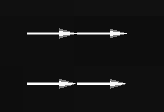
I only get these 4 arrows when I’m supposed to get 672 400 arrows
And I don’t know why they seem to still be not oriented in the 3D space, they lose there color and the image isn’t fix anymore like if, the arrow wasn’t assign to they point in the image. Really strange …
---
### Author:  [@dgobbi](https://discourse.vtk.org/u/dgobbi)
#### Post date: [August 23, 2019, 3:13pm UTC](https://discourse.vtk.org/t/reslice-of-imagedata-and-glyph3d-arrows/1617/13 "2019-08-23T15:13:17Z")
Check the input to the glyph filter to see if you can get some clues. E.g. print out the following values:
```
imageVectorSliceMem->GetNumberOfPoints();
imageVectorSliceMem->GetPointData()->GetVectors()->GetNumberOfTuples();
imageVectorSliceMem->GetPointData()->GetVectors()->GetNumberOfComponents();
```
Also check some of the actual values to make sure that they’re not all (0,0,0).
---
### Author:  [@Louis](https://discourse.vtk.org/u/Louis)
#### Post date: [August 26, 2019, 9:07am UTC](https://discourse.vtk.org/t/reslice-of-imagedata-and-glyph3d-arrows/1617/14 "2019-08-26T09:07:45Z")

It seems it comes from the moment I convert the data to vector type, but I don’t understand why it doesn’t associate rightfully the data.
```auto
imageVectorSliceMem->CopyStructure(imageResliceMem->GetOutput());
imageVectorSliceMem->GetPointData()->SetVectors(imageResliceMem->GetOutput()->GetPointData()->GetScalars());
```
---
### Author:  [@dgobbi](https://discourse.vtk.org/u/dgobbi)
#### Post date: [August 26, 2019, 1:05pm UTC](https://discourse.vtk.org/t/reslice-of-imagedata-and-glyph3d-arrows/1617/15 "2019-08-26T13:05:10Z")
Are you sure you called `imageResliceMem->Update()` before calling `imageResliceMem->GetOutput()`?
Also check `imageResliceMem->GetOutput()->GetNumberOfPoints()`.
---
### Author:  [@Louis](https://discourse.vtk.org/u/Louis)
#### Post date: [August 26, 2019, 2:39pm UTC](https://discourse.vtk.org/t/reslice-of-imagedata-and-glyph3d-arrows/1617/16 "2019-08-26T14:39:02Z")
Well, … I think I use it correctly
It also return 4 …
I really do not understand what Reslice on doing
```auto
imageVectorMem = vtkSmartPointer::New();
imageResliceMem = vtkSmartPointer::New();
imageResliceMem->SetInputData(imageVectorMem);
imageResliceMem->SetOutputDimensionality(2);
imageResliceMem->SetInterpolationMode(true ? VTK_RESLICE_LINEAR : VTK_RESLICE_NEAREST);
imageResliceMem->SetInterpolationMode(true);
imageResliceMem->Update();
imageVectorSliceMem = vtkSmartPointer::New();
imageVectorSliceMem->AllocateScalars(VTK_FLOAT, 3);
imageVectorSliceMem->SetOrigin(imageVectorMem->GetOrigin());
imageVectorSliceMem->CopyStructure(imageResliceMem->GetOutput());
imageVectorSliceMem->GetPointData()->SetVectors(imageResliceMem->GetOutput()->GetPointData()->GetScalars());
imageVectorSliceMem->GetPointData()->SetActiveVectors("ImageScalars");
cout << imageVectorSliceMem->GetNumberOfPoints() << endl; // return 4
cout << imageVectorSliceMem->GetPointData()->GetVectors() << endl; // return 00000...
cout << imageResliceMem->GetOutput()->GetNumberOfPoints() << endl; // return 4
//cout << imageVectorSliceMem->GetPointData()->GetVectors()->GetNumberOfTuples() << endl; // CRASH, no reading rights
//cout << imageVectorSliceMem->GetPointData()->GetVectors()->GetNumberOfComponents() <::New();
glyphFilterMem = vtkSmartPointer::New();
glyphFilterMem->SetSourceConnection(arrowSourceMem->GetOutputPort());
glyphFilterMem->SetInputData(imageVectorSliceMem);
glyphFilterMem->SetVectorModeToUseVector();
glyphFilterMem->OrientOn();
vectorMapperMem = vtkSmartPointer::New();
vectorMapperMem->SetInputConnection(glyphFilterMem->GetOutputPort());
actorMem = vtkSmartPointer::New();
actorMem->SetMapper(vectorMapperMem);
```
---
### Author:  [@dgobbi](https://discourse.vtk.org/u/dgobbi)
#### Post date: [August 26, 2019, 3:19pm UTC](https://discourse.vtk.org/t/reslice-of-imagedata-and-glyph3d-arrows/1617/17 "2019-08-26T15:19:09Z")
Strange. When you “Set” something, generally a “Get” will return exactly what you “Set”. It certainly does so when I try the following on my computer:
```
imageVectorSliceMem->GetPointData()->SetVectors(imageResliceMem->GetOutput()->GetPointData()->GetScalars());
cout << imageVectorSliceMem->GetPointData()->GetVectors() << endl;
```
Are you absolutely sure that the following isn’t also returning zero?
```
cout << imageResliceMem->GetOutput()->GetPointData()->GetScalars() << endl;
```
Also, never call AllocateScalars() immediately after calling New(). It’s always necessary to set the Extent (or Dimensions) of the data before AllocateScalars(). Internally, `y->CopyStructure(x)` sets the Extent, Spacing, and Origin of y to the Extent, Spacing, and Origin of x.
---
### Author:  [@Louis](https://discourse.vtk.org/u/Louis)
#### Post date: [August 27, 2019, 8:48am UTC](https://discourse.vtk.org/t/reslice-of-imagedata-and-glyph3d-arrows/1617/18 "2019-08-27T08:48:47Z")
Ok ! It seems that the AllocateScalars() was bugging my code, so now I place it after the :
`imageVectorSliceMem->CopyStructure(imageResliceMem->GetOutput());`
And now I get some result at the output but my arrows still do not display:

---
### Author:  [@Louis](https://discourse.vtk.org/u/Louis)
#### Post date: [August 29, 2019, 7:37am UTC](https://discourse.vtk.org/t/reslice-of-imagedata-and-glyph3d-arrows/1617/19 "2019-08-29T07:37:27Z")
Well I guess there is no solution for me …
I started to developpe my own Reslice to be able to reslice my vectors and I start to get some good result.
Thanks for your help David