# Retrieving Interpolation Image of Reslice Output with TextureVisibilityOff()
**URL:** https://discourse.vtk.org/t/retrieving-interpolation-image-of-reslice-output-with-texturevisibilityoff/3083
**Category:** Support
**Created:** [April 17, 2020, 4:32pm UTC](https://discourse.vtk.org/t/retrieving-interpolation-image-of-reslice-output-with-texturevisibilityoff/3083 "2020-04-17T16:32:39Z")
**Posts on this page:** 2
**Page:** 1
### Author:  [@Aaron\_Nowack](https://discourse.vtk.org/u/Aaron_Nowack)
#### Post date: [April 17, 2020, 4:32pm UTC](https://discourse.vtk.org/t/retrieving-interpolation-image-of-reslice-output-with-texturevisibilityoff/3083/1 "2020-04-17T16:32:40Z")
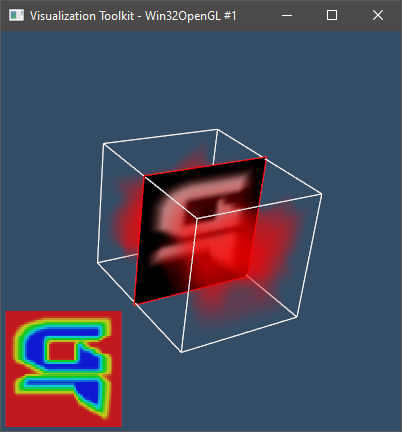
I’m creating an application which slices through a 3D volume and displays an overlay of the slice in a corner. I use a vtkImagePlaneWidget for interacting with the slice, and vtkLogoRepresentation to display the 2D slice, as shown below
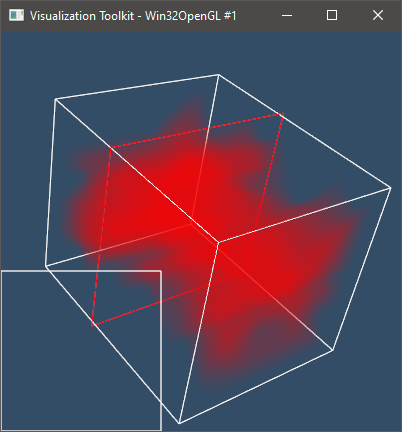
Instead I would like to not display the image within the volume, and only show the outline. I do this by calling TextureVisibilityOff() of the vtkImagePlaneWidget. However then the 2D corner display does not display any data and returns an error message of “No scalar values found for texture input!”
The relevant section of code is here, using the Python bindings
```python
plane_widget = vtk.vtkImagePlaneWidget()
plane_widget.SetResliceInterpolateToLinear()
plane_widget.DisplayTextOn()
plane_widget.SetInputConnection(dataImporter.GetOutputPort())
plane_widget.SetPlaneOrientationToXAxes()
plane_widget.SetSliceIndex(int(s_shape[0] / 2))
plane_widget.SetPicker(picker)
plane_widget.SetKeyPressActivationValue("x")
plane_widget.SetPlaneOrientationToZAxes()
plane_widget.TextureVisibilityOff()
plane_widget.GetLookupTable().SetTableRange(0, s_max)
plane_widget.SetMarginSizeX(0)
plane_widget.SetMarginSizeY(0)
prop1 = plane_widget.GetPlaneProperty()
prop1.SetColor(1, 0, 0)
logo_rep = vtk.vtkLogoRepresentation()
logo_rep.SetImage(plane_widget.GetResliceOutput())
logo_rep.SetPosition(0, 0)
logo_rep.SetPosition2(0.4, 0.4)
logo_rep.GetImageProperty().SetOpacity(0.7)
```
---
### Author:  [@Aaron\_Nowack](https://discourse.vtk.org/u/Aaron_Nowack)
#### Post date: [April 17, 2020, 11:00pm UTC](https://discourse.vtk.org/t/retrieving-interpolation-image-of-reslice-output-with-texturevisibilityoff/3083/2 "2020-04-17T23:00:17Z")
I did finally discover the answer I was searching for, which is that instead of calling TextureVisibilityOff(), to grab the texture property through plane\_widget.GetTexturePlaneProperty(), and use SetOpacity(0.00001) on the property. Setting to 0.0 doesn’t allow selecting the plane widget any longer, so this seems to be working for now.
I sure wish there was a better way to understand the framework of VTK, I’ve seen mentions of videos and workshops, but haven’t seen materials. I’ve browsed through VTK User’s Guide, and there is too much focus on how graphics visualization is implemented instead of the VTK system itself.