# rotate actor about line
**URL:** https://discourse.vtk.org/t/rotate-actor-about-line/4594
**Category:** Support
**Created:** [November 6, 2020, 11:42am UTC](https://discourse.vtk.org/t/rotate-actor-about-line/4594 "2020-11-06T11:42:56Z")
**Posts on this page:** 8
**Page:** 1
### Author:  [@azk](https://discourse.vtk.org/u/azk)
#### Post date: [November 6, 2020, 11:42am UTC](https://discourse.vtk.org/t/rotate-actor-about-line/4594/1 "2020-11-06T11:42:56Z")
Hello! I am new to python and VTK so please have patience 🙂
I have an actor and I would like to rotate it about a line I drew using vtkLineSource(). I chose my start and end points and I drew the line. Now what I thought is (please correct me if I am wrong) that I should make an axis on the line and then apply the vtkTransformWXYZ() to rotate about the axis. It does not work, it gives a weird rotation about the chosen point, but not the one I desire.
I also tried defining the axis on the middle of the line I drew and apply the rotation on it, but when I try, it rotates about the global coordinates, and not the local. I also tried to give as input the point, but again, the rotation is very weird.
Is there a way to define the line as an axis and rotate the actor about it? So far I tried like in the following examples: [https://lorensen.github.io/VTKExamples/site/Python/PolyData/RotationAroundLine/](https://lorensen.github.io/VTKExamples/site/Python/PolyData/RotationAroundLine/) and [https://lorensen.github.io/VTKExamples/site/Python/Rendering/Rotations/](https://lorensen.github.io/VTKExamples/site/Python/Rendering/Rotations/) but my actor always rotates in a weird way.
Could anyone help/point me in the right direction please?
Here is the part of my code where I am trying to rotate the actor…
###################### create line to rotate about and display it
```
lineStart = [16.8879, -106.476, -782.449]
lineFinish = [-17.827, -92.2757, lineStart[2]]
lineMiddle = [(lineStart[0]+lineFinish[0])/2, (lineStart[1]+lineFinish[1])/2, lineStart[2]]
lineSource = vtk.vtkLineSource()
lineSource.SetPoint1(lineStart)
lineSource.SetPoint2(lineFinish)
lineSource.Update()
mapperLine = vtk.vtkPolyDataMapper()
mapperLine.SetInputConnection(lineSource.GetOutputPort())
actorLine = vtk.vtkActor()
actorLine.SetMapper(mapperLine)
actorLine.GetProperty().SetLineWidth(4)
actorLine.GetProperty().SetColor(1,0,0)
ren.AddActor(actorLine)
```
############# rotate about the line
```
modelMapper = vtk.vtkPolyDataMapper()
modelMapper.SetInputData(cleanFilter.GetOutput())
modelActor = vtk.vtkActor()
modelActor.SetMapper(modelMapper)
modelAxesSource = vtk.vtkAxes()
modelAxesSource.SetScaleFactor(100)
modelAxesSource.SetOrigin(lineMiddle)
modelAxesMapper = vtk.vtkPolyDataMapper()
modelAxesMapper.SetInputConnection(modelAxesSource.GetOutputPort())
modelAxes = vtk.vtkActor()
modelAxes.SetMapper(modelAxesMapper)
ren.AddActor(modelAxes)
modelAxes.VisibilityOn()
##this did not work
# modelActor.SetOrientation(lineMiddle)
# modelActor.RotateZ(45)
# ren.AddActor(modelActor)
transform = vtk.vtkTransform()
transform.RotateWXYZ(45, lineMiddle)
transformFilter = vtk.vtkTransformPolyDataFilter()
transformFilter.SetTransform(transform)
transformFilter.SetInputConnection(cleanFilter.GetOutputPort())
transformFilter.Update()
NewMapper = vtk.vtkPolyDataMapper()
NewMapper.SetInputConnection(transformFilter.GetOutputPort())
actorRotated = vtk.vtkActor()
actorRotated.SetMapper(NewMapper)
ren.AddActor(actorRotated)
```
Thanks in advance,
Diana
---
### Author:  [@azk](https://discourse.vtk.org/u/azk)
#### Post date: [November 6, 2020, 12:17pm UTC](https://discourse.vtk.org/t/rotate-actor-about-line/4594/2 "2020-11-06T12:17:37Z")
I also tried the following but it does not display anything…
```
rotate = vtk.vtkRotationFilter()
rotate.SetInputConnection(cleanFilter.GetOutputPort())
rotate.SetAxisToY()
rotate.SetCenter(lineMiddle)
rotate.SetAngle(45)
mapper = vtk.vtkDataSetMapper()
mapper.SetInputConnection(rotate.GetOutputPort())
actor = vtk.vtkActor()
actor.SetMapper(mapper)
ren.AddActor(actor)
```
---
### Author:  [@lassoan](https://discourse.vtk.org/u/lassoan)
#### Post date: [November 6, 2020, 3:31pm UTC](https://discourse.vtk.org/t/rotate-actor-about-line/4594/3 "2020-11-06T15:31:22Z")
If the line does not go through the origin then the cleanest solution to this is to concatenate 3 transforms:
- transform the actor from the world coordinate system to a coordinate system aligned with the line
- apply rotation matrix (simple rotation along one coordinate system axis that is aligned with the line)
- transform back to the world coordinate system (inverse of the first transform)
See an implementation of rotating an actor around an arbitrary line (specified by two points): [https://www.slicer.org/wiki/Documentation/Nightly/ScriptRepository#Rotate\_a\_node\_around\_a\_specified\_line](https://www.slicer.org/wiki/Documentation/Nightly/ScriptRepository#Rotate_a_node_around_a_specified_line)
The computation is done on pure VTK classes (vtkMatrix4x4, vtkTransform, etc.) but there is some extra code to make the rotation interactive (as the line is moved or the rotation matrix is changed) that you can ignore if you don’t use 3D Slicer.
---
### Author:  [@azk](https://discourse.vtk.org/u/azk)
#### Post date: [November 9, 2020, 11:00am UTC](https://discourse.vtk.org/t/rotate-actor-about-line/4594/4 "2020-11-09T11:00:09Z")
Thank you for your reply!
I am trying for quite some time now and I can’t get my head around this…
I have tried using the link you provided and I just cannot get it to work… I tried adapting the program in the link to my problem, but I cannot figure it out and I am not sure why… Th code I used is as follows:
```
def updateFinalTransform(rotationAxisPoint1_World, rotationAxisPoint2_World, obj, angle):
axisDirectionZ_World = np.array(rotationAxisPoint2_World)-np.array(rotationAxisPoint1_World)
axisDirectionZ_World = axisDirectionZ_World/np.linalg.norm(axisDirectionZ_World)
# Get transformation between world coordinate system and rotation axis aligned coordinate system
worldToRotationAxisTransform = vtk.vtkMatrix4x4()
p = vtk.vtkPlaneSource()
p.SetNormal(axisDirectionZ_World)
axisOrigin = np.array(p.GetOrigin())
axisDirectionX_World = np.array(p.GetPoint1())-axisOrigin
axisDirectionY_World = np.array(p.GetPoint2())-axisOrigin
rotationAxisToWorldTransform = np.row_stack((np.column_stack((axisDirectionX_World, axisDirectionY_World, axisDirectionZ_World, rotationAxisPoint1_World)), (0, 0, 0, 1)))
rotationAxisToWorldTransformMatrix = np.array(rotationAxisToWorldTransform)
worldToRotationAxisTransform = np.array(np.linalg.inv(rotationAxisToWorldTransform))
# Compute transformation chain
rotationMatrix = vtk.vtkMatrix4x4()
finalTransform = vtk.vtkTransform()
finalTransform.Concatenate(rotationAxisToWorldTransformMatrix)
finalTransform.Concatenate(rotationMatrix)
finalTransform.Concatenate(worldToRotationAxisTransformMatrix)
finalTransformNode.SetAndObserveMatrixTransformToParent(finalTransform.GetMatrix())
obj = vtk.vtkTransform()
obj.RotateWXYZ(angle, finalTransformNode)
transformFilter=vtk.vtkTransformPolyDataFilter()
transformFilter.SetTransform(obj)
transformFilter.SetInputConnection(cleanFilter.GetOutputPort())
transformFilter.Update()
NewMapper = vtk.vtkPolyDataMapper()
NewMapper.SetInputConnection(transformFilter.GetOutputPort())
actorRotated = vtk.vtkActor()
actorRotated.SetMapper(NewMapper)
ren.AddActor(actorRotated)
```
I also tried implementing the Euler-Rodrigues formula, but my actor does not display… I tried using the following code:
```
def rotate(angle, axis, axis_point, obj):
anglerad = np.deg2rad(angle)
a = np.cos(anglerad / 2)
b = -axis[0] * np.sin(anglerad / 2)
c = -axis[1] * np.sin(anglerad / 2)
d = -axis[2] * np.sin(anglerad / 2)
aa, bb, cc, dd = a * a, b * b, c * c, d * d
bc, ad, ac, ab, bd, cd = b * c, a * d, a * c, a * b, b * d, c * d
R = np.array(
[
[aa + bb - cc - dd, 2 * (bc + ad), 2 * (bd - ac)],
[2 * (bc - ad), aa + cc - bb - dd, 2 * (cd + ab)],
[2 * (bd + ac), 2 * (cd - ab), aa + dd - bb - cc],
]
)
rv = np.dot(R, obj.GetPosition() - np.array(axis_point)) + axis_point
obj = vtk.vtkTransform()
obj.RotateWXYZ(angle, axis[0], axis[1], axis[2])
obj.Translate(rv[0], rv[1], rv[2])
transformFilter=vtk.vtkTransformPolyDataFilter()
transformFilter.SetTransform(obj)
transformFilter.SetInputConnection(cleanFilter.GetOutputPort())
transformFilter.Update()
NewMapper = vtk.vtkPolyDataMapper()
NewMapper.SetInputConnection(transformFilter.GetOutputPort())
actorRotated = vtk.vtkActor()
actorRotated.SetMapper(NewMapper)
ren.AddActor(actorRotated)
```
There is clearly something I am doing wrong, but I am not sure what.
[EDIT]:
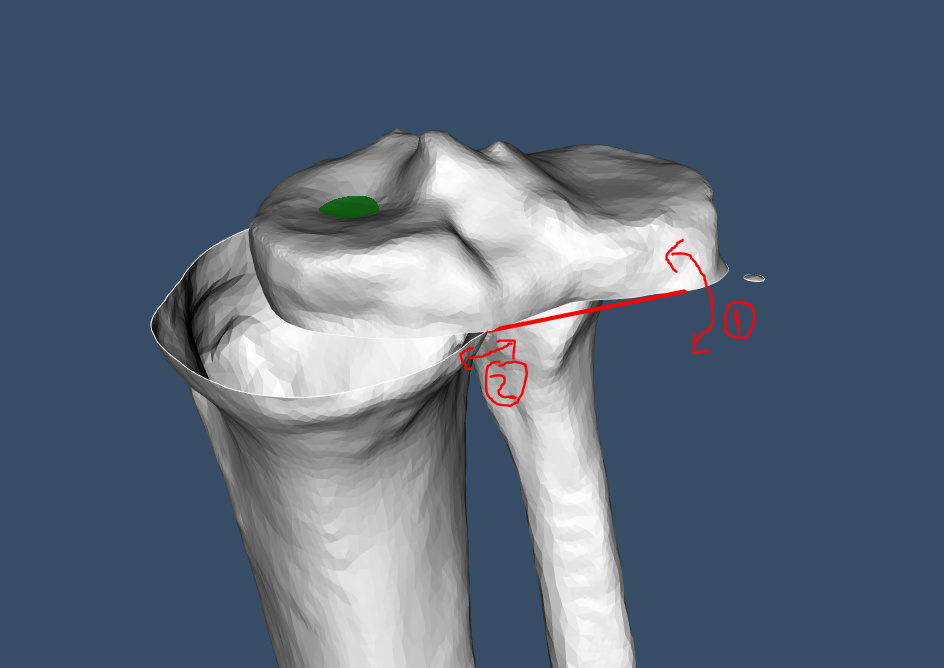
For the E-R algorithm, I realized the translation coordinates were too big, so I had to divide them by 1000000000. Now I can see the rotated actor, but the problem is that the rotation is on the Z axis and not the Y or X. What I obtain for the E-R is shown in the image below. I am trying to rotate it about the line I drew, in the axis of the line, so the (1) direction, but instead it is rotating like in (2) and I am not sure why.
Any help is appreciated!
---
### Author:  [@lassoan](https://discourse.vtk.org/u/lassoan)
#### Post date: [November 9, 2020, 6:05pm UTC](https://discourse.vtk.org/t/rotate-actor-about-line/4594/5 "2020-11-09T18:05:31Z")
Euler angles can be used as orientation representation for a very small subset of problems, as it suffers from gimbal lock and it is not invertible (same orientation can be represented using different Euler angles). Orientation matrix and quaternion representations do not have this problem.
If you are not sure what’s wrong with your code, I would suggest to start from the working example that I provided above and make modifications in small steps, testing your code after each step.
---
### Author:  [@azk](https://discourse.vtk.org/u/azk)
#### Post date: [November 10, 2020, 8:15am UTC](https://discourse.vtk.org/t/rotate-actor-about-line/4594/6 "2020-11-10T08:15:03Z")
Thank you for your reply.
I tried using the example you provided, but I could not make it work and I still do not know why…
What I ended up doing was using the E-R formula and numpy, calculate the rotation and translation matrix (T \* R \* -T) and display it using actors. Now it works as intended.
Thanks for all the help!
---
### Author:  [@lassoan](https://discourse.vtk.org/u/lassoan)
#### Post date: [November 10, 2020, 1:03pm UTC](https://discourse.vtk.org/t/rotate-actor-about-line/4594/7 "2020-11-10T13:03:01Z")
Yes, as I wrote above in my first post, T \* R \* inv(T) is the transformation you need. You can compute it either numpy or vtkTransform. If you use vtkTransform then you may need to apply the transforms in reverse order (depending on the vtkTransform object, if it is set to `PreMultiply` or `PostMultiply` mode).
---
### Author:  [@azk](https://discourse.vtk.org/u/azk)
#### Post date: [November 10, 2020, 1:37pm UTC](https://discourse.vtk.org/t/rotate-actor-about-line/4594/8 "2020-11-10T13:37:10Z")
You are right!
What I meant was that I was trying to use the vtk classes but I could not manage. So I turned to numpy.