# Rotating my volume using setUserMatrix results in a skewed volume
**URL:** https://discourse.vtk.org/t/rotating-my-volume-using-setusermatrix-results-in-a-skewed-volume/6648
**Category:** Support
**Created:** [September 16, 2021, 4:01pm UTC](https://discourse.vtk.org/t/rotating-my-volume-using-setusermatrix-results-in-a-skewed-volume/6648 "2021-09-16T16:01:38Z")
**Posts on this page:** 20
**Page:** 1
### Author:  [@shanebenlolo](https://discourse.vtk.org/u/shanebenlolo)
#### Post date: [September 16, 2021, 4:01pm UTC](https://discourse.vtk.org/t/rotating-my-volume-using-setusermatrix-results-in-a-skewed-volume/6648/1 "2021-09-16T16:01:38Z")
hello,
I am attempting to apply an Affine Transformation to my volume using the `setUserMatrix` method. I am using the rotation transformation, which is detailed here:
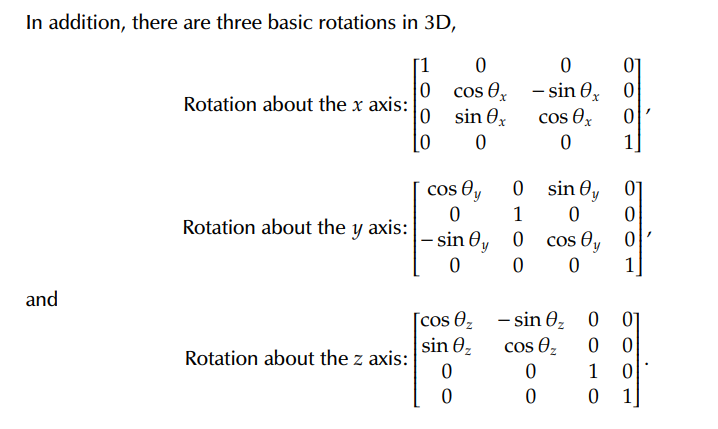
This is my implementation, which occurs as a coordinate slider is adjusted:
```auto
var newMatrix = [...state.currentMatrix]
switch (coord) {
case coord = 'X':
newMatrix[5] = Math.cos(value)
newMatrix[6] = Math.asin(value)
newMatrix[9] = Math.sin(value)
newMatrix[10] = Math.cos(value)
break;
case coord = 'Y':
newMatrix[0] = Math.cos(value)
newMatrix[2] = Math.sin(value)
newMatrix[8] = Math.asin(value)
newMatrix[10] = Math.cos(value)
break;
case coord = 'Z':
newMatrix[0] = Math.cos(value)
newMatrix[1] = Math.asin(value)
newMatrix[4] = Math.sin(value)
newMatrix[5] = Math.cos(value)
break;
default:
break;
}
setState({currentMatrix:[...newMatrix]})
setUserMatrix(newMatrix)
```
Here is the results:


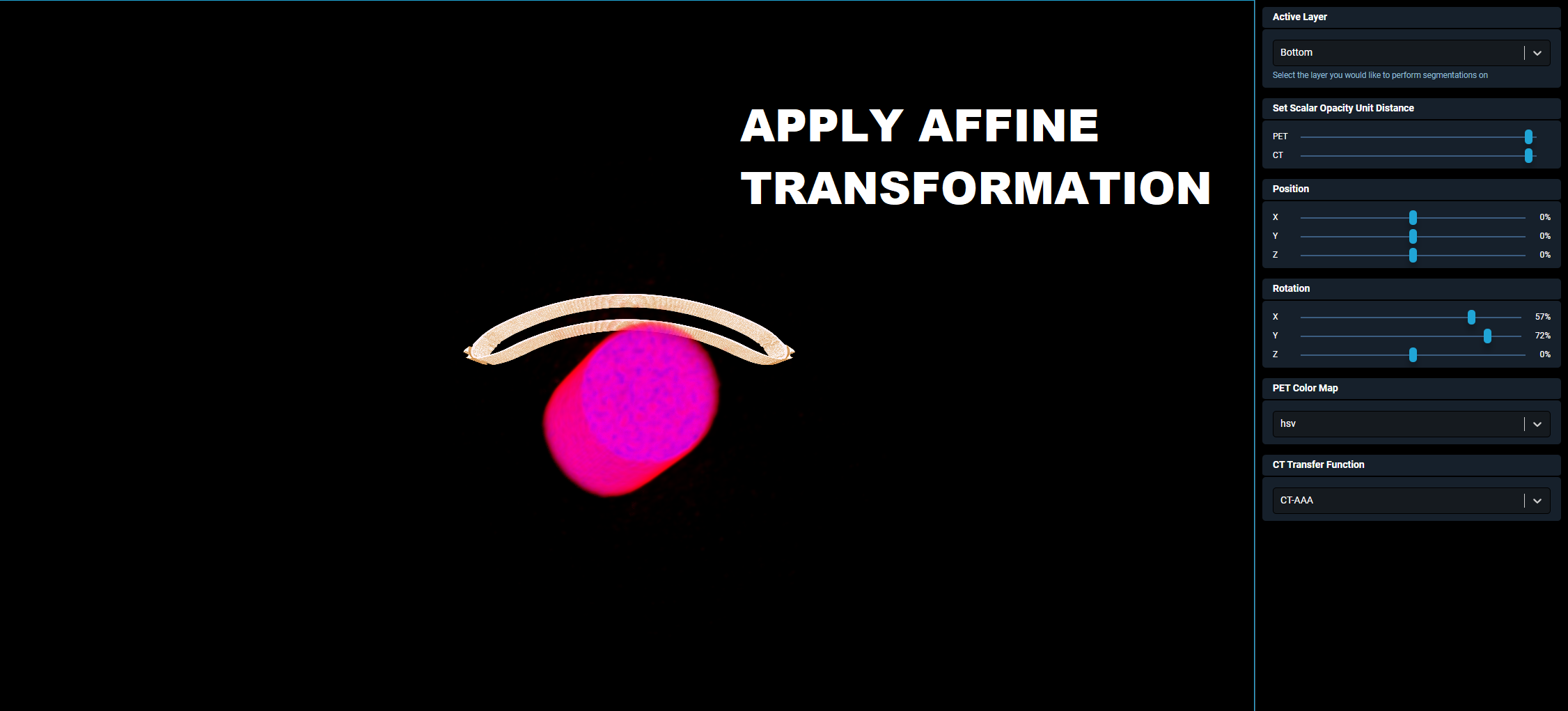
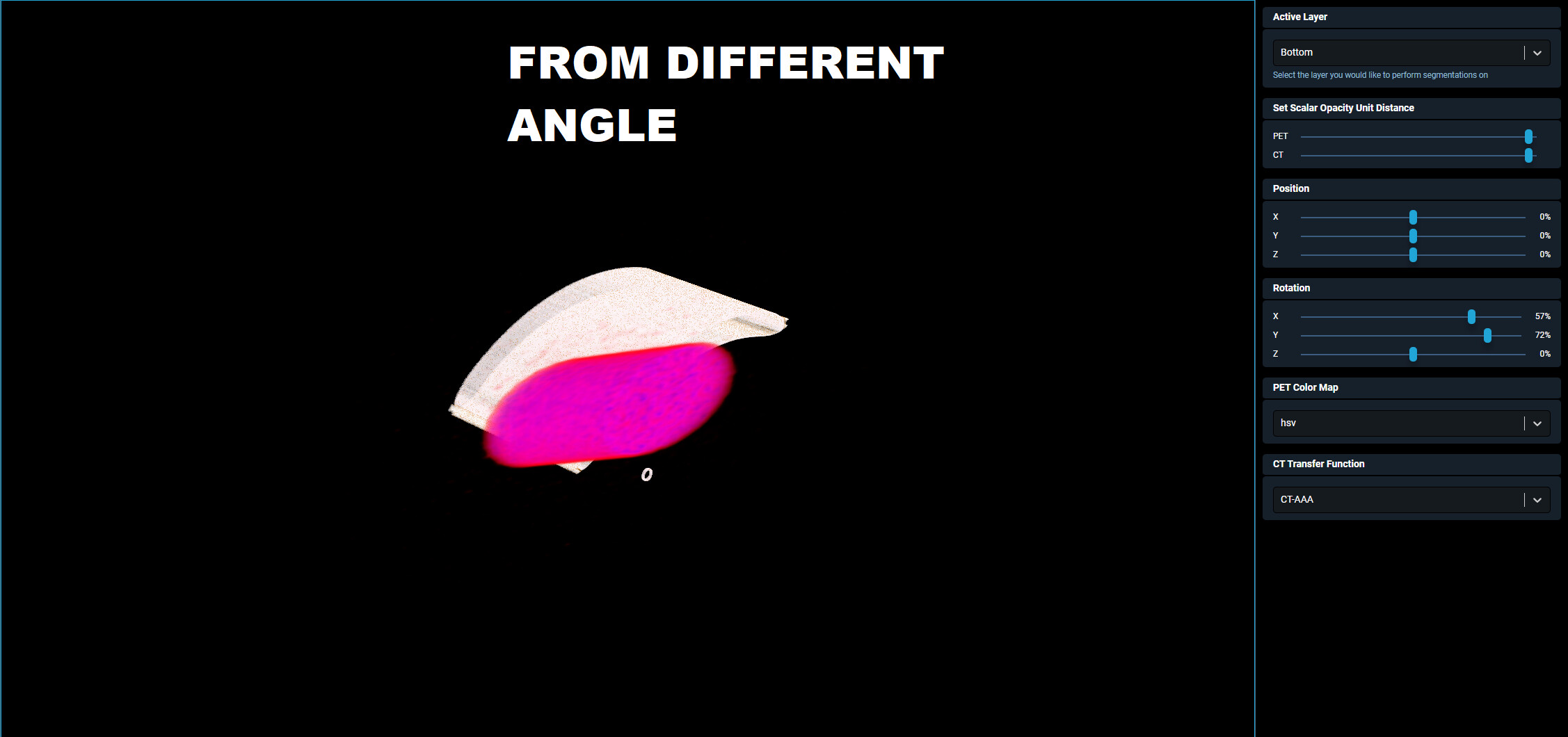
As you can see, the image has become distored. If anyone knows why this is happening please let me know, thank you.
---
### Author:  [@lassoan](https://discourse.vtk.org/u/lassoan)
#### Post date: [September 16, 2021, 11:47pm UTC](https://discourse.vtk.org/t/rotating-my-volume-using-setusermatrix-results-in-a-skewed-volume/6648/2 "2021-09-16T23:47:44Z")
All these computations are implemented in vtkTransform. I would recommend to use that.
---
### Author:  [@Paulo\_Carvalho](https://discourse.vtk.org/u/Paulo_Carvalho)
#### Post date: [September 17, 2021, 11:38am UTC](https://discourse.vtk.org/t/rotating-my-volume-using-setusermatrix-results-in-a-skewed-volume/6648/3 "2021-09-17T11:38:11Z")
Hi, Shane,
I suspect you assumed `Math.asin()` is the same as `-Math.sin()`. `Math.asin(value)` is the arcsine. The arcsine is the reverse sine function (you give a sine value, you get an angle), not the inverted signal sine. That’s why your transform yields unexpected results.
cheers,
Paulo
---
### Author:  [@shanebenlolo](https://discourse.vtk.org/u/shanebenlolo)
#### Post date: [September 17, 2021, 2:16pm UTC](https://discourse.vtk.org/t/rotating-my-volume-using-setusermatrix-results-in-a-skewed-volume/6648/4 "2021-09-17T14:16:41Z")
Thanks for the response Paulo,
You were correct, and switching my equation to include `-Math.sin()` fixed the skewing issue.
However, my volume is still rotating around a point which is not at the center of my volume, making it disappear off screen after a couple degrees of rotation. I have tried using the method `setOrigin()`, which, from the documentation, is supposed to “set the point about which all rotations take place”. [Prop3D | vtk.js](https://vtkjs.com/api/Rendering_Core_Prop3D.html#setOrigin-1)
I run the command `volume.setOrigin(volume.getCenter())` before performing my rotation, and yet this seems to have no affect on the point which the rotation is taking place from. I can run `volume.getOrigin()` before and after setting it, and see that the origin has changed to what I set it, and yet it does not seem to make a difference.
Is there any other way I can change the point which my volume rotates around? Or am I simply using the method `setOrigin` incorrectly? Thanks again
---
### Author:  [@shanebenlolo](https://discourse.vtk.org/u/shanebenlolo)
#### Post date: [September 17, 2021, 2:22pm UTC](https://discourse.vtk.org/t/rotating-my-volume-using-setusermatrix-results-in-a-skewed-volume/6648/5 "2021-09-17T14:22:24Z")
Thanks for the response Andras,
I was able to perform my repositioning using the `setPosition` method found in vtkTransform and it worked great. However, when trying to use `setOrientation(1,2,3)` or `setOrientation([1,2,3])` I receive the following error:
```auto
macro.js?e35e:510 Uncaught (in promise) TypeError: Cannot read properties of undefined (reading 'forEach')
```
similarly, if I run `getOrientation()` I recieve `[undefined]`, which goes against what the documentation says should be the default, which is [0,0,0]. Issues with these methods has caused me to resort to using `setUserMatrix()`
---
### Author:  [@lassoan](https://discourse.vtk.org/u/lassoan)
#### Post date: [September 17, 2021, 2:24pm UTC](https://discourse.vtk.org/t/rotating-my-volume-using-setusermatrix-results-in-a-skewed-volume/6648/6 "2021-09-17T14:24:13Z")
> [@shanebenlolo](#):
>
> However, my volume is still rotating around a point which is not at the center of my volume
Rotation happens around the origin. To rotate around an arbitrary point, translate to that point, apply the rotation, and translate back. You can simply call Translate(-c[0],-c[1],-c[2]), RotateX/Y/Z, Translate(c[0],c[1],c[2]), GetMatrix on vtkTransform to specify all the transforms and get the correct transformation matrix.
> [@shanebenlolo](#):
>
> similarly, if I run `getOrientation()` I recieve `[undefined]`,
vtkTransform has no such method. Probably you meant GetOrientation.
---
### Author:  [@shanebenlolo](https://discourse.vtk.org/u/shanebenlolo)
#### Post date: [September 17, 2021, 2:32pm UTC](https://discourse.vtk.org/t/rotating-my-volume-using-setusermatrix-results-in-a-skewed-volume/6648/7 "2021-09-17T14:32:25Z")
I don’t believe I have access to the vtkTransform methods you are mentioning. I have `rotateX`, `rotateY`, `rotateZ` , but they’re useless without `Translate`. I only have access to these methods:
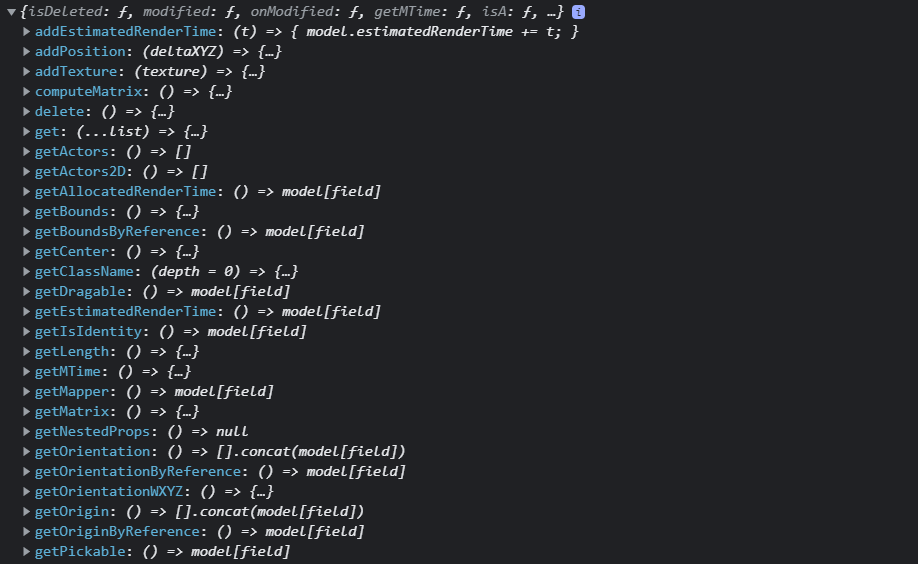

I am working with the react-vtkjs-viewport. From what I’ve been able to deduce, this is the documentation I am supposed to follow: [https://vtkjs.com/api/Rendering\_Core\_Prop3D.html](https://vtkjs.com/api/Rendering_Core_Prop3D.html)
The introduction mentions `Translate`, but it’s rather vague
> vtkProp3D is an abstract class used to represent an entity in a rendering
> scene (i.e., vtkProp3D is a vtkProp with an associated transformation
> matrix). It handles functions related to the position, orientation and
> scaling. It combines these instance variables into one 4x4 transformation
> matrix as follows: [x y z 1] = [x y z 1] **Translate(-origin)** Scale(scale)
> Rot(y) Rot(x) Rot (z) Trans(origin) Trans(position). Both vtkActor and
> vtkVolume are specializations of class vtkProp. The constructor defaults
> to: origin(0,0,0) position=(0,0,0) orientation=(0,0,0), no user defined
> matrix or transform, and no texture map.
I’m not sure how I’m supposed to maniupulate `Translate` using the information I am provided. Correct me if I am wrong but I believe `setOrigin()` would be the translate function I need, right? But it does not seem to change anything about my rotation when I set it.
---
### Author:  [@lassoan](https://discourse.vtk.org/u/lassoan)
#### Post date: [September 18, 2021, 2:26am UTC](https://discourse.vtk.org/t/rotating-my-volume-using-setusermatrix-results-in-a-skewed-volume/6648/8 "2021-09-18T02:26:27Z")
Oh no, you are not talking about VTK but VTK.js. That is an entirely different library. Please always use the [web](https://discourse.vtk.org/c/web/9) category when you ask questions about VTK.js to avoid confusion.
---
### Author:  [@Paulo\_Carvalho](https://discourse.vtk.org/u/Paulo_Carvalho)
#### Post date: [September 18, 2021, 2:29pm UTC](https://discourse.vtk.org/t/rotating-my-volume-using-setusermatrix-results-in-a-skewed-volume/6648/9 "2021-09-18T14:29:50Z")
And I thought you were on Python.
---
### Author:  [@shanebenlolo](https://discourse.vtk.org/u/shanebenlolo)
#### Post date: [September 18, 2021, 6:24pm UTC](https://discourse.vtk.org/t/rotating-my-volume-using-setusermatrix-results-in-a-skewed-volume/6648/10 "2021-09-18T18:24:59Z")
My mistake, I apologize for the confusion. Fortunately I have figured out how to bring the transform class from VTK.js, which has given me access to the translate function. I am still a little confused on how to use it though.
Andras, would mind expanding on your explanation a bit where you said:
> You can simply call Translate(-c[0],-c[1],-c[2]), RotateX/Y/Z, Translate(c[0],c[1],c[2])
what does -c and c represent in this scenario?
---
### Author:  [@lassoan](https://discourse.vtk.org/u/lassoan)
#### Post date: [September 18, 2021, 9:29pm UTC](https://discourse.vtk.org/t/rotating-my-volume-using-setusermatrix-results-in-a-skewed-volume/6648/11 "2021-09-18T21:29:01Z")
By `c` I meant the position of the desired center of rotation.
---
### Author:  [@shanebenlolo](https://discourse.vtk.org/u/shanebenlolo)
#### Post date: [September 19, 2021, 8:08pm UTC](https://discourse.vtk.org/t/rotating-my-volume-using-setusermatrix-results-in-a-skewed-volume/6648/12 "2021-09-19T20:08:39Z")
I see, that makes perfect sense. Do you have any idea on how to find the coordinate point that represents the center of rotation? That seem to be the only thing I am missing now.
I tried running `actor.getBounds()`, which returns the min/max XYZ of my actor, and then doing:
```auto
translate(minX, minY, minZ)
rotateX(angle)
translate(-1*minX, -1*minY, -1*minZ)
```
Thinking that the min XYZ would be the point I need, but this did not seem to bring the object to the point around which the rotation is occurring.
Please understand that I am trying to figure the answers out to these questions on my own before asking you. I appreciate all the advice you have all offered this far it has been very helpful.
---
### Author:  [@lassoan](https://discourse.vtk.org/u/lassoan)
#### Post date: [September 19, 2021, 8:12pm UTC](https://discourse.vtk.org/t/rotating-my-volume-using-setusermatrix-results-in-a-skewed-volume/6648/13 "2021-09-19T20:12:37Z")
It is often intuitive to use the center of the bounding box as center of rotation. The coordinates are: `[(minX+maxX)/2.0, (minY+maxY)/2.0, (minZ+maxZ)/2.0]`.
---
### Author:  [@shanebenlolo](https://discourse.vtk.org/u/shanebenlolo)
#### Post date: [September 19, 2021, 9:14pm UTC](https://discourse.vtk.org/t/rotating-my-volume-using-setusermatrix-results-in-a-skewed-volume/6648/15 "2021-09-19T21:14:24Z")
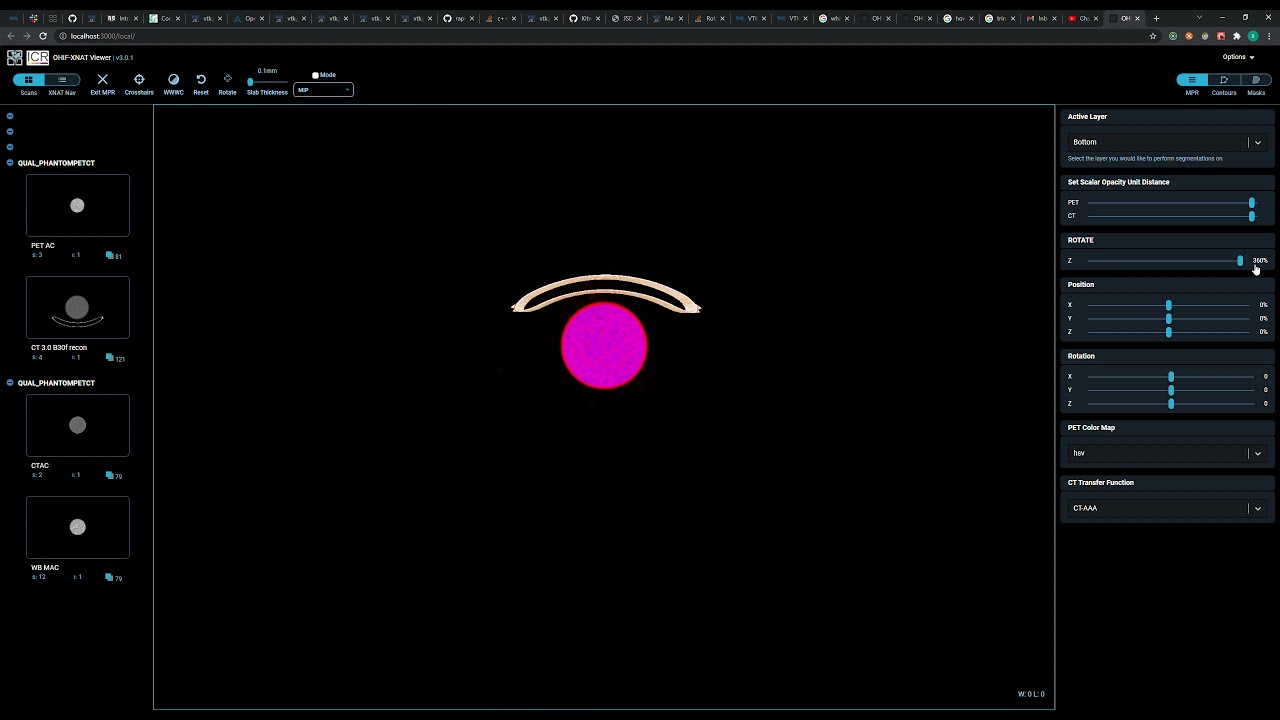
This is what happens when I run:
```auto
const newMatrix = vtkMatrixBuilder.buildFromDegree().rotateZ(angle)
api.volumes[1].setUserMatrix(newMatrix.matrix)
```
[ ](https://www.youtube.com/watch?v=XTKSp20-5LI)
The Z axis rotates properly, but for some reason the object seems to oscillate back and forth as I rotate between -360 and 360 degrees. I cannot figure out why. Is it because the point of rotation is not at the center of my object? If so, where is it? How can I find where it is?
My object is already in the center of my bounding box, at
`[(minX+maxX)/2.0, (minY+maxY)/2.0, (minZ+maxZ)/2.0]`
So I’m not sure what point it is that I should be translating to before / after my rotation.
---
### Author:  [@lassoan](https://discourse.vtk.org/u/lassoan)
#### Post date: [September 19, 2021, 10:36pm UTC](https://discourse.vtk.org/t/rotating-my-volume-using-setusermatrix-results-in-a-skewed-volume/6648/16 "2021-09-19T22:36:23Z")
Here is a complete, tested, working implementation of rotating a VTK object around an arbitrary point: [Script repository — 3D Slicer documentation](https://slicer.readthedocs.io/en/latest/developer_guide/script_repository.html#rotate-a-node-around-a-specified-point)
> **[RotateAroundPoint.mp4](https://onedrive.live.com/redir?resid=872AF7415C00BFB9%21942589&authkey=%21AKXenncNWtXIMW4&ithint=video%2cmp4&e=x5SJOd)**
>
> MP4 File
Computing a transformation matrix around an arbitrary point is very simple (just multiplication of trivial homogeneous transformation matrices). However, the usual trial-and-error programming technique does not work because here because you can mess up so many things (order of operations, use a transform or its inverse, store coordinates in row or column vectors, multiply from left or right, etc.). I would recommend to either “debug” your computation by computing the matrices using pen and paper on a concreate example (draw sketches, compute matrices); or use a GUI application, such as 3D Slicer to concatenate matrices and visualize results interactively to find where are the errors in your computations.
Don’t be discouraged. It is not just you. See how we tried to explain this to various developers over the years:
- [How to do custom rotation sliders and transformation buttons with python? - Support - 3D Slicer Community](https://discourse.slicer.org/t/how-to-do-custom-rotation-sliders-and-transformation-buttons-with-python/19747)
- [Rotate model around specific point - Support - 3D Slicer Community](https://discourse.slicer.org/t/rotate-model-around-specific-point/16846)
- [Set center of rotation for transform in 3D view - Feature requests - 3D Slicer Community](https://discourse.slicer.org/t/set-center-of-rotation-for-transform-in-3d-view/14363)
- [How to set center of rotation for linear transformation in GUI - Support - 3D Slicer Community](https://discourse.slicer.org/t/how-to-set-center-of-rotation-for-linear-transformation-in-gui/10903)
- [Can I adjust the center of orientation when using 'transform module'? - Support - 3D Slicer Community](https://discourse.slicer.org/t/can-i-adjust-the-center-of-orientation-when-using-transform-module/857)
---
### Author:  [@Paulo\_Carvalho](https://discourse.vtk.org/u/Paulo_Carvalho)
#### Post date: [September 20, 2021, 1:21pm UTC](https://discourse.vtk.org/t/rotating-my-volume-using-setusermatrix-results-in-a-skewed-volume/6648/17 "2021-09-20T13:21:52Z")
Hello,
From that video, the pink object is still orbiting around a far off center. To rotate an object around its center you do this matrix multiplication: S = T-1 \* R \* T. S will be transform you look for. T is the translation matrix from current location to origin. R is the rotation matrix. T-1 is the translation back. Notice that order is important and the transforms are applied in reverse order as seen in the multiplation, that is, T occurs first, then R and finally, T-1.
I hope this helps,
Paulo
---
### Author:  [@shanebenlolo](https://discourse.vtk.org/u/shanebenlolo)
#### Post date: [September 20, 2021, 1:40pm UTC](https://discourse.vtk.org/t/rotating-my-volume-using-setusermatrix-results-in-a-skewed-volume/6648/18 "2021-09-20T13:40:02Z")
Hey Paulo,
I agree the object is not near the origin, and that I need to translate the object to the origin, rotate the object, then translate my object back to it original position. However, I cannot figure out where my origin is located in relation to my object.
If I run the method `getOrigin` is see the origin is at` [0,0,0]` in world coordinates.
If I run `getCenter` I get the center of the bounding box in world coordinates, in this case the value is `[-0.724395751953125, -138.78439331054688, -0.5]`
Is this enough information to figure out where I should be translating to / from? What other information is needed?
Thank you
---
### Author:  [@Paulo\_Carvalho](https://discourse.vtk.org/u/Paulo_Carvalho)
#### Post date: [September 20, 2021, 9:43pm UTC](https://discourse.vtk.org/t/rotating-my-volume-using-setusermatrix-results-in-a-skewed-volume/6648/19 "2021-09-20T21:43:11Z")
Hi,
That info not only is enough, but it has expected values. If you are not getting the rotation right, certainly there is something amiss in your code. No further geometry info required.
Try to reduce your problem to a trivial case: a simple cube centered at the origin, then apply rotation. You should get a working code. Grow in complexity bit-by-bit until you get something wrong. You should be able to pinpoint the bug. That’s what I do in face of mysteries or when I’m not sure what the API does.
take care,
Paulo
---
### Author:  [@Paulo\_Carvalho](https://discourse.vtk.org/u/Paulo_Carvalho)
#### Post date: [September 20, 2021, 9:47pm UTC](https://discourse.vtk.org/t/rotating-my-volume-using-setusermatrix-results-in-a-skewed-volume/6648/20 "2021-09-20T21:47:09Z")
Are those data of the `vtkActor` or of the `vtkImage`? Their stats are not necessarily the same.
---
### Author:  [@shanebenlolo](https://discourse.vtk.org/u/shanebenlolo)
#### Post date: [September 21, 2021, 2:15pm UTC](https://discourse.vtk.org/t/rotating-my-volume-using-setusermatrix-results-in-a-skewed-volume/6648/21 "2021-09-21T14:15:06Z")
The data I’ve been referring to has been for the`vtkActor`. When getting origin of `vtkImage`, the origin is placed at the min bounds of XYZ.
**vtkActor Data:**
```auto
getOrigin: [0,0,0]
getCenter: [-0.724395751953125, -138.78439331054688, -0.5]
```
So I try translating so that my center is moved to my origin, rotating, then moving back:
```auto
const newMatrix = vtkMatrixBuilder
.buildFromDegree()
.translate(-0.724395751953125, -138.78439331054688, -0.5)
.rotateZ(10)
.translate(0.724395751953125, 138.78439331054688, 0.5)
api.volumes[0].setUserMatrix(newMatrix.matrix)
```
this only nudges my object a little bit, then performs the transformation similar in the video.
* * *
* * *
* * *
**vtkImage Data:**
```auto
getOrigin: [-405.971, -544.031, -120.5] //these are the min bounds
getCenter: [-0.724395751953125, -138.78439331054688, -0.5]
```
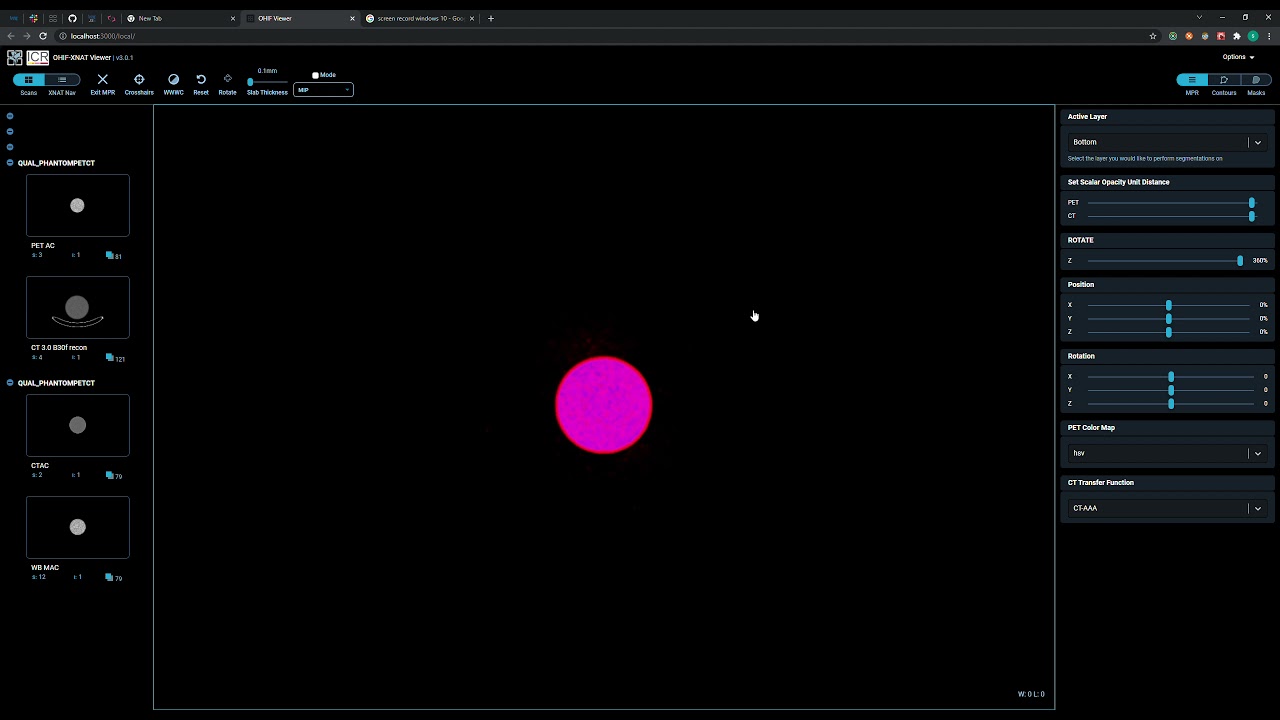
so I try translating to min bounds, rotating, translate back:
```auto
const newMatrix = vtkMatrixBuilder
.buildFromDegree()
.translate(-405.97100830078125, -544.031005859375, -120.5)
.rotateZ(value)
.translate(405.97100830078125, 544.031005859375, 120.5)
api.volumes[0].setUserMatrix(newMatrix.matrix)
```
Here is the behavior of that one:
[ ](https://www.youtube.com/watch?v=vr0cLEL5O3c)
As you can see, the object is rotating around an origin much closer to the center of the object but its still a ways off. I will try adding different values to the translation to see if I can get it to rotate at the center of my object. Please let me know if anything sticks out to you that I am doing wrong. Thank you.
[Next page](https://discourse.vtk.org/t/rotating-my-volume-using-setusermatrix-results-in-a-skewed-volume/6648.md?page=2)