# Running trame dashboard in browder from jupyter notebook
**URL:** https://discourse.vtk.org/t/running-trame-dashboard-in-browder-from-jupyter-notebook/10181
**Category:** Support
**Tags:** python
**Created:** [December 14, 2022, 1:06am UTC](https://discourse.vtk.org/t/running-trame-dashboard-in-browder-from-jupyter-notebook/10181 "2022-12-14T01:06:22Z")
**Posts on this page:** 5
**Page:** 1
### Author:  [@Robert\_Collar](https://discourse.vtk.org/u/Robert_Collar)
#### Post date: [December 14, 2022, 1:06am UTC](https://discourse.vtk.org/t/running-trame-dashboard-in-browder-from-jupyter-notebook/10181/1 "2022-12-14T01:06:22Z")
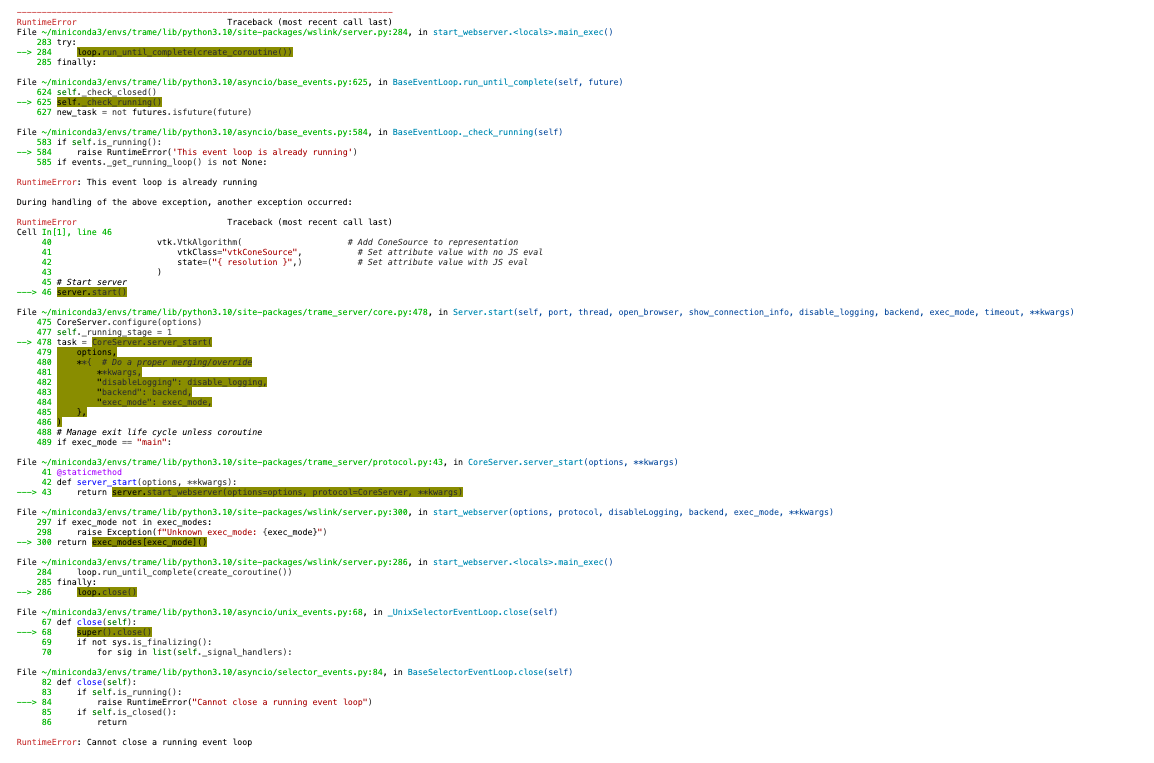
Hi VTK community! When I throw the simple example from [here](https://kitware.github.io/trame/docs/cheatsheet.html) on the trame website into a jupyter notebook, I get the error displayed in the screenshot below. I’m able to run an app displayed in the browser from a `app.py` file and I know how to display such a dashboard within a jupyter notebook, but how do I run one from a jupyter notebook while displaying in a browser (e.g., as is possible with `plotly-dash`?
Thanks, Robert
---
### Author:  [@Sebastien\_Jourdain](https://discourse.vtk.org/u/Sebastien_Jourdain)
#### Post date: [December 14, 2022, 3:12pm UTC](https://discourse.vtk.org/t/running-trame-dashboard-in-browder-from-jupyter-notebook/10181/2 "2022-12-14T15:12:18Z")
You should not start the server that way within Jupyter. You need to schedule your server as a task within Jupyter runtime.
We provide some helper to do that but basically you will need to [setup your script that way](https://github.com/Kitware/trame/blob/master/examples/06_vtk/01_SimpleCone/RemoteRendering.py#L163-L179). Then should import it and call the show() method.
---
### Author:  [@Robert\_Collar](https://discourse.vtk.org/u/Robert_Collar)
#### Post date: [December 14, 2022, 3:21pm UTC](https://discourse.vtk.org/t/running-trame-dashboard-in-browder-from-jupyter-notebook/10181/3 "2022-12-14T15:21:02Z")
Hi Sebastien, thanks for the quick response! If, within the jupyter notebook, I add the following:
```auto
def show(**kwargs):
from trame.app import jupyter
jupyter.show(server, **kwargs)
```
followed by
```auto
show()
```
the dashboard is displayed inline, as expected. How might I have it connect to a port and open in my browser, as occurs when I run a .py file with `server.start()`? Is it that I must build the app external to jupyter, store it as a `.py` file with the lines you linked included, and then import it into the jupyter notebook that I’m working in (i.e., there’s no way to build the app within a jupyter notebook and display it externally)?
---
### Author:  [@Sebastien\_Jourdain](https://discourse.vtk.org/u/Sebastien_Jourdain)
#### Post date: [December 15, 2022, 12:01am UTC](https://discourse.vtk.org/t/running-trame-dashboard-in-browder-from-jupyter-notebook/10181/4 "2022-12-15T00:01:55Z")
You can use something like [that](https://jupyter-server-proxy.readthedocs.io/en/latest/index.html) (possible example of it with visualizer [here](https://github.com/jwindgassen/jupyter-trame-proxy)) or ask the server on which port is running and open a browser to `http(s)://localhost:{port}/`.
```python
print(f"https://localhost:{server.port}/")
```
Also if you don’t want to show it inline, you can start your server that way too.
```python
server.start(
exec_mode="task",
port=0,
open_browser=True, # Up to you to make the browser open a tab or not
show_connection_info=False,
disable_logging=True,
timeout=0,
)
```
---
### Author:  [@Robert\_Collar](https://discourse.vtk.org/u/Robert_Collar)
#### Post date: [December 28, 2022, 5:11pm UTC](https://discourse.vtk.org/t/running-trame-dashboard-in-browder-from-jupyter-notebook/10181/5 "2022-12-28T17:11:19Z")
Thanks Sebastien, I’ll give it a try!