# Scaling a Nifti Volume
**URL:** https://discourse.vtk.org/t/scaling-a-nifti-volume/10658
**Category:** Development
**Created:** [February 11, 2023, 2:01am UTC](https://discourse.vtk.org/t/scaling-a-nifti-volume/10658 "2023-02-11T02:01:33Z")
**Posts on this page:** 6
**Page:** 1
### Author:  [@totte\_karlsson](https://discourse.vtk.org/u/totte_karlsson)
#### Post date: [February 11, 2023, 2:01am UTC](https://discourse.vtk.org/t/scaling-a-nifti-volume/10658/1 "2023-02-11T02:01:33Z")
Hello,
When reading a volume as a TIFF stack using the vtkTiffReader the size of the volume can be scaled using the readers SetDataSpacing function.
However, when reading a Nifti volume, using the Nifti reader, the SetDataSpacing(x,y,z) function don’t seem to do anything.
Any tips on how to scale a nifti? Is it possible?
---
### Author:  [@dgobbi](https://discourse.vtk.org/u/dgobbi)
#### Post date: [February 11, 2023, 5:09pm UTC](https://discourse.vtk.org/t/scaling-a-nifti-volume/10658/2 "2023-02-11T17:09:46Z")
The [vtkImageChangeInformation](https://vtk.org/doc/nightly/html/classvtkImageChangeInformation.html) class can change the spacing, put it into your pipeline just after the reader. The way this filter works, is that it makes a shallow copy of the data (it keeps the same voxel array) and attaches new information to the data.
---
### Author:  [@totte\_karlsson](https://discourse.vtk.org/u/totte_karlsson)
#### Post date: [February 14, 2023, 7:32pm UTC](https://discourse.vtk.org/t/scaling-a-nifti-volume/10658/3 "2023-02-14T19:32:54Z")
That worked perfect!
We know have something like this:
> ```
> vtkSmartPointer imageChange = vtkSmartPointer::New();
> imageChange->SetInputConnection(reader->GetOutputPort());
> imageChange->Update();
> mVolumeMapper->SetInputData(imageChange->GetOutput()) ;
>
> ```
My next problem is that I need to scale this volume data from being in millimeter units to to microns.
I thought using the setDataSpacing(1000,1000,1000) would do it, but I guess I’m missing something.
Another thing I noticed is that the opacity of the volume changes radically when changing the data spacing, e.g.
No Spacing:
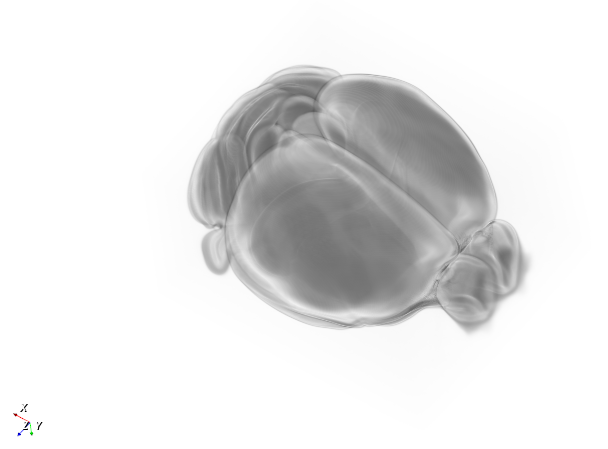
> setting spacing: imageChange-\>SetOutputSpacing(10, 10, 10);
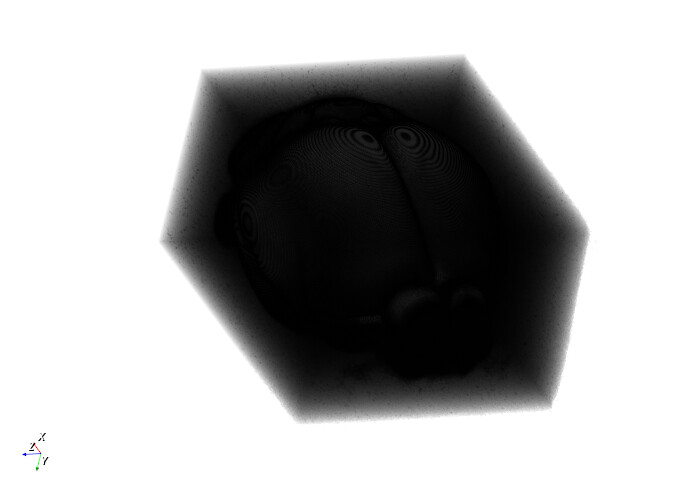
I guess this is result of how the opacity function works, as a function of distance?
Is there a way to change spacing while keeping the opacity ‘constant’?
---
### Author:  [@dgobbi](https://discourse.vtk.org/u/dgobbi)
#### Post date: [February 14, 2023, 8:27pm UTC](https://discourse.vtk.org/t/scaling-a-nifti-volume/10658/4 "2023-02-14T20:27:10Z")
If the units of the nifti file are millimeters and you want VTK world coordinates to be measured in microns, then scaling by 1000 is the correct thing to do.
Regarding the volume rendering, you will have to adjust sampling distances and opacity functions according to the size of the volume. The opacity function for a volume that’s 10 units from front to back will be very different from a volume that 10000 units from front to back.
---
### Author:  [@dgobbi](https://discourse.vtk.org/u/dgobbi)
#### Post date: [February 14, 2023, 8:32pm UTC](https://discourse.vtk.org/t/scaling-a-nifti-volume/10658/5 "2023-02-14T20:32:45Z")
Actually, let me clarify: If the units of the nifti file are millimeters and you want VTK world coordinates to be measured in microns, you would do this:
```cpp
imageChange->SetSpacingScale(1000, 1000, 1000);
```
and you would _not_ call `SetDataSpacing()` on anything.
---
### Author:  [@totte\_karlsson](https://discourse.vtk.org/u/totte_karlsson)
#### Post date: [February 14, 2023, 9:21pm UTC](https://discourse.vtk.org/t/scaling-a-nifti-volume/10658/6 "2023-02-14T21:21:16Z")
That worked perfect as well! I was afraid I had to figure out origin of volume and do some calculations regarding the extents of the data… But the above just did it. Thanks!
Now just gotta think about the opacity function.