# Scaling a rendering scene
**URL:** https://discourse.vtk.org/t/scaling-a-rendering-scene/173
**Category:** Support
**Created:** [January 30, 2019, 5:42pm UTC](https://discourse.vtk.org/t/scaling-a-rendering-scene/173 "2019-01-30T17:42:34Z")
**Posts on this page:** 14
**Page:** 1
### Author:  [@banesullivan](https://discourse.vtk.org/u/banesullivan)
#### Post date: [January 30, 2019, 5:42pm UTC](https://discourse.vtk.org/t/scaling-a-rendering-scene/173/1 "2019-01-30T17:42:34Z")
**Overview:**
I’m curious about scaling a rendering scene for a feature in an open-source, VTK-based project I have been contributing to: [`vtki`](https://github.com/akaszynski/vtki). Overall, `vtki` provides an intuitive, pythonic means of interfacing with VTK datsets and rendering VTK datasets with `matplotlib` similar syntax.
**Motivation:**
I’d like to exaggerate an axis in a VTK rendering window. This is very common (almost necessary) for many geoscientific applications. Often we’re dealing with 10s-100s of square _kilometers_ in the lateral (XY-plane) while looking only in the 10s-100s of _meters_ in the Z-direction. These proportions make visualization rather difficult and exaggeration would help significantly.
**Implementation:**
Lately, I’ve been working towards making it easy for users to scale a scene and I have implemented a way for a user to call `set_scale(1, 1, 10)` to scale the rendering scene by ten along the z-axis. On the vtki backend, I iterate over every actor in the scene and call `SetScale` which scales all the datasets in that scene. Here’s the code that does it:
```python
...
for name, actor in self._actors.items():
if hasattr(actor, 'SetScale'):
actor.SetScale(xscale, yscale, zscale)
...
```
**The Issue:**
However, whenever this gets to a `vtkCubeAxesActor` object, the `SetScale` call appears to do nothing. For an explanation please see [akaszynski/vtki#39](https://github.com/akaszynski/vtki/issues/39) and the following:
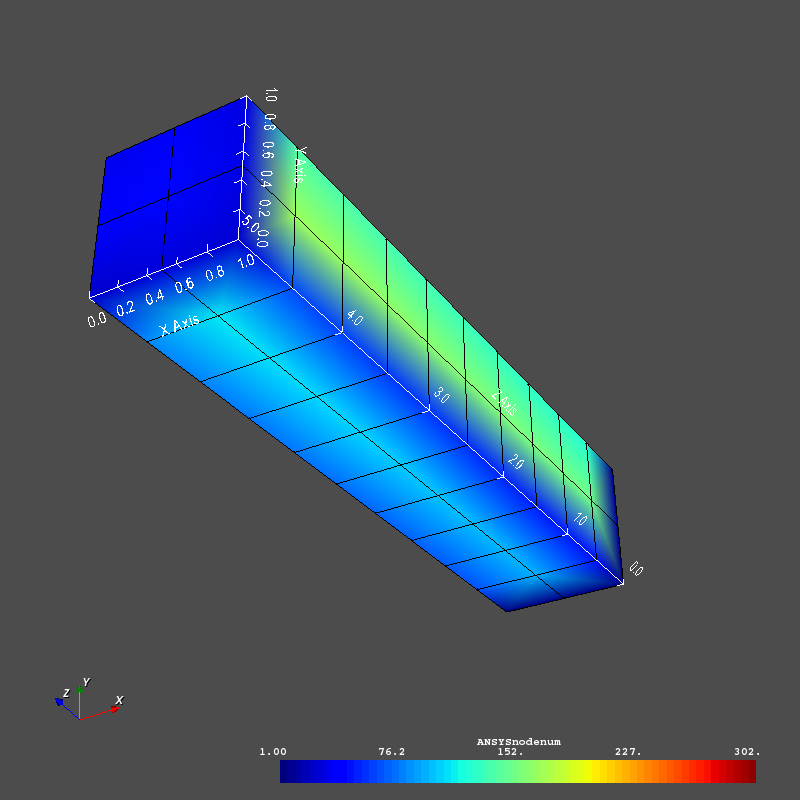
Without a scaling:
After a scaling of `(4,4,1)`:
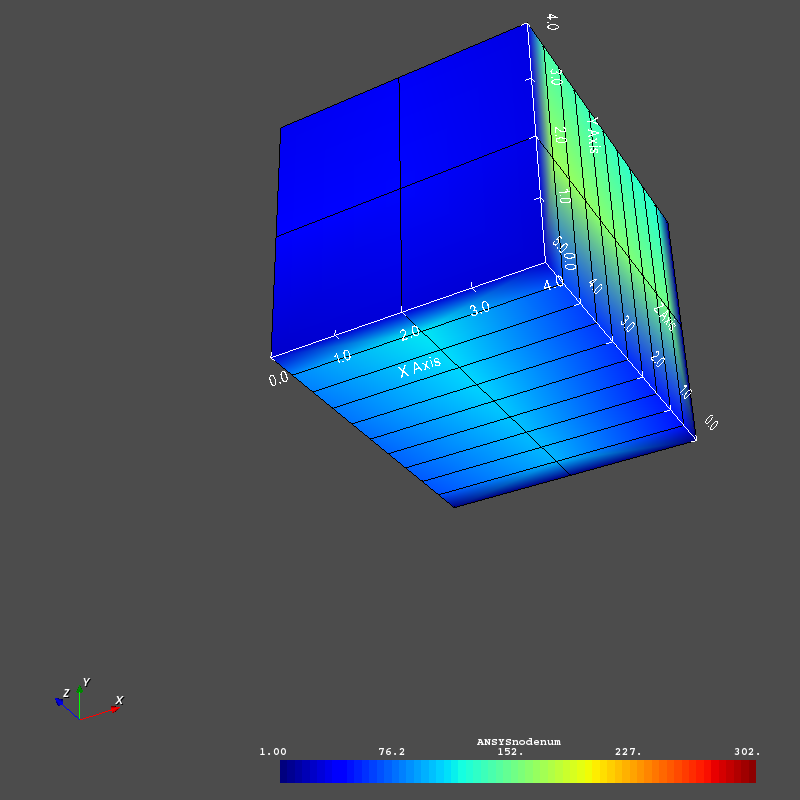
Note that the cube axes didn’t scale… Ideally, I’d like the cube axes to display scaled coordinates. such that the range is the same as in the first picture.
---
### Author:  [@allison.vacanti](https://discourse.vtk.org/u/allison.vacanti)
#### Post date: [February 12, 2019, 5:01pm UTC](https://discourse.vtk.org/t/scaling-a-rendering-scene/173/2 "2019-02-12T17:01:35Z")
Scaling a scene would be done by modifying the renderer’s camera to modify the view of the coordinate system itself, rather than resizing each object in the scene. Modifying each actor in a scene changes the size of the actor’s geometry, but leaves the coordinate system untouched.
So in this case, the CubeAxesActor is doing what it is expected to do – marking the bounds of the actor in the current coordinate system.
You’ll also see issues with the actor approach once actors are no longer positioned at the origin – the positions are not scaled, only the dimensions of the geometry. This will cause them to clump up or spread apart as the scale changes.
Instead of modifying the actors, use the GetActiveCamera method on the renderer to get the camera, and modify that to update the entire scene uniformly.
If you really want to resize the actors and just have the CubeAxes show the original, unscaled bounds, you can set the label ranges using the SetXAxisRange, etc methods on the vtkCubeAxesActor.
---
### Author:  [@banesullivan](https://discourse.vtk.org/u/banesullivan)
#### Post date: [February 12, 2019, 6:50pm UTC](https://discourse.vtk.org/t/scaling-a-rendering-scene/173/3 "2019-02-12T18:50:48Z")
Ohh… I didn’t realize I could scale the coordinates system by modifying the camera!
Once I have the camera, what exactly would I use to change the coordinate system scale? I’m not seeing any glaringly obvious functions under `vtkOpenGLCamera`.
Perhaps I need to apply a transform? Any resources for doing this would be much appreciated!
---
### Author:  [@allison.vacanti](https://discourse.vtk.org/u/allison.vacanti)
#### Post date: [February 12, 2019, 7:23pm UTC](https://discourse.vtk.org/t/scaling-a-rendering-scene/173/4 "2019-02-12T19:23:57Z")
True, the OpenGL camera model isn’t terribly intuitive 🙂 You’ll want to transform the model matrix of the camera. My python is a bit rusty, but something like
```python
renderer = ...
cam = renderer.GetActiveCamera()
transform = vtk.vtkTransform()
transform.Scale(s_x, s_y, s_z)
cam.SetModelTransformMatrix(transform.GetMatrix())
```
should do it (note that it’s the `ModelTransform`, not the `ModelViewTransform`).
---
### Author:  [@banesullivan](https://discourse.vtk.org/u/banesullivan)
#### Post date: [February 12, 2019, 7:27pm UTC](https://discourse.vtk.org/t/scaling-a-rendering-scene/173/5 "2019-02-12T19:27:47Z")
That did it!! Thank you @allison.vacanti!!!
---
### Author:  [@banesullivan](https://discourse.vtk.org/u/banesullivan)
#### Post date: [February 12, 2019, 7:35pm UTC](https://discourse.vtk.org/t/scaling-a-rendering-scene/173/6 "2019-02-12T19:35:30Z")
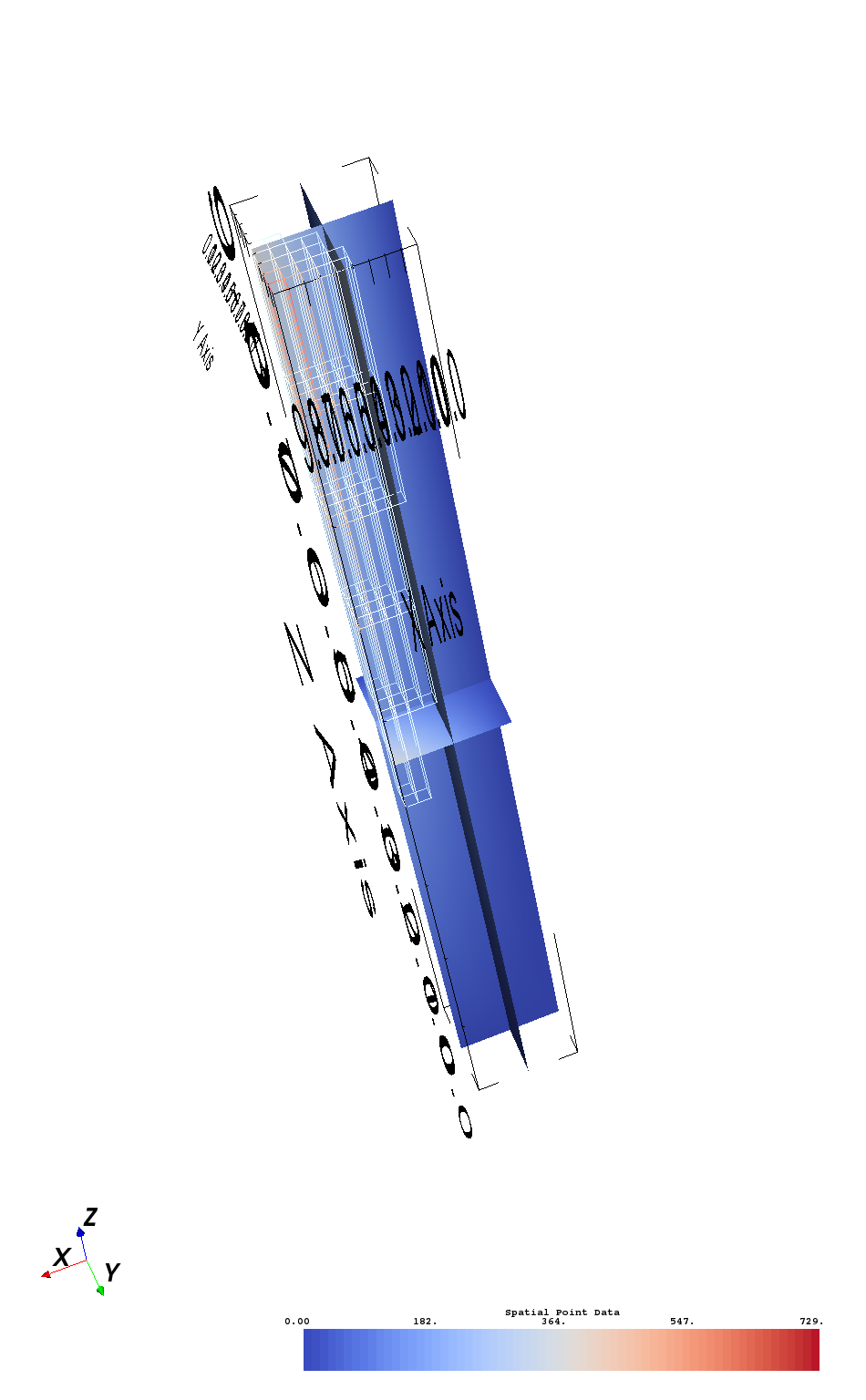
On a related note to this question… How could I not scale the text in the scene?
After scaling the camera like above, the cube axes actor’s labels go crazy (scale = 1,1,10):
---
### Author:  [@allison.vacanti](https://discourse.vtk.org/u/allison.vacanti)
#### Post date: [February 12, 2019, 7:46pm UTC](https://discourse.vtk.org/t/scaling-a-rendering-scene/173/7 "2019-02-12T19:46:14Z")
There are a few other ways that might fix that. I’m not sure which is best for your usecase, but these are the things I’d try next:
1. `vtkCubeAxesActor.SetUse2DMode(1)`. IIRC, this should render the labels in the overlay plane, which won’t be affected by the camera’s transforms. (Right now it’s rendering them as 3D geometry, so they get affected by transforms).
2. Go back to scaling actors (also repositioning if needed), and tell the `vtkCubeAxesActor` to use the original bounds of the actor as labels (`vtkActor.GetBounds()` and `vtkCubeAxesActor.Set[XYZ]AxisRange`).
---
### Author:  [@banesullivan](https://discourse.vtk.org/u/banesullivan)
#### Post date: [February 12, 2019, 7:50pm UTC](https://discourse.vtk.org/t/scaling-a-rendering-scene/173/8 "2019-02-12T19:50:30Z")
Interesting… I may go with the `vtkCubeAxesActor.SetUse2DMode(1)` route for now…
I thought maybe scaling the `vtkCubeAxesActor` the inverse of the camera’s scale might work but this goes back to the part of my original question on why `vtkCubeAxesActor.SetScale` appears to do nothing?
---
### Author:  [@allison.vacanti](https://discourse.vtk.org/u/allison.vacanti)
#### Post date: [February 12, 2019, 8:13pm UTC](https://discourse.vtk.org/t/scaling-a-rendering-scene/173/9 "2019-02-12T20:13:44Z")
I’m not exactly sure why SetScale would be ignored by this actor, but I suspect it’s because the cube axes are usually tightly coupled to an explicit bounding box, and scaling the actor would have the same effect as scaling that bounding box directly.
Either way, scaling the cube axes wouldn’t be quite right – it might get the labels back to the correct aspect ratio, but it’d resize the whole cube axes so that it wouldn’t line up with the dataset anymore.
---
### Author:  [@banesullivan](https://discourse.vtk.org/u/banesullivan)
#### Post date: [February 12, 2019, 8:21pm UTC](https://discourse.vtk.org/t/scaling-a-rendering-scene/173/10 "2019-02-12T20:21:38Z")
The labels/text properties don’t have associated actors, do they? Perhaps I could just scale the text actors on the cube axes if they exist?
---
### Author:  [@allison.vacanti](https://discourse.vtk.org/u/allison.vacanti)
#### Post date: [February 12, 2019, 8:31pm UTC](https://discourse.vtk.org/t/scaling-a-rendering-scene/173/11 "2019-02-12T20:31:03Z")
There are mappers and actors used internally, but they aren’t exposed in the API as far as I can tell.
---
### Author:  [@banesullivan](https://discourse.vtk.org/u/banesullivan)
#### Post date: [February 12, 2019, 8:34pm UTC](https://discourse.vtk.org/t/scaling-a-rendering-scene/173/12 "2019-02-12T20:34:27Z")
That sounds like an invitation to hack! 😀
I need the ability to show legible axes labels while scaling the scene to create exported screenshots for papers and such so I’ll hack away at this and see if I can’t find a way to scale those internal actors.
Thanks for all your help figuring out how to properly scale the whole scene!!
---
### Author:  [@VictoriaA](https://discourse.vtk.org/u/VictoriaA)
#### Post date: [July 1, 2020, 12:52am UTC](https://discourse.vtk.org/t/scaling-a-rendering-scene/173/13 "2020-07-01T00:52:48Z")
Hi Bane, Your scale legend looks great. I need to use a scale legend, but the built-in one legendScaleActor I use is black and white and doesn’t look good on my white background. How did you make yours?
---
### Author:  [@banesullivan](https://discourse.vtk.org/u/banesullivan)
#### Post date: [July 8, 2020, 1:26pm UTC](https://discourse.vtk.org/t/scaling-a-rendering-scene/173/14 "2020-07-08T13:26:53Z")
You can take a look at what I implemented in PyVista… there’s a lot going on there. If you need further help with this, you should open a new topic.
>