# scaling issue with vtkExtractEdges
**URL:** https://discourse.vtk.org/t/scaling-issue-with-vtkextractedges/12901
**Category:** Support
**Tags:** filter, python, code
**Created:** [December 13, 2023, 5:54pm UTC](https://discourse.vtk.org/t/scaling-issue-with-vtkextractedges/12901 "2023-12-13T17:54:47Z")
**Posts on this page:** 2
**Page:** 1
### Author:  [@gregthom992](https://discourse.vtk.org/u/gregthom992)
#### Post date: [December 13, 2023, 5:54pm UTC](https://discourse.vtk.org/t/scaling-issue-with-vtkextractedges/12901/1 "2023-12-13T17:54:47Z")
Hi,
I posted this on the slicer forum but I think the issue is with VTK.
I have the following code that extracts the edges from a vtkimagedata and applies a tube filter to the edges.
The issue is that the extractEdges filter does not use the scaling of the vtkimagedata. What am I missing ?
> import os
>
> nodeName = “MyNewVolume”
> imageSize = [4, 6, 4]
> voxelType=vtk.VTK\_UNSIGNED\_CHAR
> imageOrigin = [0.0, 0.0, 0.0]
> imageSpacing = [13.0, 13.0, 13.0]
> imageDirections = [[1,0,0], [0,1,0], [0,0,1]]
> fillVoxelValue = 500
>
> # Create an empty image volume, filled with fillVoxelValue
>
> imageData = vtk.vtkImageData()
> imageData.SetDimensions(imageSize)
> imageData.AllocateScalars(voxelType, 1)
> imageData.GetPointData().GetScalars().Fill(fillVoxelValue)
>
> extractEdges = vtk.vtkExtractEdges()
> extractEdges.SetInputData(imageData)
>
> # Tube the edges
>
> tubes = vtk.vtkTubeFilter()
> tubes.SetInputConnection(extractEdges.GetOutputPort())
> tubes.SetRadius(0.008)
> tubes.SetNumberOfSides(32)
>
> model = slicer.modules.models.logic().AddModel(tubes.GetOutputPort())
>
> # Create volume node
>
> volumeNode = slicer.mrmlScene.AddNewNodeByClass(“vtkMRMLScalarVolumeNode”, nodeName)
> volumeNode.SetOrigin(imageOrigin)
> volumeNode.SetSpacing(imageSpacing)
> volumeNode.SetIJKToRASDirections(imageDirections)
> volumeNode.SetAndObserveImageData(imageData)
> volumeNode.CreateDefaultDisplayNodes()
> volumeNode.CreateDefaultStorageNode()
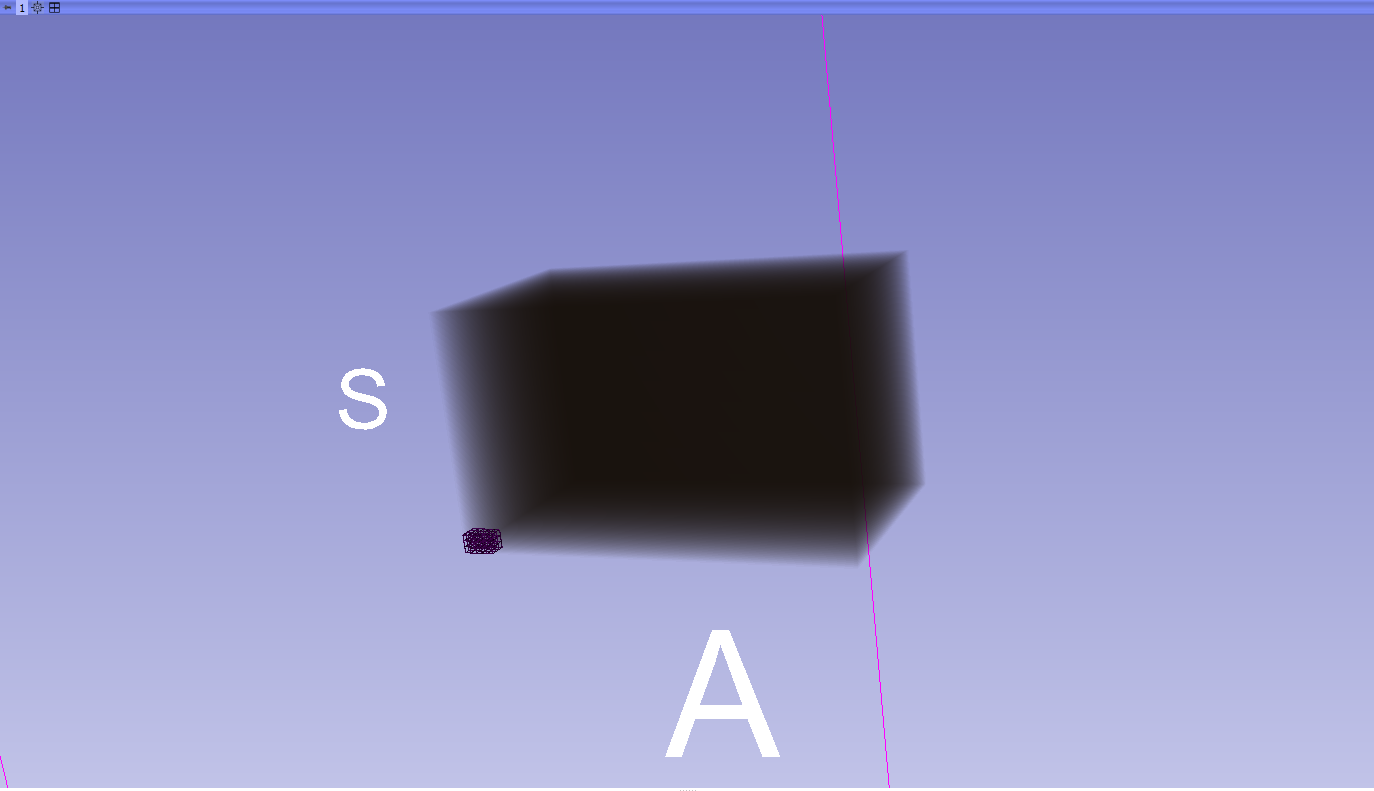
As you can see in the image, the edges are shown but the scaling is not the right. Why is this ? How do I apply the correct scaling from the input imagedata ?
Thanks
GT
---
### Author:  [@Paulo\_Carvalho](https://discourse.vtk.org/u/Paulo_Carvalho)
#### Post date: [December 18, 2023, 9:18pm UTC](https://discourse.vtk.org/t/scaling-issue-with-vtkextractedges/12901/2 "2023-12-18T21:18:42Z")
Hello,
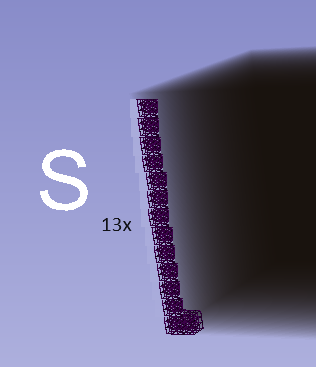
It seems the resulting wireframe is exactly 1/13rd of the volume:
.
So, I believe you could apply, via `vtkTransform::Scale()` and `vtkTransformPolydataFilter`, a scaling equal to the volume cell spacing values to the output of `vtkTubeFilter`. See example usage here: [python - How to scale a PolyData in vtk without translating it? - Stack Overflow](https://stackoverflow.com/questions/55813955/how-to-scale-a-polydata-in-vtk-without-translating-it) .
regards,
PC