# SetMultiSamples + Transparency = weird display
**URL:** https://discourse.vtk.org/t/setmultisamples-transparency-weird-display/8308
**Category:** Support
**Created:** [April 17, 2022, 3:59pm UTC](https://discourse.vtk.org/t/setmultisamples-transparency-weird-display/8308 "2022-04-17T15:59:55Z")
**Posts on this page:** 3
**Page:** 1
### Author:  [@Olivier](https://discourse.vtk.org/u/Olivier)
#### Post date: [April 17, 2022, 3:59pm UTC](https://discourse.vtk.org/t/setmultisamples-transparency-weird-display/8308/1 "2022-04-17T15:59:55Z")
Hi friends,
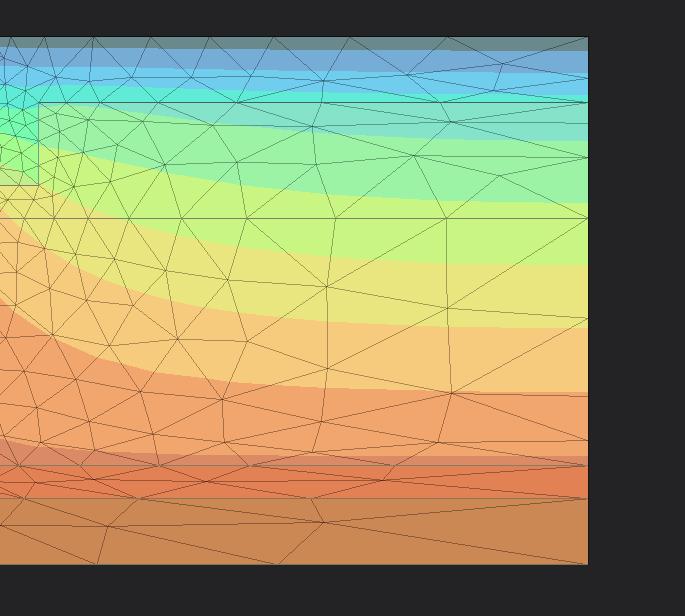
I’m displaying a 2D ortho scene with a bunch of very simple polygons.
There are 3 “layers” of polygons, offseted on the Z axis to have a proper render.
On layer #1 (Z = 0.00), I have Polydatas with plain opaque colors.
On layer #2 (Z = 0.01), I have an UnstructuredGrid colored with a LookupTable + Transparency (that shows iso surfaces).
On Layer #3 (Z = 0.02), I have an UnstructuredGrid displayed as wireframe (that show triangles).
Here is the result with MSAA (Windows + SetMultiSamples(4)) :
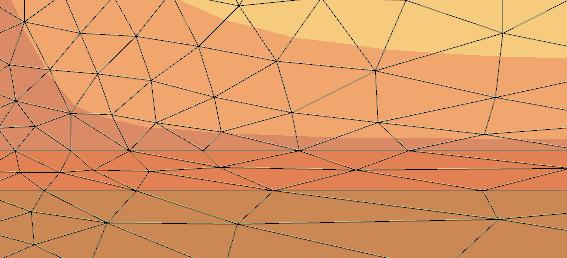
As you can see the wireframe is ugly.
Settings MSAA(8+) doesn’t change anything.
If I set layer 2 opacity to 100%, wireframe are OK.
Am I missing something ?
Is there a way to achieve a normal looking wireframe ?
---
### Author:  [@lassoan](https://discourse.vtk.org/u/lassoan)
#### Post date: [April 17, 2022, 10:49pm UTC](https://discourse.vtk.org/t/setmultisamples-transparency-weird-display/8308/2 "2022-04-17T22:49:45Z")
I, too, would be interested if there is a solution for this.
My understanding is that when you use multisampling then multiple objects at different distances can contribute to drawing of a single screen pixel. Therefore, the z buffer is no longer well defined, so if you rely on the z buffer for rendering then you may get image artifacts.
You can do screen-space smoothing (FXAA), which is very simple and fast and but it has its own limitations and it may introduce other kinds of artifacts.
---
### Author:  [@Olivier](https://discourse.vtk.org/u/Olivier)
#### Post date: [April 18, 2022, 2:16pm UTC](https://discourse.vtk.org/t/setmultisamples-transparency-weird-display/8308/3 "2022-04-18T14:16:06Z")
Here is a sample with exactly same parameters, but with wireframe opacity = 20%
Display is OK.
It seams that MSAA is done :
- during “opaque” pass, excluding transparent actors
- during “transparent” pass, excluding opaque actors