# ShadowLightsDemo - extents of shadows, light frustum, darkened areas
**URL:** https://discourse.vtk.org/t/shadowlightsdemo-extents-of-shadows-light-frustum-darkened-areas/3410
**Category:** Support
**Created:** [May 28, 2020, 9:41am UTC](https://discourse.vtk.org/t/shadowlightsdemo-extents-of-shadows-light-frustum-darkened-areas/3410 "2020-05-28T09:41:48Z")
**Posts on this page:** 4
**Page:** 1
### Author:  [@michele-arrival](https://discourse.vtk.org/u/michele-arrival)
#### Post date: [May 28, 2020, 9:41am UTC](https://discourse.vtk.org/t/shadowlightsdemo-extents-of-shadows-light-frustum-darkened-areas/3410/1 "2020-05-28T09:41:48Z")
Hi all, this is my first post in this forum.
Long post ahead, because I’ve been trying to learn how lights and shadows work in VTK and i’ve encountered some situations that i cannot explain.
I’ve expressed my concerns on that page ([https://github.com/lorensen/VTKExamples/issues/655](https://github.com/lorensen/VTKExamples/issues/655)) where i have received some answers. However I was advised to ask here about further doubts I have.
I’ve looked at some examples from [https://github.com/lorensen/VTKExamples](https://github.com/lorensen/VTKExamples). I’ve run my own versions, but I would like to first look at the vanilla version of the demo (the python version in my case):
- [https://lorensen.github.io/VTKExamples/site/Cxx/Visualization/ShadowsLightsDemo/](https://lorensen.github.io/VTKExamples/site/Cxx/Visualization/ShadowsLightsDemo/)
Here we have a scene with some spotlights, illuminating (partly) a horizontal plane opposite these lights.
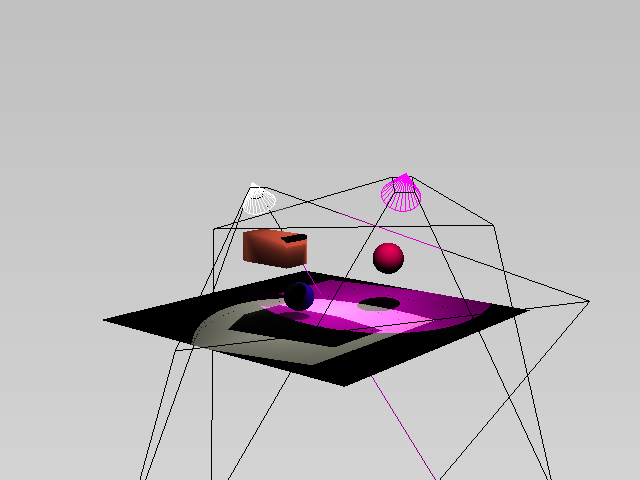
What I cannot explain is how the illuminated area(s) on the horizontal planes is not an ellipse (at least as far as the plane goes). One can make the planes as big as needed, the illuminated areas will show some straight borders (excluding of course the shadows cast by the other objects in the scene).
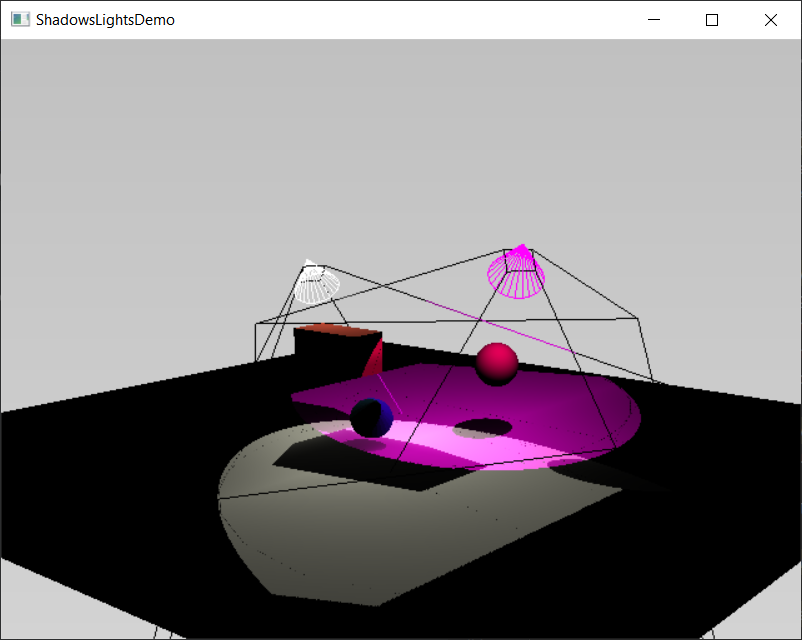
To make it simple I’ve reduced the scene to 1 spotlight, 1 plane. The light also has a pyramid prop showing the light frustum. This is what i’m seeing:
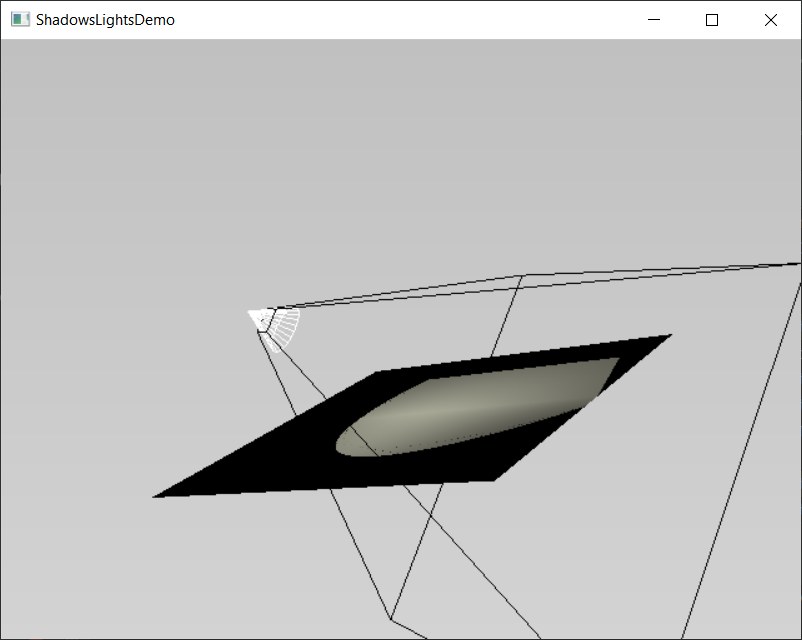
It looks like the illuminated area on the horizontal plane is intersection between an ellipse and a quadrilateral. While the first is expected, the straight border (supposedly coming from the intersection of the light’s pyramidal frustum with the horizontal plane) is less obvious.
- Where does the quadrilateral come from?
- Why does the light cone not reach the furthest parts of the plane?
- If it’s because the light frustum is smaller than the cone, why is that so? the light frustum volume should be a super-set of the light cone volume in the first place, right?
- If the it is the prop the one not show the true frustum of the light, why is that so? is it a bug in the prop?
Code below:
```auto
import vtk
def main():
interactor = vtk.vtkRenderWindowInteractor()
renderWindow = vtk.vtkRenderWindow()
renderWindow.SetSize(400, 400)
renderWindow.SetMultiSamples(0)
renderWindow.SetAlphaBitPlanes(1)
interactor.SetRenderWindow(renderWindow)
renderer = vtk.vtkOpenGLRenderer()
renderWindow.AddRenderer(renderer)
renderWindow.SetSize(640, 480)
x = 5.0
rectangleSource = vtk.vtkPlaneSource()
rectangleSource.SetOrigin(-x, 0.0, x)
rectangleSource.SetPoint1(x, 0.0, x)
rectangleSource.SetPoint2(-x, 0.0, -x)
rectangleSource.SetResolution(100, 100)
rectangleMapper = vtk.vtkPolyDataMapper()
rectangleMapper.SetInputConnection(rectangleSource.GetOutputPort())
rectangleMapper.SetScalarVisibility(0)
shadows = vtk.vtkShadowMapPass()
seq = vtk.vtkSequencePass()
passes = vtk.vtkRenderPassCollection()
passes.AddItem(shadows.GetShadowMapBakerPass())
passes.AddItem(shadows)
seq.SetPasses(passes)
cameraP = vtk.vtkCameraPass()
cameraP.SetDelegatePass(seq)
# tell the renderer to use our render pass pipeline
glrenderer = renderer
glrenderer.SetPass(cameraP)
colors = vtk.vtkNamedColors()
rectangleColor = colors.GetColor3d("Beige")
rectangleActor = vtk.vtkActor()
rectangleActor.SetMapper(rectangleMapper)
rectangleActor.VisibilityOn()
rectangleActor.GetProperty().SetColor(rectangleColor)
renderer.AddViewProp(rectangleActor)
# Spotlights.
# lighting the box.
l1 = vtk.vtkLight()
l1.SetPosition(-4.0, 4.0, -1.0)
l1.SetFocalPoint(-2.0, 2.0, 0.0)
l1.SetColor(1.0, 1.0, 1.0)
l1.PositionalOn()
renderer.AddLight(l1)
l1.SwitchOn()
# For each spotlight, add a light frustum wireframe representation and a cone
# wireframe representation, colored with the light color.
angle = l1.GetConeAngle()
if l1.LightTypeIsSceneLight() and l1.GetPositional() and angle < 180.0: # spotlight
la = vtk.vtkLightActor()
la.SetLight(l1)
renderer.AddViewProp(la)
renderer.SetBackground2(colors.GetColor3d("Silver"))
renderer.SetBackground(colors.GetColor3d("LightGrey"))
renderer.SetGradientBackground(True)
renderWindow.Render()
renderWindow.SetWindowName('ShadowsLightsDemo')
renderer.ResetCamera()
camera = renderer.GetActiveCamera()
camera.Azimuth(40.0)
camera.Elevation(10.0)
renderWindow.Render()
interactor.Start()
if __name__ == ' __main__':
main()
```
Thank you very much for those who have read thus far.
I’m on windows 10, python 3.7, VTK version 9.0.0
---
### Author:  [@cxwong](https://discourse.vtk.org/u/cxwong)
#### Post date: [January 27, 2023, 8:42am UTC](https://discourse.vtk.org/t/shadowlightsdemo-extents-of-shadows-light-frustum-darkened-areas/3410/2 "2023-01-27T08:42:37Z")
I have the same problem. Now I have a solution, though I don’t understand why it worked for me… Here is my code that worked:
```auto
opaque = vtk.vtkOpaquePass()
passes = vtk.vtkRenderPassCollection()
passes.AddItem(opaque)
seq.SetPasses(passes)
cameraP = vtk.vtkCameraPass()
cameraP.SetDelegatePass(seq)
renderer.SetPass(cameraP)
```
---
### Author:  [@amaclean](https://discourse.vtk.org/u/amaclean)
#### Post date: [January 27, 2023, 11:17pm UTC](https://discourse.vtk.org/t/shadowlightsdemo-extents-of-shadows-light-frustum-darkened-areas/3410/3 "2023-01-27T23:17:56Z")
@cxwong I have implemented your solution on the **official** [VTK Examples](https://kitware.github.io/vtk-examples/site/) site. Thankyou for innput.
See here [Python](https://kitware.github.io/vtk-examples/site/Python/Visualization/ShadowsLightsDemo/), [C++](https://kitware.github.io/vtk-examples/site/Cxx/Visualization/ShadowsLightsDemo/).
**Do not** use the Lorenson site, it is no longer maintained.
---
### Author:  [@JimCAmato](https://discourse.vtk.org/u/JimCAmato)
#### Post date: [March 21, 2023, 3:33am UTC](https://discourse.vtk.org/t/shadowlightsdemo-extents-of-shadows-light-frustum-darkened-areas/3410/4 "2023-03-21T03:33:02Z")
The VTK Examples site for ShadowsLightsDemo is missing shadows. This is true even in the demo image at the top of the page.
As it stands, the relevant portion seems to be in lines 60-65:
```
shadows = vtkShadowMapPass()
passes.AddItem(shadows.GetShadowMapBakerPass())
passes.AddItem(shadows)
opaque = vtkOpaquePass()
passes.AddItem(opaque)
```
Re-arranging to
```
shadows = vtkShadowMapPass()
opaque = vtkOpaquePass()
passes.AddItem(shadows.GetShadowMapBakerPass())
passes.AddItem(opaque)
passes.AddItem(shadows)
```
makes shadows appear, but the weird boundary (from the original topic) returns.
Further experimentation, widening the rectangle and animating the light so that it moves reveals some strange changes in that boundary. (Replace `iren.Start()` with the following)
```
l1_pos = l1.GetPosition()
for i in range(1000):
l1.SetPosition(l1_pos[0] + i / 50, l1_pos[1] + 10, l1_pos[2])
renwin.Render()
```
There’s a discontinuity in the boundary that may provide a clue as to its origin, but I can’t figure it out.
Last, replacing the spotlight with a lightbulb removes the ability of the light to cast a shadow. (Replacing `l1.SetFocalPoint(box_actor.GetPosition())` with `l1.SetConeAngle(100)` )
Sorry to overload this post.