# strange problems when running the examples in different languages
**URL:** https://discourse.vtk.org/t/strange-problems-when-running-the-examples-in-different-languages/2571
**Category:** Support
**Created:** [February 9, 2020, 3:23pm UTC](https://discourse.vtk.org/t/strange-problems-when-running-the-examples-in-different-languages/2571 "2020-02-09T15:23:31Z")
**Posts on this page:** 8
**Page:** 1
### Author:  [@chaos](https://discourse.vtk.org/u/chaos)
#### Post date: [February 9, 2020, 3:23pm UTC](https://discourse.vtk.org/t/strange-problems-when-running-the-examples-in-different-languages/2571/1 "2020-02-09T15:23:31Z")
Hi, I’m a VTK beginner, and I have a strange problem when I ran the VTK example, which was that setting the renderer’s background color would sometimes fail and the background would turn black, and dragging the actor instance would create a drag.Both python and qt occur this problem.
The following screenshot shows this problem when SetBackground is set to (1.0,1.0,0.5).
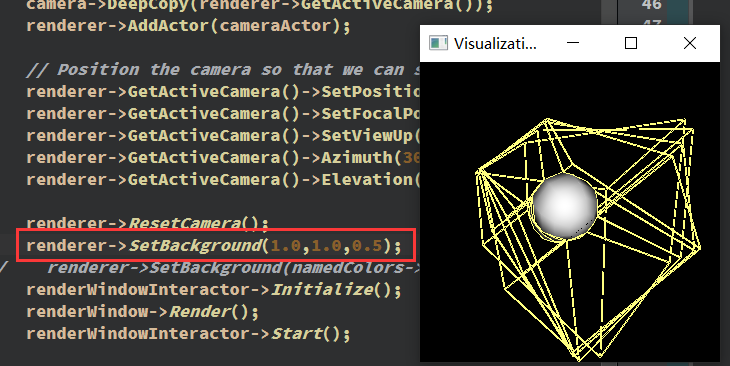
But when SetBackground is set to (1.0,1.0,0.5) this problem disappeared.
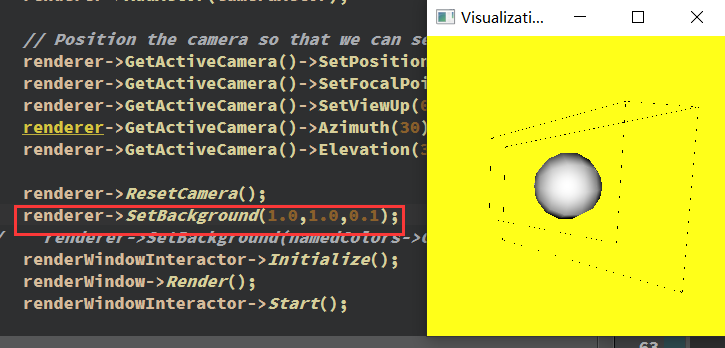
This problem occurs in python too.

I hope you can help me, thank you very much.And please forgive my broken English
---
### Author:  [@chaos](https://discourse.vtk.org/u/chaos)
#### Post date: [February 17, 2020, 6:26am UTC](https://discourse.vtk.org/t/strange-problems-when-running-the-examples-in-different-languages/2571/2 "2020-02-17T06:26:29Z")
Can anyone help me please!
---
### Author:  [@mwestphal](https://discourse.vtk.org/u/mwestphal)
#### Post date: [February 17, 2020, 6:43am UTC](https://discourse.vtk.org/t/strange-problems-when-running-the-examples-in-different-languages/2571/3 "2020-02-17T06:43:26Z")
Which example ?
---
### Author:  [@chaos](https://discourse.vtk.org/u/chaos)
#### Post date: [February 17, 2020, 12:53pm UTC](https://discourse.vtk.org/t/strange-problems-when-running-the-examples-in-different-languages/2571/5 "2020-02-17T12:53:23Z")
Example in the website [https://lorensen.github.io/VTKExamples/site/Python/GeometricObjects/CylinderExample/](https://lorensen.github.io/VTKExamples/site/Python/GeometricObjects/CylinderExample/)

It’s like every example in the GeometricObjects module have this problem.
---
### Author:  [@mwestphal](https://discourse.vtk.org/u/mwestphal)
#### Post date: [February 18, 2020, 3:24am UTC](https://discourse.vtk.org/t/strange-problems-when-running-the-examples-in-different-languages/2571/6 "2020-02-18T03:24:25Z")
I’m sure to have seen this issue reported already, but could not find where it was.
Must have been on discourse or gitlab.
This is probably a driver issue.
---
### Author:  [@mwestphal](https://discourse.vtk.org/u/mwestphal)
#### Post date: [February 18, 2020, 3:24am UTC](https://discourse.vtk.org/t/strange-problems-when-running-the-examples-in-different-languages/2571/7 "2020-02-18T03:24:59Z")
> [@Problem with view update since Intel UHD Graphics 620 driver update](https://discourse.vtk.org/t/problem-with-view-update-since-intel-uhd-graphics-620-driver-update/1224/5):
>
> Enable OpenGL compatibility profile on Windows did not solve the problem. I had to uninstall the Intel driver provided by windows 10 and manually install a current driver (26.20.100.6912) and it worked as before.
Here it is.
---
### Author:  [@mwestphal](https://discourse.vtk.org/u/mwestphal)
#### Post date: [February 18, 2020, 3:25am UTC](https://discourse.vtk.org/t/strange-problems-when-running-the-examples-in-different-languages/2571/8 "2020-02-18T03:25:20Z")
Upgrade your intel driver.
---
### Author:  [@chaos](https://discourse.vtk.org/u/chaos)
#### Post date: [February 24, 2020, 2:12pm UTC](https://discourse.vtk.org/t/strange-problems-when-running-the-examples-in-different-languages/2571/9 "2020-02-24T14:12:13Z")
Thank you very much! I solve this problem by forbiddening intel graphics card.