# Synchronize renderWindow, addObserver on vtkRenderWindowInteractor in vtk.js
**URL:** https://discourse.vtk.org/t/synchronize-renderwindow-addobserver-on-vtkrenderwindowinteractor-in-vtk-js/1218
**Category:** Web
**Created:** [June 26, 2019, 2:57pm UTC](https://discourse.vtk.org/t/synchronize-renderwindow-addobserver-on-vtkrenderwindowinteractor-in-vtk-js/1218 "2019-06-26T14:57:46Z")
**Posts on this page:** 7
**Page:** 1
### Author:  [@PBrockmann](https://discourse.vtk.org/u/PBrockmann)
#### Post date: [June 26, 2019, 2:57pm UTC](https://discourse.vtk.org/t/synchronize-renderwindow-addobserver-on-vtkrenderwindowinteractor-in-vtk-js/1218/1 "2019-06-26T14:57:46Z")
Hi,
I would like to synchronize 2 renderWindows (or more). Any mouse move from one will be apply to the others.
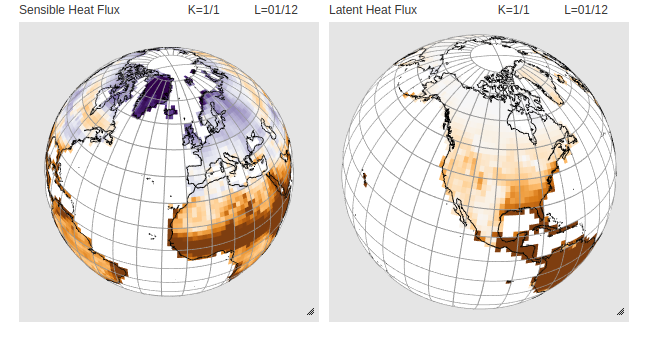
I have imagined to capture the camera from one renderWindow and then apply it to the other but I cannot trigger an event like EndMouseMove.
I have read this example ([https://vtk.org/Wiki/VTK/Examples/Python/Interaction/MouseEventsObserver](https://vtk.org/Wiki/VTK/Examples/Python/Interaction/MouseEventsObserver)) that seems to be a solution but I cannot find the addObserver method on vtkRenderWindowInteractor in vtk.js.
Any idea or a simple vtk.js example to point me out ?
---
### Author:  [@PBrockmann](https://discourse.vtk.org/u/PBrockmann)
#### Post date: [June 27, 2019, 3:19pm UTC](https://discourse.vtk.org/t/synchronize-renderwindow-addobserver-on-vtkrenderwindowinteractor-in-vtk-js/1218/2 "2019-06-27T15:19:21Z")
Ok I get it by using onMouseMove (and onMouseWheel) method from vtkRenderWindowInteractor to save a camera and then apply it to other renderers.
You can find a JSFiddle from [https://jsfiddle.net/PBrockmann/5ae3tg6x/](https://jsfiddle.net/PBrockmann/5ae3tg6x/) that tests this approach.
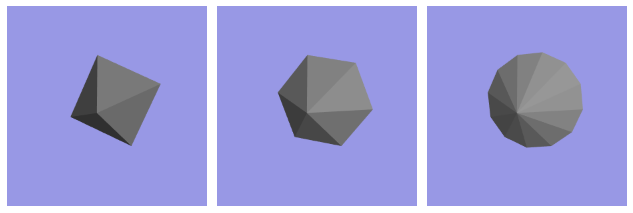
It works nicelly. All 3 renderWindows are synchronized from any mouse and wheel move.
(the addObserver is not used finally)
Let me know if this could have been achieved a simpler way ?
---
### Author:  [@Sebastien\_Jourdain](https://discourse.vtk.org/u/Sebastien_Jourdain)
#### Post date: [June 28, 2019, 9:57am UTC](https://discourse.vtk.org/t/synchronize-renderwindow-addobserver-on-vtkrenderwindowinteractor-in-vtk-js/1218/3 "2019-06-28T09:57:54Z")
You can also use the same camera instance across all your renderer.
---
### Author:  [@PBrockmann](https://discourse.vtk.org/u/PBrockmann)
#### Post date: [June 28, 2019, 3:40pm UTC](https://discourse.vtk.org/t/synchronize-renderwindow-addobserver-on-vtkrenderwindowinteractor-in-vtk-js/1218/4 "2019-06-28T15:40:59Z")
I have tried to use the same camera but windows are not synchronized.
Please test it from [https://jsfiddle.net/PBrockmann/07tnhL14/](https://jsfiddle.net/PBrockmann/07tnhL14/) if you mind.
---
### Author:  [@Sebastien\_Jourdain](https://discourse.vtk.org/u/Sebastien_Jourdain)
#### Post date: [June 28, 2019, 6:25pm UTC](https://discourse.vtk.org/t/synchronize-renderwindow-addobserver-on-vtkrenderwindowinteractor-in-vtk-js/1218/5 "2019-06-28T18:25:13Z")
The missing part is the call to render which can be automated.
```auto
camera.onModified(macro.chain(rw1.render, rw2.render, rw3.render);
```
---
### Author:  [@PBrockmann](https://discourse.vtk.org/u/PBrockmann)
#### Post date: [June 29, 2019, 3:52pm UTC](https://discourse.vtk.org/t/synchronize-renderwindow-addobserver-on-vtkrenderwindowinteractor-in-vtk-js/1218/6 "2019-06-29T15:52:49Z")
Ok thank you Sebastian for this simpler solution indeed.
The JSFiddle has been modified accordingly.
Available from [https://jsfiddle.net/PBrockmann/07tnhL14/](https://jsfiddle.net/PBrockmann/07tnhL14/)
I let it there for the record.
Regards
---
### Author:  [@lassoan](https://discourse.vtk.org/u/lassoan)
#### Post date: [June 30, 2019, 9:15pm UTC](https://discourse.vtk.org/t/synchronize-renderwindow-addobserver-on-vtkrenderwindowinteractor-in-vtk-js/1218/7 "2019-06-30T21:15:27Z")
You need to be careful with reusing the same camera in multiple views, as clipping range is stored in the camera object and the values are not the same, if the size of the render windows are not exactly the same or if they don’t show the exact same content.