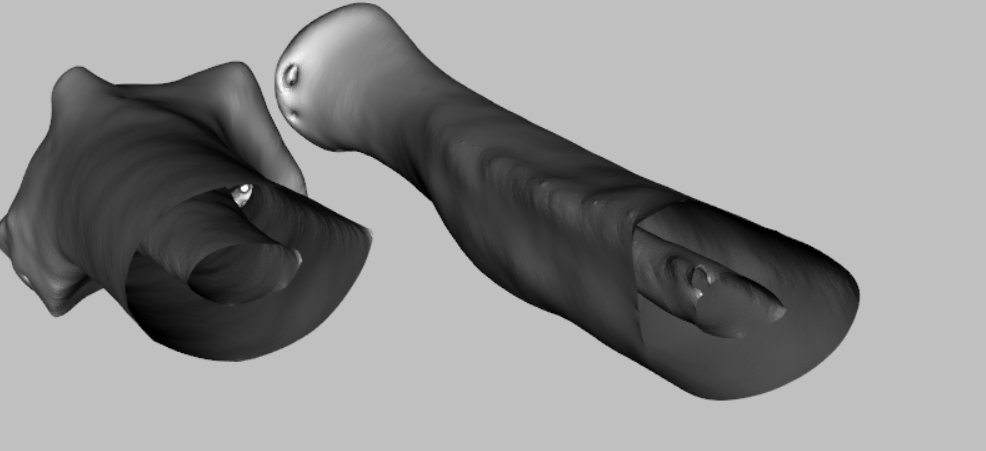
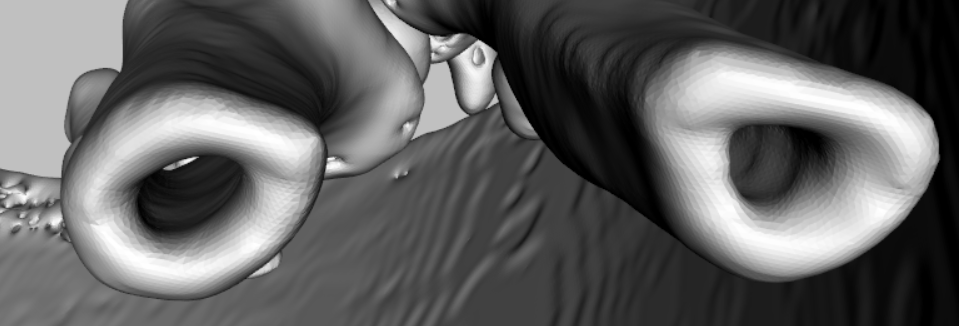
# The bottom of the first picture is not closed. If you want to achieve the same effect as the second picture, how can vtk do it or can vtk achieve such a task?
**URL:** https://discourse.vtk.org/t/the-bottom-of-the-first-picture-is-not-closed-if-you-want-to-achieve-the-same-effect-as-the-second-picture-how-can-vtk-do-it-or-can-vtk-achieve-such-a-task/11492
**Category:** Support
**Tags:** python
**Created:** [May 19, 2023, 11:43am UTC](https://discourse.vtk.org/t/the-bottom-of-the-first-picture-is-not-closed-if-you-want-to-achieve-the-same-effect-as-the-second-picture-how-can-vtk-do-it-or-can-vtk-achieve-such-a-task/11492 "2023-05-19T11:43:23Z")
**Posts on this page:** 4
**Page:** 1
### Author:  [@649841458](https://discourse.vtk.org/u/649841458)
#### Post date: [May 19, 2023, 11:43am UTC](https://discourse.vtk.org/t/the-bottom-of-the-first-picture-is-not-closed-if-you-want-to-achieve-the-same-effect-as-the-second-picture-how-can-vtk-do-it-or-can-vtk-achieve-such-a-task/11492/1 "2023-05-19T11:43:23Z")
---
### Author:  [@charly\_bollinger](https://discourse.vtk.org/u/charly_bollinger)
#### Post date: [May 22, 2023, 1:55pm UTC](https://discourse.vtk.org/t/the-bottom-of-the-first-picture-is-not-closed-if-you-want-to-achieve-the-same-effect-as-the-second-picture-how-can-vtk-do-it-or-can-vtk-achieve-such-a-task/11492/2 "2023-05-22T13:55:31Z")
Hello,
This looks like a camera clipping issue. I guess what you could do is either to move back the camera, or to modify its clipping range. If changing the clipping range doesn’t solve your issue, it means that you’re camera is placed “inside” your dataset and you must back it.
To modify the clipping range, you can use `vtkCamera::SetClippingRange(double, double)`. You can get the camera from your renderer with `vtkRenderer::GetActiveCamera()`.
In python, this should look like
```py
view = vtk.vtkContextView()
[...]
renderer = view.GetRenderer()
camera = renderer.GetActiveCamera()
camera.SetClippingRange(0.01, 1000) #default is [0.1, 1000]
```
---
### Author:  [@649841458](https://discourse.vtk.org/u/649841458)
#### Post date: [May 22, 2023, 2:07pm UTC](https://discourse.vtk.org/t/the-bottom-of-the-first-picture-is-not-closed-if-you-want-to-achieve-the-same-effect-as-the-second-picture-how-can-vtk-do-it-or-can-vtk-achieve-such-a-task/11492/4 "2023-05-22T14:07:52Z")
Thank you, my second picture is the stl model generated by 3D Slicer, and the first picture is using vtk.vtkContourFilter() in vtk to extract the bone contours of each ct and combine them together. I found that I can’t just extract outline such that the middle of the model is empty
---
### Author:  [@charly\_bollinger](https://discourse.vtk.org/u/charly_bollinger)
#### Post date: [May 24, 2023, 7:45am UTC](https://discourse.vtk.org/t/the-bottom-of-the-first-picture-is-not-closed-if-you-want-to-achieve-the-same-effect-as-the-second-picture-how-can-vtk-do-it-or-can-vtk-achieve-such-a-task/11492/5 "2023-05-24T07:45:07Z")
Hello,
Not sure to understand. Did you solve your issue / understand it?
Isn’t it a clipping range issue? Or are you saying that `vtkContourFilter` simply can’t achieve what you wanted?