# The VOLUME RENDERING quality of \`vtkGPUVolumeRayCastMapper\`

**URL:** https://discourse.vtk.org/t/the-volume-rendering-quality-of-vtkgpuvolumeraycastmapper/14024
**Category:** Support
**Tags:** code
**Created:** [June 12, 2024, 12:34pm UTC](https://discourse.vtk.org/t/the-volume-rendering-quality-of-vtkgpuvolumeraycastmapper/14024 "2024-06-12T12:34:01Z")
**Posts on this page:** 3
**Page:** 1

<div class="post-metadata">

### Author: ![Hedwig\_Huang](https://discourse.vtk.org/user_avatar/discourse.vtk.org/hedwig_huang/32/7745_2.png) [@Hedwig\_Huang](https://discourse.vtk.org/u/Hedwig_Huang)
#### Post date: [June 12, 2024, 12:34pm UTC](https://discourse.vtk.org/t/the-volume-rendering-quality-of-vtkgpuvolumeraycastmapper/14024/1 "2024-06-12T12:34:02Z")

</div>

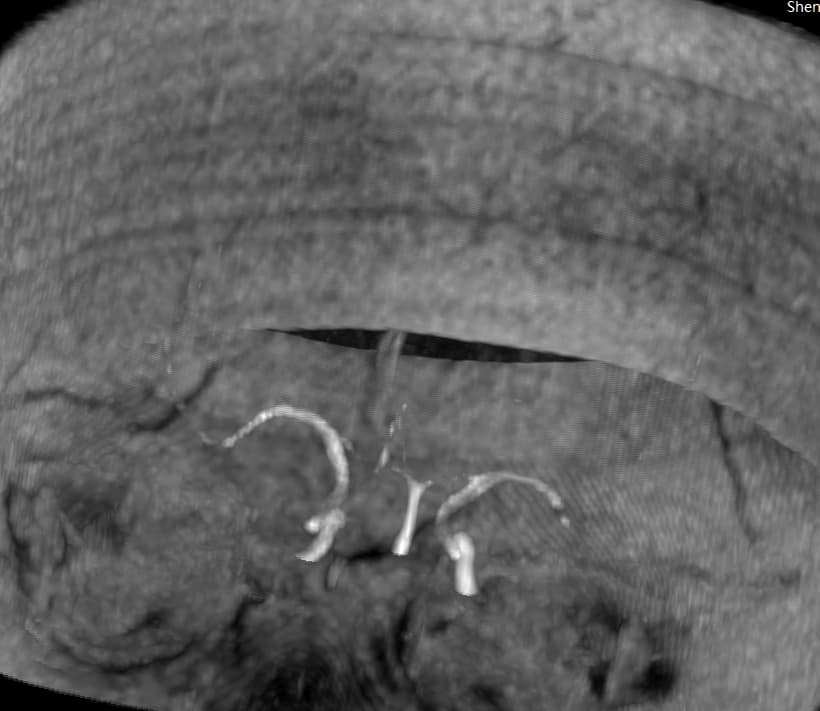
Hi there, I have a question for `vtkGPUVolumeRayCastMapper` rendering, for I tried to use this kind of mapper for MIP, but seems getting the very low resolution rendered result like this:  
 ![5a9cbc14854013a21f7d40d2f6b9dfa2](https://discourse.vtk.org/uploads/default/original/2X/9/99c74a5d1f5a342471a9c950cab6eae07fe138ed.png)  
 ![08c07678418f63f3a55a61627c9b2174](https://discourse.vtk.org/uploads/default/original/2X/8/8ae5c3a3f06da7732c906ddc9ca44de923a114a6.png)

As you can see the voxels are treated as hexagon, not very smooth. Could you please give me a hand? I have no idea how to improve the resolution of the MIP rendering result.

I am using VTK8.2 in Visual studio2015, X64.  
Here is the MIP mode setting:

```auto
void MyProject::SetMIP() {
	mapper->AutoAdjustSampleDistancesOff();
	mapper->LockSampleDistanceToInputSpacingOn();
	mapper->SetImageSampleDistance(1);

	vtkSmartPointer<vtkPiecewiseFunction> opacity = vtkSmartPointer<vtkPiecewiseFunction>::New();

	opacity ->AddPoint(minValue, 0.00);
	opacity ->AddPoint(m_nMipLevel, 0.30);
	opacity ->AddPoint(maxValue, 1.00);
	property->SetScalarOpacity(opacity );

	mapper->SetInputData(m_pImageData->GetImageData());
	mapper->SetBlendModeToMaximumIntensity();
	volume->SetMapper(mapper);
	property->Modified();
	volume->SetProperty(property);

	renderer->SetViewport(0, 0, 1, 1);
	renderer->SetBackground(0, 0, 0);
	renderer->AddVolume(volume);

	InitMyCamera();

}

```

Here is one of refering Dicom Viewer’s result, seems much more better!!:
 ![image](https://discourse.vtk.org/uploads/default/original/2X/3/30625fb2f0ec954d0ee3fe4041714aa5d67f7ed8.jpeg)

---

<div class="post-metadata">

### Author: ![Hedwig\_Huang](https://discourse.vtk.org/user_avatar/discourse.vtk.org/hedwig_huang/32/7745_2.png) [@Hedwig\_Huang](https://discourse.vtk.org/u/Hedwig_Huang)
#### Post date: [June 12, 2024, 12:53pm UTC](https://discourse.vtk.org/t/the-volume-rendering-quality-of-vtkgpuvolumeraycastmapper/14024/2 "2024-06-12T12:53:54Z")

</div>

I tried to comment out these code:

```auto
	//mapper->AutoAdjustSampleDistancesOff();
	//mapper->LockSampleDistanceToInputSpacingOn();
	//mapper->SetImageSampleDistance(1);

```

but not work, can I just set some parameters for resample the volumes or some stuff? great thanks!

---

<div class="post-metadata">

### Author: ![lassoan](https://discourse.vtk.org/user_avatar/discourse.vtk.org/lassoan/32/50_2.png) [@lassoan](https://discourse.vtk.org/u/lassoan)
#### Post date: [June 13, 2024, 6:44pm UTC](https://discourse.vtk.org/t/the-volume-rendering-quality-of-vtkgpuvolumeraycastmapper/14024/3 "2024-06-13T18:44:32Z")

</div>

This apperance looks normal. You can adjust your transfer functions and projection parameters (e.g., switch to parallel projection) to reduce the noise. You can also reduce resample the input volume to have 1.5-4x smaller spacing to make individual cubes less recognizable.

The “Dicom Viewer’s result” in the last screenshot does not look like MIP.
