txt = Text2D(font="LogoType")
TypeError: Text2D() missing 1 required positional argument: 'txt'
```
I modify the code as: `txt = Text2D('txt', font="LogoType")`.
1. bug for `func` as: `TypeError: func() takes 1 positional argument but 2 were given`. I change the definition from `def func(evt)` to `def func(evt, p)`.
2. bug for `evt.picked3d` as following:
```auto
Traceback (most recent call last):
File "C:/Users/MLoong/Desktop/test/test.py", line 10, in func
if evt.picked3d is None:
AttributeError: 'vtkmodules.vtkRenderingUI.vtkWin32RenderWindowInte' object has no attribute 'picked3d'
```
and I don’t know how to fix this bug.
Moreover, why the z value of a world point is not zero? In my thought, the conversion between pixel index (i, j, z) and world point (x, y, z) should be:
```auto
worldPoint (x,y,z) = i*spacingX*directionX + j*spacingY*directionY + k*spacingZ*directionZ + originPoint
```
Now, the direction should be:
```auto
directionX = [1, 0, 0]
directionY = [0, 1, 0]
directionZ = [0, 0, 1]
```
and `originPoint=[0, 0, 0]`, `spacingX=1`, `spacingY=1`, `spacingZ=1`. Thus, the conversion should be:
```auto
x = i
y = j
z = k
```
Since the image in this code is converted from numpy, `k` should be 0.
I am confuzed that the world point is (20.43, 29.55, -0.18), why the z value is not 0.
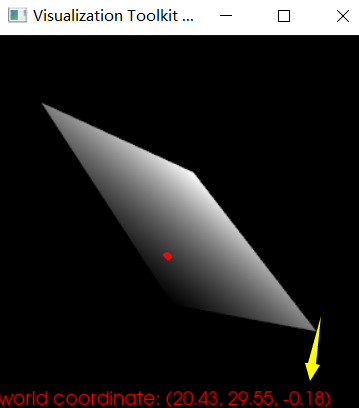
And I don’t think it is a precision issue. It is a huge difference between 0 and -0.18.
On the other hand, when the image is not rotated, the z value is 0. While the image is rotated, the z value is not 0. But, I think the world point should be not related with the image rotation.
---
### Author:  [@marcomusy](https://discourse.vtk.org/u/marcomusy)
#### Post date: [May 29, 2021, 9:42am UTC](https://discourse.vtk.org/t/the-world-coordinate-is-changed-when-the-shown-image-is-rotated/5879/4 "2021-05-29T09:42:26Z")
Just update with `pip install vedo -U`. If that doesn’t do the job please open an issue on github.
If it’s world coordinates you dont need to make conversions apart from a simple scaling
(check out the example).
I don’t know about the z not being zero maybe someone here has a better answer.
---
### Author:  [@zhang-qiang-github](https://discourse.vtk.org/u/zhang-qiang-github)
#### Post date: [May 29, 2021, 2:47pm UTC](https://discourse.vtk.org/t/the-world-coordinate-is-changed-when-the-shown-image-is-rotated/5879/5 "2021-05-29T14:47:25Z")
@marcomusy Do you know how to acquire the image intensity according to the world point?
---
### Author:  [@dgobbi](https://discourse.vtk.org/u/dgobbi)
#### Post date: [June 1, 2021, 2:28pm UTC](https://discourse.vtk.org/t/the-world-coordinate-is-changed-when-the-shown-image-is-rotated/5879/6 "2021-06-01T14:28:14Z")
I recommend using [vtkImageInterapolator](https://vtk.org/doc/nightly/html/classvtkImageInterpolator.html) (also see base class [vtkAbstractImageInterpolator](https://vtk.org/doc/nightly/html/classvtkAbstractImageInterpolator.html)) to get the image intensity at a point.
```python
interp = vtk.vtkImageInterpolator()
interp.Initialize(img)
interp.SetInterpolationModeToLinear()
# some images are multi-component
value = [0.0] * interp.GetNumberOfComponents()
# the xs, ys, zs here are in continuous structured coordinates
interp.InterpolateIJK((xs, ys, zs), value)
print(value)
```
To convert from image data physical coords to structured coords, you can use
`img.TransformPhysicalPointToContinuousIndex()`.
If you use [vtkCellPicker](https://vtk.org/doc/nightly/html/classvtkCellPicker.html) for picking, then you can use `picker.GetMapperPosition()` to get the pick position in image physical coords. Otherwise, you have to do the world\_coords to image\_physical\_coords transformation yourself (the transformation is identity unless you have repositioned the vtkImageActor).
Also note that the vtkCellPicker will be more precise than vtkWorldPointPicker, because the vtkWorldPointPicker is limited by the precision of the GPU depth buffer.
---
### Author:  [@zhang-qiang-github](https://discourse.vtk.org/u/zhang-qiang-github)
#### Post date: [June 1, 2021, 3:13pm UTC](https://discourse.vtk.org/t/the-world-coordinate-is-changed-when-the-shown-image-is-rotated/5879/7 "2021-06-01T15:13:16Z")
Thank you for your kindly reply, but I still have two questions:
1. Why the picker point is outside of image bounds? In the above figure, I have picked a world point (20.43, 29.55, -0.18). But the image bounds is: `(0, 127, 0, 127, 0, 0)`.
2. In this code, the `TransformPhysicalPointToContinuousIndex` retuan the same value for voxel coordinate with world coordinate. The `TransformPhysicalPointToContinuousIndex` return (20.43,29.55,-0.18) for the voxel coordinate, but the size of image is: (128,128,1). Why the z-value is -0.18?
---
### Author:  [@dgobbi](https://discourse.vtk.org/u/dgobbi)
#### Post date: [June 1, 2021, 3:35pm UTC](https://discourse.vtk.org/t/the-world-coordinate-is-changed-when-the-shown-image-is-rotated/5879/8 "2021-06-01T15:35:52Z")
The z-value of 0.18 is probably due to the limited precision of the depth buffer, which is used by vtkWorldPointPicker. That is why I suggested trying vtkCellPicker to see if it gives a more precise result.
I’m sure you already know why TransformPhysicalPointToContinuousIndex() returns the same value. It is because the spacing is [1,1,1], the origin is [0,0,0] and the direction is the identity matrix. Under these circumstances, do you expect TransformPhysicalPointToContinuousIndex() to give a different answer?
---
### Author:  [@marcomusy](https://discourse.vtk.org/u/marcomusy)
#### Post date: [June 1, 2021, 10:21pm UTC](https://discourse.vtk.org/t/the-world-coordinate-is-changed-when-the-shown-image-is-rotated/5879/9 "2021-06-01T22:21:21Z")
maybe the `vtkImageActorPointPlacer` is also a relevant class?
[https://vtk.org/doc/nightly/html/classvtkImageActorPointPlacer.html#details](https://vtk.org/doc/nightly/html/classvtkImageActorPointPlacer.html#details)
---
### Author:  [@zhang-qiang-github](https://discourse.vtk.org/u/zhang-qiang-github)
#### Post date: [June 2, 2021, 12:19am UTC](https://discourse.vtk.org/t/the-world-coordinate-is-changed-when-the-shown-image-is-rotated/5879/10 "2021-06-02T00:19:04Z")
I have tried the `vtkCellPicker` and `GetMapperPosition`:
```auto
# picker = vtk.vtkWorldPointPicker()
picker = vtk.vtkCellPicker()
picker.Pick(x, y, 0, render)
# worldPoint = picker.GetPickPosition()
worldPoint = picker.GetMapperPosition()
```
And the result is:
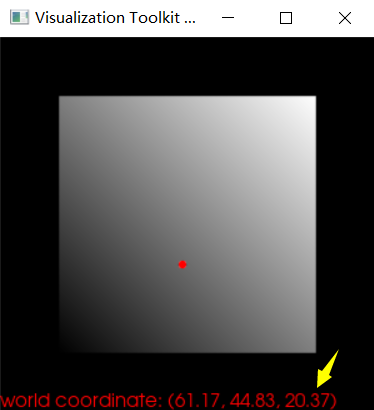
The obtained world point is still wrong.
Moreover, even the z-value is 0.18, if I use `TransformPhysicalPointToContinuousIndex` to obtain the voxel coordinate (i, j, k), is the cooridiante i/j correct?
---
### Author:  [@dgobbi](https://discourse.vtk.org/u/dgobbi)
#### Post date: [June 2, 2021, 1:26am UTC](https://discourse.vtk.org/t/the-world-coordinate-is-changed-when-the-shown-image-is-rotated/5879/11 "2021-06-02T01:26:54Z")
That result does not make sense to me. Can you show me the original (x,y) screen position, the vtkWorldPointPicker.GetPickPosition(), the vtkCellPicker.GetPickPosition(), and vtkCellPicker.GetMapperPosition() all together so that I can compare them?
As I stated above, for your situation, TransformPhysicalPointToContinuousIndex() will just be the identity transformation. It does not do any clamping or anything like that, it just transforms the point based on the spacing, origin, and direction.
---
### Author:  [@zhang-qiang-github](https://discourse.vtk.org/u/zhang-qiang-github)
#### Post date: [June 2, 2021, 11:54am UTC](https://discourse.vtk.org/t/the-world-coordinate-is-changed-when-the-shown-image-is-rotated/5879/12 "2021-06-02T11:54:59Z")
@dgobbi I modify the `mouseMoveEvent` as:
```auto
x, y = iren.GetEventPosition()
worldPicker = vtk.vtkWorldPointPicker()
worldPicker.Pick(x, y, 0, render)
worldPickPoint = worldPicker.GetPickPosition()
cellPicker = vtk.vtkCellPicker()
cellPicker.Pick(x, y, 0, render)
cellPickPoint = cellPicker.GetPickPosition()
cellMapperPickPoint = cellPicker.GetMapperPosition()
...
textActor = vtk.vtkTextActor()
textActor.SetInput('screen pos: (%.1f, %.1f)\n'
'vtkWorldPointPicker position: (%.3f, %.3f, %.3f)\n'
'vtkCellPicker GetPickPosition: (%.3f, %.3f, %.3f)\n'
'vtkCellPicker GetMapperPosition: (%.3f, %.3f, %.3f)'%(x, y, worldPickPoint[0], worldPickPoint[1], worldPickPoint[2], cellPickPoint[0], cellPickPoint[1], cellPickPoint[2],
cellMapperPickPoint[0], cellMapperPickPoint[1], cellMapperPickPoint[2]))
```
And the shown result is:
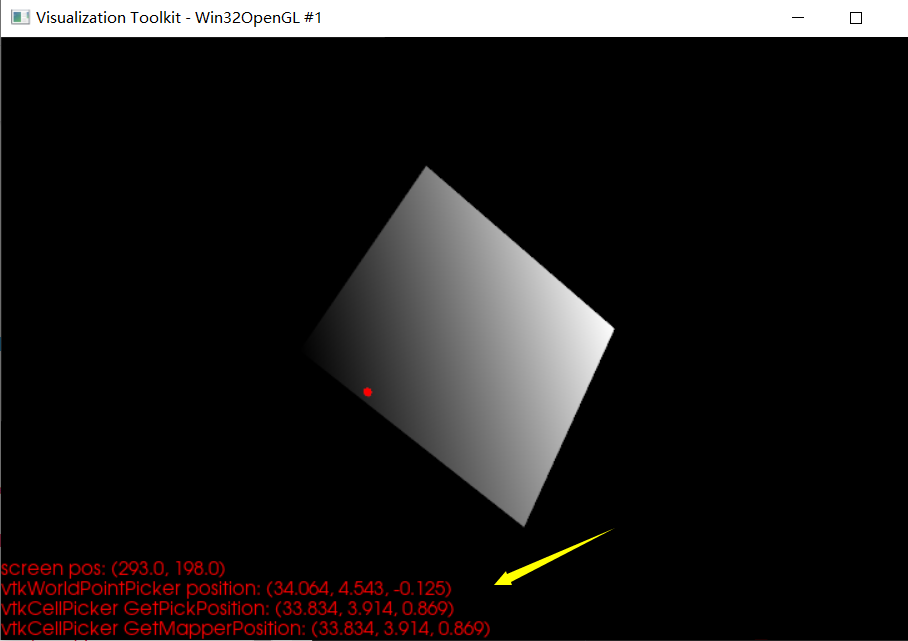
All picked point has non-zero z-value.
---
### Author:  [@dgobbi](https://discourse.vtk.org/u/dgobbi)
#### Post date: [June 2, 2021, 2:17pm UTC](https://discourse.vtk.org/t/the-world-coordinate-is-changed-when-the-shown-image-is-rotated/5879/13 "2021-06-02T14:17:29Z")
Good. For the CellPicker, the World and Mapper positions are exactly the same, which is what I expected for your data.
The pick is probably hitting the sphere instead of hitting the plane. Try setting PickableOff() on the sphere, and also on the text.
```auto
sphereActor.PickableOff()
textActor.PickableOff()
```
The WorldPointPicker position isn’t far different (we don’t expect the WorldPointPicker and the CellPicker to return exactly the same result, since they use different methods).
You should not expect the Z to be _exactly_ zero because there might be roundoff error in the pick calculations. The tolerance of vtkCellPicker is plus or minus 0.025 by default, but you can call picker-\>SetTolerance(…) to change it. The tolerance of vtkWorldPointPicker depends on the rendered pixel size and the depth buffer precision.
---
### Author:  [@zhang-qiang-github](https://discourse.vtk.org/u/zhang-qiang-github)
#### Post date: [June 2, 2021, 4:06pm UTC](https://discourse.vtk.org/t/the-world-coordinate-is-changed-when-the-shown-image-is-rotated/5879/14 "2021-06-02T16:06:37Z")
After setting `sphereActor.PickableOff()`, the z-value of vtkCellPicker is about zero.

It shows that vtkCellPicker is more accurate than vtkWorldPicker.
@dgobbi Really thank you for your kindly reply.
@marcomusy Maybe `vtkCellPicker` is also accurate than `vtkPropPicker`.