# Trackpad Interactions
**URL:** https://discourse.vtk.org/t/trackpad-interactions/6598
**Category:** Support
**Created:** [September 9, 2021, 10:13pm UTC](https://discourse.vtk.org/t/trackpad-interactions/6598 "2021-09-09T22:13:23Z")
**Posts on this page:** 6
**Page:** 1
### Author:  [@coffeecup](https://discourse.vtk.org/u/coffeecup)
#### Post date: [September 9, 2021, 10:13pm UTC](https://discourse.vtk.org/t/trackpad-interactions/6598/1 "2021-09-09T22:13:23Z")
Hi,
I am trying to understand which Events correspond to trackpad events.
When I create a `vtkSphereWidget` and click on it using my Mac trackpad, it lights up - so I know vtk can accept trackpad events.
However, when I took that same tutorial and tried to create my own `Callback` that gets run when a trackpad click is applied to the sphere, none of the events I tried worked:
```auto
import vtk
# Call back function
def sphereCallback(obj, event):
print(f'obj is \n{obj}\n event is {event}')
def main():
colors = vtk.vtkNamedColors()
# colors.SetColor('bkg', [0.1, 0.2, 0.4, 1.0])
# A renderer and render window
renderer = vtk.vtkRenderer()
renderer.SetBackground(colors.GetColor3d('MidnightBlue'))
renwin = vtk.vtkRenderWindow()
renwin.AddRenderer(renderer)
renwin.SetWindowName("SphereWidget")
# An interactor
interactor = vtk.vtkRenderWindowInteractor()
interactor.SetRenderWindow(renwin)
# A Sphere widget
sphereWidget = vtk.vtkSphereWidget()
sphereWidget.SetInteractor(interactor)
sphereWidget.SetRepresentationToSurface()
sphereWidget.GetSphereProperty().SetColor(colors.GetColor3d("BurlyWood"))
sphereWidget.OnLeftButtonDown(sphereCallback)
# Connect the event to a function
sphereWidget.AddObserver("TapEvent", sphereCallback)
sphereWidget.AddObserver("MiddleButtonPressEvent", sphereCallback)
sphereWidget.AddObserver("RightButtonPressEvent", sphereCallback)
sphereWidget.AddObserver("LeftButtonPressEvent", sphereCallback)
sphereWidget.AddObserver("MouseWheelForwardEvent", sphereCallback)
sphereWidget.AddObserver("MouseWheelBackwardEvent", sphereCallback)
sphereWidget.AddObserver("MouseMoveEvent", sphereCallback)
sphereWidget.AddObserver("CursorChangedEvent", sphereCallback)
sphereWidget.AddObserver("SelectionChangedEvent", sphereCallback)
sphereWidget.AddObserver("SwipeEvent", sphereCallback)
sphereWidget.AddObserver("LeftButtonDoubleClickEvent", sphereCallback)
sphereWidget.AddObserver("MiddleButtonDoubleClickEvent", sphereCallback)
sphereWidget.AddObserver("RightButtonDoubleClickEvent", sphereCallback)
sphereWidget.AddObserver("MouseWheelLeftEvent", sphereCallback)
sphereWidget.AddObserver("MouseWheelRightEvent", sphereCallback)
# Start
interactor.Initialize()
renwin.Render()
sphereWidget.On()
interactor.Start()
if __name__ == ' __main__':
main()
```
As you can see I tried many different events but no Callbacks were printed when I clicked on the sphere created. Which events correspond to trackpad use?
Best,
CoffeeCup
---
### Author:  [@dgobbi](https://discourse.vtk.org/u/dgobbi)
#### Post date: [September 10, 2021, 5:07pm UTC](https://discourse.vtk.org/t/trackpad-interactions/6598/2 "2021-09-10T17:07:23Z")
The Tap, Swipe, etc. events are only available in C++ VTK programs that use Qt. For all other VTK programs, you must use the Button and Mouse events.
If you use PyQt (or PySide) and are feeling ambitious, you can add trackpad event handling to [QVTKRenderWindowInteractor.py](https://gitlab.kitware.com/vtk/vtk/-/blob/master/Wrapping/Python/vtkmodules/qt/QVTKRenderWindowInteractor.py).
Edit: I should add that DoubleClick events are also only for Qt.
---
### Author:  [@coffeecup](https://discourse.vtk.org/u/coffeecup)
#### Post date: [September 14, 2021, 5:35pm UTC](https://discourse.vtk.org/t/trackpad-interactions/6598/3 "2021-09-14T17:35:24Z")
Thanks for responding so quickly!
So, to be clear, using Python VKT, I can’t capture interactive trackpad events like I can with mouse clicks and buttons?
---
### Author:  [@dgobbi](https://discourse.vtk.org/u/dgobbi)
#### Post date: [September 14, 2021, 6:52pm UTC](https://discourse.vtk.org/t/trackpad-interactions/6598/4 "2021-09-14T18:52:19Z")
That’s correct. The only events you will get from the trackpad are mouse events.
---
### Author:  [@coffeecup](https://discourse.vtk.org/u/coffeecup)
#### Post date: [September 17, 2021, 4:48pm UTC](https://discourse.vtk.org/t/trackpad-interactions/6598/5 "2021-09-17T16:48:56Z")
Thanks!
---
### Author:  [@lassoan](https://discourse.vtk.org/u/lassoan)
#### Post date: [September 29, 2021, 4:49pm UTC](https://discourse.vtk.org/t/trackpad-interactions/6598/6 "2021-09-29T16:49:14Z")
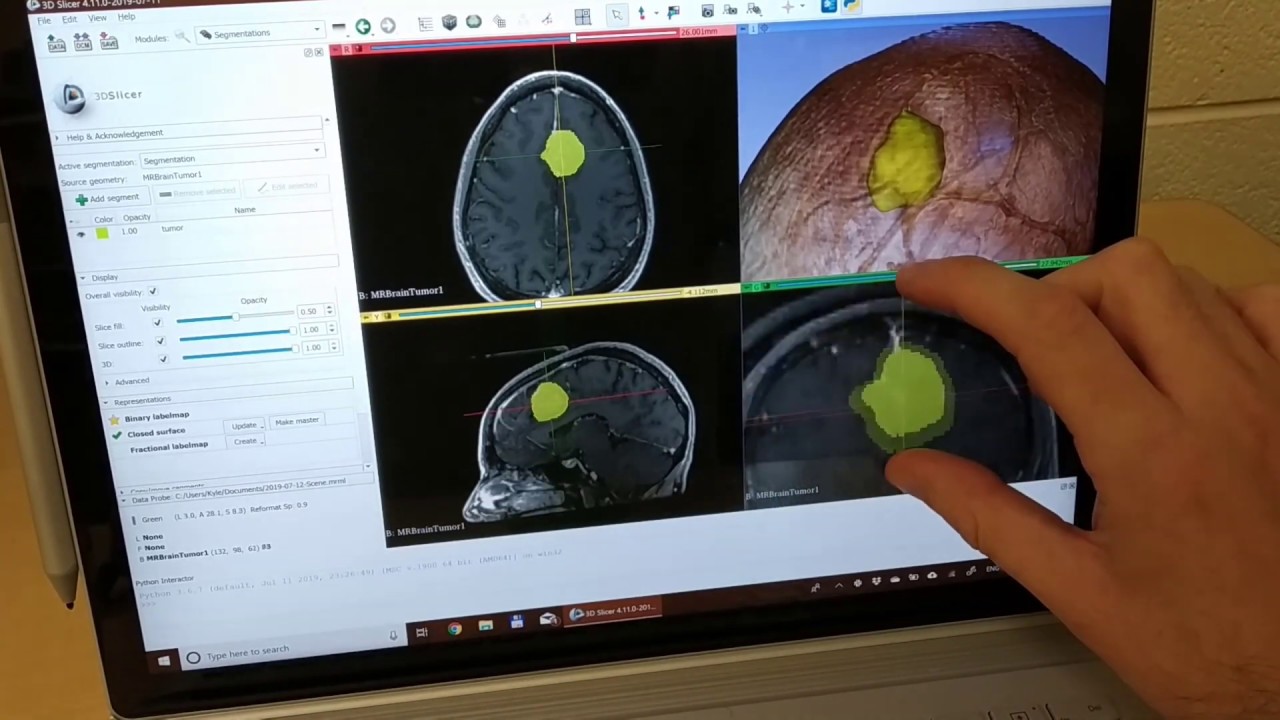
You can use the VTK render widget provided by [CTK](https://www.commontk.org) in Python. This widget can handle macOS touchpad events and Windows touchscreen events.
The only inconvenience is that CTK is not available on PyPI but you need to build it locally or use a Python environment where it is made available already, such as in 3D Slicer.
See how the [ctkVTKRenderView](https://github.com/commontk/CTK/blob/master/Libs/Visualization/VTK/Widgets/ctkVTKRenderView.h) class works in 3D Slicer:
[ ](https://www.youtube.com/watch?v=7lsN93iPmbg)