# Translucent texture for texture coordinates outside \[0,1\]
**URL:** https://discourse.vtk.org/t/translucent-texture-for-texture-coordinates-outside-0-1/1791
**Category:** Support
**Created:** [September 19, 2019, 10:27pm UTC](https://discourse.vtk.org/t/translucent-texture-for-texture-coordinates-outside-0-1/1791 "2019-09-19T22:27:08Z")
**Posts on this page:** 18
**Page:** 1
### Author:  [@drpeterfranz](https://discourse.vtk.org/u/drpeterfranz)
#### Post date: [September 19, 2019, 10:27pm UTC](https://discourse.vtk.org/t/translucent-texture-for-texture-coordinates-outside-0-1/1791/1 "2019-09-19T22:27:08Z")
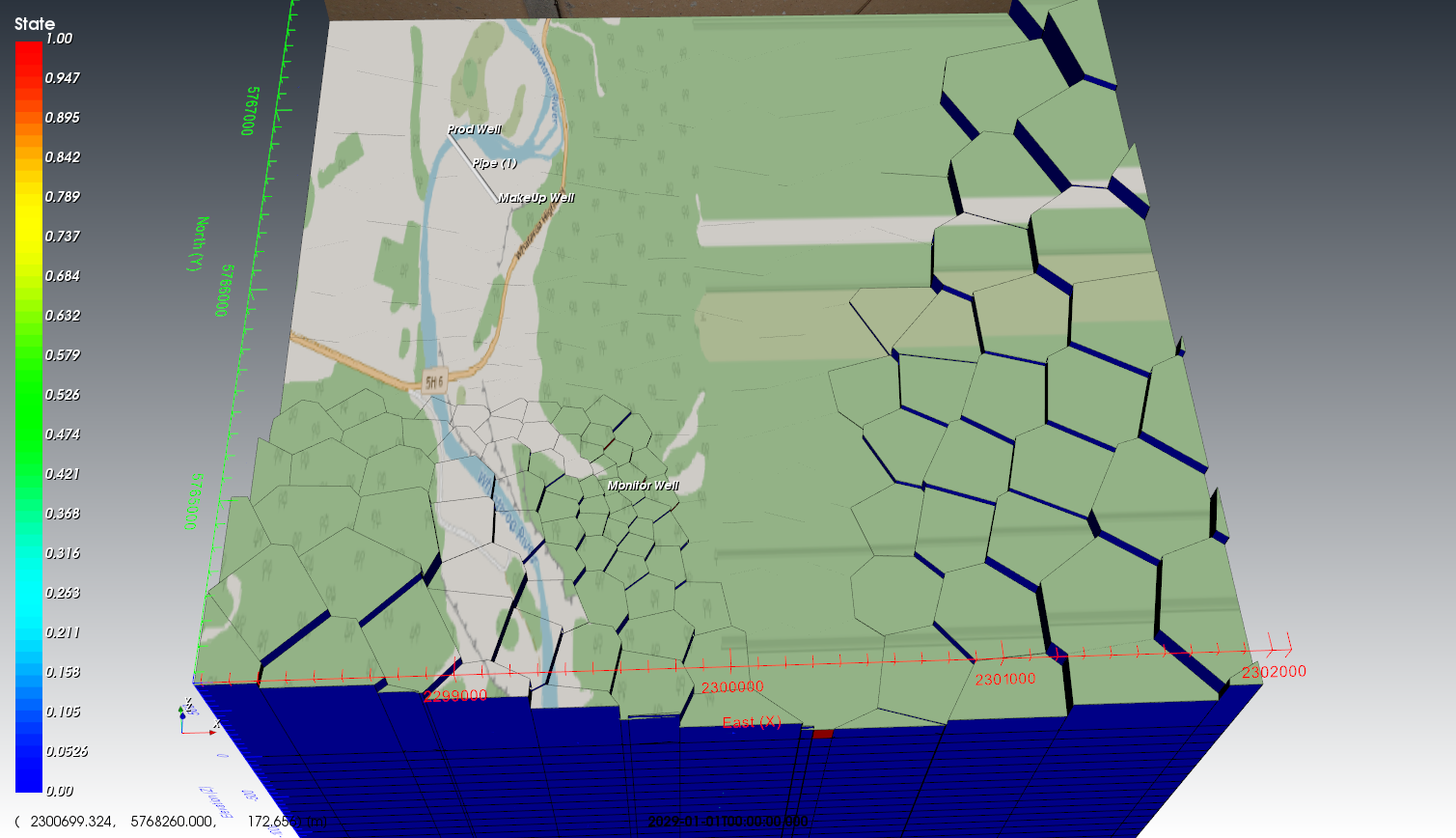
I have a 3D geological model. I would now like to project a 2D map onto its surface; however the map only covers some parts of the 3D model surface. Currently I have set repetition off; but the effect is that parts of the 3D surface which are not covered by the map get colour assigned from the map border. The effect is quite ugly - see the right hand part of the image below.
Is there a way to make a texture translucent when the texture coordinates fall outside the [0,1] range? Or alternatively, could I assign a constant colour in this case?
Thanks for your help!
---
### Author:  [@Michael](https://discourse.vtk.org/u/Michael)
#### Post date: [September 23, 2019, 8:08am UTC](https://discourse.vtk.org/t/translucent-texture-for-texture-coordinates-outside-0-1/1791/2 "2019-09-23T08:08:12Z")
Hi,
You can try to set the color you want using `SetBorderColor` and `SetWrapS`/`SetWrapT` to `ClampToBorder`
---
### Author:  [@drpeterfranz](https://discourse.vtk.org/u/drpeterfranz)
#### Post date: [September 23, 2019, 8:00pm UTC](https://discourse.vtk.org/t/translucent-texture-for-texture-coordinates-outside-0-1/1791/3 "2019-09-23T20:00:58Z")
Hi, thanks for the hint. However I can’t figure out how to use this - I assume you are talking about vtkTextureObject?
I currently use vtkOpenGLPolyDataMapper and vtkTexture.
---
### Author:  [@Michael](https://discourse.vtk.org/u/Michael)
#### Post date: [September 24, 2019, 7:10am UTC](https://discourse.vtk.org/t/translucent-texture-for-texture-coordinates-outside-0-1/1791/4 "2019-09-24T07:10:16Z")
Assuming `myTexture` is your `vtkTexture`:
`vtkTextureObject* texObject = vtkOpenGLTexture::SafeDownCast(myTexture)->GetTextureObject();`
---
### Author:  [@drpeterfranz](https://discourse.vtk.org/u/drpeterfranz)
#### Post date: [September 24, 2019, 7:36pm UTC](https://discourse.vtk.org/t/translucent-texture-for-texture-coordinates-outside-0-1/1791/5 "2019-09-24T19:36:24Z")
Nope, that doesn’t work, it returns a NULL pointer for texObject.
---
### Author:  [@drpeterfranz](https://discourse.vtk.org/u/drpeterfranz)
#### Post date: [September 24, 2019, 7:37pm UTC](https://discourse.vtk.org/t/translucent-texture-for-texture-coordinates-outside-0-1/1791/6 "2019-09-24T19:37:29Z")
I have got something working; I manually set the border pixels of my image to have 0 as alpha value. But still if somebody can find a more elegant solution I’d be grateful.
---
### Author:  [@Michael](https://discourse.vtk.org/u/Michael)
#### Post date: [September 25, 2019, 7:03am UTC](https://discourse.vtk.org/t/translucent-texture-for-texture-coordinates-outside-0-1/1791/7 "2019-09-25T07:03:50Z")
You have to load it before getting the texture object:
`myTexture->Load(renderer);`
---
### Author:  [@drpeterfranz](https://discourse.vtk.org/u/drpeterfranz)
#### Post date: [September 25, 2019, 9:20pm UTC](https://discourse.vtk.org/t/translucent-texture-for-texture-coordinates-outside-0-1/1791/8 "2019-09-25T21:20:29Z")
Tried it but now now after using m\_Texture-\>Load(m\_Renderer) the texture is no longer visible.
---
### Author:  [@banesullivan](https://discourse.vtk.org/u/banesullivan)
#### Post date: [October 3, 2019, 6:52pm UTC](https://discourse.vtk.org/t/translucent-texture-for-texture-coordinates-outside-0-1/1791/9 "2019-10-03T18:52:36Z")
Assigning values above 1 in the texture coordinates where you don’t have textures with setting repeat on the `vtkTexture` to False should do the trick. Here is an example using [PyVista](https://docs.pyvista.org) to show what this would look like:
```python
from pyvista import examples
texture = examples.download_puppy_texture()
texture.SetRepeat(False)
mesh = examples.load_random_hills()
mesh.texture_map_to_plane(inplace=True)
# Now turn off a region of the texture mapping
idx = mesh.points[:,0] > 5
mesh.t_coords[idx] = [1.1, 1.1]
mesh.plot(texture=texture, cpos='xy',
show_grid=True, color='white')
```
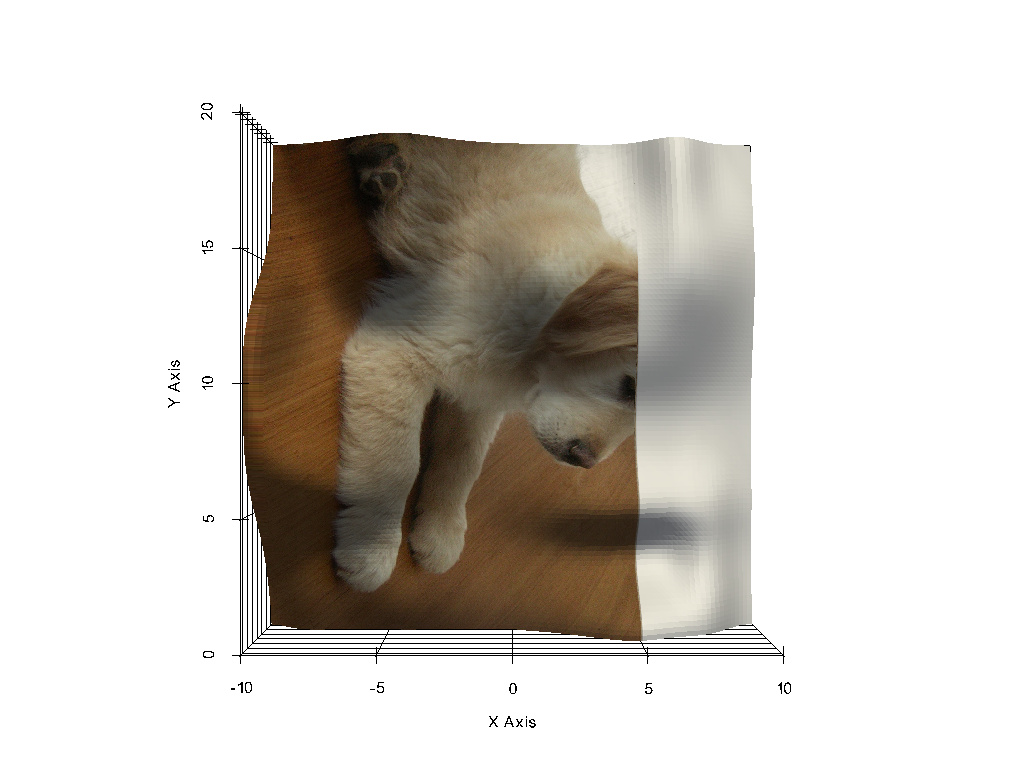
---
### Author:  [@drpeterfranz](https://discourse.vtk.org/u/drpeterfranz)
#### Post date: [October 3, 2019, 7:34pm UTC](https://discourse.vtk.org/t/translucent-texture-for-texture-coordinates-outside-0-1/1791/10 "2019-10-03T19:34:54Z")
Hi Bane,
thanks, but setting vtkTexture::SetRepeat(false) is exactly what I had done and I get the picture shown above; the stripes on the right hand side all have texture values \> 1.
But it’s interesting to see that it works for the pyvista example. Makes me think if there’s an additional setting I need to change, or if it is a bug in VTK which has been fixed in your version but not mine. What version is your pvyista built on? I am using VTK 8.2 here.
---
### Author:  [@banesullivan](https://discourse.vtk.org/u/banesullivan)
#### Post date: [October 3, 2019, 7:40pm UTC](https://discourse.vtk.org/t/translucent-texture-for-texture-coordinates-outside-0-1/1791/11 "2019-10-03T19:40:09Z")
> [@drpeterfranz](#):
>
> Makes me think if there’s an additional setting I need to change, or if it is a bug in VTK which has been fixed in your version but not mine. What version is your pvyista built on? I am using VTK 8.2 here.
I am also using VTK 8.2 - I don’t think this is a VTK issue. Maybe quickly pip install PyVista and run that example to see?
That’s really strange that it isn’t working for you though… perhaps you are setting other options on the `vtkTexture` that conflict with the Repeat option? what values above 1 are you using? Because if I use NaN, this doesn’t work
---
### Author:  [@drpeterfranz](https://discourse.vtk.org/u/drpeterfranz)
#### Post date: [October 3, 2019, 7:45pm UTC](https://discourse.vtk.org/t/translucent-texture-for-texture-coordinates-outside-0-1/1791/12 "2019-10-03T19:45:43Z")
Your pyvista example works alright here, but I am not using system-built libraries for VTK when using C+++.
All I do with vtkTexture is to
- load an image via SetInputData()
- set InterpolateOn() [but I also tried InterpolateOff()]
- SetRepeat(false)
That’s all.
---
### Author:  [@drpeterfranz](https://discourse.vtk.org/u/drpeterfranz)
#### Post date: [October 3, 2019, 7:46pm UTC](https://discourse.vtk.org/t/translucent-texture-for-texture-coordinates-outside-0-1/1791/13 "2019-10-03T19:46:25Z")
Oh, and the values \> 1.0 are calculated values from a transformation, but they are not NAN.
---
### Author:  [@banesullivan](https://discourse.vtk.org/u/banesullivan)
#### Post date: [October 3, 2019, 7:48pm UTC](https://discourse.vtk.org/t/translucent-texture-for-texture-coordinates-outside-0-1/1791/14 "2019-10-03T19:48:22Z")
Hm… make me suspect a graphics library/ OpenGL difference
---
### Author:  [@drpeterfranz](https://discourse.vtk.org/u/drpeterfranz)
#### Post date: [October 3, 2019, 7:50pm UTC](https://discourse.vtk.org/t/translucent-texture-for-texture-coordinates-outside-0-1/1791/15 "2019-10-03T19:50:38Z")
Here are my CMAKE settings when searching for OpenGL:

---
### Author:  [@drpeterfranz](https://discourse.vtk.org/u/drpeterfranz)
#### Post date: [October 3, 2019, 7:51pm UTC](https://discourse.vtk.org/t/translucent-texture-for-texture-coordinates-outside-0-1/1791/16 "2019-10-03T19:51:31Z")
Do you think that I would need vtkImagingOpenGL2 to be set to true?
---
### Author:  [@drpeterfranz](https://discourse.vtk.org/u/drpeterfranz)
#### Post date: [October 3, 2019, 7:55pm UTC](https://discourse.vtk.org/t/translucent-texture-for-texture-coordinates-outside-0-1/1791/17 "2019-10-03T19:55:40Z")
Never mind, I just tried it and it doesn’t make a difference.
---
### Author:  [@banesullivan](https://discourse.vtk.org/u/banesullivan)
#### Post date: [October 18, 2019, 4:20am UTC](https://discourse.vtk.org/t/translucent-texture-for-texture-coordinates-outside-0-1/1791/18 "2019-10-18T04:20:43Z")
I’m wondering it `vtk.vtkTexture.SetEdgeClamp` is the method to control this? It’s docs:
> Turn on/off the clamping of the texture map when the texture
> coords extend beyond the [0,1] range. Only used when Repeat is
> off, and edge clamping is supported by the graphics card.
I’m having trouble with this, so I wonder if its a GPU dependent thing?